Sponsored

OBD and Forscan. Sound like cool ideas but…

lex-man

Active member
First Name
Alex
Joined
Apr 27, 2026
Threads
13
Messages
30
Reaction score
21
Location
Upstate New York, Sarasota Florida
Vehicles
Ford Lighning Lariat
I really curious about the OBD scanners and the real time apps (as well as Forscan). Once I see a few stats, what do I do with them? What or how would I adjust my behavior based on the real time or historical day?

With Forscan, looks like there are other ways to edit some settings without digging into the code - like silencing the seat belt chimes etc.

I’m genuinely curious and think I will probably get them, just because I love this truck and anything I can do to ‘pimp it out’ is winning for me...but I’m also wondering if it’s just another gadget(s) I will look at but not benefit from.

Thanks and looking forward to hearing people’s thoughts.
This forum has been great for me so far!!
(Ps eat it Cyber Yuk)
Sponsored

 
Last edited:
fhteagle

Well-known member
First Name
D
Joined
Jun 15, 2025
Threads
7
Messages
201
Reaction score
294
Vehicles
'22 Lightning Lariat, '23 MYLR, '13 Forester, sold '13 Volt
OBDLink MX+ and CarScanner user here. I bought my truck used just under a year ago. When i first got it, 100% SOC where L2 charging stopped was only displaying ~126kWh. During the winter, 100% was more like 118kWh reported. After a dozen or so carefully managed large SOC change events, 100% SOC waa 129.5kWh yesterday, which I take to mean the BMS has recovered sone imbalance allowed by the previous owners driving and charging habits.

I also found out the difference between 99 and 100% SOC waa like 8+ kWh in my truck. Seems to be narrowing, between 5 and 6 kWh now.

So those are two examples of things I've learned by watching the data.

I really miss seeing realtime cell voltage and imbalance, like my Volt with the MyGreenVolt app used to give me. Really helped me prove the pack stats and condition and get top private party resale value.

If anyone knows how to get cell V and deltaV data conveniently, please let me know. PM is fine if you don't rant to derail this thread.
 

Mach Turtle

Well-known member
Joined
Aug 22, 2024
Threads
1
Messages
219
Reaction score
282
Location
Central California
Vehicles
2021 Mach E, 2024 XLT
Occupation
Bum
I've found CarScanner and Forscan, along with the hardware, both really helpful and recommend both if you want some control and understanding (rather than preferring to just let the dealer handle everything).

CarScanner is good for monitoring what's going on under the frunk and spotting possible problems (such as 12V battery issues) before they become serious. When something strange happens, it's nice to be able to check DTCs and understand whether something serious may be up. Wish there were a way to do that with human bodies...could this latest symptom be a heart attack or that spicy dinner fighting back?

I couldn't resist using ForScan to tweak headlight configuration, seat belt warnings, etc. following the excellent ForScan threads on this forum. It is a good diagnostic tool as well. Recently had intermittent electrical problems on another Ford (a Mach-E, but it could just as easily have been the truck), printed the DTCs along with a relevant Tech Service Bulletin, took them to the dealer, and they fixed the problem under warranty without hesitation. Sometimes adjusting their behavior is the best benefit.
 

bmwhitetx

Well-known member
First Name
Bruce
Joined
May 21, 2021
Threads
48
Messages
3,213
Reaction score
4,668
Location
DFW-Texas
Vehicles
2022 F150 Lightning Lariat ER
Occupation
Retired engineer
If anyone knows how to get cell V and deltaV data conveniently, please let me know. PM is fine if you don't rant to derail this thread.
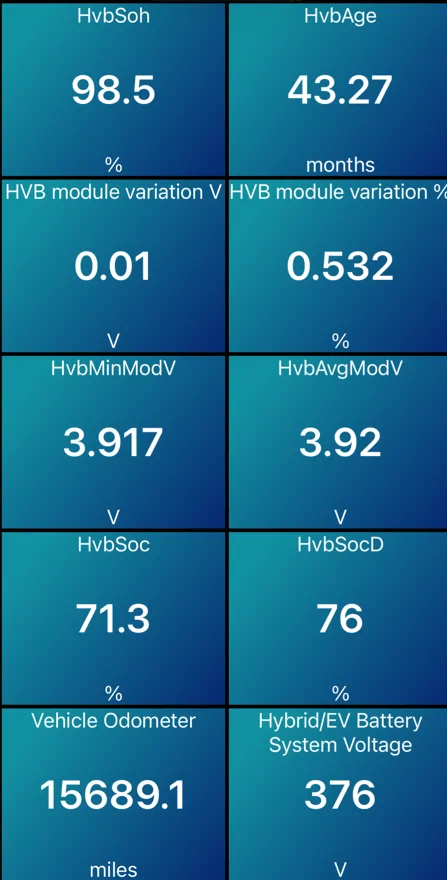
While you can only get individual cell voltages with the Battery Health Test in FDRS; CarScanner and FORScan will display the max deviation between cells, both in Volts and %. Will also show Battery SOH which in my experience matches the FDRS test used for warranty.

Here is a screens from CarScanner that I screenshot and save every month for HVB Health:
Ford F-150 Lightning OBD and Forscan. Sound like cool ideas but… 1779135123150-ho

And here is a real example of how I used the above data to diagnose a bad battery module.
 

davehu

Well-known member
Joined
Jan 7, 2022
Threads
65
Messages
1,298
Reaction score
1,343
Location
hot springs, AR
Vehicles
2023 Lighting Lariat ER, Iconic Silver
Occupation
retired
I really curious about the OBD scanners and the real time apps (as well as Forscan). Once I see a few stats, what do I do with them? What or how would I adjust my behavior based on the real time or historical day?


(Ps eat it Cyber Yuk)
First; welcome to the forum. ton's of information here. Second,; good questions. I finally got an OBlink M+ and have looked at their software and Car Scanner. I am known as a computer nerd by my friends (25 years at CPQ, DEC, &HP) and the software is a heavy lift. Not saying it's not good, just that it, like most complex software, takes a lot of time to understand. The software is not intuitive and I can only guess what Forscan would be like. Good luck.
 

Sponsored

potato

Well-known member
First Name
John
Joined
Feb 1, 2024
Threads
0
Messages
526
Reaction score
783
Location
BC, Canada
Vehicles
2023 F150 Lightning XLT ER
An OBD dongle + Forscan are needed to change module configuration. For me that includes several things, all of which are important to me:

- correct speedo/odo for tire size
- glare free headlights
- improve seat belt chime

Forscan has a terrible user interface that feels 20+ years old, but it's all we've got.

My 23 still does not have charging speed on the dash. An egregious omission. So if I want to see what's going on at a charger, I use CarScanner with a dashboard that shows charging speed, max current available, requested and delivered. It can help you to tell right away whether the charger you're at is behaving properly.

Some people like to use ABRP in real time. It can communicate with the truck via the dongle to get real time energy use and battery %, for increased accuracy of route planning. Personally I haven't had to use that. My drives are usually pretty simple. But it's there if I need it.
 

chl

Well-known member
First Name
CHRIS
Joined
Dec 16, 2022
Threads
10
Messages
3,985
Reaction score
2,469
Location
alexandria virginia
Vehicles
2023 LIGHTNING PRO, 2012 Nissan Leaf, 2015 Toyota Prius, 2000 HD 883 Sportster
Occupation
Patent Atty / Electrical Engineer
You didn't say in your profile what year Lariat you have.

There are some features that were made standard with 24+ model years, like
"Enable Pro Power Onboard with truck off (2022-2023 only. Standard on 2024+)"

I have a 2023 Pro so I did that one.

Disabling the door AJAR and seat belt chimes on start up, enabling glare-free headlights, and enabling 'silent mode' have made the truck more enjoyable to use.

See the FORscan thread for more:

https://www.f150lightningforum.com/forum/threads/f150-lightning-forscan-thread-version-2.23634/
 

oldman_74

Well-known member
First Name
Bob
Joined
Mar 9, 2026
Threads
1
Messages
45
Reaction score
43
Location
Central Florida
Vehicles
2024 Lightning Flash
Occupation
Retired
OBDLink MX+ and CarScanner user here. I bought my truck used just under a year ago. When i first got it, 100% SOC where L2 charging stopped was only displaying ~126kWh. During the winter, 100% was more like 118kWh reported. After a dozen or so carefully managed large SOC change events, 100% SOC waa 129.5kWh yesterday, which I take to mean the BMS has recovered sone imbalance allowed by the previous owners driving and charging habits.

I also found out the difference between 99 and 100% SOC waa like 8+ kWh in my truck. Seems to be narrowing, between 5 and 6 kWh now.

So those are two examples of things I've learned by watching the data.

I really miss seeing realtime cell voltage and imbalance, like my Volt with the MyGreenVolt app used to give me. Really helped me prove the pack stats and condition and get top private party resale value.

If anyone knows how to get cell V and deltaV data conveniently, please let me know. PM is fine if you don't rant to derail this thread.
How do you get car scanner to recognize the Lightning? mine only sees it as ICE.. Maybe I downloaded the wrong Car scanner.. Maybe the link to IOS, please
Ford F-150 Lightning OBD and Forscan. Sound like cool ideas but… IMG_1327


What does this mean, is it indicating front end damage?
 
Last edited:

chl

Well-known member
First Name
CHRIS
Joined
Dec 16, 2022
Threads
10
Messages
3,985
Reaction score
2,469
Location
alexandria virginia
Vehicles
2023 LIGHTNING PRO, 2012 Nissan Leaf, 2015 Toyota Prius, 2000 HD 883 Sportster
Occupation
Patent Atty / Electrical Engineer
How do you get car scanner to recognize the Lightning? mine only sees it as ICE.. Maybe I downloaded the wrong Car scanner.. Maybe the link to IOS, please
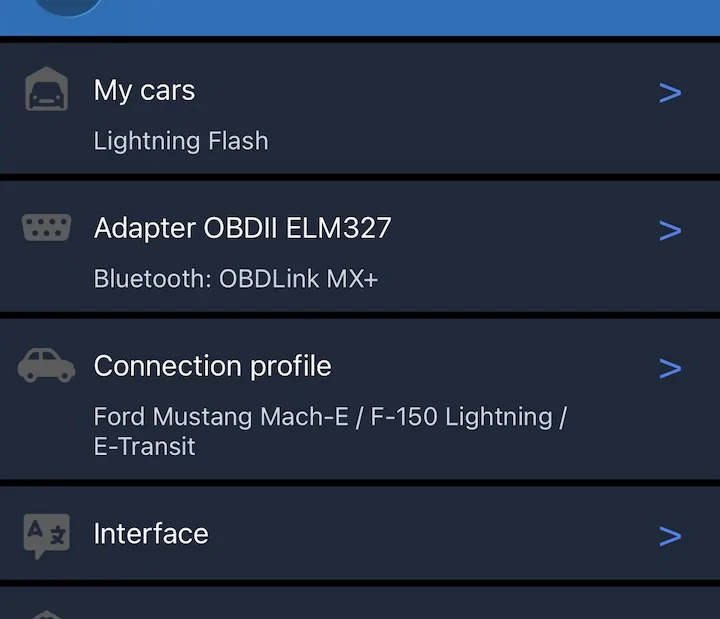
Under Connection Profile, scroll down and explicitly select the Mustang Mach-E / F-150 Lightning / E-Transit profile. Do not choose a generic OBD2 profile, as it will not show the correct EV-specific sensors.
 

Kansan

Well-known member
First Name
Wayne
Joined
Dec 8, 2024
Threads
11
Messages
147
Reaction score
190
Vehicles
2024 Flash
Occupation
Civil Engineer
I have and and use the OBDLink MX+, FORScan, FORScan Lite, and FDRS. There are many cool improvements to make with FORScan. FORScan Lite works with iPhones and the MX+ and it allows you to reboot individual modules; it’s also the best tool I’ve found for clearing DTCs.

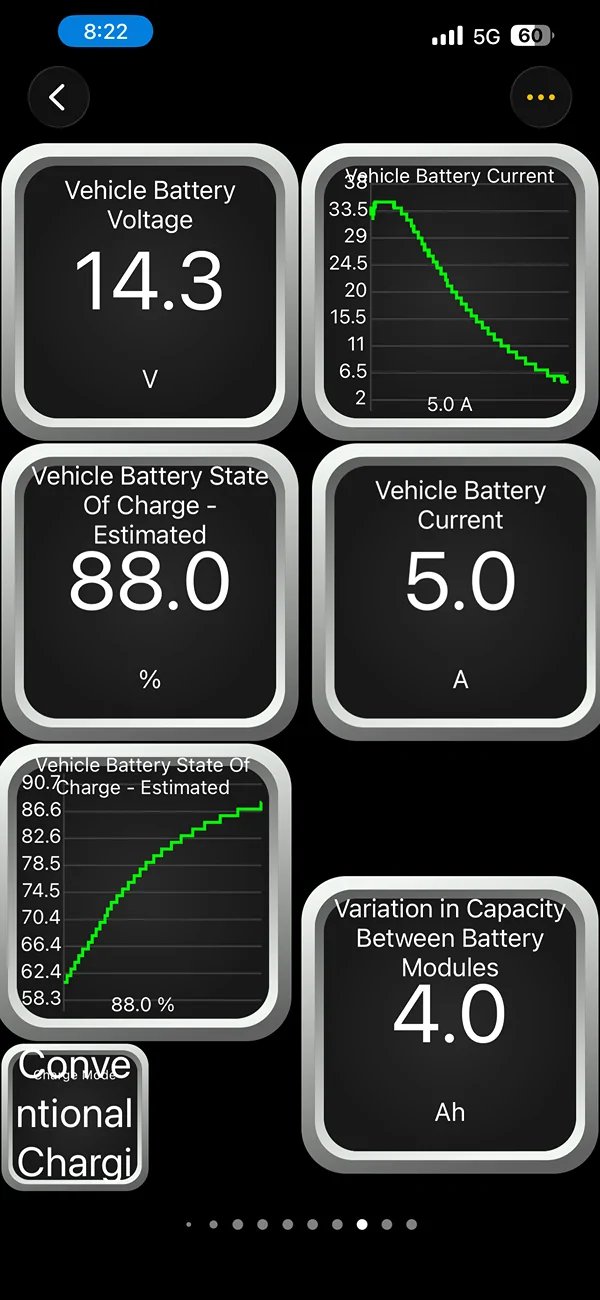
I use Carscanner on occasion, but find I more frequently run the OBDLink app that came with the MX+. Having made all the available updates to my truck with FDRS I find that the 12v battery management has improved dramatically since buying it new in Nov 2024. That said, I still keep track of the SOC of the 12v with the OBDLink software. The screen capture shows a recharge event while running after an odd discharge of the 12v. I had the indicative old school chimes and started the so to see what was happening - it’s a very useful tool.

Ford F-150 Lightning OBD and Forscan. Sound like cool ideas but… IMG_2223
 

Sponsored

oldman_74

Well-known member
First Name
Bob
Joined
Mar 9, 2026
Threads
1
Messages
45
Reaction score
43
Location
Central Florida
Vehicles
2024 Lightning Flash
Occupation
Retired
Under Connection Profile, scroll down and explicitly select the Mustang Mach-E / F-150 Lightning / E-Transit profile. Do not choose a generic OBD2 profile, as it will not show the correct EV-specific sensors.
I purchased the OBDII MX+ the Car Scanner app will not connect I selected Mustang Mach-E / F-150 Lightning / E-Transit profile., I can connect in settings but no matter what it will not connect in Car Scanner App..it must be an iPhone thing. I can connect using ODBLink App but there will be a learning curve and it does not seem to have a lot of bells and whistles, I did see where there are 5200+ PIDs in the truck.. for scan will not work on iPhone, I'll keep trying
Ford F-150 Lightning OBD and Forscan. Sound like cool ideas but… Car Connect
 

chl

Well-known member
First Name
CHRIS
Joined
Dec 16, 2022
Threads
10
Messages
3,985
Reaction score
2,469
Location
alexandria virginia
Vehicles
2023 LIGHTNING PRO, 2012 Nissan Leaf, 2015 Toyota Prius, 2000 HD 883 Sportster
Occupation
Patent Atty / Electrical Engineer
Hmm...

So this is the procedure I use.

1) with truck off plug in the blue tooth OBD device
2) turn ON the truck without pushing on the brake so it it in ACC mode
3) pair the OBD with your Phone (be sure blue tooth is ON on your phone settings)
4) run the Car Scanner App and select the Lightning

That was about all I had to do but I use an Android Tablet.

If it doesn't connect, perhaps your OBD device is not compatible? The CarScanner web site says some are low quality and don't work with the App.

I use an Android tablet and a Vgate iCar Pro OBD device

Here is a Mache thread with step by step instructions:

https://www.macheforum.com/site/thr...r-output-regen-charging-and-other-data.33211/

See this video maybe?

Sponsored


Top