rugedraw
Well-known member
No, and didn't even think of that, tbh. General rule of thumb is to try the easier things first, so I will. I plan to mess around a bit tomorrow since I'm off.Have you tried "headlight calibration" via FORScan?
Sponsored
No, and didn't even think of that, tbh. General rule of thumb is to try the easier things first, so I will. I plan to mess around a bit tomorrow since I'm off.Have you tried "headlight calibration" via FORScan?
Thanks!I just did it for my 2024 XLT, it’s about 500 for all parts and a few hours of your time. Find the thread called diy adaptive cruise control install by brotato and Hhunterfamily on this forums all instructions and all problems you will encounter will be there.
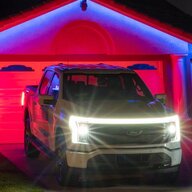
Did you do any investigation this weekend? I made a post a few weeks back about the behavior changing. The lights used to have a very smooth change to them, you could see the blend. That is no longer the case. My last trip you can see the pixels actually turning on and off as the lights change now. It's rather blunt, no longer smooth. I don't know where or how, but I'm guessing Ford has updated an underlying module or piece of SW somewhere.Well, I didn't get a chance to mess with it yet, but the movement of the lights is jolted and not smooth or fluid. Also, they turn off sometimes even when there are no cars coming in the opposite direction. I live in the city where it is bright and it is rare I am in an area dark enough for them to come on. It's hard to describe the behavior, but I can tell you when I first enabled them a while back ago, it worked REALLY well and now it doesn't, so something isn't right somewhere.
I did not. I was planning on messing with it at my buddy's house, but when I got there, it was beer o'clock and before you knew it, the sun was going down and I didn't do a damn thing. lolDid you do any investigation this weekend? I made a post a few weeks back about the behavior changing. The lights used to have a very smooth change to them, you could see the blend. That is no longer the case. My last trip you can see the pixels actually turning on and off as the lights change now. It's rather blunt, no longer smooth. I don't know where or how, but I'm guessing Ford has updated an underlying module or piece of SW somewhere.
I didn't really have any unexpected behavior, but the blending is no longer smooth. I haven't had Forscan plugged into the truck in a while, so I know I didn't make any changes to affect this.
Did you do any investigation this weekend? I made a post a few weeks back about the behavior changing. The lights used to have a very smooth change to them, you could see the blend. That is no longer the case. My last trip you can see the pixels actually turning on and off as the lights change now. It's rather blunt, no longer smooth. I don't know where or how, but I'm guessing Ford has updated an underlying module or piece of SW somewhere.
I didn't really have any unexpected behavior, but the blending is no longer smooth. I haven't had Forscan plugged into the truck in a while, so I know I didn't make any changes to affect this.
I've seen a video of a lightning dash cam with glare free and it showed the black box effect going in and out.` Is this what you mean by blocky? and which is normal? Mine is smooth but I only notice it on the side of the road and not in front or behind any cars.I enabled glare free before my truck received its first update, mine have always been abrupt. Each segment immediately disables and then will fade back in very quickly.
The bending is smooth and rapid.
I have noticed it down the center but it's less obvious, to the sides is certainly more obvious.I've seen a video of a Lighting dash cam with glare free and it showed the black box effect going in and out.` Is this what you mean by blocky? and which is normal? Mine is smooth but I only notice it on the side of the road and not in front or behind any cars.
Somewhere I read that it's supposed to be 16 sections (one section for each horizontal LED in the high beam). Can't remember where I saw that now.I have noticed it down the center but it's less obvious, to the sides is certainly more obvious.
Mine disables in specific segments, if I had to guess I would say maybe 10 or so separate sections that turn on and off
I am attempting to do the same on a 2024 Flash, but when I try to edit IPC lines per the OP, it gives only the option for an odometer write. I cannot get to the settings below. Were you able to?Successfully did anti-glare on 2024 Flash last night. Confirmed the bending light still works too. Awesome feature, thanks for the info!
| IPC | 720-01-01 | xx8x | xxxx | xx-- |
| IPC | 720-10-01 | xxxx | xxx3 | xx-- |
It communicates with my 2024 , so presume it should with a 2023.Can anyone confirm if the latest available FORSCAN version 2.3.63 can communicate with 2023 Lightings? I tried to edit some settings months ago but forscan was unable to communicate with the truck. I know at the beginning of the thread it says to contact forscan for a beta version, but thats 2022 info.
Yes it does.Can anyone confirm if the latest available FORSCAN version 2.3.63 can communicate with 2023 Lightings? I tried to edit some settings months ago but forscan was unable to communicate with the truck. I know at the beginning of the thread it says to contact forscan for a beta version, but thats 2022 info.
When you say "communicate", I think that has more to do with having a quality OBD adapter that is recommend by ForScan and a working laptop.Can anyone confirm if the latest available FORSCAN version 2.3.63 can communicate with 2023 Lightings? I tried to edit some settings months ago but forscan was unable to communicate with the truck. I know at the beginning of the thread it says to contact forscan for a beta version, but thats 2022 info.