
Firn
Well-known member
- Thread starter
- #1
Loving the work done across the community through Livingitup's spreadsheets, Forscan, and the AB files I spend (too much) time digging into different configurations. That said, the bouncing back and forth is very time consuming and viewing it is, well, rough.
To that end I spent last night and today working to build some tools to help visualize and dig into the configurations.
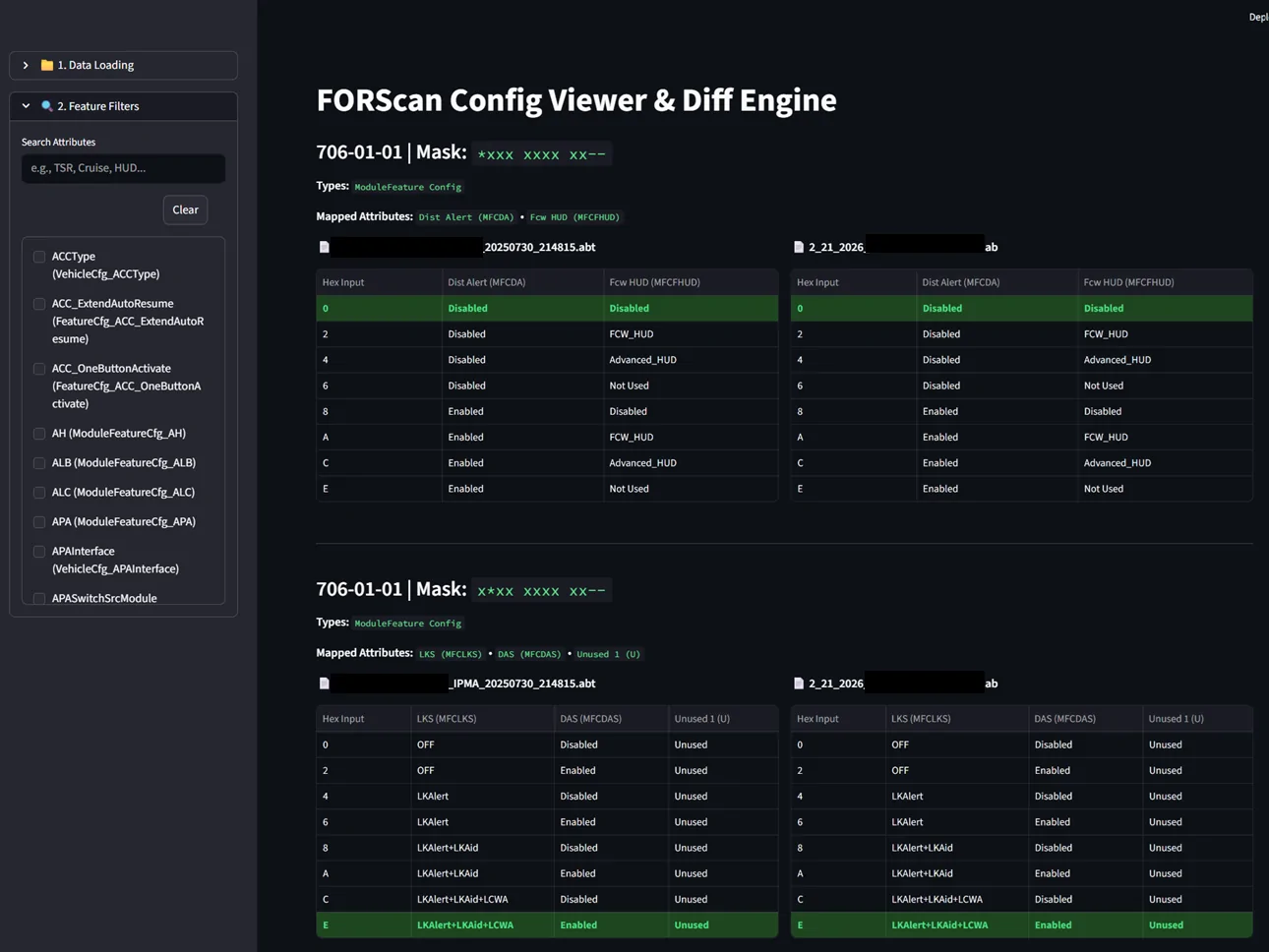
Simply put, this allows you to load one sheet from the Livingitup spreadsheet, visualize it in a browser, but then also load one or more Forscan ABT export, or even the Ford As-Built file (or either or) and visualize what your individual options are.


This all runs on your own computer using python and the command line.
This is very much a work in progress and it needs validation. I'm offering it here for whomever wants to use it, I just ask you help improve it by testing it.
- The first thing I need help with is making sure it processes the Livingitup sheets properly, they were designed for a person to view, not a computer, so the structure is wonky and varies. The result is I may not have all the different variations of how the data is structured built into the parser.
Below are some instructions for how to get this up and running.
-Of note, its not built (yet) to run the entire Livingitup workbook, just an individual sheet. So make sure to download the workbook and copy the sheet you need into its own excel file and save that individually.
 FORScan As-Built Config Viewer & Diff Engine: Setup Guide
This tool take a sheet from Livnitup’s Excel workbook and turns it into an offline web application. You can load your truck's backup files, overlay them against the spreadsheet to see exactly what features are enabled, and even load multiple files side-by-side to highlight the exact hex differences.
Prerequisites
You will need Python installed on your computer. If you don't have it, download the latest version from python.org. (Note: Make sure to check the box that says "Add Python to PATH" during installation).
Step 1: Install Dependencies
Open your Command Prompt (Windows) or Terminal (Mac) and install the required libraries by pasting this exact command and hitting Enter: pip install pandas openpyxl streamlit
Step 2: Set Up Your Folder
Create a new folder on your Desktop (e.g., FORScan_Viewer). Inside this folder, you will need four things:
Before the viewer can work, we need to convert the Excel spreadsheet into a smart JSON database.
Step 4: Launch the Web App
Now for the fun part. In your Command Prompt, type: streamlit run viewer.py
This will automatically open a new tab in your default web browser with the application running!
Step 5: How to Use the App
To that end I spent last night and today working to build some tools to help visualize and dig into the configurations.
Simply put, this allows you to load one sheet from the Livingitup spreadsheet, visualize it in a browser, but then also load one or more Forscan ABT export, or even the Ford As-Built file (or either or) and visualize what your individual options are.
This all runs on your own computer using python and the command line.
This is very much a work in progress and it needs validation. I'm offering it here for whomever wants to use it, I just ask you help improve it by testing it.
- The first thing I need help with is making sure it processes the Livingitup sheets properly, they were designed for a person to view, not a computer, so the structure is wonky and varies. The result is I may not have all the different variations of how the data is structured built into the parser.
Below are some instructions for how to get this up and running.
-Of note, its not built (yet) to run the entire Livingitup workbook, just an individual sheet. So make sure to download the workbook and copy the sheet you need into its own excel file and save that individually.
FORScan As-Built Config Viewer & Diff Engine: Setup GuideThis tool take a sheet from Livnitup’s Excel workbook and turns it into an offline web application. You can load your truck's backup files, overlay them against the spreadsheet to see exactly what features are enabled, and even load multiple files side-by-side to highlight the exact hex differences.
Prerequisites
You will need Python installed on your computer. If you don't have it, download the latest version from python.org. (Note: Make sure to check the box that says "Add Python to PATH" during installation).
Step 1: Install Dependencies
Open your Command Prompt (Windows) or Terminal (Mac) and install the required libraries by pasting this exact command and hitting Enter: pip install pandas openpyxl streamlit
Step 2: Set Up Your Folder
Create a new folder on your Desktop (e.g., FORScan_Viewer). Inside this folder, you will need four things:
- Livnitup’s Spreadsheet: Download the .xlsx file for the module you are working on (e.g., IPMA, BCM).
- Your Truck's Data: Have your .abt files (from FORScan) or your .ab file (from Motorcraft) handy.
- The Parser Script: Use the attached parser.py.txt and remove the ".txt"
- The Viewer Script: Use the attached viewer.py.txt and remove the ".txt"
Before the viewer can work, we need to convert the Excel spreadsheet into a smart JSON database.
- Open parser.py in a text editor (like Notepad or VS Code).
- Scroll to the very bottom and locate this line: input_file = r"C:\Your\Path\Here\Livnitups_Sheet.xlsx"
- Change that path to point directly to wherever you saved Livnitup's Excel file.
- Save the file.
- Open your Command Prompt, navigate to your folder (or type "CMD" in the file explorer address bar in that folder), and run: python parser.py
Step 4: Launch the Web App
Now for the fun part. In your Command Prompt, type: streamlit run viewer.py
This will automatically open a new tab in your default web browser with the application running!
Step 5: How to Use the App
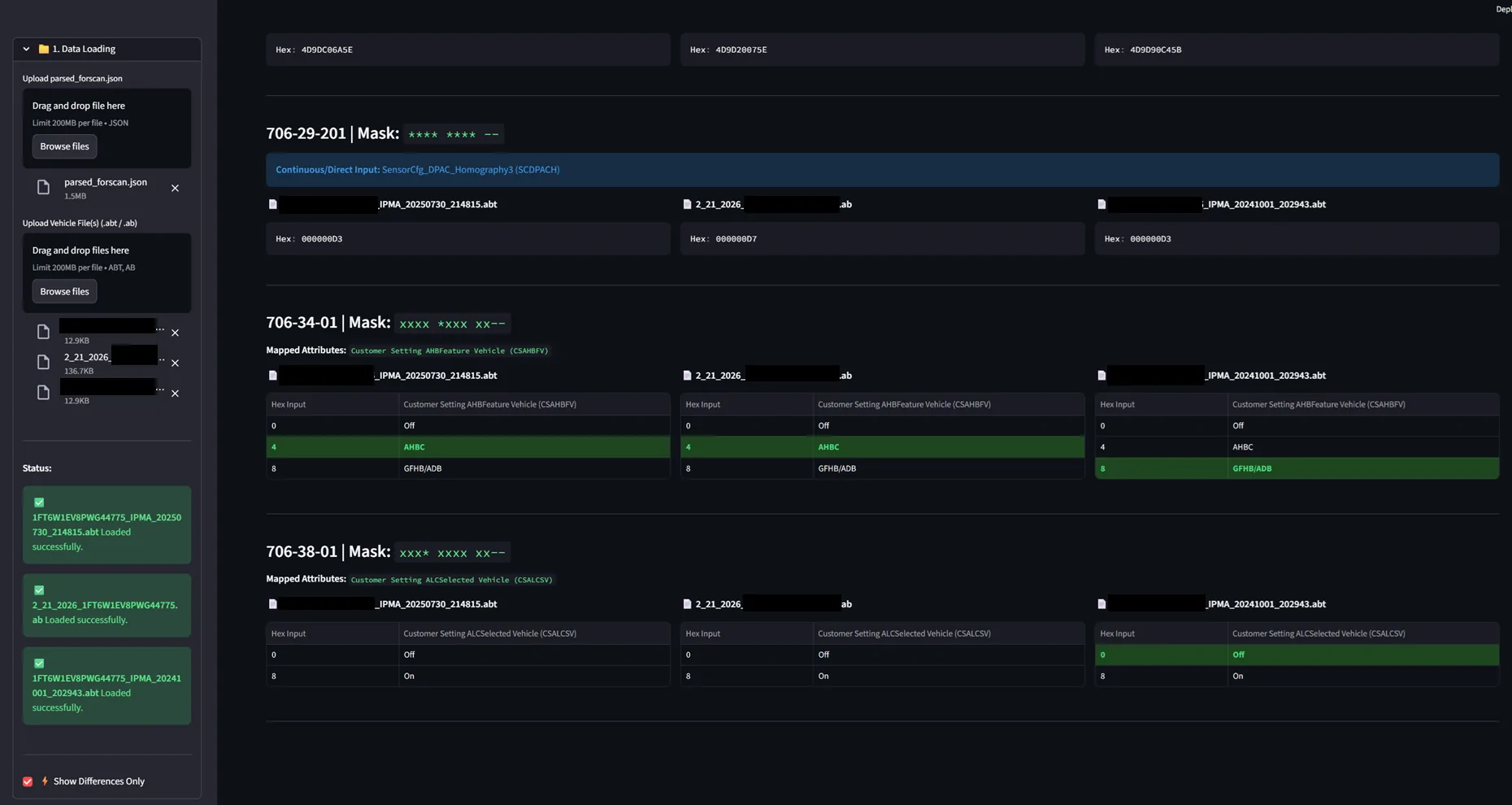
- Load the Database: In the left sidebar under "Data Loading", upload the parsed_forscan.json file you just generated.
- Load Your Truck(s): Right below that, drag and drop your .abt or .ab file. You can upload multiple files at once. The app will automatically read the FORScan (.abt) or As-Built (.ab) file apply the variable bitmasks, and highlight your exact configuration in green.
- The Diff Engine: If you uploaded two or more files (e.g., a factory backup and a modified file), a new toggle will appear: " Show Differences Only". Check this box, and the UI will collapse, hiding everything except the memory addresses where the trucks differ.
- Smart Search: Use the search box to find specific features. Type "Cruise" or "ACC" and it will instantly filter the matrix down to only those related settings.
Sponsored
Attachments
-
10 KB Views: 24
-
10.5 KB Views: 29
Last edited: