Sponsored

OBD MX +

Robert1380

Well-known member
First Name
Robert
Joined
May 14, 2025
Threads
15
Messages
250
Reaction score
187
Vehicles
2025 Ford F-150 Lightning Platinum
Occupation
Retired law enforcement
Good morning guys. Gonna have to ask how the heck to use this scanner device since I’m not having much luck getting it configured.

It’s installed and able to connect so there’s half the battle. Unfortunately, the only information I can access is the 12v battery SOC and current speed. How do I set up the screen to view other critical information like the HVB health, etc?

Been messing with this off and on for a few months and gave up. Appreciate it
Sponsored
 

RickLightning

Well-known member
Joined
Jan 17, 2022
Threads
108
Messages
6,776
Reaction score
9,231
Location
SE MI
Vehicles
'22 Lightning ER Lariat,'22 Mach-E Premium 4X
Good morning guys. Gonna have to ask how the heck to use this scanner device since I’m not having much luck getting it configured.

It’s installed and able to connect so there’s half the battle. Unfortunately, the only information I can access is the 12v battery SOC and current speed. How do I set up the screen to view other critical information like the HVB health, etc?

Been messing with this off and on for a few months and gave up. Appreciate it
Install the Car Scanner app...
 
OP
OP
Robert1380

Robert1380

Well-known member
First Name
Robert
Joined
May 14, 2025
Threads
15
Messages
250
Reaction score
187
Vehicles
2025 Ford F-150 Lightning Platinum
Occupation
Retired law enforcement

fhteagle

Well-known member
First Name
D
Joined
Jun 15, 2025
Threads
7
Messages
151
Reaction score
206
Vehicles
'22 Lightning Lariat, '23 MYLR, '13 Forester, sold '13 Volt
CarScanner connects to my OBDLink MX+ just fine. It does take up to a minute from disconnected state to actually have the "dashboard" start updating sometimes though. How long are you waiting for CarScanner to finish the connection cycle?
 

chapba

Active member
First Name
mike
Joined
Dec 13, 2024
Threads
0
Messages
26
Reaction score
10
Vehicles
2024 Flash
Occupation
fire
Man I’m having issues with my MX+. Have both car scanner and Obd app. Neither make connection to my ECU no matter how long I wait or reset/reinstall.
 

Sponsored
OP
OP
Robert1380

Robert1380

Well-known member
First Name
Robert
Joined
May 14, 2025
Threads
15
Messages
250
Reaction score
187
Vehicles
2025 Ford F-150 Lightning Platinum
Occupation
Retired law enforcement
CarScanner connects to my OBDLink MX+ just fine. It does take up to a minute from disconnected state to actually have the "dashboard" start updating sometimes though. How long are you waiting for CarScanner to finish the connection cycle?
My problem was that I never got it to connect. If my
Memory serves me? It had some error message and never successfully configured
 

21st Century Truck

Well-known member
First Name
Martin
Joined
Jul 11, 2024
Threads
17
Messages
1,012
Reaction score
1,200
Location
Virginia
Vehicles
Ford 150 Lightning 2023 XLT ER pkg. 312A
It sometimes helps to try and get an EPROM update on the OBD MX+. If there is a new EPROM update it'll say so on the home web page, and sometimes the OBD MX+ will self-update too if connected by BlueTooth to a laptop. That's been my experience with these over the past decade or so, until i got the newer cable-tethered OBD EX+.
 

mr.Magoo

Well-known member
Joined
May 27, 2022
Threads
24
Messages
1,000
Reaction score
1,275
Location
Michigan
Vehicles
2022 Lariat ER, AMB
Probably worth using the OBDLink App first to:
A) update firmware
B) make sure everything is working/talking

...before introducing other apps / sources of issues.

Also remember that the truck needs to be ON for it to work (you'll be able to connect but won't get any data if it's OFF).
 
OP
OP
Robert1380

Robert1380

Well-known member
First Name
Robert
Joined
May 14, 2025
Threads
15
Messages
250
Reaction score
187
Vehicles
2025 Ford F-150 Lightning Platinum
Occupation
Retired law enforcement
It sometimes helps to try and get an EPROM update on the OBD MX+. If there is a new EPROM update it'll say so on the home web page, and sometimes the OBD MX+ will self-update too if connected by BlueTooth to a laptop. That's been my experience with these over the past decade or so, until i got the newer cable-tethered OBD EX+.
Thanks for the info. Appreciate it
Probably worth using the OBDLink App first to:
A) update firmware
B) make sure everything is working/talking

...before introducing other apps / sources of issues.

Also remember that the truck needs to be ON for it to work (you'll be able to connect but won't get any data if it's OFF).
copy that. I’ll mess with it again see if I can get it working. Thank you!
 

chapba

Active member
First Name
mike
Joined
Dec 13, 2024
Threads
0
Messages
26
Reaction score
10
Vehicles
2024 Flash
Occupation
fire
Thanks for the info. Appreciate it

copy that. I’ll mess with it again see if I can get it working. Thank you!
So I finally found the trick to get my MX+ to work. It’s still acted stubborn for awhile but is working pretty frequently now after:
1. Updating the firmware as mentioned with the OBD linkapp and then no close the app after updating. After updating I have never used the linkapp again.
2. Try to connect to CarScanner and if it gives you an error, disconnect within the app, then unplug OBD reader from the truck. While the CarScanner app is on and running in your phone, re-plug the reader in and connect within the app again.

I had to do this several times when first starting the OBD reader but now it connects almost every time I plug it in! Hope that helps!
 

Sponsored

Jim Lewis

Well-known member
First Name
Jim
Joined
Jan 10, 2023
Threads
53
Messages
1,021
Reaction score
991
Location
San Antonio, TX
Vehicles
Honda Accord 2017; 2023 Lariat ER
Occupation
Retired
IIRC, using the OBDLink app with the MX+ reader will give you more predefined Ford PIDs in the app than Car Scanner. To dive deep into module PIDs with Car Scanner, you have to know the PIDs you want to enter in the Car Scanner app.
 

chapba

Active member
First Name
mike
Joined
Dec 13, 2024
Threads
0
Messages
26
Reaction score
10
Vehicles
2024 Flash
Occupation
fire
IIRC, using the OBDLink app with the MX+ reader will give you more predefined Ford PIDs in the app than Car Scanner. To dive deep into module PIDs with Car Scanner, you have to know the PIDs you want to enter in the Car Scanner app.
Good to know! This is my first reader and still learning all the bells and whistles. The threads I looked at stated that the OBDLink app was not as useful but will have to look at it more!
 

Jim Lewis

Well-known member
First Name
Jim
Joined
Jan 10, 2023
Threads
53
Messages
1,021
Reaction score
991
Location
San Antonio, TX
Vehicles
Honda Accord 2017; 2023 Lariat ER
Occupation
Retired
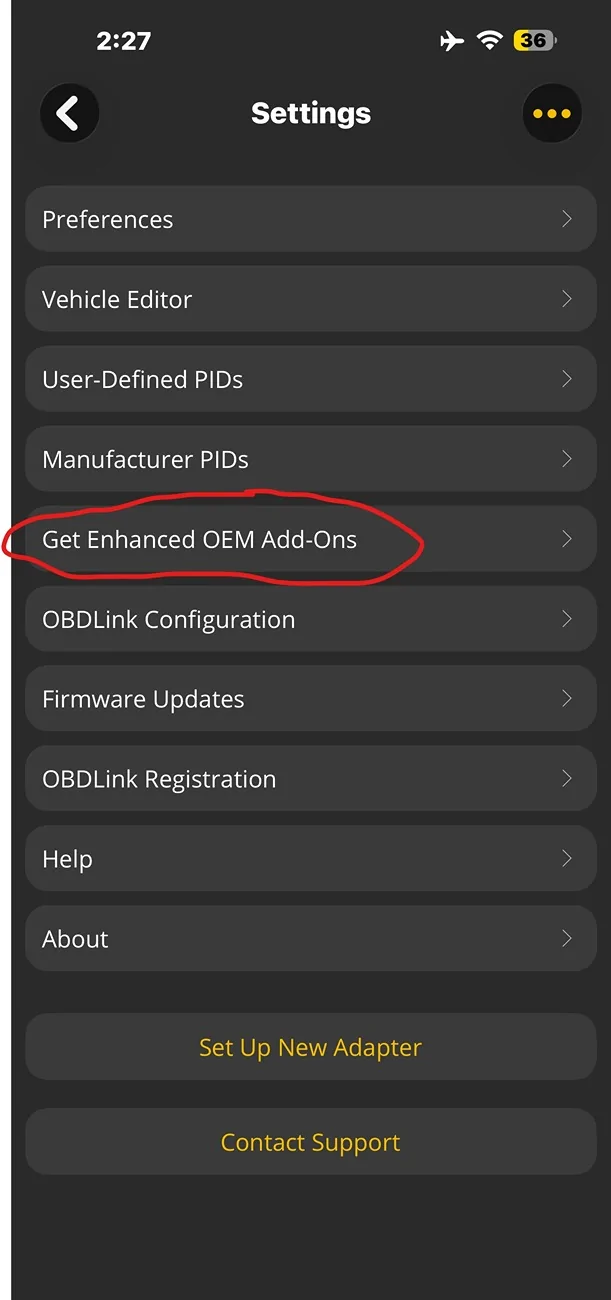
@chapba, You have to select the advanced settings that you want to use in the OBDLink app. Here's how to do it (I don't remember the exact steps as I did it ~2.5 years ago).

Go to Settings on the main screen of the OBDLink app. Click on "Get Enhanced OEM Add-Ons."
Ford F-150 Lightning OBD MX + IMG_1510_Edit.PNG

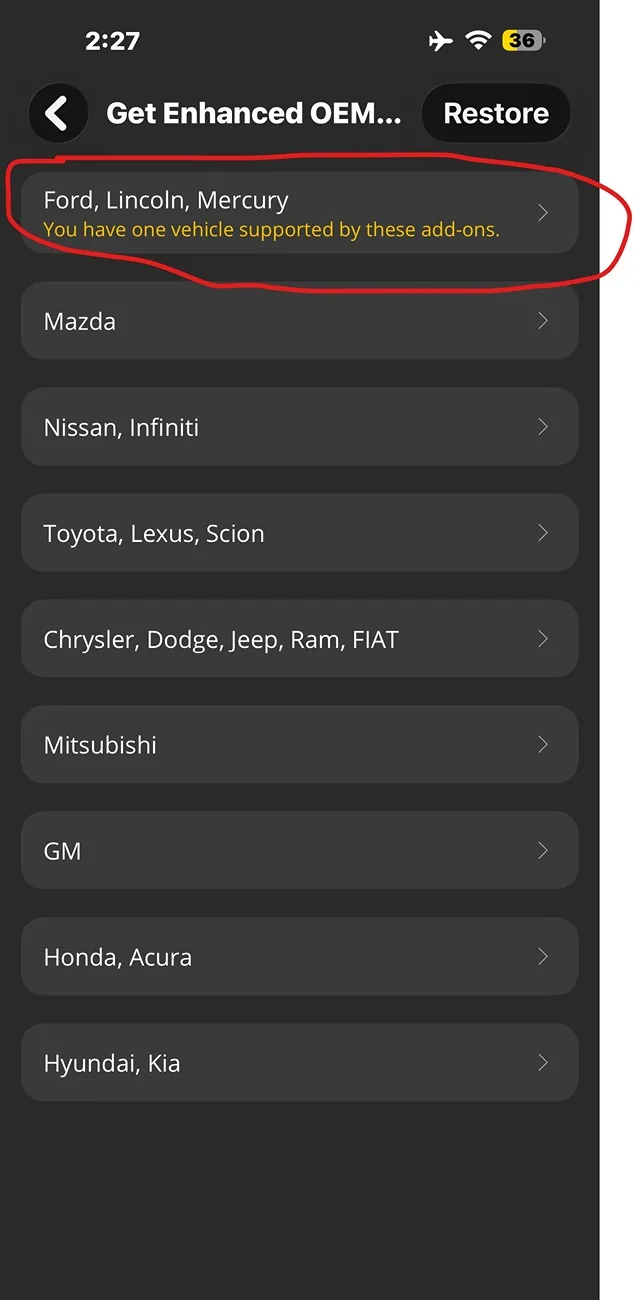
When you open that option, you'll see a button to load in the predefined Ford, Lincoln, Mercury PIDs.
Ford F-150 Lightning OBD MX + IMG_1511_Edit.PNG

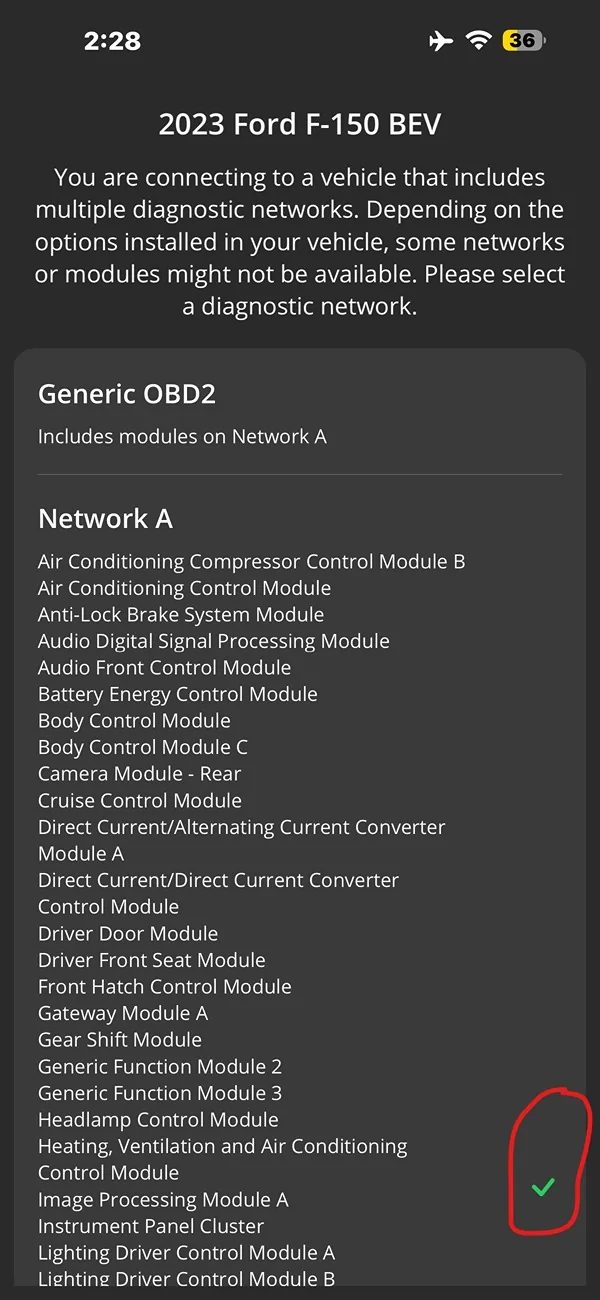
Once you've load the pre-defined Ford PIDs, when you go to connect, don't pick the generic OBDII reader settings. Below that on the CONNECT screen, you should see a list of all the Ford modules available to read, scroll down a bit and tap to the right of the list and that list should end up with a green check mark. Scroll all the way to the end and pick CONNECT.
Ford F-150 Lightning OBD MX + IMG_1513_Edit.PNG

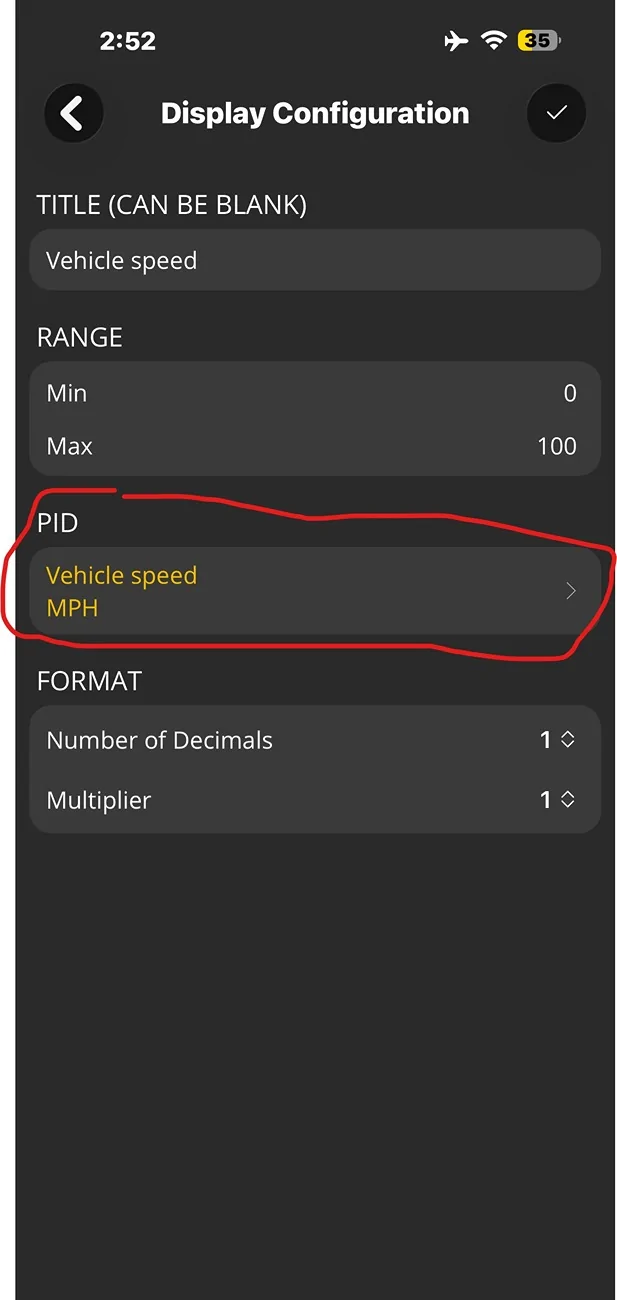
When you go to create a dashboard gauge or graph using ADD DISPLAY, step through the process of creating the type of display you want, until you get to the screen that offers you a choice of the PID to use (see below). Tap the Right Angle Bracket next to the PID offered.
Ford F-150 Lightning OBD MX + IMG_1515_EDIT.PNG

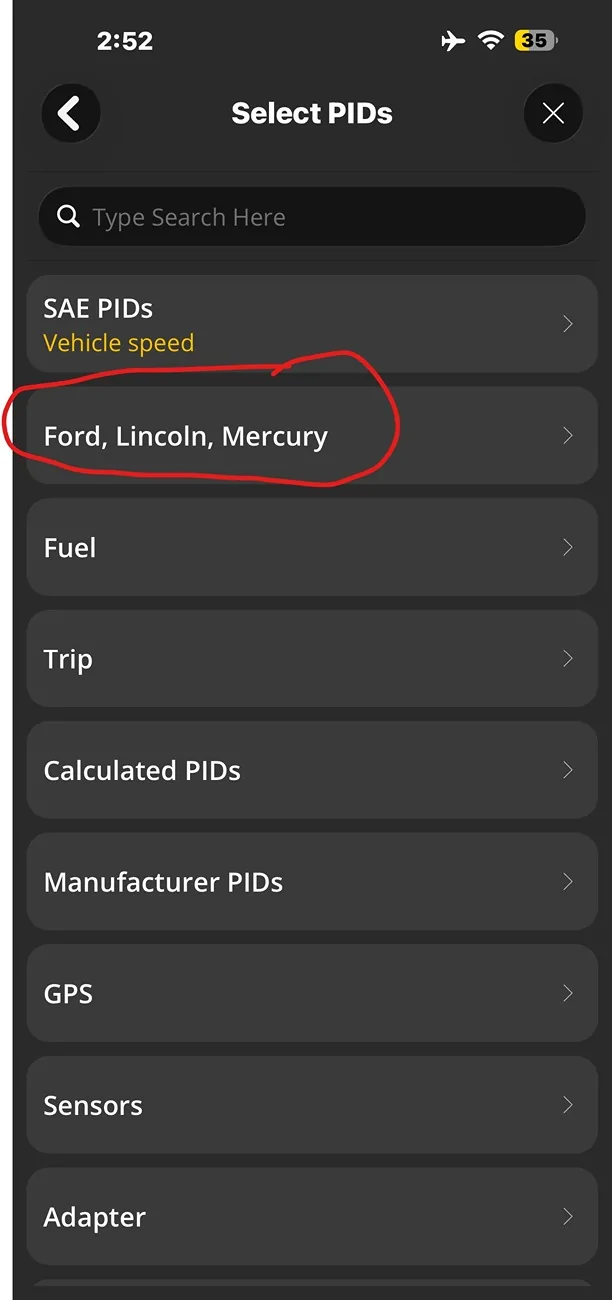
On the next screen, to get the enhanced set of PIDs available for Ford, Lincoln, Mercury, tap that category button. (You could search amongst all PID categories at the top but it's probably more fruitful to focus in on the Ford, Lincoln, Mercury ones).
Ford F-150 Lightning OBD MX + IMG_1516_Edit.PNG

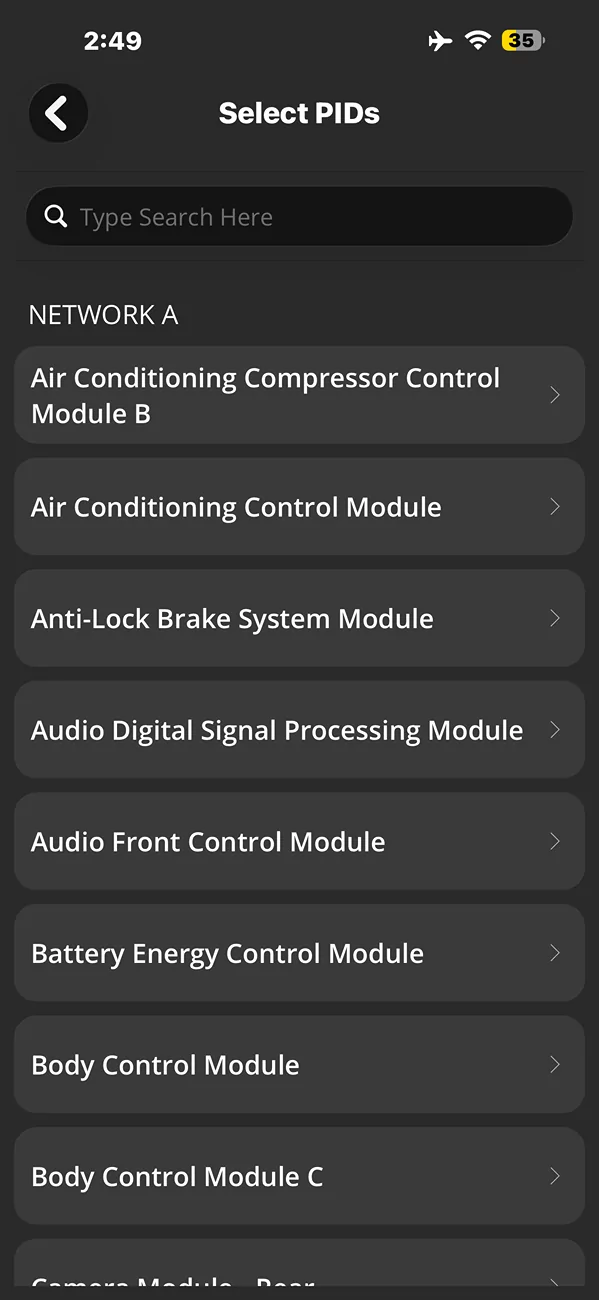
Once you pull up the Ford, Lincoln, Mercury module list, you could look in specific modules for the PID you want to display in your dashboard gauge or graph. But it's easiest to just search for the type of PID you want, e.g., for "battery" (without the quotes). My recollection is poor, but IIRC, you get a list of modules that have a PID with the search term in the description, and you have to tap on each module to see what PIDs were found with the search term.
Ford F-150 Lightning OBD MX + IMG_1514
Sponsored


Top