Sponsored

Firn

Active member
Joined
Aug 26, 2024
Threads
20
Messages
42
Reaction score
171
Location
USA
Vehicles
23 Pro ER
As Built Pro: A Web Utility for FORScan & Ford Configurations

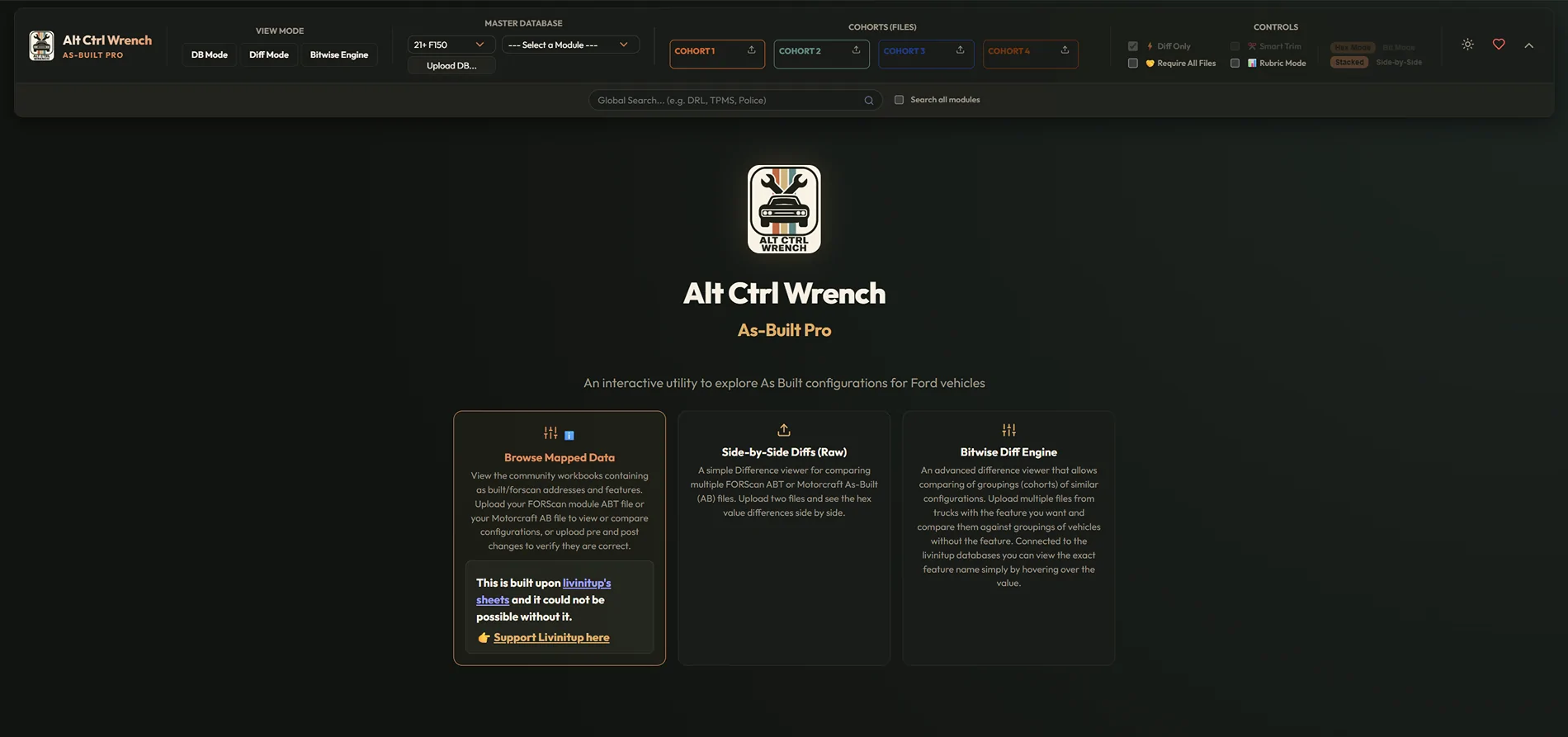
Like many of you, I rely heavily on Livnitup’s master spreadsheets for truck modifications. While his research is the gold standard, hunting down specific hex values and comparing multiple modules can get tedious.

To speed up the process, I built a modern, web-based utility to provide a searchable interface for our As-Built files.

You can use the tool here: asbuilt.altctrlwrench.com

Ford F-150 Lightning As Build Pro: FORScan & As-Built Diff Tool Screenshot 2026-07-12 100424


Core Features

Interactive Reference Viewer & DB Mode
You don't need a file to use the tool. You can jump straight in to browse the reference sheets, searching for features, addresses, or keywords by name to see how things are mapped.

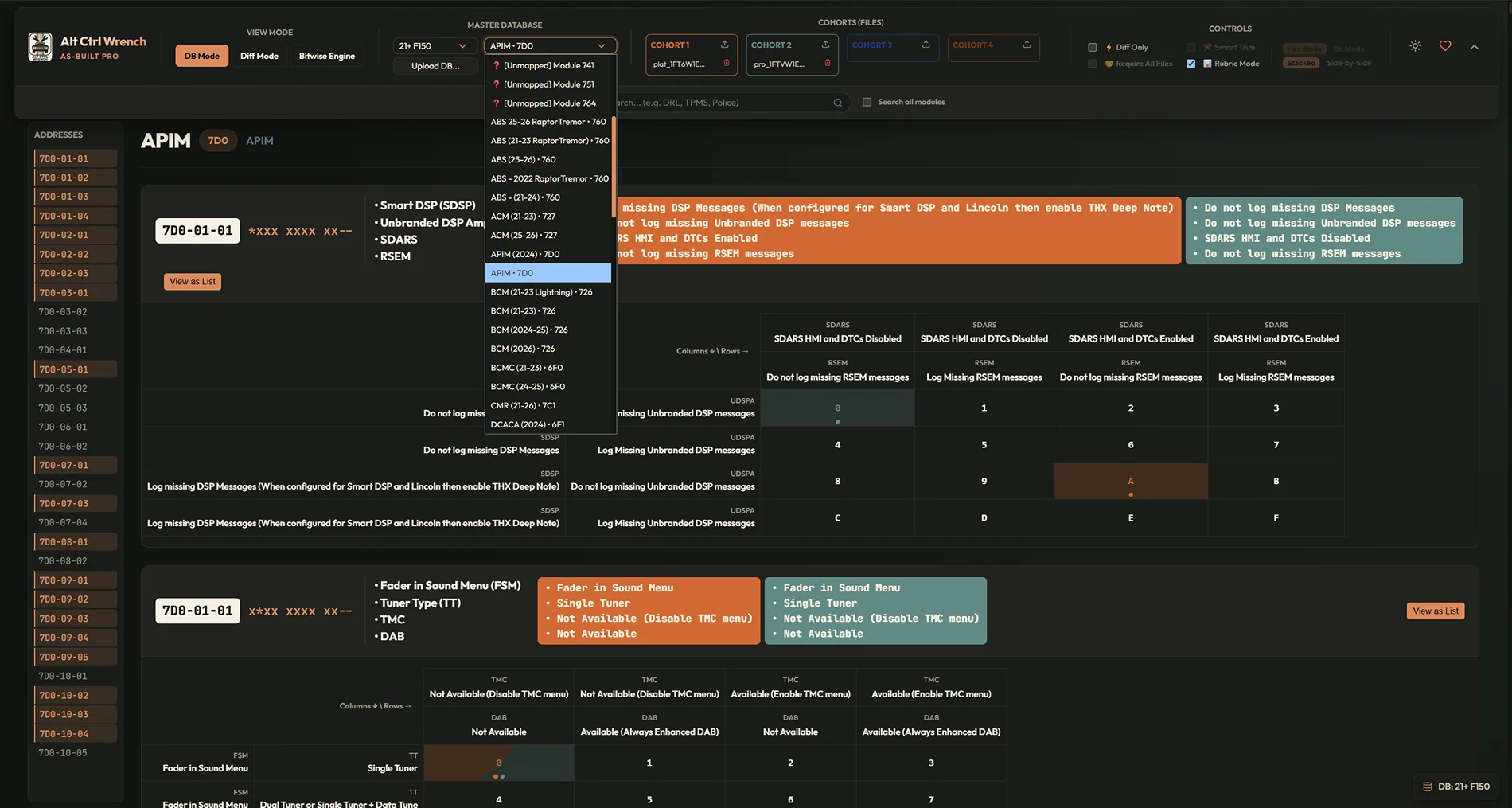
Exact Configuration Decoding & Rubric Mode Upload your .ab or .abt files to instantly view your truck's current configuration mapped against the reference data. The tool shows exactly what features are turned on or off. Toggle "Rubric Mode" to see exactly how As-Built hex nibbles control various feature states, or leave it off for a traditional table view.

Ford F-150 Lightning As Build Pro: FORScan & As-Built Diff Tool Screenshot 2026-07-12 101158


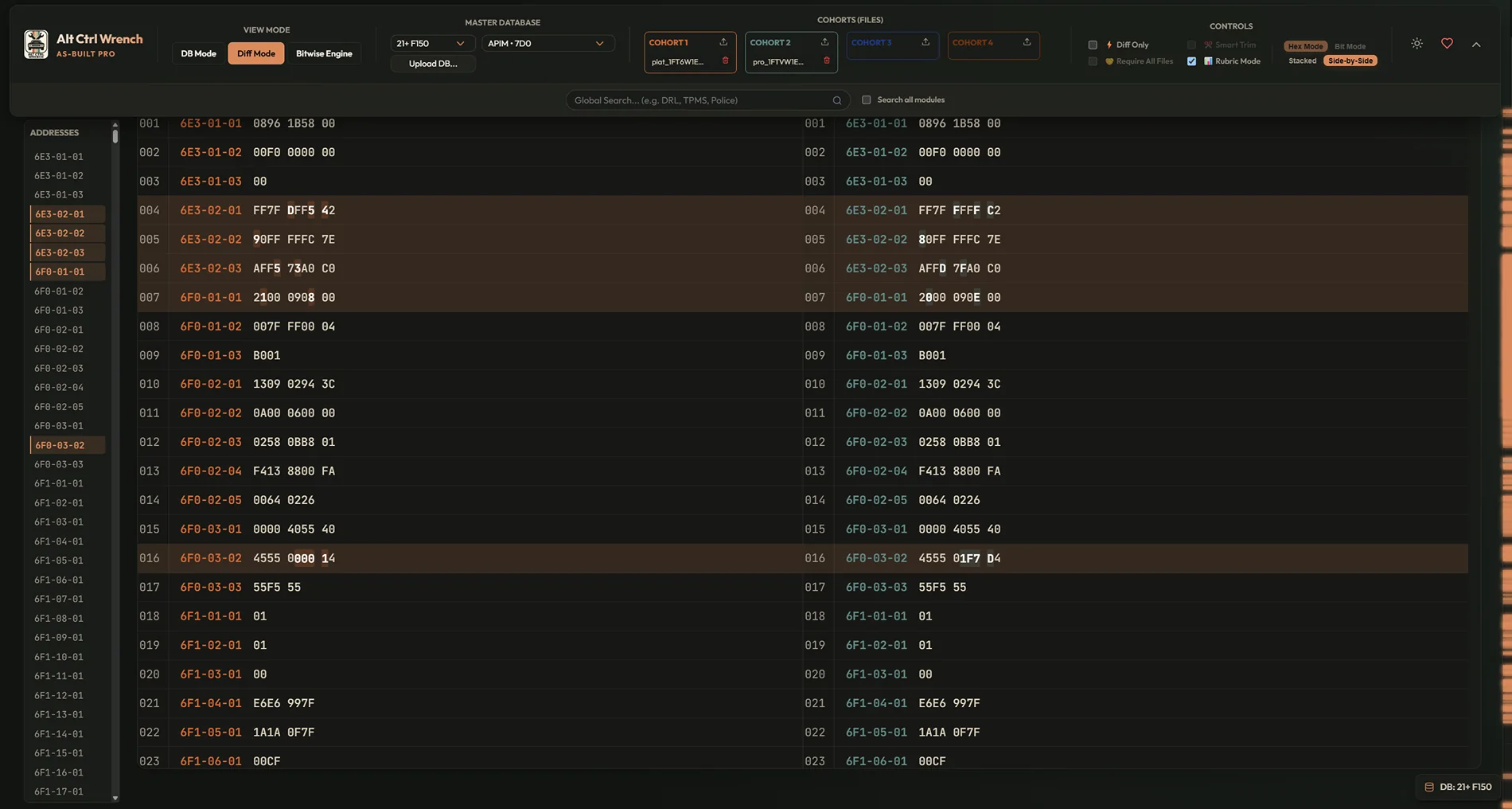
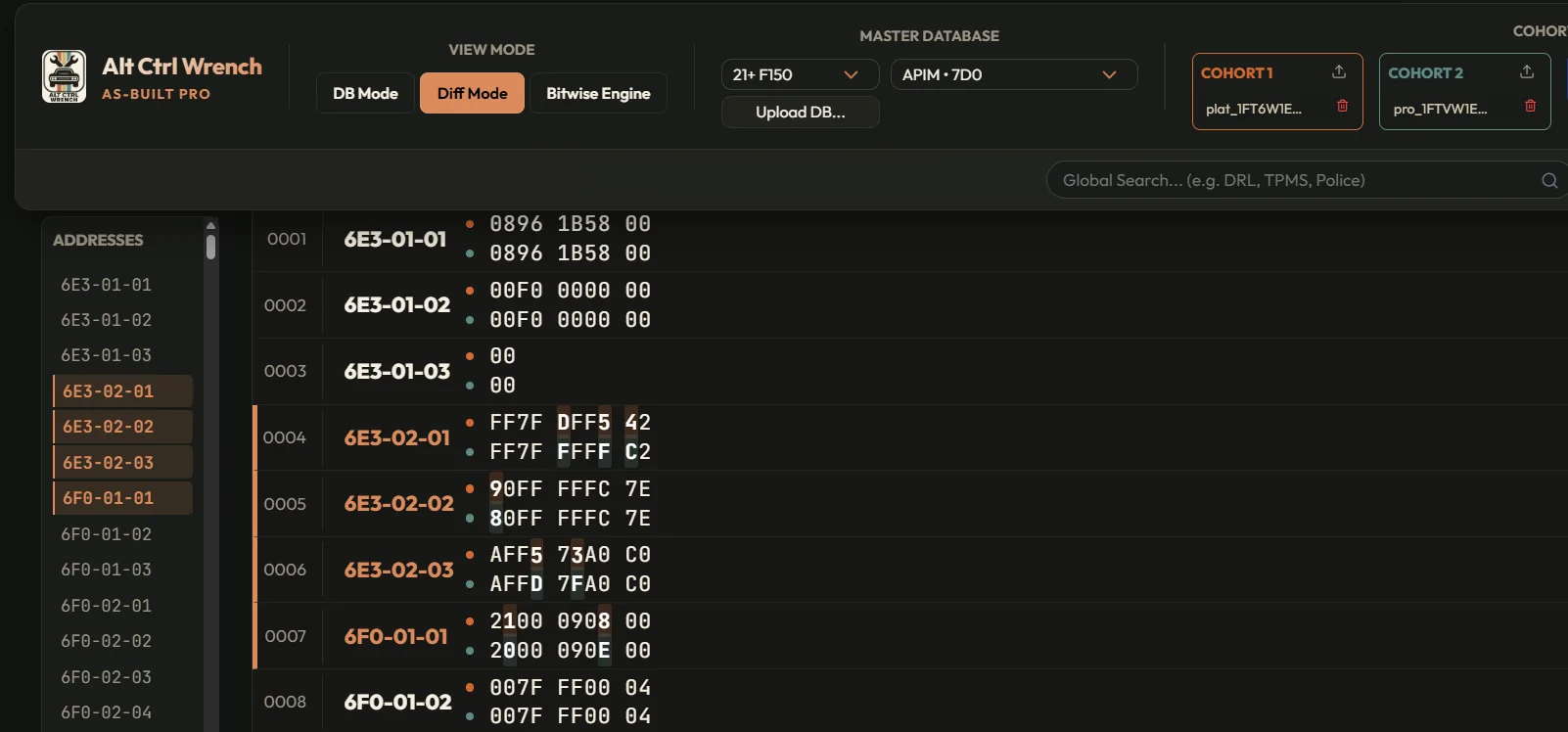
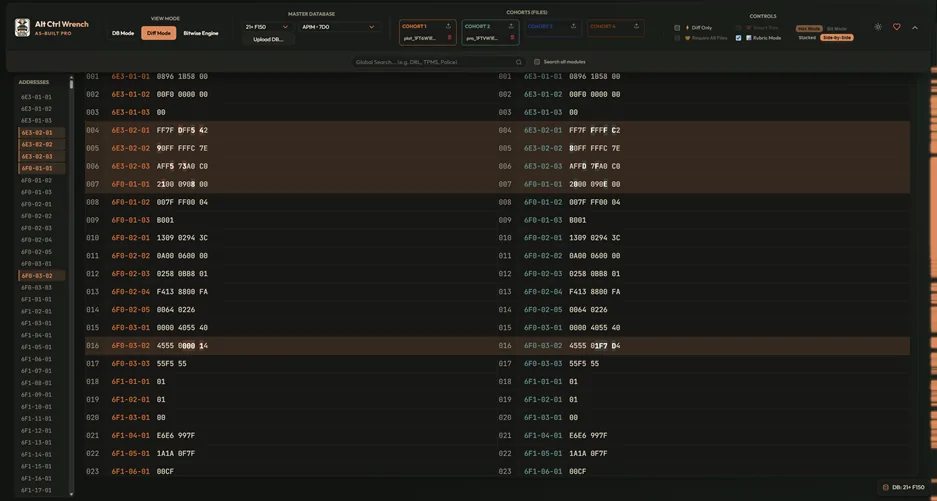
Diff Mode & Side-by-Side Comparing Load multiple files simultaneously to compare changes across different backups or truck configurations. You can view these differences mapped directly to human-readable feature names, or toggle off the database mapping for a raw data diff.

Side by Side view
Ford F-150 Lightning As Build Pro: FORScan & As-Built Diff Tool Screenshot 2026-07-12 101654


Stacked View
Ford F-150 Lightning As Build Pro: FORScan & As-Built Diff Tool Screenshot 2026-07-12 101919


The Cohort System Upload multiple files of a similar makeup ("Cohorts") to easily compare groups. For example, if Canadian Lightnings have Glare-Free headlights, load multiple Canadian files into one cohort, and American files into another. Compare the "Haves" against the "Have-Nots" to isolate the exact address changes. Note: Inconsistencies within a single cohort are marked with an asterisk (*) to show that group is not consistent among itself.

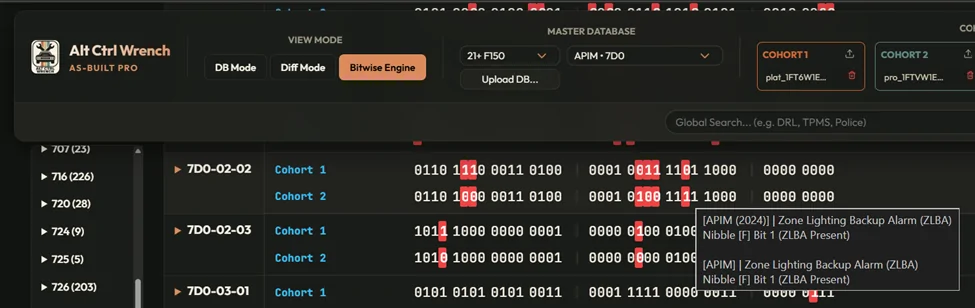
Bitwise Engine, the Diff engine ramped up to 11! FORScan displays values as 0-9 and A-F, but these are hex "nibbles" representing four binary bits (e.g., 0 is 0000, F is 1111). Individual features are typically toggled by these specific bits. The Bitwise Engine lets you view these individual bits directly. Since it is linked to the database, hovering over a nibble or bit reveals the exact feature it controls.

Ford F-150 Lightning As Build Pro: FORScan & As-Built Diff Tool 1783870275568-02


Smart Filtering & Custom Sheets Filter by module (APIM, IPC, BCM, etc.) or specific feature keywords instantly. While Livnitup's F-150 data is the default, the tool supports all of his sheets for different platforms. Sheets of the same design can be uploaded manually as well.

Data Privacy & Currency
  • Always Up to Date: The tool pulls the latest data directly from community reference mappings every time the cloud instance is rebuilt.
  • 100% Private: Vehicle data is processed entirely in-memory. Uploaded files are never saved to a database, stored on a server, or tracked.
Credit, Support & Feedback

Livnitup's research is the absolute backbone of the default logic. There is permanent attribution and a link to his services to ensure his efforts are supported.

Running this on a managed cloud instance to keep performance snappy carries an ongoing hosting cost. If you find the tool valuable, please check out the "Support the Developer" section in the sidebar for hardware recommendations and my custom 3D-printed automotive parts to help offset server hosting.

If you run into an address that parses strangely, identify bugs, or have a UI request, let me know here, via the heart icon in the top right, or via the public tracking repo linked in the app.

Thanks, Firn (Alt Ctrl Wrench)

Ford F-150 Lightning As Build Pro: FORScan & As-Built Diff Tool 1783870075633-50
Sponsored

 
Last edited:

PJnc284

Well-known member
Joined
Sep 30, 2024
Threads
0
Messages
1,224
Reaction score
1,394
Location
Garner, NC
Vehicles
2023 Ford F150 Lightning Lariat ER
Finally live! Sure it will be getting a lot of use. btw the link in your post pulls up a google search instead of going to the site.
 

bmwhitetx

Well-known member
First Name
Bruce
Joined
May 21, 2021
Threads
48
Messages
3,207
Reaction score
4,635
Location
DFW-Texas
Vehicles
2022 F150 Lightning Lariat ER
Occupation
Retired engineer
Hey, nice work (sorry I haven't replied to your DM). It might have been easy for you, but the spreadsheet is not the easiest to transform into a proper dataset from my POV.

Hopefully this spurs some more FORScan breakthroughs. I feel like we've slowed down quite a bit - the last significant update I made to the mods thread was last October.
 

Mike G

Well-known member
First Name
Mike
Joined
Jan 6, 2022
Threads
34
Messages
1,902
Reaction score
2,809
Location
N. AL, USA
Vehicles
2022 F-150 Lightning, 2023(J1) Mach-E GT-PE, '24 Bronco HLE 2Dr
I haven't seen what you've done yet but will do so shortly. And thanks in advance for tackling something like this. I know it was a challenge.

One thing I have a question about though before even checking it out is; what did you do about the sections of the asbuilt that the spreadsheets had no reference data for? Cause I know there are some sections where there is actual configuration data in the vehicle's asbuilt file....but when you'd go looking for what those values meant in the spreadsheets...there were whole sections of configuration info 'missing' for those values. As if somebody intentionally didn't want us to know what the options were for those bits on that module. 🤔
 

rugedraw

Well-known member
First Name
Javier
Joined
Dec 14, 2021
Threads
4
Messages
1,907
Reaction score
2,340
Location
Miami
Vehicles
2021 Ford F150 Platinum FX4 EB/2023 Bronco Sport Badlands/1991 Mustang 5.0 coupe
Occupation
Auto Sales
@Firn This thing is absoltely awesome. I've used it a few times already and it makes comparing two ab files side-by-side as easy as easy can be.

One thing I have a question about though before even checking it out is; what did you do about the sections of the asbuilt that the spreadsheets had no reference data for? Cause I know there are some sections where there is actual configuration data in the vehicle's asbuilt file....but when you'd go looking for what those values meant in the spreadsheets...there were whole sections of configuration info 'missing' for those values. As if somebody intentionally didn't want us to know what the options were for those bits on that module. 🤔
Yes, there was info that was purposely omitted fromt he spreadsheet. Ford would have a titty-attack if everything was put out there.
 

Sponsored
OP
OP

Firn

Active member
Joined
Aug 26, 2024
Threads
20
Messages
42
Reaction score
171
Location
USA
Vehicles
23 Pro ER
Development Update! 🚀
I'm excited to announce a backend and front-end update to the AS-Built Database tool! A lot of this work was entirely under the hood to support future capabilities, but it comes packed with some new features and quality-of-life UI improvements for the Advanced Diff Viewer.

--Note: "The Cloud" is building it now and pulling in all of Livinitup's great sheets so it may take a minute to finish building.

🛠 Backend Overhaul: SQLite Migration
First up, the backend has been completely rewritten! We migrated from static JSON files to a robust, fully relational SQLite database.

  • This means the app can now ingest, parse, and serve multiple vehicle databases simultaneously with improved querying speeds.
  • The server now handles complex lookups and data merging efficiently, setting the stage for future expansions and platform stability.
(Note: The underlying FORScan sheet parser has been fully rebuilt to feed this new database. Because FORScan sheets from 2015-2020 F-150s have wildly varying layouts and non-standard formatting, some of them don't parse 100% correctly yet. I'm actively working on custom handlers to resolve those final few sheets!)

🔬 Advanced Diff Viewer v2.0
The Advanced Diff Viewer got a ton of love this update!

  • Smart Feature Matching: When comparing hex code, it's often hard to figure out which feature changes which specific bit. The viewer now automatically does the heavy lifting for you! It analyzes the differences and matches the exact feature name straight to the bit you are looking at, taking the guesswork out of comparing modules.
  • Intelligent Cross-Cohort Diffs: The "Diff Only" view and the right-side minimap have been heavily refined. They now correctly ignore internal intra-cohort splits (where multiple files in the same cohort conflict) and will only highlight true cross-cohort differences, reducing noise when you're comparing groups of vehicles.
  • Sticky Ribbon UI: The giant upload boxes at the top of the screen have been condensed into a sleek, toggleable sticky ribbon. It stays anchored to the top of your screen as you scroll, completely freeing up your vertical screen real estate for data analysis.
  • Auto-Scrolling Module Sidebar: The left-hand module sidebar is now independently scrollable. Clicking a module name instantly expands it and seamlessly auto-scrolls the main table to precisely that address block. No more losing your place when flipping between hex, bits, or side-by-side views!
  • UI Enhancements: A centralized loading indicator now appears when toggling heavy data filters, and hovering over any data point will now explicitly display [ Module ] | Feature Name in the tooltip so you never lose context of what you're looking at.
Give the new viewer a try and let me know how it performs! As always, keep the feedback coming!
 
OP
OP

Firn

Active member
Joined
Aug 26, 2024
Threads
20
Messages
42
Reaction score
171
Location
USA
Vehicles
23 Pro ER
We are excited to share the latest release for ACW AsBuilt Pro, which introduces a massive UI overhaul and a brand-new analysis tool designed to make comparing vehicle configurations easier and faster.

Here is a summary of what’s new and how to use it:

🎛 1. The Unified Global Ribbon
We have consolidated all primary navigation controls, cohort selection, view modes (Grid vs. Split Diff), and search bars into a floating, sticky Ribbon at the top of the application.

  • Optimized Layout: The ribbon dynamically adjusts its height based on your viewport. It also features a Minimize button to collapse it when you want to maximize your screen real estate for reading long tables.
  • Unified Search: Search across all modules and addresses instantly from a single input field.
  • Responsive Sidebar: The left-side quick reference lists (Addresses/Modules sidebars) are now locked with fixed positioning. They sit perfectly aligned below the ribbon, resize dynamically, and scroll independently.
📊 2. Introducing: Feature Rubric Mode
The highlight of this release is the Feature Rubric. Previously, looking at hex values across multiple vehicle cohorts required cross-referencing and manually translating configuration bytes. The Rubric does this for you automatically.

  • Formula Evaluation (Hex-to-Decimal): The Rubric parses hexadecimal configurations and evaluates them against stored engineering formulas. Raw hex bytes (like 0A) are automatically translated into human-readable physical values (like 10 seconds, 2.5 degrees, or Enabled).
  • Multi-Cohort Highlighting: When comparing multiple cohorts, the Rubric automatically highlights matching configuration bytes and calls out differences.
  • Dynamic Columns: The tool arranges cohorts side-by-side, displaying the address, acronym, description, and evaluated formulas side-by-side.
  • Filter to Differences: A single toggle allows you to hide identical configurations and zoom in immediately on what makes cohorts different.
⚡ 3. Performance & Size Optimizations
Behind the scenes, we also optimized our master database. By eliminating duplicate configuration state indexings, we shrunk the master database file size by over 60% (from 1.28 GB down to 506 MB). This significantly speeds up startup times, reduces the server memory footprint, and makes local or cloud deployments incredibly lightweight.

Feel free to spin up the tool and check out the new layout! As always, let us know your feedback or if you spot any bugs

*First post updated to be more of a walkthrough.
 
OP
OP

Firn

Active member
Joined
Aug 26, 2024
Threads
20
Messages
42
Reaction score
171
Location
USA
Vehicles
23 Pro ER
Yay, im back!

Word for the wise, dont post a similar post on multiple forums promoting what looks like a commercial service!! Lesson Learned!!

Huge thanks to the @Administrator for hearing me out and fixing my mistake!

---

Quick update since development didnt stall during this time ( apologies for the formatting since im typing this on my phone).

Since the last update I have added a fourth page to AsBuiltPro. This new page shows the major named acronyms and their state for any given truck (or cohort). This should be handy for determining if any specific truck has a feature enabled or not. This could even be useful for comparing two (or more) Lightnings for sale simply by grabbing their vin and .ab files.

More is on the way too!
The switch to the databas should allow us in the future to compare features from different models, looking at say F150 vs Maverick vs Mach-E to identify features across platforms.
Also on my to do list is to build a proper ontology so true knowledge graph style discovery can happen. That however will require a local LLM to churn for a couple days through the over 700,000 blocks of data (in the F150 sheets alone!).
But first, import and export, so the community can start building proposed change packages, enabling import and export, and forum users to share and collaborate together on potential modifications.

As always please share your feedback!

Firn
 

Sponsored

rugedraw

Well-known member
First Name
Javier
Joined
Dec 14, 2021
Threads
4
Messages
1,907
Reaction score
2,340
Location
Miami
Vehicles
2021 Ford F150 Platinum FX4 EB/2023 Bronco Sport Badlands/1991 Mustang 5.0 coupe
Occupation
Auto Sales
Glad to see you back! I was so confused when I saw you were banned, that I almost reached out to admin myself. lol
 
OP
OP

Firn

Active member
Joined
Aug 26, 2024
Threads
20
Messages
42
Reaction score
171
Location
USA
Vehicles
23 Pro ER
Glad to see you back! I was so confused when I saw you were banned, that I almost reached out to admin myself. lol
Yeah, my mistake. Took a minute to get resolved. Unfortunately still blocked on the other forums though.
 

astrand1

Well-known member
First Name
Alex
Joined
Dec 16, 2021
Threads
10
Messages
773
Reaction score
820
Location
Michigan
Vehicles
2023 Ford F150 Lightning lariat ER
Occupation
Studio truck driver
Yeah, my mistake. Took a minute to get resolved. Unfortunately still blocked on the other forums though.
there are times I think some of these admins really do get a big head. I feel like some of them would fit in nicely on a HOA board. 🤣🤣🤣
Sponsored


Top