Jiji
Active member
- First Name
- Rick
- Joined
- Aug 5, 2024
- Threads
- 3
- Messages
- 29
- Reaction score
- 30
- Location
- Finger Lakes, NY
- Vehicles
- 2024 F-150 Lightning
- Thread starter
- #1
TL;DR: TestFlight Invite
What is Pankuzu?
Pankuzu, which is Japanese for breadcrumbs, is an iOS application that records your trips and charges and dives into the individual details or aggregates you EV trips and charges to enlighten your Mustang Mach-E or F-150 ownership. Why Pankuzu? Every name I tried was rejected by Apple so I had tothink out-of-the-box to get this into TestFlight for your personal enjoyment.
Testing
As of this initial post, Pankuzu is untested, if you have a problem you can submit a screenshot or crash report using TestFlight. Once the source code is posted on GitHub, there will be a Issues and Discussion sections for problem reports and comments.
Disclaimer
Pankuzu is provided "as is" for entertainment purposes only and is not intended for, nor fit for, any specific purpose. The are no warranties, express or implied, regarding accuracy, reliability, or suitability. Use of this app is entirely at your own risk. There is a lot going on under the hood with Bluetooth, Swift, SwiftUI, SQLIte, and more and this is just another of my winter projects to keep the brain exercised in my advanced old age.
Specifically, do not go out and buy an OBDLink MX+ unless you see some independent reviews from others that already have an MX+ so aren't making a financial investment - caveat emptor.
Requirements
iPhone:
I have only used it on iOS26 and an iPone 17 Pro but should work on other iPhones or iPads
OBDlink MX+:
An OBDLink MX+ scan tool is required to record trips and charges but anyone can try out the user interface as the Database Seeding section in Settings lets you add trips and charges so
Privacy
No ads, no trackers, nothing bad.
All data collected is stored on your device and in your iCloud account and is not shared with anyone.
Location Always permission is required as Pankuzu runs in the background logging your position to create the trip route map. Location is only collected for the duration of a trip or at the start of a charge to display your location on a map.
Recording a trip
Happens automatically, as you approach your vehicle your phone will connect with the OBDLink <X+ scan tool and when you shift out of Park the trip will start recording. When the gear selector is returned to Park the trip ends. As I am a bit paranoid about this, there are optional notifications when the scan tool connects and disconnects and when a trip is started.
At least this is now it is supposed to work.
Trips
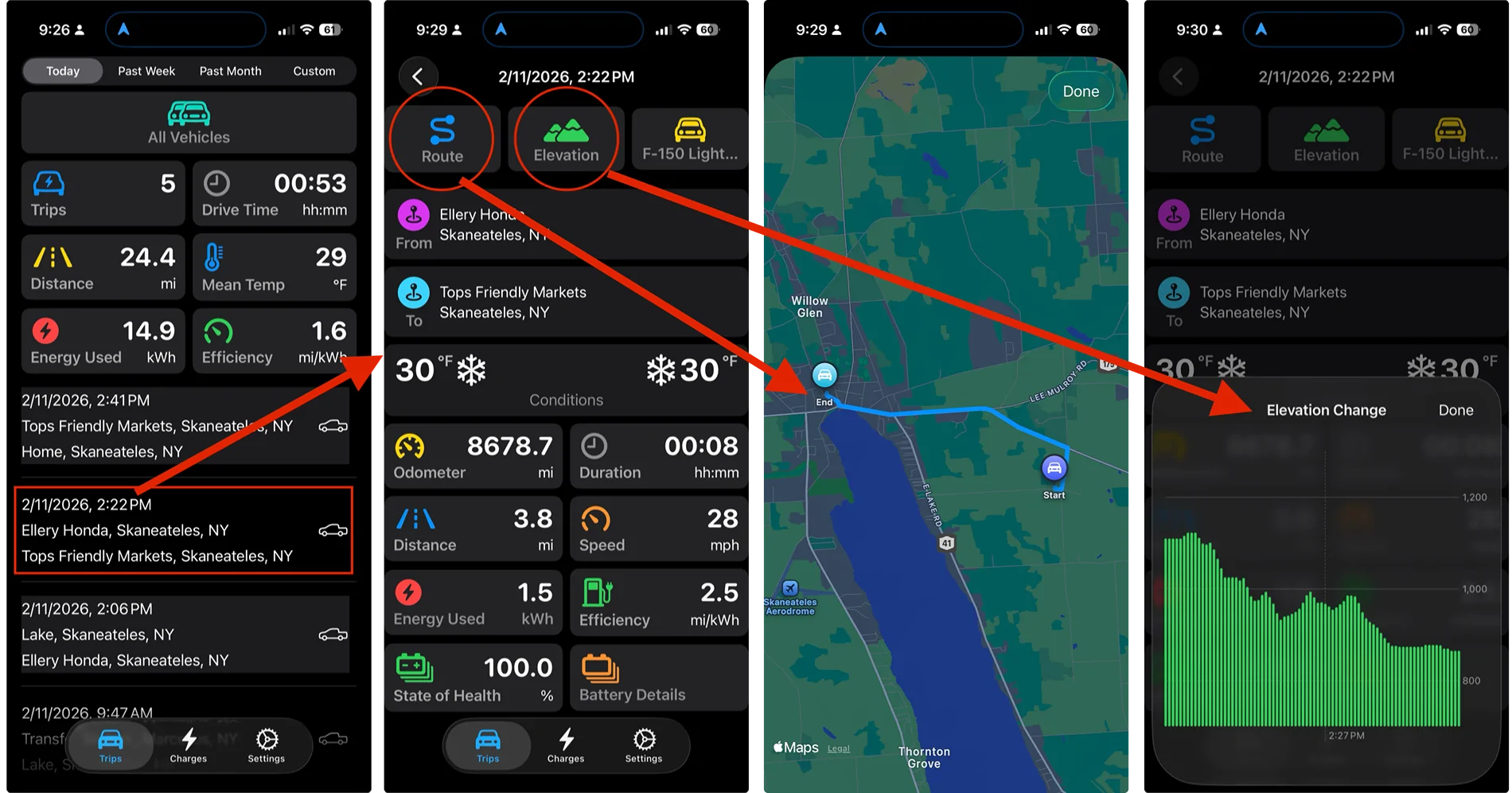
Let's look at your trips. The Trips tab shows your recent trips in a convenient or custom format. On the left are the trips taken today in all vehicles in the household or fleet. We can drill into the trip details (second from the left) and see the vehicle used, origin and destination, weather conditions along with the most useful vehicle details. The Route button will display the trip path on a map, scroll and zoom for pertinent details along the way. And the Elevation button adds useful insight into the ups and downs of the journey, 2.5mi/kWh as it was mostly downhill.

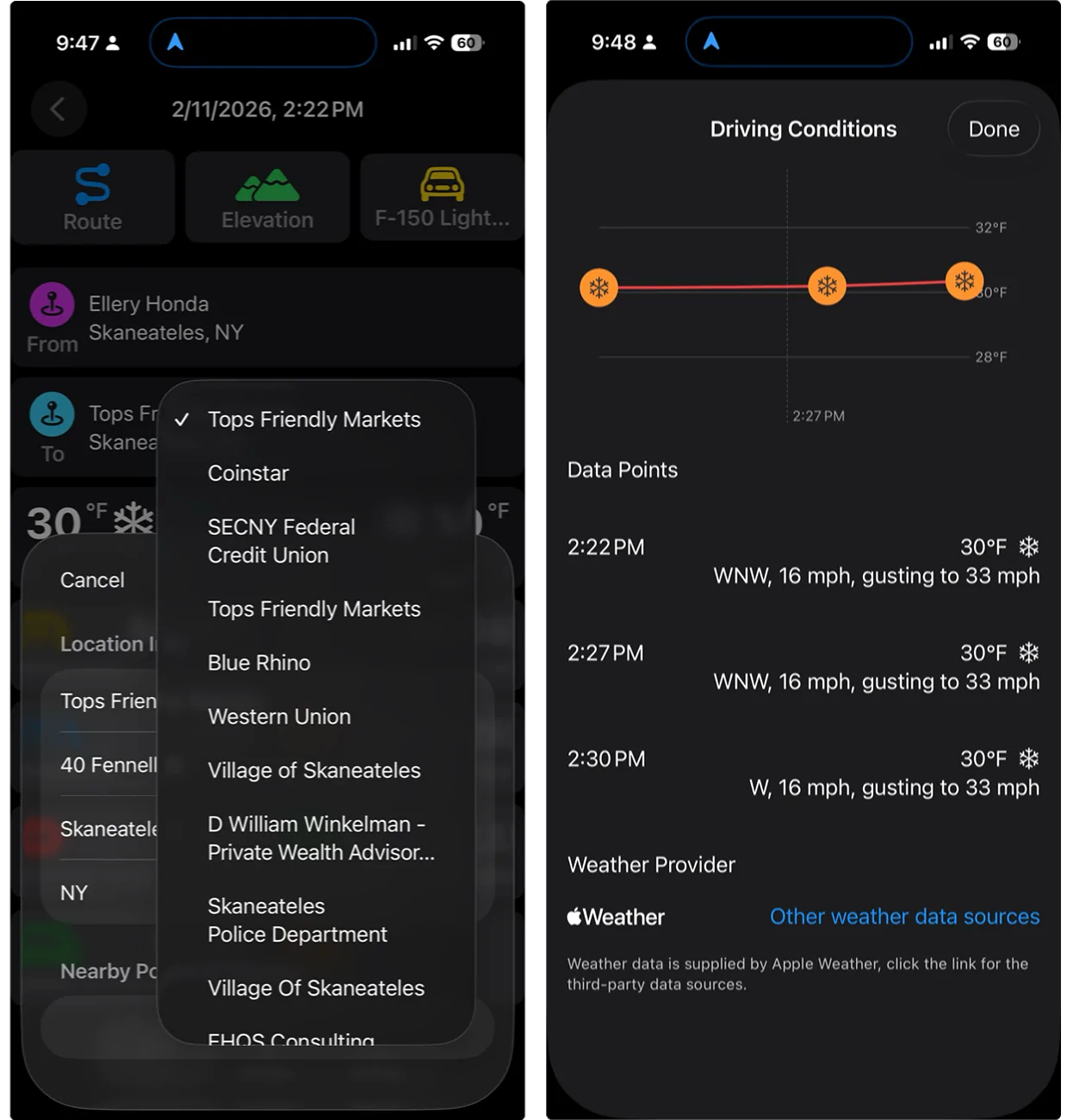
But wait, there is more to discover as map points of interest and weather data are integrated into the trip data. Tapping on the 'From' or 'To' field you find full address information plus the ability to select from nearby points of interest, Pankuzu will select the nearest but you can change it to your actual destination (left side). Or Tapp on the weather conditions and see a detailed summary of the weather along the route, looks like a stiff headwind on this trip.

Enough for now, I'll add the Charges at an another time, to be continued.
What is Pankuzu?
Pankuzu, which is Japanese for breadcrumbs, is an iOS application that records your trips and charges and dives into the individual details or aggregates you EV trips and charges to enlighten your Mustang Mach-E or F-150 ownership. Why Pankuzu? Every name I tried was rejected by Apple so I had tothink out-of-the-box to get this into TestFlight for your personal enjoyment.
Testing
As of this initial post, Pankuzu is untested, if you have a problem you can submit a screenshot or crash report using TestFlight. Once the source code is posted on GitHub, there will be a Issues and Discussion sections for problem reports and comments.
Disclaimer
Pankuzu is provided "as is" for entertainment purposes only and is not intended for, nor fit for, any specific purpose. The are no warranties, express or implied, regarding accuracy, reliability, or suitability. Use of this app is entirely at your own risk. There is a lot going on under the hood with Bluetooth, Swift, SwiftUI, SQLIte, and more and this is just another of my winter projects to keep the brain exercised in my advanced old age.
Specifically, do not go out and buy an OBDLink MX+ unless you see some independent reviews from others that already have an MX+ so aren't making a financial investment - caveat emptor.
Requirements
iPhone:
I have only used it on iOS26 and an iPone 17 Pro but should work on other iPhones or iPads
OBDlink MX+:
An OBDLink MX+ scan tool is required to record trips and charges but anyone can try out the user interface as the Database Seeding section in Settings lets you add trips and charges so
Privacy
No ads, no trackers, nothing bad.
All data collected is stored on your device and in your iCloud account and is not shared with anyone.
Location Always permission is required as Pankuzu runs in the background logging your position to create the trip route map. Location is only collected for the duration of a trip or at the start of a charge to display your location on a map.
Recording a trip
Happens automatically, as you approach your vehicle your phone will connect with the OBDLink <X+ scan tool and when you shift out of Park the trip will start recording. When the gear selector is returned to Park the trip ends. As I am a bit paranoid about this, there are optional notifications when the scan tool connects and disconnects and when a trip is started.
At least this is now it is supposed to work.
Trips
Let's look at your trips. The Trips tab shows your recent trips in a convenient or custom format. On the left are the trips taken today in all vehicles in the household or fleet. We can drill into the trip details (second from the left) and see the vehicle used, origin and destination, weather conditions along with the most useful vehicle details. The Route button will display the trip path on a map, scroll and zoom for pertinent details along the way. And the Elevation button adds useful insight into the ups and downs of the journey, 2.5mi/kWh as it was mostly downhill.
But wait, there is more to discover as map points of interest and weather data are integrated into the trip data. Tapping on the 'From' or 'To' field you find full address information plus the ability to select from nearby points of interest, Pankuzu will select the nearest but you can change it to your actual destination (left side). Or Tapp on the weather conditions and see a detailed summary of the weather along the route, looks like a stiff headwind on this trip.
Enough for now, I'll add the Charges at an another time, to be continued.
Sponsored