Sponsored

Power-Up 2.3.0 OTA rolling out

Hauk

Member
First Name
David
Joined
Jan 28, 2022
Threads
1
Messages
13
Reaction score
8
Location
Florida
Vehicles
2021 F150
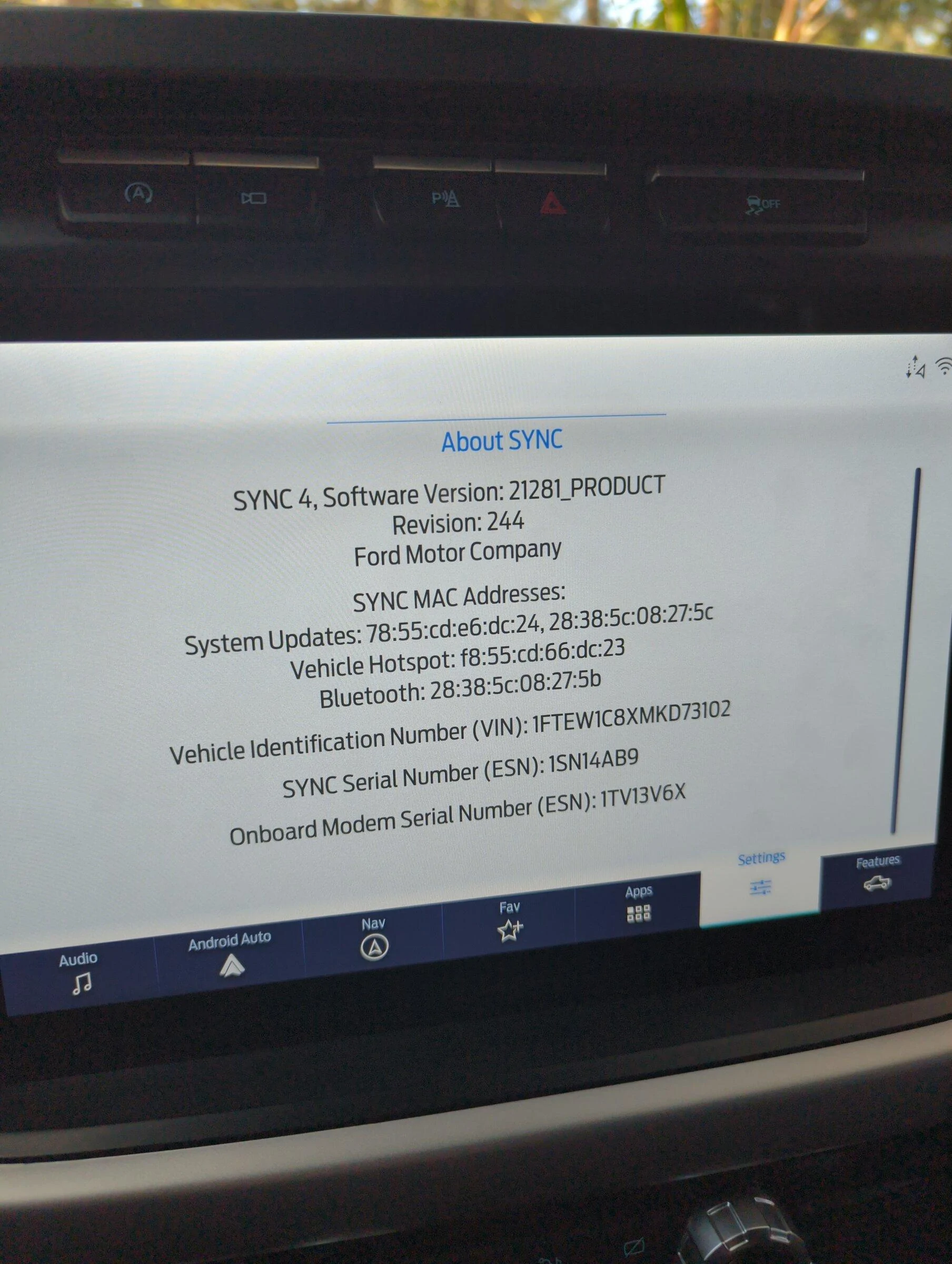
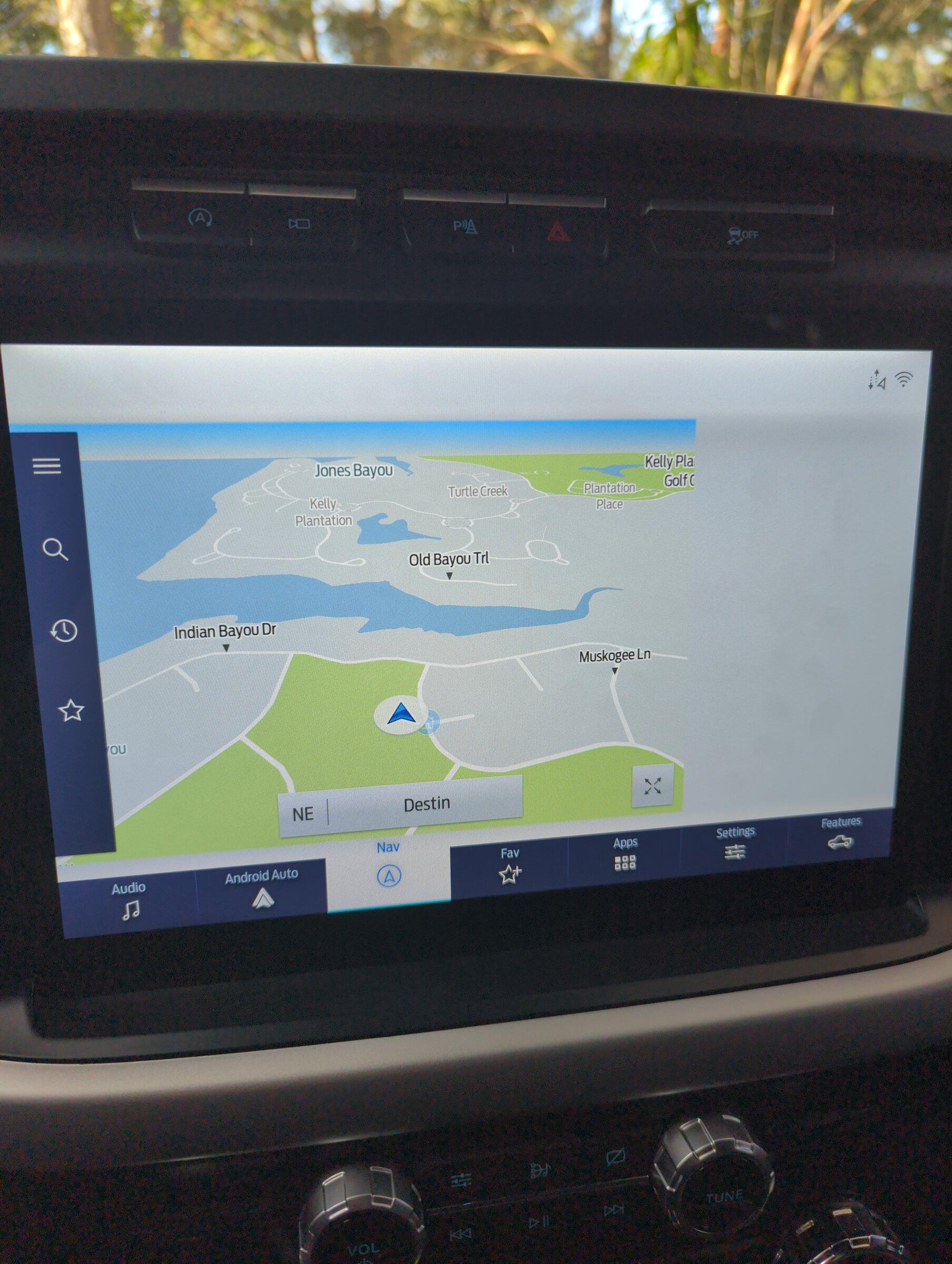
First, thanks for the great guide on these updates. I was able to update my modules, but seem to have an issue with the Sync display now. The screen graphics now seem to be misaligned and don't display correctly. For example on nav screen the right app screen is completely missing, also on the top my clock and phone list is missing. See attached.
Ford F-150 Lightning Power-Up 2.3.0 OTA rolling out 16434060755255679224432712171406

Ford F-150 Lightning Power-Up 2.3.0 OTA rolling out 16434059224557303248060930479320


I have tried to wait 30 minutes with the truck off, pulled the battery terminal for 5 minutes, and I still have the same results. I have tried soft reset and master reset of the sync but still the same results.

It is almost like the sync is configured for the 8 inch screen and not the 12 on some menus.

One thing to note, when I was installing from the USB drive, FDRS gave an error message when validating the software, and prompted me to retry. After the second attempt everything passed the validation. Is it possiblen something for corrupted? Is it possible to reinstall the apmi software? It is no longer an option in FDRS that I see. Any help appreciated. Please let me know if you need more details.

Thanks!
Sponsored

 
OP
OP

Jesse-Infotainment

Well-known member
First Name
Jesse
Joined
May 27, 2021
Threads
5
Messages
1,020
Reaction score
1,297
Location
Dallas
Vehicles
2024 F150 Lightning Platinum
First, thanks for the great guide on these updates. I was able to update my modules, but seem to have an issue with the Sync display now. The screen graphics now seem to be misaligned and don't display correctly. For example on nav screen the right app screen is completely missing, also on the top my clock and phone list is missing. See attached.
16434060755255679224432712171406.jpg

16434059224557303248060930479320.jpg


I have tried to wait 30 minutes with the truck off, pulled the battery terminal for 5 minutes, and I still have the same results. I have tried soft reset and master reset of the sync but still the same results.

It is almost like the sync is configured for the 8 inch screen and not the 12 on some menus.

One thing to note, when I was installing from the USB drive, FDRS gave an error message when validating the software, and prompted me to retry. After the second attempt everything passed the validation. Is it possiblen something for corrupted? Is it possible to reinstall the apmi software? It is no longer an option in FDRS that I see. Any help appreciated. Please let me know if you need more details.

Thanks!
Man.. that looks like it loaded the wrong files. That’s the 8” screen. The crazy thing is the 8” and 12” files are identical. But it is supposed to load the proper ones for the correct apim.
 

Snakebitten

Well-known member
First Name
Bruce
Joined
Jun 19, 2021
Threads
3
Messages
1,521
Reaction score
923
Location
Coastal Texas
Vehicles
2021 F150 Powerboost Platinum
First, thanks for the great guide on these updates. I was able to update my modules, but seem to have an issue with the Sync display now. The screen graphics now seem to be misaligned and don't display correctly. For example on nav screen the right app screen is completely missing, also on the top my clock and phone list is missing. See attached.
16434060755255679224432712171406.webp

16434059224557303248060930479320.jpg


I have tried to wait 30 minutes with the truck off, pulled the battery terminal for 5 minutes, and I still have the same results. I have tried soft reset and master reset of the sync but still the same results.

It is almost like the sync is configured for the 8 inch screen and not the 12 on some menus.

One thing to note, when I was installing from the USB drive, FDRS gave an error message when validating the software, and prompted me to retry. After the second attempt everything passed the validation. Is it possiblen something for corrupted? Is it possible to reinstall the apmi software? It is no longer an option in FDRS that I see. Any help appreciated. Please let me know if you need more details.

Thanks!
You can repeat the USB procedure on the truck if you still have the files. But FRDS does a scan and if it thinks the module is up to date, it removes the update from the list so I don't think you could initiate a fresh download.

Believe me when I say I initiated the USB update 10 times. :)
 
OP
OP

Jesse-Infotainment

Well-known member
First Name
Jesse
Joined
May 27, 2021
Threads
5
Messages
1,020
Reaction score
1,297
Location
Dallas
Vehicles
2024 F150 Lightning Platinum
It won’t let you redo the update either if it’s up to date.
Did yours come with the 12” or did you add it? Just asking
 

Hauk

Member
First Name
David
Joined
Jan 28, 2022
Threads
1
Messages
13
Reaction score
8
Location
Florida
Vehicles
2021 F150
You can repeat the USB procedure on the truck if you still have the files. But FRDS does a scan and it thinks the module is up to date, it removes the update from the list so I don't think you could initiate a fresh download.
I still have the USB stick, however the sync screen says that the software is already up to date after it scans and indexes the USB drive and does not allow me to reinstall.

Any other options here?
 

Sponsored
OP
OP

Jesse-Infotainment

Well-known member
First Name
Jesse
Joined
May 27, 2021
Threads
5
Messages
1,020
Reaction score
1,297
Location
Dallas
Vehicles
2024 F150 Lightning Platinum
Yeah. It loaded the wrong update files. That’s the 8” resolution

the only thing I could suggest right now is One a master reset .
2 in fdrs run apim configuration

I would do 2 first

sorry know that’s out of order
 

Hauk

Member
First Name
David
Joined
Jan 28, 2022
Threads
1
Messages
13
Reaction score
8
Location
Florida
Vehicles
2021 F150
Yeah. It loaded the wrong update files. That’s the 8” resolution

the only thing I could suggest right now is One a master reset .
2 in fdrs run apim configuration

I would do 2 first

sorry know that’s out of order
Thanks, I will try the apim configuration next and report back. Is there anything I need to be aware of, or is it an automated/guided process once I kick it off?
 
OP
OP

Jesse-Infotainment

Well-known member
First Name
Jesse
Joined
May 27, 2021
Threads
5
Messages
1,020
Reaction score
1,297
Location
Dallas
Vehicles
2024 F150 Lightning Platinum
Thanks, I will try the apim configuration next and report back. Is there anything I need to be aware of, or is it an automated/guided process once I kick it off?
It’s just automated.. it will rerun the as built config
 

Hauk

Member
First Name
David
Joined
Jan 28, 2022
Threads
1
Messages
13
Reaction score
8
Location
Florida
Vehicles
2021 F150
It’s just automated.. it will rerun the as built config
Unfortunately, the apim configuration yielded the same results. I did a master reset earlier from the sync settings menu as well and still the same. Any other ideas to try here? Is it possible to set the correct parameters using forscan?
 

Sponsored
OP
OP

Jesse-Infotainment

Well-known member
First Name
Jesse
Joined
May 27, 2021
Threads
5
Messages
1,020
Reaction score
1,297
Location
Dallas
Vehicles
2024 F150 Lightning Platinum
Unfortunately, the apim configuration yielded the same results. I did a master reset earlier from the sync settings menu as well and still the same. Any other ideas to try here? Is it possible to set the correct parameters using forscan?
Go to Forscan take a pic of the as built and send it to me or post it. But that honestly I’m sorry to say looks like it loaded the wrong files
 

JEB

Well-known member
Joined
Aug 15, 2021
Threads
0
Messages
576
Reaction score
393
Location
Northern Illinois
Vehicles
2021 F-150 Lariat Powerboost
I hate even to suggest this, because it’s a long shot. But about two days after I updated my APIM, a second APIM update came down. Very small and went through the CAN bus. I don’t know what it fixed, but maybe it will be enough of a tweak to correct the display errors. Keep an eye out for it. Also, are there any other out of date modules? Might as well update them to rule out any interaction issues. I’m not optimistic about either of these alternatives, unfortunately.

Jesse: Are there any other sources for pre-update as-built files for the APIM? Just wondering if it were possible to reload the as-built configuration using the FDRS tool for programming newly installed replacement modules.
 
OP
OP

Jesse-Infotainment

Well-known member
First Name
Jesse
Joined
May 27, 2021
Threads
5
Messages
1,020
Reaction score
1,297
Location
Dallas
Vehicles
2024 F150 Lightning Platinum
I hate even to suggest this, because it’s a long shot. But about two days after I updated my APIM, a second APIM update came down. Very small and went through the CAN bus. I don’t know what it fixed, but maybe it will be enough of a tweak to correct the display errors. Keep an eye out for it. Also, are there any other out of date modules? Might as well update them to rule out any interaction issues. I’m not optimistic about either of these alternatives, unfortunately.

Jesse: Are there any other sources for pre-update as-built files for the APIM? Just wondering if it were possible to reload the as-built configuration using the FDRS tool for programming newly installed replacement modules.
His situation looks bad. I realy think they sent the wrong file out for his truck. It loaded them and screwed it up. That is 100% the 8inch look. The 12” even if the as built was wrong would still have the side bar. The 8” and 12” are identical and load based on what the manifest calls for. And it called for the wrong setup. His only hope at this point would be another update.
I am more than willing if he sends it to me to try and rectify it.
I have not seen the update that you got on my truck if heard from anyone else that had it. I really am not certain what it was.

this issue would happen with guys on3.4 they have a sync 3 and a sync 3 lite. Guys would download a update from online and load the update and all the sudden their sync unit would display in 4” size. That’s because they loaded the 4” update which were the same different resolution.
I think his is toast. If he sends it to me I can try to downgrade and then go back up.
Outside a future update he will be stuck like that. He is limited in what he can do. I have way more capacity in my office because I have so many tools.
I am sorry it isn’t his fault it is fords servers. They detected something wrong. This is a fluke. He just got the wrong update and there is NOTHING HE DID OR COULD HAVE DONE to cause it
 

JEB

Well-known member
Joined
Aug 15, 2021
Threads
0
Messages
576
Reaction score
393
Location
Northern Illinois
Vehicles
2021 F-150 Lariat Powerboost
His situation looks bad. I realy think they sent the wrong file out for his truck. It loaded them and screwed it up. That is 100% the 8inch look. The 12” even if the as built was wrong would still have the side bar. The 8” and 12” are identical and load based on what the manifest calls for. And it called for the wrong setup. His only hope at this point would be another update.
I am more than willing if he sends it to me to try and rectify it.
I have not seen the update that you got on my truck if heard from anyone else that had it. I really am not certain what it was.

this issue would happen with guys on3.4 they have a sync 3 and a sync 3 lite. Guys would download a update from online and load the update and all the sudden their sync unit would display in 4” size. That’s because they loaded the 4” update which were the same different resolution.
I think his is toast. If he sends it to me I can try to downgrade and then go back up.
Outside a future update he will be stuck like that. He is limited in what he can do. I have way more capacity in my office because I have so many tools.
I am sorry it isn’t his fault it is fords servers. They detected something wrong. This is a fluke. He just got the wrong update and there is NOTHING HE DID OR COULD HAVE DONE to cause it
Yeah, that’s what it sounded like to me too. I got a very queasy feeling when I read this. Ford sending the wrong update could happen to anyone. That’s why I was hoping maybe an earlier build before this last update could fix the problem because he said he was fine through 2.1.1.


Top