YzermanTopShelf
Well-known member
- First Name
- Tom
- Joined
- Jan 19, 2021
- Threads
- 5
- Messages
- 111
- Reaction score
- 35
- Location
- California
- Vehicles
- 2021 F-150 Platinum
I got 2.3.0 today. Does that mean I should expect Blue Cruise soon?
Sponsored
Unless of course, the USB drive happens to have bad sectors.The USB drive format should not be an issue here. I have installed updates (GWM, APIM as well as TCU) from different flash drives, using both USB2.0 as well as USB3.0. Both were quick formatted to exFAT. Doing long format is not necessary, the only thing it does it scrubs the drive and checks for bad sectors, and it takes awfully long. Also, drive label does not matter IMO. I had one named "FDRS" another was blank

I just wanted to update everyone on my situation. I was able to get my software reloaded on my APIM and it is working correctly now.I have a pathway in my head to correct it but I need it here. There is really no way to edit the manifest. THe update changed the reslution the only way to fix it is rerun the update and I dont know of a way to edit the manifest and it maintain its signature. There may be some people on this forum that are smarter than I am(I am certain of it) that can take care of the json stuff and edit it and maintain the signature or hash. If that were possible then we could then take the version checker out. He could then run the update but the update he has is wrong so he would need one that is right.
I can run it here in my system and have much more flexibility within what is allowed in the existing files.
THere is no way with forscan to make the version change in the apim.
This is another shot in the dark. @Hauk but try to run a PMI on the APIM in FDRS. IT MAY allow you to redownload the files it MAY see a weird version in its check and download a new update. It may also boot you since its already the existing APIM. Its something to try while you have FDRS
I know I said this privately but I’m happy and proud you stuck with it.I just wanted to update everyone on my situation. I was able to get my software reloaded on my APIM and it is working correctly now.
I checked FDRS and there was a software update available for my instrument cluster. I updated this, and then tried to re-run the PMI procedures on my APIM, and the servers saw the mismatch and I was able to re-download the correct manifest and files. Perhaps something in the manifest was a little differant with the updated instrument cluster file and that kicked off the update?
Anyways I am really glad I was able to get this resolved. Also a big thanks to everyone on here and a HUGE shoutout to Jesse who was immensely helpful and supportive through this ordeal.
That is great news. Very well done.I just wanted to update everyone on my situation. I was able to get my software reloaded on my APIM and it is working correctly now.
I checked FDRS and there was a software update available for my instrument cluster. I updated this, and then tried to re-run the PMI procedures on my APIM, and the servers saw the mismatch and I was able to re-download the correct manifest and files. Perhaps something in the manifest was a little differant with the updated instrument cluster file and that kicked off the update?
Anyways I am really glad I was able to get this resolved. Also a big thanks to everyone on here and a HUGE shoutout to Jesse who was immensely helpful and supportive through this ordeal.

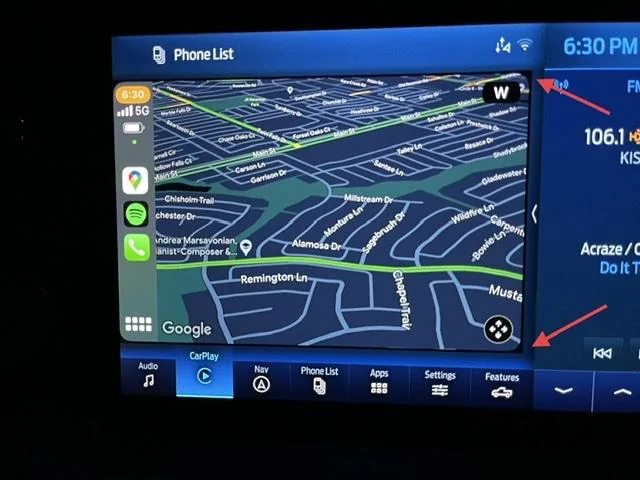
This happened at random one day almost a year ago and I could not find a way to resolve it. Ford Power Up 2.1.0 magically fixed it overnight in my truck. I don't think it's an iOS issue because I have two iPhones and had this problem for both across many different iterations of the public releases of iOS 14 and iOS 15.Anyone noticed the CarPlay screen is messed up ? It seems they shrunk the the resolution, exposing a black rectangle behind it. Also the Phone List at the top left is misaligned:

IMHO, It looked better in previous versions of APIM
The 8" files are the same names and same size as 12"Anyone with similar issues can try holding seek forward on the dash and steering wheel together for several seconds to enter the APIM diagnostics.
In those menu's you can confirm which screen resolution the APIM defaults too and that should confirm any speculation that the 8" files are loaded. You can also go into the IVSU menus in the embedded Sync 4 diagnostics and read all the system files currently installed.
If you have access to ForScan ensure that the IOD cards in the APIM are enabled, the correct screen type is configured and force reset the APIM a few times over the network.


IF you have an iphone...How do I check to see what Power-Up Version is on my truck? Its a Lariat PowerBoost (November 2021 blend date). The truck and FordPass both report 'software up to date'. I have ForScan and OBD-Link EX and have made a few mods.