Sponsored

heffer86

Well-known member
Joined
Sep 3, 2020
Threads
11
Messages
125
Reaction score
28
Location
Iowa
Vehicles
2021 F150 Lariat 501A
2021 F-150 XLT 302A
Anyone getting a message on the Sync 4 screen after unplugging the ODB adapter that reads,
"Vehicle location, Driving Data (e.g. usage info) and/or Vehicle Data (e.g. diagnostics) sharing active. See Settings to adjust."
It comes on about 8-10 seconds after starting the truck. It goes away on its own.

This message came on after FORScan did not load all the modules properly the first time I used it. I closed FORScan and unplugged the adapter. I have not made any changes to the truck.

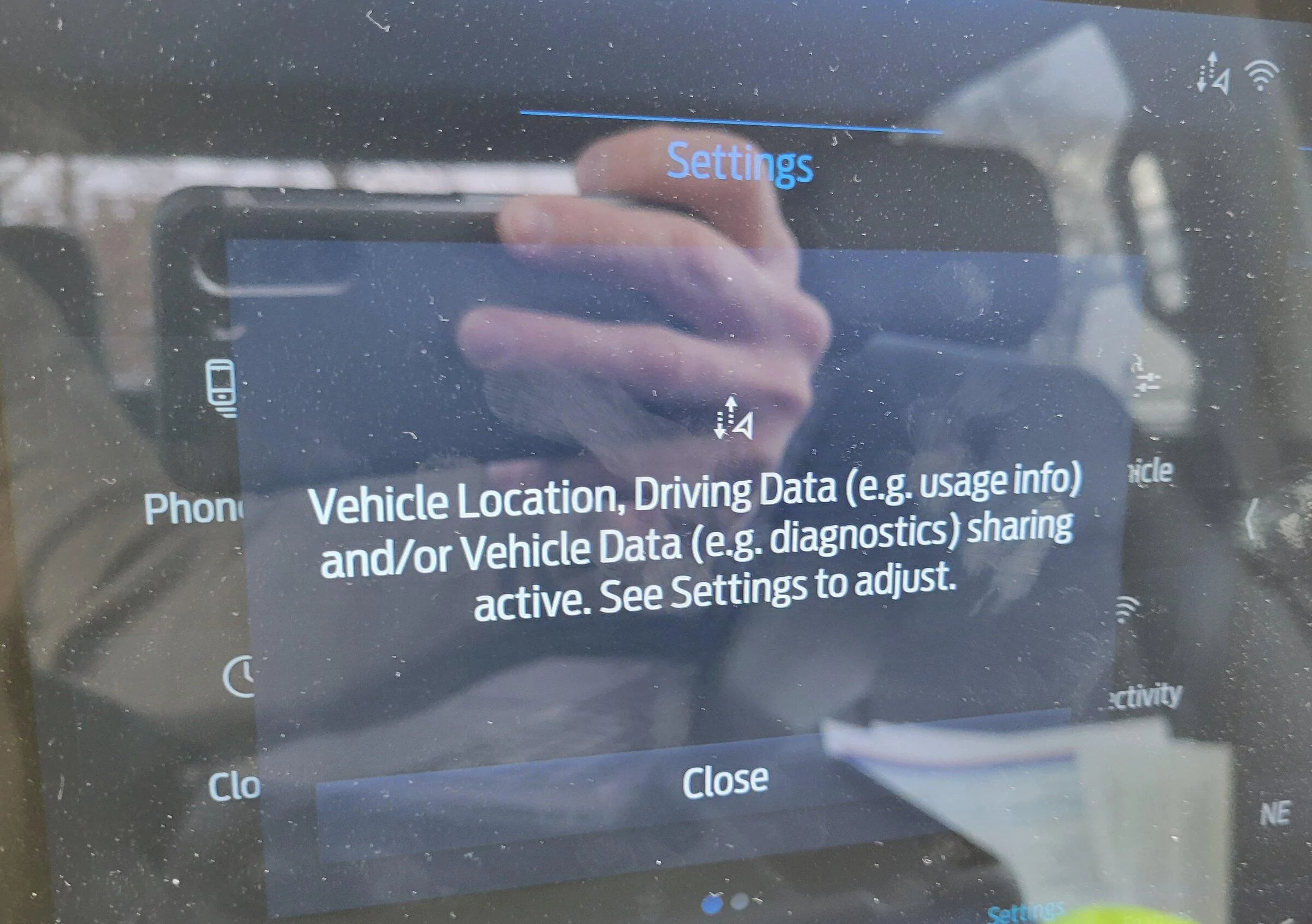
Pic of screen.jpg
Mine only comes up if I don't have my phone paired to Bluetooth.
Sponsored


Ford204

Member
First Name
Ray
Joined
Jan 11, 2022
Threads
0
Messages
6
Reaction score
0
Location
Mt. Vernon, IL
Vehicles
2021 F-150
Mine only comes up if I don't have my phone paired to Bluetooth.
I will check that out. I did turn off Bluetooth before I connected to FORscan. I swear I have never seen that message before. Maybe I just missed it in the past. Thank you!
 

Ford204

Member
First Name
Ray
Joined
Jan 11, 2022
Threads
0
Messages
6
Reaction score
0
Location
Mt. Vernon, IL
Vehicles
2021 F-150
That message is completely normal. I see it after making changes in Forscan. It goes away and doesn't return until I make changes again.
Okay. I will check that out. I know I have not seen that before. I was just a little nervous about it. I will see what happens when I try another change. Thank you!
 

Omodan

Active member
First Name
Randal
Joined
Aug 18, 2021
Threads
2
Messages
26
Reaction score
15
Location
Augusta GA
Vehicles
2021 F150 King Ranch, 2019 Expedition Limited
Anyone happen to know what setting to change in order to have the front camera to display on the Sync 4 screen when the front proximity sensors detect an object?

I recently added the four front proximity sensors to my 21 KR. I managed to get the truck to detect the front sensors, but instead of displaying the front camera, it shows an overhead picture of the F150 and displays a yellow or red color for whichever sensor is detecting an object.
 

superfordman

Well-known member
First Name
Troy
Joined
Jun 29, 2021
Threads
0
Messages
66
Reaction score
33
Location
NE CO
Vehicles
2021 F150 Lariat
The HVAC module is very slow to write. I was able to do it with a MX+. If you haven’t already, try to optimize your usb adapter latency and turn on auto increase in forscan.
https://forscan.org/forum/viewtopic.php?f=4&t=1763
Gave this a try today and still no go... I already had auto increase on and my min delay was actually already running at 1 ms without changing anything, actually went up to 2 ms when I changed the COM port settings.

So no idea what the deal is really, think the next thing is to send logs to Forscan and see what they think. I wonder if it's just a Job1 build/software issue. My VCXnano should be here shortly so maybe once I try to update everything I can things will start clicking.
 

Sponsored

ROBB1

Well-known member
First Name
Justin
Joined
Oct 10, 2021
Threads
0
Messages
128
Reaction score
48
Location
NC
Vehicles
2021 F150 Tremor
Gave this a try today and still no go... I already had auto increase on and my min delay was actually already running at 1 ms without changing anything, actually went up to 2 ms when I changed the COM port settings.

So no idea what the deal is really, think the next thing is to send logs to Forscan and see what they think. I wonder if it's just a Job1 build/software issue. My VCXnano should be here shortly so maybe once I try to update everything I can things will start clicking.
I think the best bet may be sending a log to forscan. It seems there are a lot of mixed results with writing the the HVAC module. Forscans data base may not be totally complete. I got lucky I guess.
 

johnatuckeriii

Well-known member
First Name
John
Joined
May 16, 2021
Threads
0
Messages
63
Reaction score
13
Location
Houston
Vehicles
2021 F-150 FX4 SuperCrew AMB
Job1 501A, heated and cooled seats but no heated steering wheel
I have a 500A Job 1 2021 with the same. I still can't help but think this is a pattern. If someone sends logs to Forscan it would be awesome but I suspect this is the issue.
 

Sponsored

ckosmas

New member
First Name
Chris
Joined
Feb 23, 2022
Threads
0
Messages
1
Reaction score
0
Location
98671
Vehicles
2021 F150 Lariat Crew 5.0
I've started adding FORScan spreadsheets here for anyone interested: https://bit.ly/3cJnYMS


Currently the newest version of FORScan can only change the BCM and 1/3 of the IPC (cluster) versions so when that changes I'll add the other modules as well.

My FORScan tutorial is here: https://docs.google.com/document/d/1-8dKaS_Spu4Zw4hV_CrKC4tLoP9G8yejqegF1wxIqxY/edit

Enable cameras at speed not working on my '21 F150 Lariat. The changes in your spreadsheet only allow the camera button the dash to make a popup on the main screen "warning, cameras are disabled for your safety". Where as the camera button does nothing without the code, either way, no cameras. Any ideas?
 

Platinum Peasant

Well-known member
First Name
Mike
Joined
Sep 26, 2020
Threads
11
Messages
843
Reaction score
184
Location
West Sacramento
Vehicles
2021 Ford F150 Platinum 3.0 Powerstroke
Occupation
Neonatal Respiratory Therapist
Enable cameras at speed not working on my '21 F150 Lariat. The changes in your spreadsheet only allow the camera button the dash to make a popup on the main screen "warning, cameras are disabled for your safety". Where as the camera button does nothing without the code, either way, no cameras. Any ideas?
Did you have the dealer perform an IPMA update as stated earlier?
 

Ajzride

Well-known member
First Name
Alan
Joined
Jun 6, 2021
Threads
4
Messages
650
Reaction score
574
Location
Houston
Vehicles
21Mach-E / 65Mustang / 21PB 502A 157"
Occupation
Eng
Enable cameras at speed not working on my '21 F150 Lariat. The changes in your spreadsheet only allow the camera button the dash to make a popup on the main screen "warning, cameras are disabled for your safety". Where as the camera button does nothing without the code, either way, no cameras. Any ideas?
check your IPMA version then triple check your changes? I have a job 1 lariat 502a and it worked for me.

edit: I see you said spreadsheet. I changed the registers listed below from the post, perhaps the spreadsheet has a typo, I can’t sort it very well from my phone.


Originally Posted by Livnitup
Ford F-150 Lightning 2021+ F-150 FORScan List / Database / Spreadsheet ? viewpost

Here are the final (for now) changes to enable cameras in motion and this has been added to the Common spreadsheet:
IPMA 706-02-02 xxxB CExx xx--
APIM 7D0-01-01 xxxx xxxx Fx--
APIM 7D0-01-04 xxxx EDxx xx--

https://www.f150forum.com/f129/forscan-14th-gen-f150s-481816/index152/#post7124189
 

Shotofpadron

Member
First Name
Rob
Joined
May 21, 2021
Threads
2
Messages
11
Reaction score
0
Location
ND
Vehicles
2021 F150
Have any powerboost owners had issues turning the pedestrian alert off? I had a 4 check digit and switched it to a 0 but may try the other method in the link too
 

Ruffiano99

Well-known member
First Name
Joe
Joined
Jan 11, 2022
Threads
0
Messages
93
Reaction score
17
Location
NY
Vehicles
2021 f150
Have any powerboost owners had issues turning the pedestrian alert off? I had a 4 check digit and switched it to a 0 but may try the other method in the link too
Dont forget to unplug the module otherwise you will still hear it.
Sponsored


Top