Sponsored

Twilly 3.0

Member
First Name
Trevor
Joined
Feb 5, 2022
Threads
1
Messages
10
Reaction score
0
Location
Alberta, Canada
Vehicles
2021 F150 3.0L Powerstroke, 2021 Edge SEL
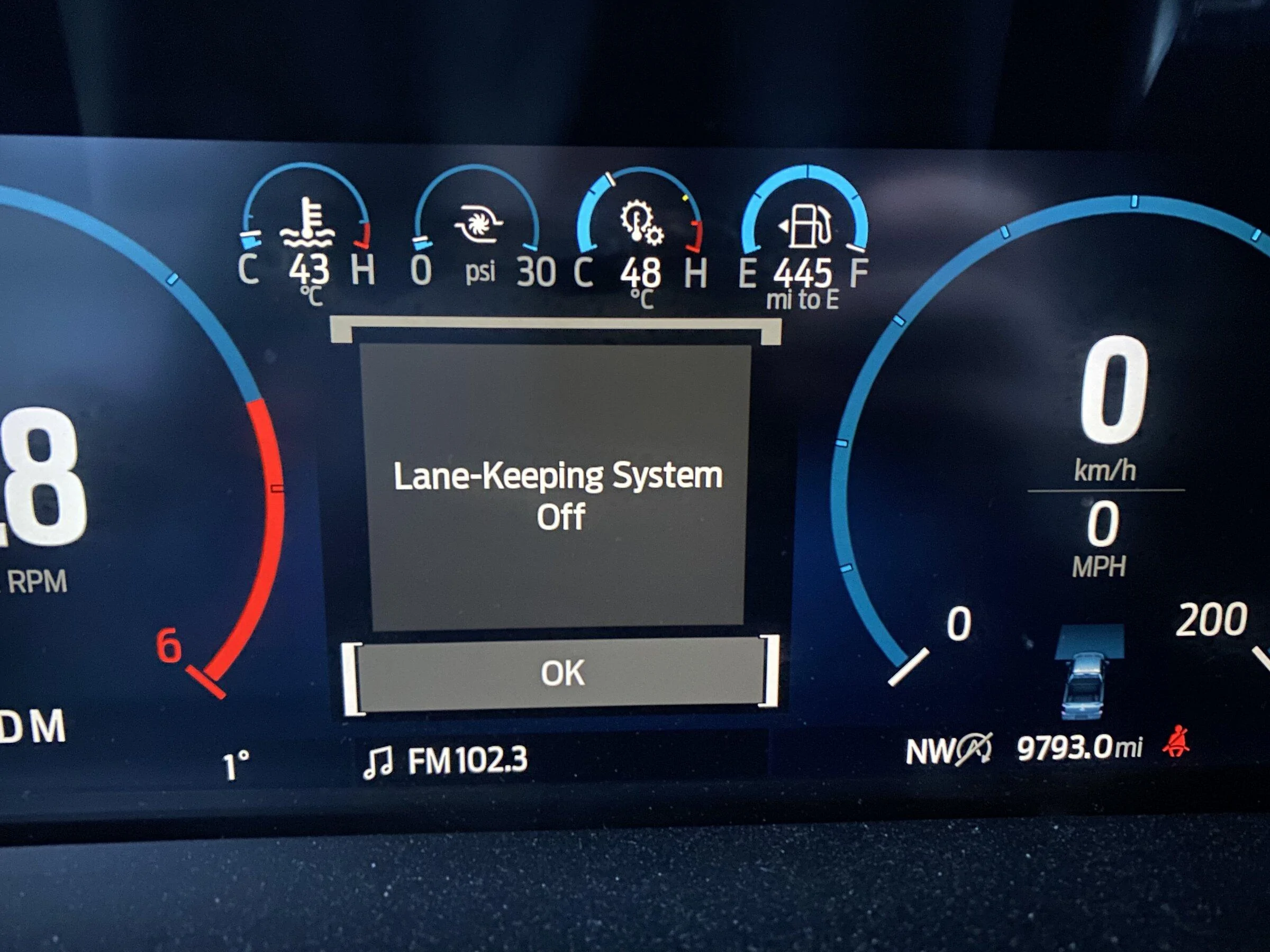
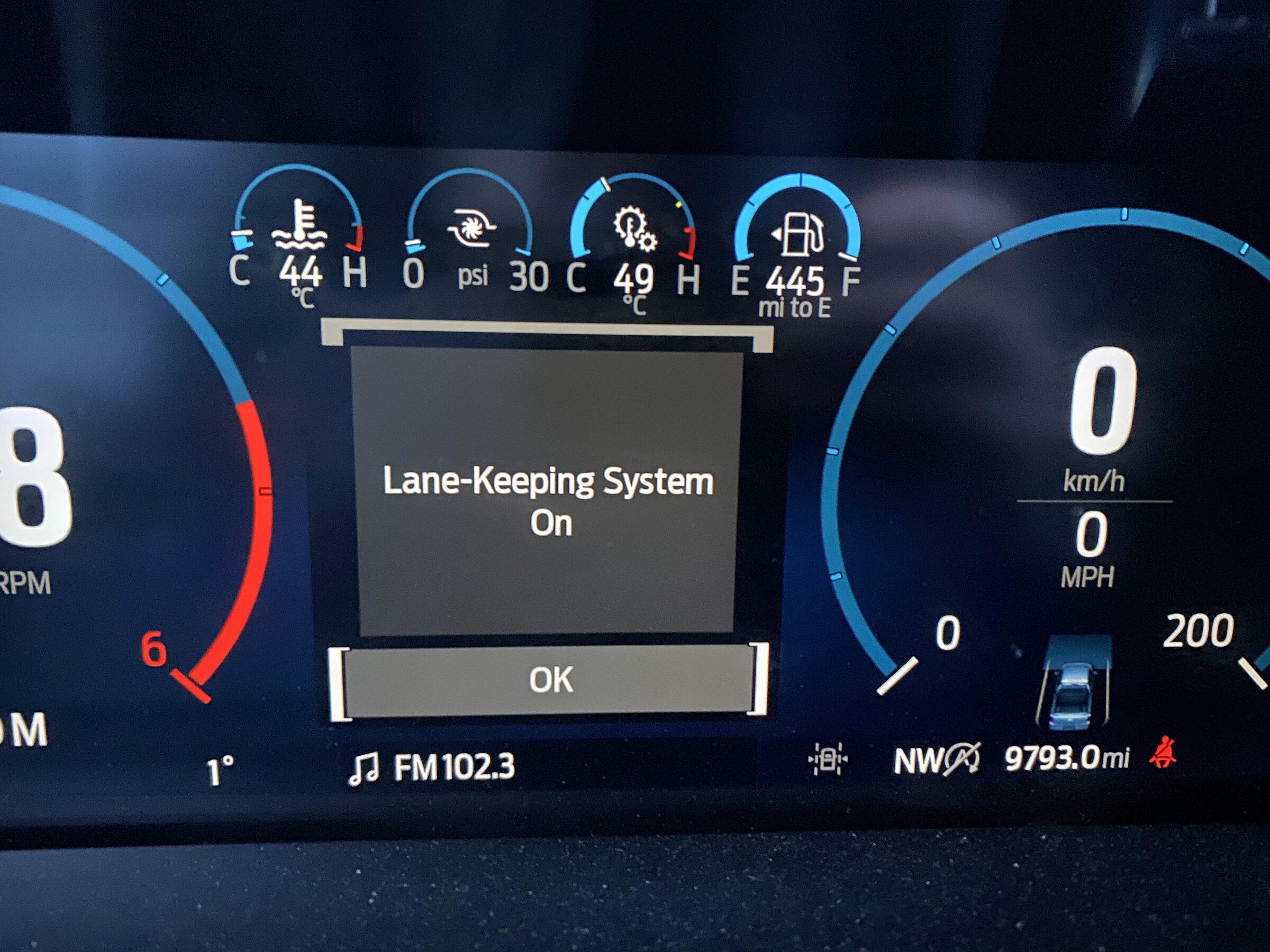
It's lane keeping assist and you have it turned on; press the button on the steering wheel that matches this image telltale and it'll turn off

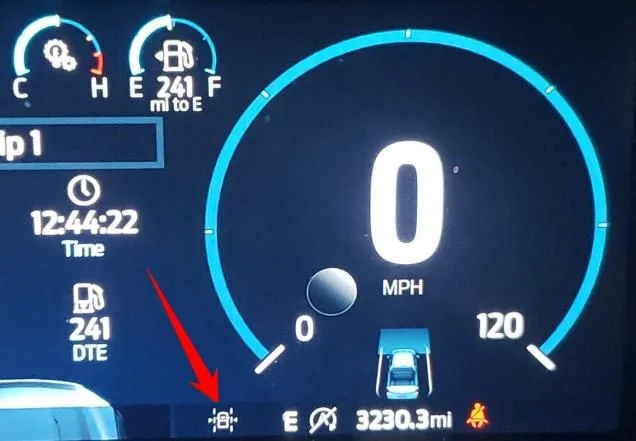
lane keeping.webp
I pulled that picture from the interwebs and it looks slightly different, no lines on the side and the front sensing portion shows a vehicle and changes the colour from green to red when in traffic and I’m too close. It is definitely not lane keep assist. I just took these pictures.

Ford F-150 Lightning 2021+ F-150 FORScan List / Database / Spreadsheet ? ECD98E12-467D-46C4-BA9B-54AFA6C85CEF


Ford F-150 Lightning 2021+ F-150 FORScan List / Database / Spreadsheet ? 5891FCA5-2265-488E-BFC8-655A6AC164EE
Sponsored

 
OP
OP
Livnitup

Livnitup

Well-known member
Joined
Jul 15, 2020
Threads
3
Messages
103
Reaction score
208
Location
SoCal
Vehicles
2021 F150 Platinum
I pulled that picture from the interwebs and it looks slightly different, no lines on the side and the front sensing portion shows a vehicle and changes the colour from green to red when in traffic and I’m too close. It is definitely not lane keep assist. I just took these pictures.

ECD98E12-467D-46C4-BA9B-54AFA6C85CEF.jpeg
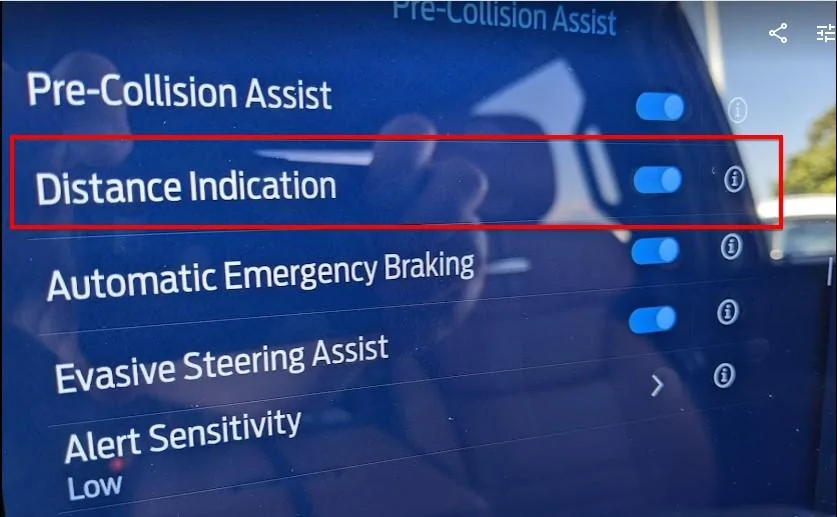
The picture above is the Distance Indication feature is turned on under Features, Pre-Collision Assist Menu in Sync so turning that off will remove it.
Ford F-150 Lightning 2021+ F-150 FORScan List / Database / Spreadsheet ? Distance Indication
 

CJ912

Member
First Name
Corey
Joined
Jun 9, 2021
Threads
0
Messages
14
Reaction score
2
Location
MI
Vehicles
2021 F150 Platinum 2017 Explorer Sport
Occupation
Warehouse consultant
Has anybody had success with the 2021s and the Bluetooth version: OBDLink MX+ OBD2 Bluetooth Scanner?

I noticed that they recommend a USB version but I don’t want to use my only laptop (which is a work computer).

can’t wait to turn off the pedestrian back up sounds, every time I come home it wakes my wife up who works hospital hours!

Thanks
 

jabrego

Well-known member
First Name
Jason
Joined
Jul 13, 2020
Threads
8
Messages
121
Reaction score
65
Location
Los Angeles
Vehicles
2021 F-150 4X4 Lariat 501A Sport
Occupation
Engineer
Has anybody had success with the 2021s and the Bluetooth version: OBDLink MX+ OBD2 Bluetooth Scanner?

I noticed that they recommend a USB version but I don’t want to use my only laptop (which is a work computer).

can’t wait to turn off the pedestrian back up sounds, every time I come home it wakes my wife up who works hospital hours!

Thanks
Well you could always make your own adapter or buy one a member sells. I made my own sound delete jumper. for less than $10.
https://www.f150gen14.com/forum/threads/pedestrian-sounder-delete-no-codes-easily-reversible.6066/

https://megaohmmotorsports.bigcartel.com/products
 

Sponsored

CJ912

Member
First Name
Corey
Joined
Jun 9, 2021
Threads
0
Messages
14
Reaction score
2
Location
MI
Vehicles
2021 F150 Platinum 2017 Explorer Sport
Occupation
Warehouse consultant
That’s fantastic. Great tip on the homemade version.
I knew about the $60 version. Since I tow often and monitor suitcases and gas cans in the pick up bed I’m going for scan so I can also turn on the pick up bed camera.
 

abd79

Well-known member
First Name
Wayne
Joined
Aug 16, 2021
Threads
1
Messages
100
Reaction score
44
Location
Canada
Vehicles
2021 F-150
Has anybody had success with the 2021s and the Bluetooth version: OBDLink MX+ OBD2 Bluetooth Scanner?

I noticed that they recommend a USB version but I don’t want to use my only laptop (which is a work computer).

can’t wait to turn off the pedestrian back up sounds, every time I come home it wakes my wife up who works hospital hours!

Thanks
The MX adaptor is all I use. Have had no issues at all. The EX I believe is a usb wired version tested thoroughly with Forscan.
 

ROBB1

Well-known member
First Name
Justin
Joined
Oct 10, 2021
Threads
0
Messages
128
Reaction score
48
Location
NC
Vehicles
2021 F150 Tremor
Has anybody had success with the 2021s and the Bluetooth version: OBDLink MX+ OBD2 Bluetooth Scanner?

I noticed that they recommend a USB version but I don’t want to use my only laptop (which is a work computer).

can’t wait to turn off the pedestrian back up sounds, every time I come home it wakes my wife up who works hospital hours!

Thanks
I use the MX+ as well. It has been rock solid. Buy with confidence.
 

RapidRedRick

Active member
First Name
Rick
Joined
Jan 19, 2022
Threads
0
Messages
29
Reaction score
6
Location
Northern Virginia
Vehicles
Ford F150 Platinum Powerboost
I am taking truck into dealership next week and wanted to restore module data back to original. When I first used FORScan, as recommended, I made backup copies of all modules. With my VIN when I downloaded the As Built file from Motorcraft and, using the compare tool I found a number of differences in the Motorcraft AS built file and individual backup module files. Is this normal? Using the compare tool, should I use the Motorcraft file or my backup files to return modules back to original for my dealer visit?
 

BCrippsy38

Active member
Joined
Jul 22, 2021
Threads
0
Messages
27
Reaction score
6
Location
New Hampshire
Vehicles
2021 F-150 Lariat Powerboost
I am taking truck into dealership next week and wanted to restore module data back to original. When I first used FORScan, as recommended, I made backup copies of all modules. With my VIN when I downloaded the As Built file from Motorcraft and, using the compare tool I found a number of differences in the Motorcraft AS built file and individual backup module files. Is this normal? Using the compare tool, should I use the Motorcraft file or my backup files to return modules back to original for my dealer visit?
Interested as well. When I pull the BCM AB from the factory AB link on forscan I get a message saying the register / block count don't match up... not sure if this is due to my bad APIM and not having OTA updates or if there's something else going on.
 

Sponsored

Jesse-Infotainment

Well-known member
First Name
Jesse
Joined
May 27, 2021
Threads
5
Messages
1,030
Reaction score
1,314
Location
Dallas
Vehicles
2024 F150 Lightning Platinum
I am taking truck into dealership next week and wanted to restore module data back to original. When I first used FORScan, as recommended, I made backup copies of all modules. With my VIN when I downloaded the As Built file from Motorcraft and, using the compare tool I found a number of differences in the Motorcraft AS built file and individual backup module files. Is this normal? Using the compare tool, should I use the Motorcraft file or my backup files to return modules back to original for my dealer visit?
The asbuild file online changes if you change it in certain modules. Also as updates are installed the as build can change. Ford will release a new as build and write it when the update is finished and once finished it will update the mothership. If you manually change as build the truck self reports every few days or so. The BCM, IPC, ACM seem to not self report and changes. Thats what I have seen with my truck at least. For other modules though even the gateway those changes will eventually report and change online
 

BCrippsy38

Active member
Joined
Jul 22, 2021
Threads
0
Messages
27
Reaction score
6
Location
New Hampshire
Vehicles
2021 F-150 Lariat Powerboost
The asbuild file online changes if you change it in certain modules. Also as updates are installed the as build can change. Ford will release a new as build and write it when the update is finished and once finished it will update the mothership. If you manually change as build the truck self reports every few days or so. The BCM, IPC, ACM seem to not self report and changes. Thats what I have seen with my truck at least. For other modules though even the gateway those changes will eventually report and change online
So does that mean the "Factory AB" isn't really factory but a cloud backup of the current settings?
 

Jesse-Infotainment

Well-known member
First Name
Jesse
Joined
May 27, 2021
Threads
5
Messages
1,030
Reaction score
1,314
Location
Dallas
Vehicles
2024 F150 Lightning Platinum
Well I try to tell people when playing with Forscan to save your original file as it is before any changes because if you change something it will change there also. It’s not a static thing is the way I can put it. It’s not really a back up but it’s not static for the reason ford will change things in updates. Example the recent ipma update made as build changes and they were reflected online after the update. If they didnt reflect them and the next time some one did a config it would load wrong data that didn’t reflect the changes made for the update .
Older sync 3 cars did this also. For guys that did the 4-8 and had their cars on Wi-Fi it would report too sis they had sync 3.
So I suggest to anyone to save the online as build before you make any changes in Forscan. But even then if you update modules that original save could become outdated.
 

BCrippsy38

Active member
Joined
Jul 22, 2021
Threads
0
Messages
27
Reaction score
6
Location
New Hampshire
Vehicles
2021 F-150 Lariat Powerboost
Ok that makes sense. I saved all my modules when I first started making changes so I could revert back when bringing it in for major services. But sounds like that could cause problems as updates come out and the old original saved modules become outdated.

I was more concerned to see a meaage when I pull the BCM AB from the factory AB link on forscan it says the register / block count does't match up... I also have never recieved an OTA update, ever. My sync 4 version is 20312_product rev 243... just had the APIM swapped to fix the OTA issue but it still thinks it's up to date and on top of it I have the dimming screen issue now!...
 

RapidRedRick

Active member
First Name
Rick
Joined
Jan 19, 2022
Threads
0
Messages
29
Reaction score
6
Location
Northern Virginia
Vehicles
Ford F150 Platinum Powerboost
Well I try to tell people when playing with Forscan to save your original file as it is before any changes because if you change something it will change there also. It’s not a static thing is the way I can put it. It’s not really a back up but it’s not static for the reason ford will change things in updates. Example the recent ipma update made as build changes and they were reflected online after the update. If they didnt reflect them and the next time some one did a config it would load wrong data that didn’t reflect the changes made for the update .
Older sync 3 cars did this also. For guys that did the 4-8 and had their cars on Wi-Fi it would report too sis they had sync 3.
So I suggest to anyone to save the online as build before you make any changes in Forscan. But even then if you update modules that original save could become outdated.
IPMA module -made changes based on original backup file 4 days ago. Ran Motorcraft file this morning and compared it to the Motorcraft file I ran prior to making changes. The two Motorcraft files are identical.
1.How long does it take Mothership to update?
2. My truck has never received an OTA, could this be an indication it does not communicate with Mothership? I have set update screen to auto, as well as daily update with no differences. Tried WiFi and cell signal. I am sure I will get it eventually, but so far it has me stumped.
Sponsored


Top