Sponsored
OP
OP
Jiji

Jiji

Well-known member
First Name
Rick
Joined
Aug 5, 2024
Threads
3
Messages
81
Reaction score
109
Location
Finger Lakes, NY
Vehicles
2024 F-150 Lightning
Wow this an awesome idea for an app! Does it only work on iOS26? I’m still chugging along on iOS18 on my 14promax but would love to try it out! Very new to the MX+ world but drive about 400 miles a week with an elevation change of 6,000 feet and would love to see the data on my trips.
I checked the TestFlight stats and all 57 installs are on iOS26.

While I am always on the newest IOS the idea is that this should run on your old device that just stays in the vehicle so download and try it, you don’t need the scan tool to try it out.
Sponsored
 
OP
OP
Jiji

Jiji

Well-known member
First Name
Rick
Joined
Aug 5, 2024
Threads
3
Messages
81
Reaction score
109
Location
Finger Lakes, NY
Vehicles
2024 F-150 Lightning
Build 2026.03.15 goes live tonight, please review before installing it.

Build 2026.03.15 Update

ATTENTION 2026.03.3 USERS:
Make a backup of your trips/charges before installing this build
- Settings.Database, Backup
- Install new build
- Clear the database, Settings.Database, Clear Database
- Restore from your backup

If you can’t log a trip or charge, make sure background operation is enabled in Settings.Bluetooth (a red symbol in the Bluetooth button means you are disabled).

What's New
Key updates are robustness and user features:
- 2025 Mustang Mach-E support (OBDLink MX+ required)
- create/edit charges using the Ford app Charge History (no OBDLink required)
- more robust design works without network connection
- Live Activities are properly supported (iOS does not allow Live Activities from background app)

Trips
- destination updates every 10 seconds with reverse geocoded address
- trips start and end gracefully even if there is no network connection
- view high voltage battery history

Charges
- charges start and end gracefully even if there is no network connection
- manually create a new charge
- edit a charge detail
- view high voltage battery history
- graph coupler temperature when charging
- State of Charge is now displayed on the charge power chart

Settings
- Bluetooth settings allows you to enable and disable operation and pair to a specific adapter
- fixed bug with Locations count shown as 0
- manually add new vehicles in the Vehicle settings (for those manually logging charges)
 
OP
OP
Jiji

Jiji

Well-known member
First Name
Rick
Joined
Aug 5, 2024
Threads
3
Messages
81
Reaction score
109
Location
Finger Lakes, NY
Vehicles
2024 F-150 Lightning
Got an ABRP telemetry key today, now looking for a special someone (or two) that uses both ABRP and Pankuzu to double check my work before a wider release.

I only need a few at this stage so if you like to help, send me a DM so I know you are interested.
 
OP
OP
Jiji

Jiji

Well-known member
First Name
Rick
Joined
Aug 5, 2024
Threads
3
Messages
81
Reaction score
109
Location
Finger Lakes, NY
Vehicles
2024 F-150 Lightning
Getting ready to release build 2026.03.24 which will be the last March release as I am taking off till next week.

Fixed anything reported and made some improvements. For those who use ABRP, this build supports using the ABRP telemetry API. Just get your API token from the ABRP app, visit Settings, Integrations, enable the ABRP integration and add your vehicle and token.
 
OP
OP
Jiji

Jiji

Well-known member
First Name
Rick
Joined
Aug 5, 2024
Threads
3
Messages
81
Reaction score
109
Location
Finger Lakes, NY
Vehicles
2024 F-150 Lightning
So no crash reports, no screenshots, no feedback. Does anyone even use this software?

Help me out here. I think it is time for a full screen trip dashboard with elements not available on the instrument panel. Like the lock screen Live Activity with its headwind indicator but bigger and better.

Ideas?
 

Sponsored

F150Redux

Well-known member
First Name
Daniel
Joined
Jun 13, 2025
Threads
9
Messages
158
Reaction score
169
Vehicles
2025 F-150 Lightning Lariat
Occupation
Computer Geek
I bought the MX+ and downloaded your app, just haven't made time to actually use either yet. Will try to get to it this week and provide any feedback I might come up with.
 

SFsparkie

Well-known member
First Name
Jim
Joined
Aug 17, 2024
Threads
0
Messages
95
Reaction score
71
Location
California
Vehicles
2023 F150 Lightning Lariat ER 01/23
Occupation
Retired
I enjoy PANKUZU. I find it interesting to see the affects of battery temperature and weather on mi/kw. Very euphoric to get a 4.4.😀
Ford F-150 Lightning Pankuzu (Breadcrumbs): trip & charging data recording app for your F-150 Lightning IMG_1321
 
OP
OP
Jiji

Jiji

Well-known member
First Name
Rick
Joined
Aug 5, 2024
Threads
3
Messages
81
Reaction score
109
Location
Finger Lakes, NY
Vehicles
2024 F-150 Lightning
A new rerelease is coming shortly, many changes coming and I don't want anyone to lose any trips or charges so please backup your database now and again before installing any new release.

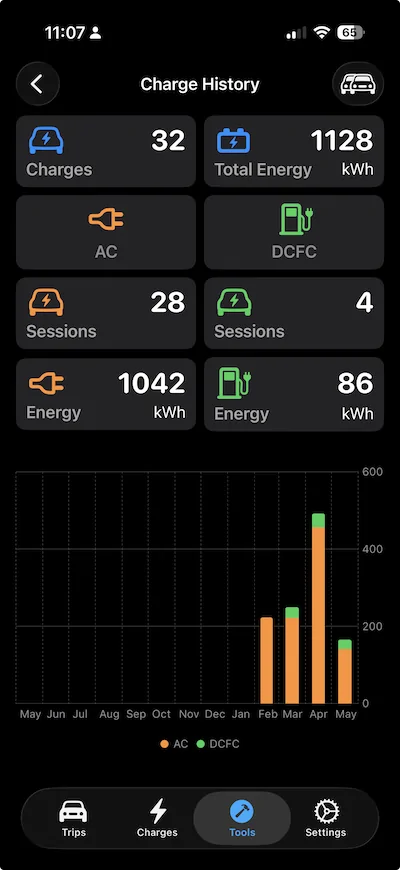
Now that I have a few months of collected trips and changes it is time start seeing some summaries. In the Tools tab you now have a Charge History control to look back at your charges during the past year:

Ford F-150 Lightning Pankuzu (Breadcrumbs): trip & charging data recording app for your F-150 Lightning IMG_1321


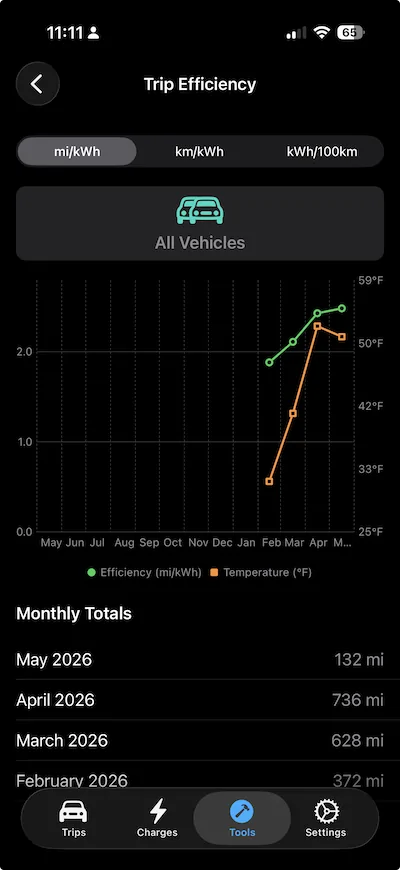
Also new is the Trip Efficiency view so you can see your monthly efficiency and temperatures during the past year:

Ford F-150 Lightning Pankuzu (Breadcrumbs): trip & charging data recording app for your F-150 Lightning IMG_1321


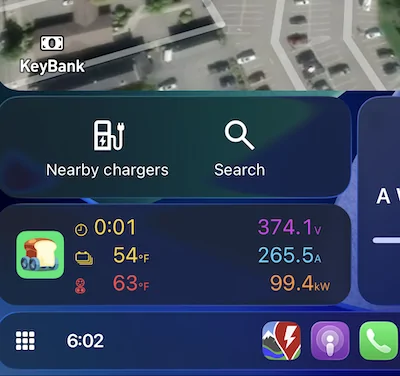
Live Activities in CarPlay
View the Lock Screen Live Activities in CarPlay! But it is tricky since your must enable Live Activities in the CarPlay Settings app and make sure you bring Pankuzu to the foreground after a trip or charge has started (best way to to tap the Pankuzu notification).

DCFC charge display some details you don't normally see in the Ford instrument panel:

Ford F-150 Lightning Pankuzu (Breadcrumbs): trip & charging data recording app for your F-150 Lightning IMG_1321


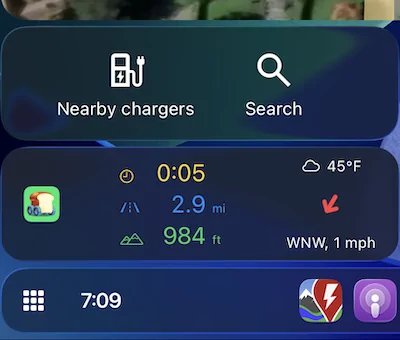
The Trip Live Activity displays the elapsed time, trip odometer, and elevation along with the wind sock showing the relative wind direction and impact on efficiency:

Ford F-150 Lightning Pankuzu (Breadcrumbs): trip & charging data recording app for your F-150 Lightning IMG_1321


I hope some are enjoying Pankuzu, if you are backup your database in anticipation of the new release.
 
OP
OP
Jiji

Jiji

Well-known member
First Name
Rick
Joined
Aug 5, 2024
Threads
3
Messages
81
Reaction score
109
Location
Finger Lakes, NY
Vehicles
2024 F-150 Lightning
Will have a new build as soon as I can addd some data to the currently empty Trip tab. For now here is a short clip of Pankuzu running in the CarPlay simulator recording an AC Charge. Key points to see are:
- scan tool is plugged in but not enabled
- Settings tab opens the Scan Tool and enables operation (connection notification is received)
- AC charge is started, new notification received
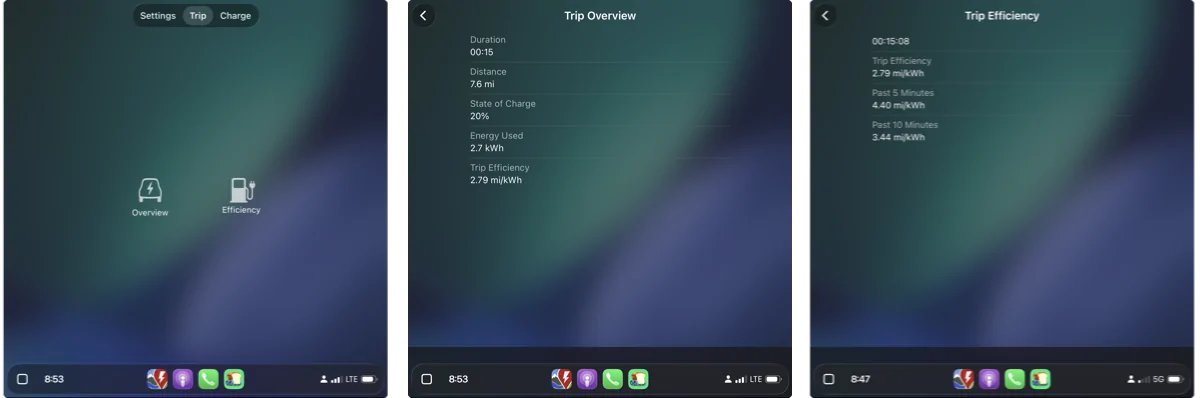
- no trip data for now but future home for all four trip efficiencies and more
- Charge tab allows viewing of key session, charger input and output, and battery data.

 
OP
OP
Jiji

Jiji

Well-known member
First Name
Rick
Joined
Aug 5, 2024
Threads
3
Messages
81
Reaction score
109
Location
Finger Lakes, NY
Vehicles
2024 F-150 Lightning
Just released a new build with CarPlay support but given the limitations of CarPlay templates it is a bit of a letdown for me. Sure there are some nice details about your current trip or charge but no charts or graphs of interesting vehicle data.


Ford F-150 Lightning Pankuzu (Breadcrumbs): trip & charging data recording app for your F-150 Lightning 1782418535329-c7


All is not lost though. For those that have used the existing trip LiveActivity there is a way to frequent updates of any content. So I just tried and coded up a second Live Activity and you can swipe thru these and have multiple trip screens each focused on specific data. Take a look at the concept on the CarPlay simulator:


Sponsored
OP
OP
Jiji

Jiji

Well-known member
First Name
Rick
Joined
Aug 5, 2024
Threads
3
Messages
81
Reaction score
109
Location
Finger Lakes, NY
Vehicles
2024 F-150 Lightning
Mach-Lee (in the Mach-E form) said:
Rivan has this:

Ford F-150 Lightning Pankuzu (Breadcrumbs): trip & charging data recording app for your F-150 Lightning LA-POC


So what sort of graph would the Lightning users like to see?

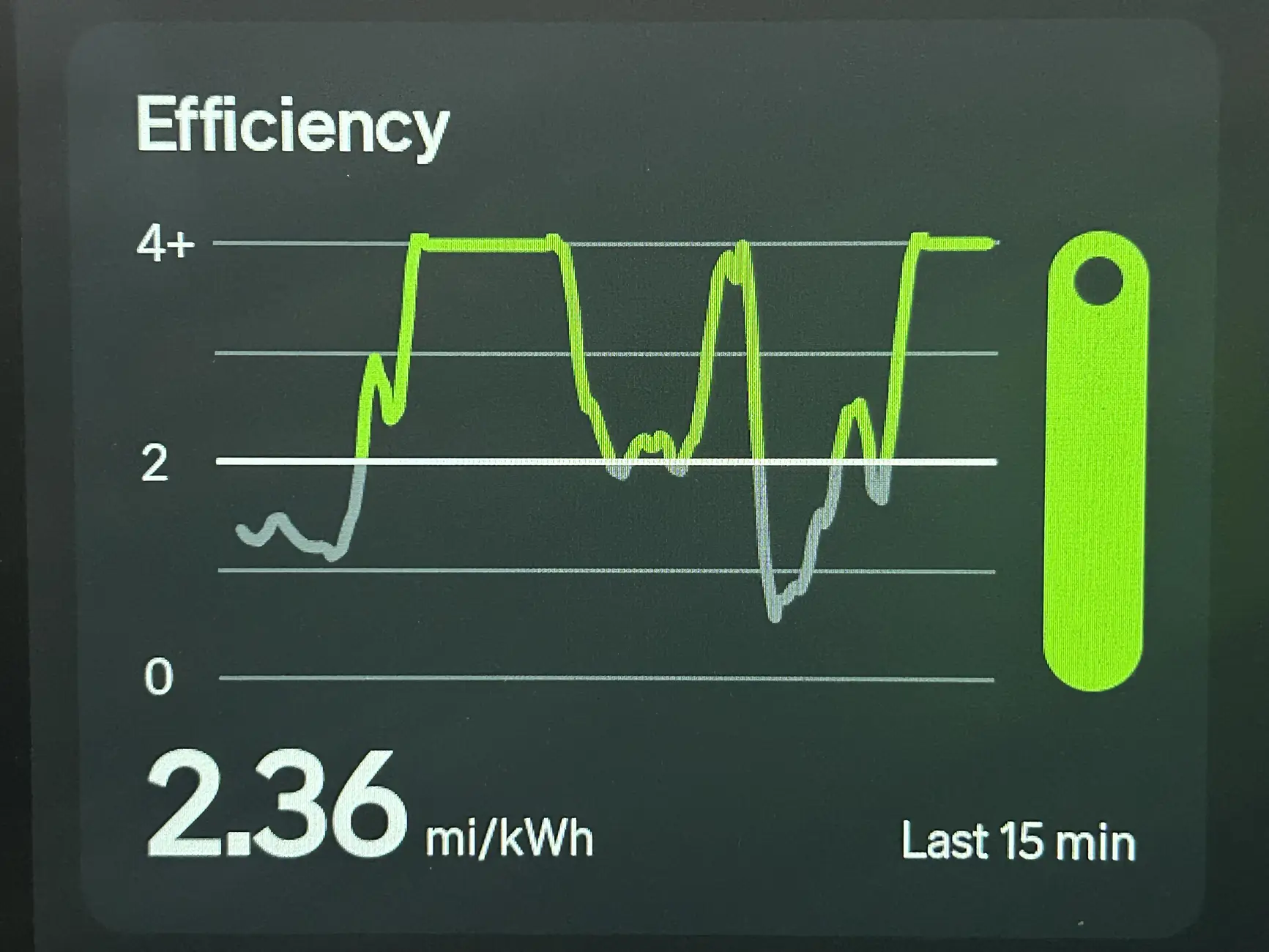
Anyone that has observed the 5, 10, 15, and overall efficiency values know they can go negative if you start a trip with a downhill segment . My efficiencies are just the difference in the latest value and the 5/10/15 minutes old value which yields the overall 2.36 mi/kWh value seen in the above graph. Rivian clamps these unsustainable efficiencies at 4 which is likely a good upper limit for the Lightning.

I am guessing that Rivian uses the instantaneous efficiency of the current and previous values but these values would be very variable and not great to look at so perhaps they they do a moving average to smooth out the variability in the data and get a nice looking graph.

I will be implementing this next so if any data visualization experts want to pipe in I'd like to hear other alternatives.
 

BhamDCam

Well-known member
Joined
Aug 12, 2023
Threads
6
Messages
242
Reaction score
334
Location
Birmingham
Vehicles
2023 F-150 Lightning Pro ER
Mach-Lee (in the Mach-E form) said:
Rivan has this:

Ford F-150 Lightning Pankuzu (Breadcrumbs): trip & charging data recording app for your F-150 Lightning LA-POC


So what sort of graph would the Lightning users like to see?

Anyone that has observed the 5, 10, 15, and overall efficiency values know they can go negative if you start a trip with a downhill segment . My efficiencies are just the difference in the latest value and the 5/10/15 minutes old value which yields the overall 2.36 mi/kWh value seen in the above graph. Rivian clamps these unsustainable efficiencies at 4 which is likely a good upper limit for the Lightning.

I am guessing that Rivian uses the instantaneous efficiency of the current and previous values but these values would be very variable and not great to look at so perhaps they they do a moving average to smooth out the variability in the data and get a nice looking graph.

I will be implementing this next so if any data visualization experts want to pipe in I'd like to hear other alternatives.
I finally got the OBD dongle the other day and downloaded your app. I’ve only made three short drives so I haven’t had much time to dig around yet. So far I think the app is great.

All to say, I would love to see graphs like this, or at least have to ability to create them. And maybe I just haven’t found out how yet, but seeing a graph with efficiency AND ambient temp or elevation would be super neat.

And not sure how difficult it would be, but could we create our own graphs within the app? We could pick which two (or more) variables we want to see in relation to each other and it plots it. Just some ideas. Keep up the awesome work!
 
OP
OP
Jiji

Jiji

Well-known member
First Name
Rick
Joined
Aug 5, 2024
Threads
3
Messages
81
Reaction score
109
Location
Finger Lakes, NY
Vehicles
2024 F-150 Lightning
I finally got the OBD dongle the other day and downloaded your app. I’ve only made three short drives so I haven’t had much time to dig around yet. So far I think the app is great.
Thanks, I'm happy you find it useful.

All to say, I would love to see graphs like this, or at least have to ability to create them. And maybe I just haven’t found out how yet, but seeing a graph with efficiency AND ambient temp or elevation would be super neat.

And not sure how difficult it would be, but could we create our own graphs within the app? We could pick which two (or more) variables we want to see in relation to each other and it plots it. Just some ideas. Keep up the awesome work!
Right now my head is into creating some interesting driving dashboards and exploring CarPlay. Normally I play with code in the winter months but I still tinker now that Apple gave me a CarPlay entitlement.

But if you want to extract the data that has been collected the entire source code is on GitHub or you can backup to a JSON file and explore it in your favorite graphing tools. Once you find the trip ID you can access the position, elevation, weather, and other data tables.

Right now it feels like so much to do and so little time, at least until the snow returns in November. But if I see an interesting idea that isn't too much effort and contributes to the cool factor then I am interesting in hearing it.
 
OP
OP
Jiji

Jiji

Well-known member
First Name
Rick
Joined
Aug 5, 2024
Threads
3
Messages
81
Reaction score
109
Location
Finger Lakes, NY
Vehicles
2024 F-150 Lightning
New build posted, no fancy graphs yet as I added support for Apple Push Notifications (APNs) which allow automatic starting of Live Activities in CarPlay and the lock screen without bringing Pankuzu to the foreground.

Normally this requires the app to communicate with its server , non-existent for Pankuzu, but it turns out that CloudFlare has Workers that allow Pankuru to send a push-to-start APN to CloudFlare and the JavaScript worker handles the communication with Apple without a server.

What it means for you is shown in the video, leave your phone in your pocket. If you don't see the Live Activities Apple does give priority to Calendar, Home, etc and you might have to swipe up to the Pankuzu Liver Activities.

 
Last edited:
OP
OP
Jiji

Jiji

Well-known member
First Name
Rick
Joined
Aug 5, 2024
Threads
3
Messages
81
Reaction score
109
Location
Finger Lakes, NY
Vehicles
2024 F-150 Lightning
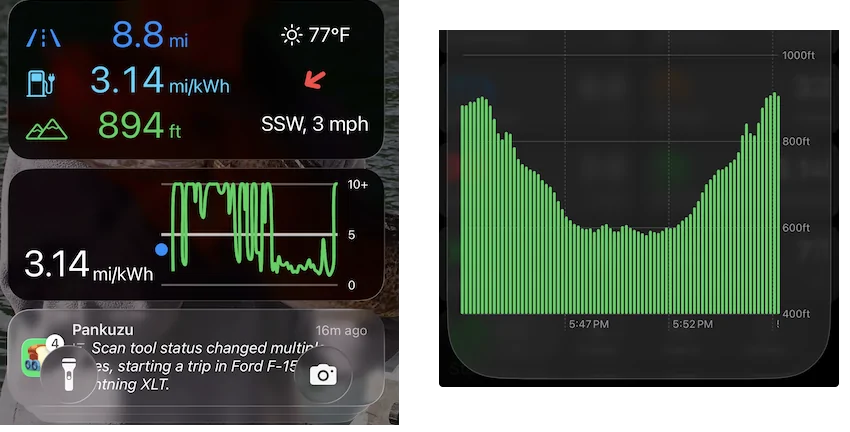
I am pushing a new build with the two trip Live Activities that can be viewed on the Lock Screen or in CarPlay (you need to scroll thru the Live Activity stack to see each one).

Still some work to be done on the 15-minute efficiency but I wanted to get it out there for comment. There is a lot of noise introduced to the efficiency measurement due to the distance resolution (100m resolution sampled every 10s) and energy model sample rate (sampled every 2s). This trip is downhill along a local stream and then the uphill return in my F-160 Lightning, it is still noisy and can be improved with a different moving average window.

Ford F-150 Lightning Pankuzu (Breadcrumbs): trip & charging data recording app for your F-150 Lightning push-to-start

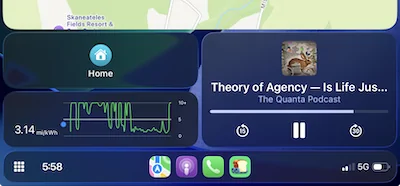
and in CarPlay:

Ford F-150 Lightning Pankuzu (Breadcrumbs): trip & charging data recording app for your F-150 Lightning push-to-start


Same data but CarPlay gets rendered like WatchOS so the sizes are tweaked to make the Live Activity as readable as possible.

Open to hearing your comments but no promises until the snow flies.
Sponsored


Top