

Sponsored
RickLightning
Well-known member
It has been discontinued.
Charge_Rob
Well-known member
The Public Charging app is decommissioned, so no. But you can always use Connected Navigation to find chargers while driving, whether you're navigating with it or not. It's super helpful to find chargers that are coming up and which exits they're at.
Lightning Bronson
Well-known member
- First Name
- Jansen
- Joined
- Jan 11, 2024
- Threads
- 6
- Messages
- 75
- Reaction score
- 133
- Location
- Greater Toronto Area
- Vehicles
- F150 Lightning Lariat
- Occupation
- Snow Removal, Landscaping
I still find it extremely stupid that Ford discontinued the Public Charging app. Definitely was a great way to make drivers more reliant on their phone to just be able to charge...
Heliian
Well-known member
It's integrated into the nav.I still find it extremely stupid that Ford discontinued the Public Charging app. Definitely was a great way to make drivers more reliant on their phone to just be able to charge...
Sponsored
OP
OP
PV2EV
Well-known member
- Thread starter
- #6
They should remove the app if it is discontinued. After these replies I tried it out while park and it suggested I use the Fordpass app on my Phone. Of course you can't touch your phone while not in park in my state, so that was a no go. This is the same reason I don't use the EA app on my phone while driving.
Then digging further I found it in nav, which I never use but I guess I will when needing to find a charger enroute.
Then digging further I found it in nav, which I never use but I guess I will when needing to find a charger enroute.

RLXXI
Well-known member
The public charging thing in the app still seems to work?, What's this about decommissioned? The map populates with chargers as it always has.
K6CCC
Well-known member
- First Name
- Jim
- Joined
- Sep 12, 2024
- Threads
- 31
- Messages
- 1,049
- Reaction score
- 1,104
- Location
- Glendora, Calif.
- Vehicles
- 2024 Lightning Flash ER in Antimatter Blue w/9.6 PPO , 2017 Corolla (wife's car)
- Occupation
- Retired from 2-Way radio systems
There used to be a "Public Charging" app on the Sync screen in the truck. The functionality was integrated into the built in Ford Navigation and the "Public Charging" app went away - around a year ago. Now if they could just get the charging stations to RELIABLY show on the screen. I still get more GAS stations than EV chargers on my electric truck...
Charge_Rob
Well-known member
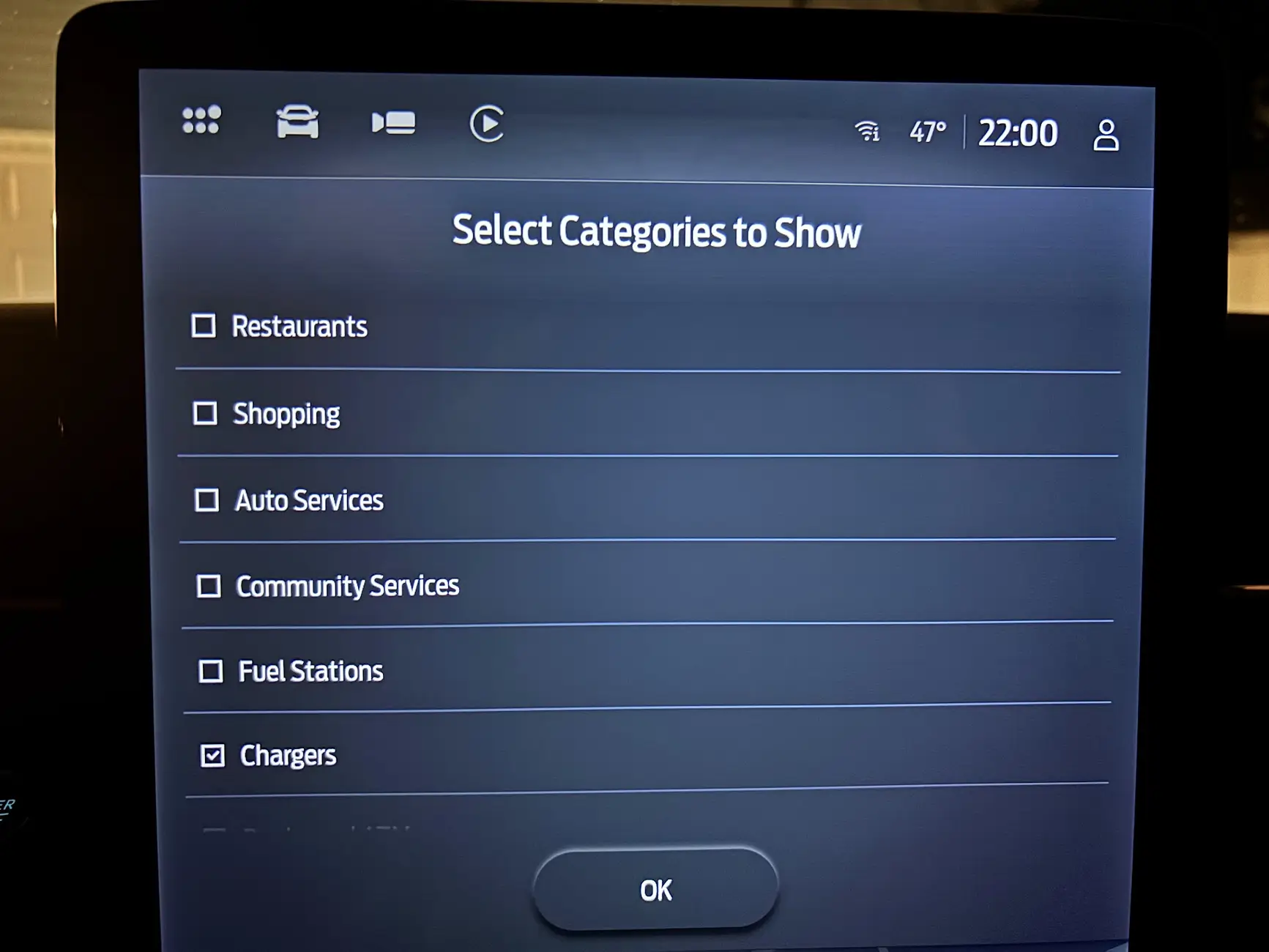
The blue point of interest pins? You can turn off gas stations (and any category you want) in Connected Navigation settings.There used to be a "Public Charging" app on the Sync screen in the truck. The functionality was integrated into the built in Ford Navigation and the "Public Charging" app went away - around a year ago. Now if they could just get the charging stations to RELIABLY show on the screen. I still get more GAS stations than EV chargers on my electric truck...
K6CCC
Well-known member
- First Name
- Jim
- Joined
- Sep 12, 2024
- Threads
- 31
- Messages
- 1,049
- Reaction score
- 1,104
- Location
- Glendora, Calif.
- Vehicles
- 2024 Lightning Flash ER in Antimatter Blue w/9.6 PPO , 2017 Corolla (wife's car)
- Occupation
- Retired from 2-Way radio systems
I'll take your word on that, and check next time I go out to the truck n about 45 minutes. However even if the gas stations are turned off, the total lack of reliability of EV charging locations makes it totally useless. Google Maps via Android Auto is better, but even that is unreliable enough to be worthless. On the long trips where I needed to DCFC along the way, I pretty much knew where I was going to charge before I ever left home. Using a combination of PlugShare.com, and the Tesla, E.A., and bpPulse apps.The blue point of interest pins? You can turn off gas stations (and any category you want) in Connected Navigation settings.
Sponsored
Charge_Rob
Well-known member
I'm curious why you say that. I've not had that issue myself, I choose from the list in Connected Navigation to build my own trip (only because I have my favorite stops - Plug & Charge ones in particular, like bp pulse and IONNA usually).I'll take your word on that, and check next time I go out to the truck n about 45 minutes. However even if the gas stations are turned off, the total lack of reliability of EV charging locations makes it totally useless. Google Maps via Android Auto is better, but even that is unreliable enough to be worthless. On the long trips where I needed to DCFC along the way, I pretty much knew where I was going to charge before I ever left home. Using a combination of PlugShare.com, and the Tesla, E.A., and bpPulse apps.
Do you have it set to automatically add stations? You can turn that to ask you which chargers you'd like instead of automatically adding them and forcing you to select the charger and replace it.
K6CCC
Well-known member
- First Name
- Jim
- Joined
- Sep 12, 2024
- Threads
- 31
- Messages
- 1,049
- Reaction score
- 1,104
- Location
- Glendora, Calif.
- Vehicles
- 2024 Lightning Flash ER in Antimatter Blue w/9.6 PPO , 2017 Corolla (wife's car)
- Occupation
- Retired from 2-Way radio systems
OK, I went outside and poked at it for a while. Never could find a way to turn off gas stations. The only way that EV chargers will semi-reliably show on the map is if you are zoomed in to within a short distance of the station (maybe a quarter mile). In other words, you have to already know where they are in order to see the station - gas stations are the same way. If zoomed out to miles, most likely no stations will display, and if so, it's a total crapshoot which ones display. Within 5 miles of my house there are five Tesla SuperChargers, and an E.A. station. Maybe one of those will display, but which one (if any) is a total crapshoot. One time it will be one, and the next time it will be a different one.I'm curious why you say that. I've not had that issue myself, I choose from the list in Connected Navigation to build my own trip (only because I have my favorite stops - Plug & Charge ones in particular, like bp pulse and IONNA usually).
Do you have it set to automatically add stations? You can turn that to ask you which chargers you'd like instead of automatically adding them and forcing you to select the charger and replace it.
I have four networks setup as my favorites - Tesla, E.A., bp Pulse, & IONNA. I tried auto add and ask with the same results.
Charge_Rob
Well-known member
There should be no missing chargers in the default nearby view, but when using the along active route view, there's a limited number of chargers at each exit shown.OK, I went outside and poked at it for a while. Never could find a way to turn off gas stations. The only way that EV chargers will semi-reliably show on the map is if you are zoomed in to within a short distance of the station (maybe a quarter mile). In other words, you have to already know where they are in order to see the station - gas stations are the same way. If zoomed out to miles, most likely no stations will display, and if so, it's a total crapshoot which ones display. Within 5 miles of my house there are five Tesla SuperChargers, and an E.A. station. Maybe one of those will display, but which one (if any) is a total crapshoot. One time it will be one, and the next time it will be a different one.
I have four networks setup as my favorites - Tesla, E.A., bp Pulse, & IONNA. I tried auto add and ask with the same results.
The screen to turn off points of interest you don't want, like gas stations.
Lightning Bronson
Well-known member
- First Name
- Jansen
- Joined
- Jan 11, 2024
- Threads
- 6
- Messages
- 75
- Reaction score
- 133
- Location
- Greater Toronto Area
- Vehicles
- F150 Lightning Lariat
- Occupation
- Snow Removal, Landscaping
But you can't start a charge with it.It's integrated into the nav.
Not does it locate the closeted charger you want to activate when you're already parked there. I've ran into issues with attempting to charge because my phone had gone flat on the same day my USB C cable broke. Wireless charging as a backup is terrible and takes way to long. Ask me how I know...
They're completely different things. If it's discontinued they should just remove it.
DavidS
Well-known member
- First Name
- DAVID
- Joined
- Dec 27, 2025
- Threads
- 0
- Messages
- 113
- Reaction score
- 99
- Location
- Green Bay, WI
- Vehicles
- F150 Lightning Lariat
Do you have plug and charge activated? If so, Tesla, Ionna, and EA’s should work without your phone or an app. I have it typically turned off because I use Tesla and EA membership plans but in a pinch use plug and charge.But you can't start a charge with it.
Not does it locate the closeted charger you want to activate when you're already parked there. I've ran into issues with attempting to charge because my phone had gone flat on the same day my USB C cable broke. Wireless charging as a backup is terrible and takes way to long. Ask me how I know...
They're completely different things. If it's discontinued they should just remove it.
Sponsored
Similar threads

- Replies
- 6
- Views
- 1,615


