Sponsored

F150 Lightning FORscan thread

Status
Not open for further replies.

bmwhitetx

Well-known member
First Name
Bruce
Joined
May 21, 2021
Threads
48
Messages
3,182
Reaction score
4,608
Location
DFW-Texas
Vehicles
2022 F150 Lightning Lariat ER
Occupation
Retired engineer
Sweet! Now if we can get someone with the 12" screen to try this and confirm it works there, too? Trying to figure out why this doesn't work on the ICE trucks; at least not this easily. Seems like only the EV's are taking this well.
Unfortunately, I don't think this applies to the 12" screens. The B&O sound system (i.e., DSP) is only on the 22-23 Lariat and up and the '24 Flash and up. All have 15" screens. I would think the Beosonic screen requires the B&O sound system.
Sponsored


rugedraw

Well-known member
First Name
Javier
Joined
Dec 14, 2021
Threads
4
Messages
1,896
Reaction score
2,318
Location
Miami
Vehicles
2021 Ford F150 Platinum FX4 EB/2023 Bronco Sport Badlands/1991 Mustang 5.0 coupe
Occupation
Auto Sales
Unfortunately, I don't think this applies to the 12" screens. The B&O sound system (i.e., DSP) is only on the 22-23 Lariat and up and the '24 Flash and up. All have 15" screens. I would think the Beosonic screen requires the B&O sound system.
Did not know that. Thanks.
 

GDN

Well-known member
First Name
Greg
Joined
Feb 15, 2022
Threads
94
Messages
3,778
Reaction score
4,861
Location
Dallas, TX
Vehicles
Lightning Lariat ER, Performance Y
Occupation
IT
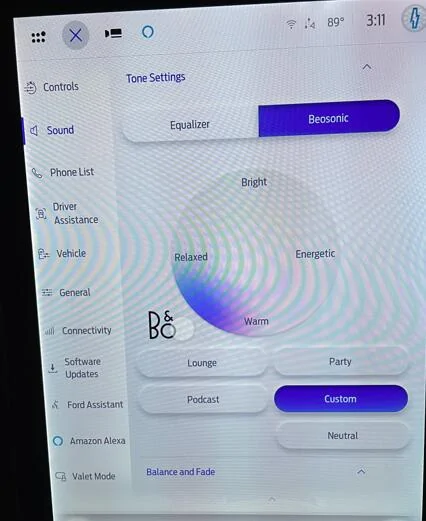
Tried it and it works! I used instructions from Mach-E forum:
Code:
783-01-01 xxXx xx - Add 1 to X  (this is DSP As Built)
7D0-01-01 xxxX xxxx xx - Add 8 to X  (this is APIM As Built)
On my truck for 783-01-01, it was a 0 so I made it 1.
For 7D0-01-01, it was an 1, so I made it a 9.
So just like you said for the 2024 ICE. I'm not an audiophile so didn't test it. For just radio, I couldn't tell a difference.

@vandy1981 : can you add this to your first post?

1727382185698-00.jpg
Wow - that is some interesting sorcery. Who knew it existed and why does Ford hold back stuff like this. It likely isn't worth the time it takes to enable it, but they've invested trying to put something together, why not make it available. They want to add no extra value.
 

astrand1

Well-known member
First Name
Alex
Joined
Dec 16, 2021
Threads
10
Messages
764
Reaction score
796
Location
Michigan
Vehicles
2023 Ford F150 Lightning lariat ER
Occupation
Studio truck driver
Tried it and it works! I used instructions from Mach-E forum:
Code:
783-01-01 xxXx xx - Add 1 to X  (this is DSP As Built)
7D0-01-01 xxxX xxxx xx - Add 8 to X  (this is APIM As Built)
On my truck for 783-01-01, it was a 0 so I made it 1.
For 7D0-01-01, it was an 1, so I made it a 9.
So just like you said for the 2024 ICE. I'm not an audiophile so didn't test it. For just radio, I couldn't tell a difference.

@vandy1981 : can you add this to your first post?

1727382185698-00.jpg
I’ll have to try this tomorrow. See if I can hear any difference.
 

Sponsored

bmwhitetx

Well-known member
First Name
Bruce
Joined
May 21, 2021
Threads
48
Messages
3,182
Reaction score
4,608
Location
DFW-Texas
Vehicles
2022 F150 Lightning Lariat ER
Occupation
Retired engineer

astrand1

Well-known member
First Name
Alex
Joined
Dec 16, 2021
Threads
10
Messages
764
Reaction score
796
Location
Michigan
Vehicles
2023 Ford F150 Lightning lariat ER
Occupation
Studio truck driver
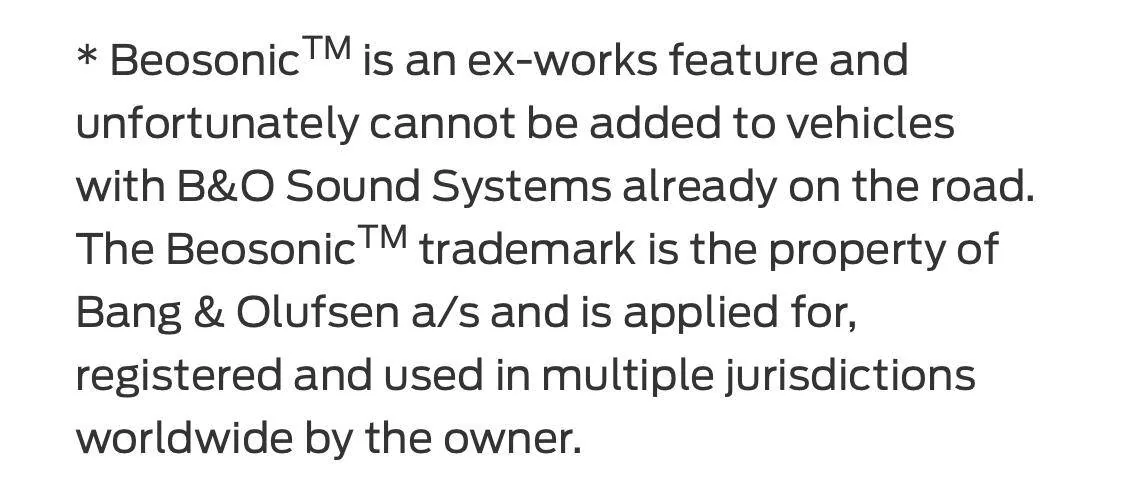
Well it says this. So maybe even though we can “enable it” it’s not really doing anything because we are missing something else. ?

Ford F-150 Lightning F150 Lightning FORscan thread 1727448655790-kh
 

21st Century Truck

Well-known member
First Name
Martin
Joined
Jul 11, 2024
Threads
20
Messages
1,180
Reaction score
1,509
Location
Virginia
Vehicles
Ford 150 Lightning 2023 XLT ER pkg. 312A
There is only one video where the owner believes his light bar is brighter. I don't think there is much more confirmation or belief that this adjustment is really working. It works for the DRL's on an ICE truck, so it was attempted, but not sure you'll really get anything out of it.
I changed my DRL setting from the factory 10% to 75%. I can confirm the DRL lamps are much brighter in daytime. Counterintuitively, by indirect observation these same DRLs might now be a bit too bright at night, and work against the effect of the glare-free headlights when seen by opposing traffic.

Having read thru the past 39 pages of this fascinating very useful thread, and focusing only on the DRL brightness adjustment issue, I now think that there might be two understandings of what the DRLs actually are on our Lightning trucks (my truck = 2023 XLT ER Option 312A).

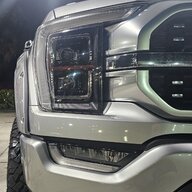
As I understand things, the DRLs on my Lightning (LED matrix headlights) are the small rectangular lights in between the top and the bottom LED headlight. This pair of lights is now much brighter after the adjustment from 10% to 75%.

Of course, the truck has to be in DRIVE for this small pair of headlights to be lit up. I tested their increased brightness by checking my frontal reflection in plate glass storefront windows in daylight at a local car dealership.

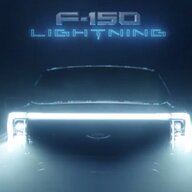
As I read the comments on adjusting DRLs here, I see that some members understand our DRL to be the Lightning's big unibrow lightbar across the front. Although I might be wrong here, IMHO the unibrow lightbar is not the "DRL". My factual proof which supports this is the observed increased brightness of those two central small headlights on my truck after "DRL adjustment".

Matter of fact, these are now so bright (and also appear to be on whether it's day or night) that they work counter to the glare-free headlights I turned on. I got several flashing headlights tonight from approaching cars on a dark winding country road... this is after I adjusted these DRLs to 75% brightness in the past 24 hours. Meaning, when the two DRLs are too bright at night, they might well appear as high beams to oncoming traffic, even though the main headlights "dip" when their glare-free function sees the same oncoming traffic... so I might turn the DRL setting down to 50% to mitigate this.
 

Scorpio3d

Well-known member
First Name
Chris
Joined
Mar 18, 2024
Threads
33
Messages
1,313
Reaction score
1,739
Location
Texas
Vehicles
2023 Ford F150 Lightning Lariat ER
Occupation
SS/IBA car wash owner
Well it says this. So maybe even though we can “enable it” it’s not really doing anything because we are missing something else. ?

1727448655790-kh.jpg
Yes but…
The article is dated April 7, 2021 so I would assume that this would have been prior to the existence of the Lightning?
Regardless, that is a pretty cool looking screen-LOL
 

GDN

Well-known member
First Name
Greg
Joined
Feb 15, 2022
Threads
94
Messages
3,778
Reaction score
4,861
Location
Dallas, TX
Vehicles
Lightning Lariat ER, Performance Y
Occupation
IT
I changed my DRL setting from the factory 10% to 75%. I can confirm the DRL lamps are much brighter in daytime. Counterintuitively, by indirect observation these same DRLs might now be a bit too bright at night, and work against the effect of the glare-free headlights when seen by opposing traffic.

Having read thru the past 39 pages of this fascinating very useful thread, and focusing only on the DRL brightness adjustment issue, I now think that there might be two understandings of what the DRLs actually are on our Lightning trucks (my truck = 2023 XLT ER Option 312A).

As I understand things, the DRLs on my Lightning (LED matrix headlights) are the small rectangular lights in between the top and the bottom LED headlight. This pair of lights is now much brighter after the adjustment from 10% to 75%.

Of course, the truck has to be in DRIVE for this small pair of headlights to be lit up. I tested their increased brightness by checking my frontal reflection in plate glass storefront windows in daylight at a local car dealership.

As I read the comments on adjusting DRLs here, I see that some members understand our DRL to be the Lightning's big unibrow lightbar across the front. Although I might be wrong here, IMHO the unibrow lightbar is not the "DRL". My factual proof which supports this is the observed increased brightness of those two central small headlights on my truck after "DRL adjustment".

Matter of fact, these are now so bright (and also appear to be on whether it's day or night) that they work counter to the glare-free headlights I turned on. I got several flashing headlights tonight from approaching cars on a dark winding country road... this is after I adjusted these DRLs to 75% brightness in the past 24 hours. Meaning, when the two DRLs are too bright at night, they might well appear as high beams to oncoming traffic, even though the main headlights "dip" when their glare-free function sees the same oncoming traffic... so I might turn the DRL setting down to 50% to mitigate this.
You may be right about something in the headlight itself changing brightness, but none of the threads or conversations nor even your reply to me talk about those. We are all trying to make the lighter brighter, which we've learned enough about is now likely impossible. Each half of the light bar gets its power from the headlight on that side of the truck. If you don't have a light bar and add it, there is a thread that notes what you have to do to turn the power on for it. Doesn't seem any way to adjust that power.

Could care less about adjusting any other light on the truck, but no one has ever capture picture of nor shared what you have, at least that I recall.
 

Sponsored

21st Century Truck

Well-known member
First Name
Martin
Joined
Jul 11, 2024
Threads
20
Messages
1,180
Reaction score
1,509
Location
Virginia
Vehicles
Ford 150 Lightning 2023 XLT ER pkg. 312A
You may be right about something in the headlight itself changing brightness, but none of the threads or conversations nor even your reply to me talk about those. We are all trying to make the lighter brighter, which we've learned enough about is now likely impossible. Each half of the light bar gets its power from the headlight on that side of the truck. If you don't have a light bar and add it, there is a thread that notes what you have to do to turn the power on for it. Doesn't seem any way to adjust that power.

Could care less about adjusting any other light on the truck, but no one has ever capture picture of nor shared what you have, at least that I recall.
Actually, I think the issue I am writing about is "adjusting the Daytime Running Lights" which are a safety / visibility item. If the DRL is not the unibrow light, then I in turn do not care about how bright the unibrow can be made. I understand that some others are focused on how bright the Lightning's unibrow can be.

If the DRL on our Lightnings = the small central rectangles in our headlights, then It can definitely be done.

If this be so, the unibrow light bar is not the DRL and that is not what "DRL intensity adjustment" does.

Therefore, the unibrow intensity seems a separate issue from Daytime Running Lights intensity.

Perhaps the confusion stems from using the same function name, i.e. "Daytime Running Lights" for two separate elements on the front of our Lightnings.

Perhaps our hive mind can find some hard-to-find Ford Corporate picture or written description of the Lightning's (not the ICE F150's) official Daytime Running Lights. I couldn't locate one in the PDF Owner's Manual, not that I tried for long.
 

macguyver13

Member
Joined
Sep 29, 2024
Threads
0
Messages
5
Reaction score
7
Location
US
Vehicles
2024 F-150 Lightning Lariat
Has anyone with a '24 Lightning (Lariat if it matters) got the glare free headlights to work? The spreadsheet (by livnitup) shows many settings to change in the Common tab. I can access all of them except the HCM 734-01-04. My truck only shows 734-01-01 and 734-01-02, but nothing past that in the first block so there is nothing to change.

Also, if I go to the "HCM (2024 Lightning)" tab in the spreadsheet, it doesn't list anything for 734-01-04 either. So why is that specified in the Common tab?

Has anyone with a '24 got that to work and if so, what values did you modify?
 

bmwhitetx

Well-known member
First Name
Bruce
Joined
May 21, 2021
Threads
48
Messages
3,182
Reaction score
4,608
Location
DFW-Texas
Vehicles
2022 F150 Lightning Lariat ER
Occupation
Retired engineer
Here is a FORScan mod I applied a few days ago that I really like. The Lightning is annoying in that if you turn the truck on without your seat belt buckled, it chimes 4 times. (My routine is to hop in my vehicle, turn it on, then buckle my seat belt while it warms up (ICE) or boots.)

This mod changes the seat belt warning type from US to European. Now you get no chimes when starting the vehicle unbuckled. But you still get chimes if you start driving without being buckled (at an increasingly annoying level). Can't say if that part is any different.

IPC: 720-01-02: xxxx x2xx
Note this assumes the previous value was 0. If your value is different than 0 then add 2. Always refer to Livinitup's spreadsheet if unsure.
 
Last edited:

GDN

Well-known member
First Name
Greg
Joined
Feb 15, 2022
Threads
94
Messages
3,778
Reaction score
4,861
Location
Dallas, TX
Vehicles
Lightning Lariat ER, Performance Y
Occupation
IT
Problem!

So, as mentioned above I dorked up my glare free lights. Before just resetting the data I wanted to compare modules, and DANG, glad I did.

Using Notepadd++ I did a "Diff" between my original unmodified As Built files and a save done just a few minutes ago.

In the IPMA only there are EIGHTY FIVE lines that have differences.

So the question is, use the backup file? Or did I get a silent update and now my original save file is worthless?
Not sure I follow that, but every time I start a Forscan session I back up the modules I'm going to modify. In just two years the SW has changed quite a bit and added many lines to some of the files.

So if you are comparing files to when you first got your truck and started using Froscan to now - I would NOT restore those files with many fewer lines.

The easiest thing is to go to https://www.motorcraftservice.com/AsBuilt and enter your VIN. Your truck will upload to Ford and update this information, but sometimes it is days behind. Go pull it down now for your truck and it may still be before you made this last round of updates. Then pull the lines you want to compare from there.

The next best thing is to find a truck with your same trim level/options and on the same SW and get a copy of the files from a matching truck.
 

bmwhitetx

Well-known member
First Name
Bruce
Joined
May 21, 2021
Threads
48
Messages
3,182
Reaction score
4,608
Location
DFW-Texas
Vehicles
2022 F150 Lightning Lariat ER
Occupation
Retired engineer
Problem!
In the IPMA only there are EIGHTY FIVE lines that have differences.
I routinely save my As-Built files from the Motorcraft site. I had my IPMA module updated by the dealer on 9/25. If I look at the differences between 8/30 and 9/30, I see 93 different lines in the IPMA module. Here are the first 10 differences: (Line 1's are after the update, line 2's are before update, checksums are not displayed):
Code:
1     706-02-02  IPMA  Image Processing Module A (IPMA)     E47F     CE00     00
2     706-02-02  IPMA  Image Processing Module A (IPMA)     E07F     CE00     00
1     706-04-01  IPMA  Image Processing Module A (IPMA)     0A03     081E     05
2     706-04-01  IPMA  Image Processing Module A (IPMA)     0A03     0800     00
1     706-04-02  IPMA  Image Processing Module A (IPMA)     0A05     070A     03
2     706-04-02  IPMA  Image Processing Module A (IPMA)     0000     0000     00
1     706-05-01  IPMA  Image Processing Module A (IPMA)     0C00     0000     00
2     706-05-01  IPMA  Image Processing Module A (IPMA)     8000     0000     00
1     706-12-01  IPMA  Image Processing Module A (IPMA)     19BC     6800     00
2     706-12-01  IPMA  Image Processing Module A (IPMA)     19BC     6400     00
1     706-15-01  IPMA  Image Processing Module A (IPMA)     A969     6000     00
2     706-15-01  IPMA  Image Processing Module A (IPMA)     A969     0000     00
1     706-18-01  IPMA  Image Processing Module A (IPMA)     0D70     801F     07
2     706-18-01  IPMA  Image Processing Module A (IPMA)     0D70     8007     02
1     706-20-02  IPMA  Image Processing Module A (IPMA)     0680     0E05     05
2     706-20-02  IPMA  Image Processing Module A (IPMA)     0680     0E00     00
1     706-21-06  IPMA  Image Processing Module A (IPMA)     8154     26    
2     706-21-06  IPMA  Image Processing Module A (IPMA)     81        
1     706-29-01  IPMA  Image Processing Module A (IPMA)     0A2B     0891     9C
2     706-29-01  IPMA  Image Processing Module A (IPMA)     0A2B     08C4     8A
I use As-Built Explorer to compare, very handy. https://www.compulsivecode.com/Project_AsBuiltCompare.aspx
Sponsored

 
Status
Not open for further replies.


Top