Sponsored

Firn

Well-known member
Joined
Aug 26, 2024
Threads
37
Messages
1,658
Reaction score
1,939
Location
USA
Vehicles
23 Pro ER
Hi everyone,

Like many of you, I’ve relied heavily on Livinitup’s incredible master spreadsheets to map out modifications on my truck. While his research is the gold standard, hunting down specific hex values and comparing multiple modules can get tedious.

To help speed up the process, I built a web-based utility to provide a modern, searchable interface for our As-Built files.

You can use it here: 🚀 asbuilt.altctrlwrench.com

🛠 What it does:
  • Interactive Reference Viewer: You don't even need to have a file ready to use the tool. You can jump straight into viewing the reference sheets directly and search for features, addresses, or keywords by name to see how things are mapped.
  • Exact Configuration Decoding: Upload your own .ab or .abt files to instantly view your truck's exact current configuration mapped against the reference data, showing you precisely what features are turned on or off.
  • Side-by-Side Module Diffing: You can load multiple files simultaneously to compare changes across different backups or truck configurations. View these differences mapped directly to their human-readable feature names, or toggle off the database mapping completely to rapidly compare raw data changes across multiple files in a clean, side-by-side diff viewer.
  • Smart Filtering: Search and filter by module (APIM, IPC, BCM, etc.) or specific feature keywords instantly—no more endless scrolling through rows of Excel.
  • Custom Reference Sheets: While Livinitup's data is the default master index for the truck community, the tool supports uploading your own custom reference spreadsheets so non-F-150 users can map other vehicle profiles right now.

🔄 Always Up to Date
To ensure total accuracy, the tool pulls the latest data directly from the community reference mappings every single time I rebuild the cloud instance. You're always parsing against the most current discoveries.

🔒 Privacy & Data Handling
I want to be completely transparent: Your vehicle data is processed entirely in-memory. Your uploaded files are never saved to a database, stored on a server, or tracked.

💬 Support & Feedback
Livinitup's research is the absolute backbone of the default logic, and I’ve included a permanent attribution and a link to his donation threads in the app sidebar to ensure his efforts are supported.

On my end, running this on a managed Google Cloud instance to keep performance snappy does carry an ongoing hosting cost. If you find the tool valuable, do me a favor and take a quick look at the "Support the Developer" section in the sidebar for hardware recommendations and my custom 3D-printed automotive parts.

If you run into an address that parses strangely or have a UI feature request, let me know here or via the public tracking repo linked in the app.

Hope this speeds up your programming sessions!

Best,
Firn (Alt Ctrl Wrench)
Sponsored

 
Last edited:
PJnc284

Well-known member
Joined
Sep 30, 2024
Threads
0
Messages
1,207
Reaction score
1,375
Location
Garner, NC
Vehicles
2023 Ford F150 Lightning Lariat ER
Finally live! Sure it will be getting a lot of use. btw the link in your post pulls up a google search instead of going to the site.
 
OP
OP
Firn

Firn

Well-known member
Joined
Aug 26, 2024
Threads
37
Messages
1,658
Reaction score
1,939
Location
USA
Vehicles
23 Pro ER
Finally live! Sure it will be getting a lot of use. btw the link in your post pulls up a google search instead of going to the site.
Fixed, thanks!
 

bmwhitetx

Well-known member
First Name
Bruce
Joined
May 21, 2021
Threads
48
Messages
3,172
Reaction score
4,576
Location
DFW-Texas
Vehicles
2022 F150 Lightning Lariat ER
Occupation
Retired engineer
Hey, nice work (sorry I haven't replied to your DM). It might have been easy for you, but the spreadsheet is not the easiest to transform into a proper dataset from my POV.

Hopefully this spurs some more FORScan breakthroughs. I feel like we've slowed down quite a bit - the last significant update I made to the mods thread was last October.
 

Mike G

Well-known member
First Name
Mike
Joined
Jan 6, 2022
Threads
32
Messages
1,869
Reaction score
2,752
Location
N. AL, USA
Vehicles
2022 F-150 Lightning, 2023(J1) Mach-E GT-PE, '24 Bronco HLE 2Dr
I haven't seen what you've done yet but will do so shortly. And thanks in advance for tackling something like this. I know it was a challenge.

One thing I have a question about though before even checking it out is; what did you do about the sections of the asbuilt that the spreadsheets had no reference data for? Cause I know there are some sections where there is actual configuration data in the vehicle's asbuilt file....but when you'd go looking for what those values meant in the spreadsheets...there were whole sections of configuration info 'missing' for those values. As if somebody intentionally didn't want us to know what the options were for those bits on that module. 🤔
 

Sponsored

rugedraw

Well-known member
First Name
Javier
Joined
Dec 14, 2021
Threads
4
Messages
1,875
Reaction score
2,301
Location
Miami
Vehicles
2021 Ford F150 Platinum FX4 EB/2023 Bronco Sport Badlands/1991 Mustang 5.0 coupe
Occupation
Auto Sales
@Firn This thing is absoltely awesome. I've used it a few times already and it makes comparing two ab files side-by-side as easy as easy can be.

One thing I have a question about though before even checking it out is; what did you do about the sections of the asbuilt that the spreadsheets had no reference data for? Cause I know there are some sections where there is actual configuration data in the vehicle's asbuilt file....but when you'd go looking for what those values meant in the spreadsheets...there were whole sections of configuration info 'missing' for those values. As if somebody intentionally didn't want us to know what the options were for those bits on that module. 🤔
Yes, there was info that was purposely omitted fromt he spreadsheet. Ford would have a titty-attack if everything was put out there.
 
OP
OP
Firn

Firn

Well-known member
Joined
Aug 26, 2024
Threads
37
Messages
1,658
Reaction score
1,939
Location
USA
Vehicles
23 Pro ER
I haven't seen what you've done yet but will do so shortly. And thanks in advance for tackling something like this. I know it was a challenge.

One thing I have a question about though before even checking it out is; what did you do about the sections of the asbuilt that the spreadsheets had no reference data for? Cause I know there are some sections where there is actual configuration data in the vehicle's asbuilt file....but when you'd go looking for what those values meant in the spreadsheets...there were whole sections of configuration info 'missing' for those values. As if somebody intentionally didn't want us to know what the options were for those bits on that module. 🤔
These should be displayed as "Unknown Module"


Hey, nice work (sorry I haven't replied to your DM). It might have been easy for you, but the spreadsheet is not the easiest to transform into a proper dataset from my POV.

Hopefully this spurs some more FORScan breakthroughs. I feel like we've slowed down quite a bit - the last significant update I made to the mods thread was last October.
I hope it helps. I'm working on something now that I hope improves the ability to dig through these sheets even more.
 
OP
OP
Firn

Firn

Well-known member
Joined
Aug 26, 2024
Threads
37
Messages
1,658
Reaction score
1,939
Location
USA
Vehicles
23 Pro ER
Advanced Diff Viewer Update (Phase 1)
I just pushed an update to the site adding Phase 1 of the Advanced Diff Viewer to help isolate hidden feature toggles.

Instead of a standard file-to-file compare, you can now load a group of 1 to 5 files for trucks without a feature (Have-Not Cohort) and stack them directly against 1 to 5 files for trucks with the feature (Have Cohort).

How it looks:
The tool aligns the cohorts vertically in a flat, horizontal row view. It strips the checksum noise and breaks every hex character into its 4 raw bits, prefixing the bits with the original hex value so you don't lose your place:

3-0011 0-0000 5-0101

The Logic:
The viewer checks every single bit position across all loaded files and filters out matching rows automatically.

  • No Highlight: The bits match perfectly across both cohorts (background noise filtered out).
  • Green: A global difference exists, but the files within that specific cohort are 100% unanimous. This indicates a stable feature state.
  • Orange (*): A difference exists, but the files within that cohort disagree. The specific split bits drop to an asterisk to highlight localized variation.
Filtering & Drill-Down:
  • The Lonely Row Rule: If an address block only has data on one side of the cohort mix, it filters it out entirely since there's no baseline to diff against.
  • Expansion: Clicking any row expands it downward to show the raw, file-by-file breakdown so you can see exactly which truck broke consistency on an orange flag.
Check it out and let me know if you run into any bugs!
 
OP
OP
Firn

Firn

Well-known member
Joined
Aug 26, 2024
Threads
37
Messages
1,658
Reaction score
1,939
Location
USA
Vehicles
23 Pro ER
Big Update: As Built Pro just got a massive Advanced Diff upgrade!

Hey folks, just pushed a major update to the Bitwise Diff Viewer on As Built Pro to make hunting down elusive feature toggles a whole lot easier.

Instead of going cross-eyed staring at endless rows of hex codes and trying to manually spot the differences, the tool has been completely overhauled to do the heavy lifting for you.

What’s new:

📂 The Multi-Cohort System & Layouts
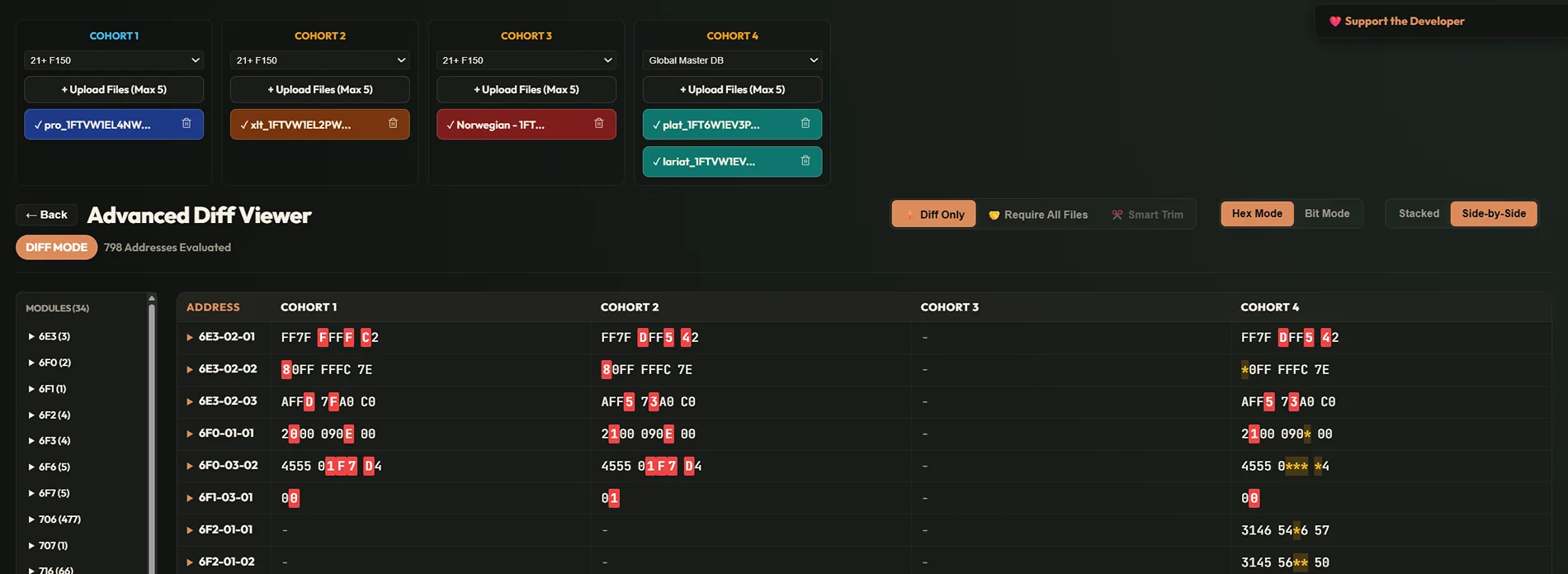
You are no longer limited to comparing just File A to File B. You can now create up to 4 different "Cohorts" (columns) of up to 5 files in each and drag-and-drop up to 10 .ab/.abt files total between them.

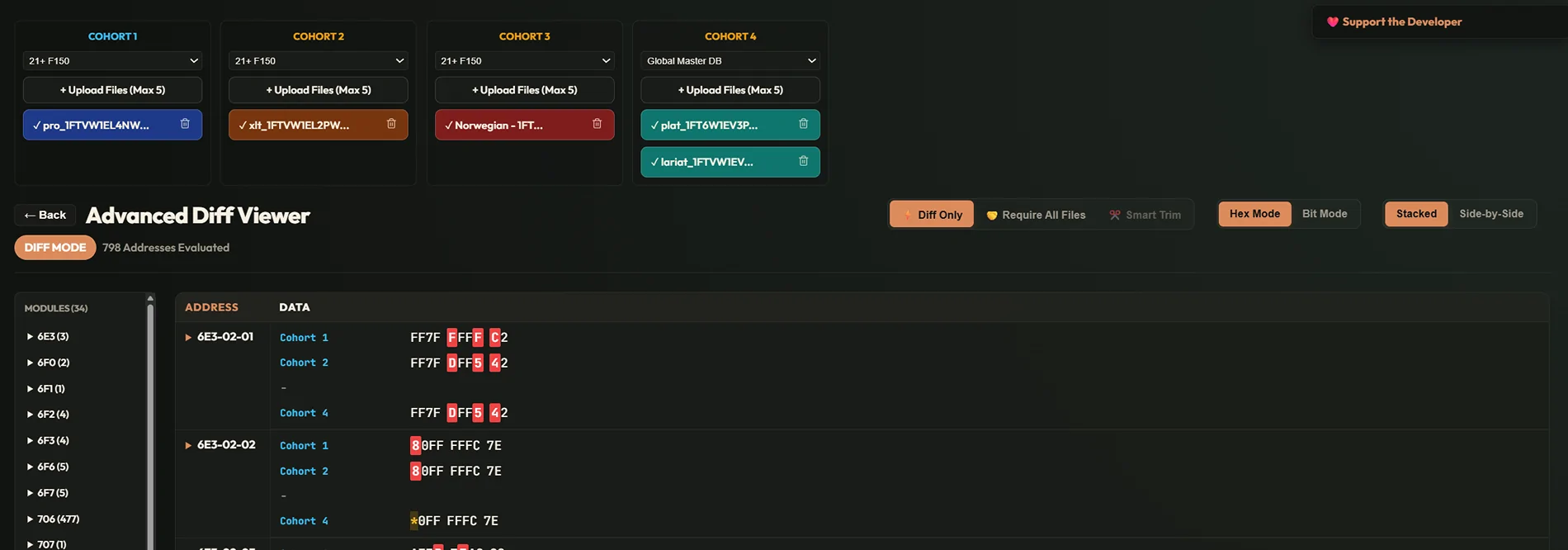
  • Layout Options: You can view your cohorts side-by-side, or switch to a stacked layout where the hex nibbles and bits perfectly align on top of each other vertically for rapid visual comparison.
  • The Logic: The engine automatically rolls up the data. If all the files inside a cohort perfectly match, you just see the plain number. But if the files inside that same cohort disagree with each other, the engine flags that specific nibble or bit with an asterisk (*). This instantly separates VIN-specific noise from actual, unified feature changes.
🔍 Bit-Level Drill Down & Focus Mode

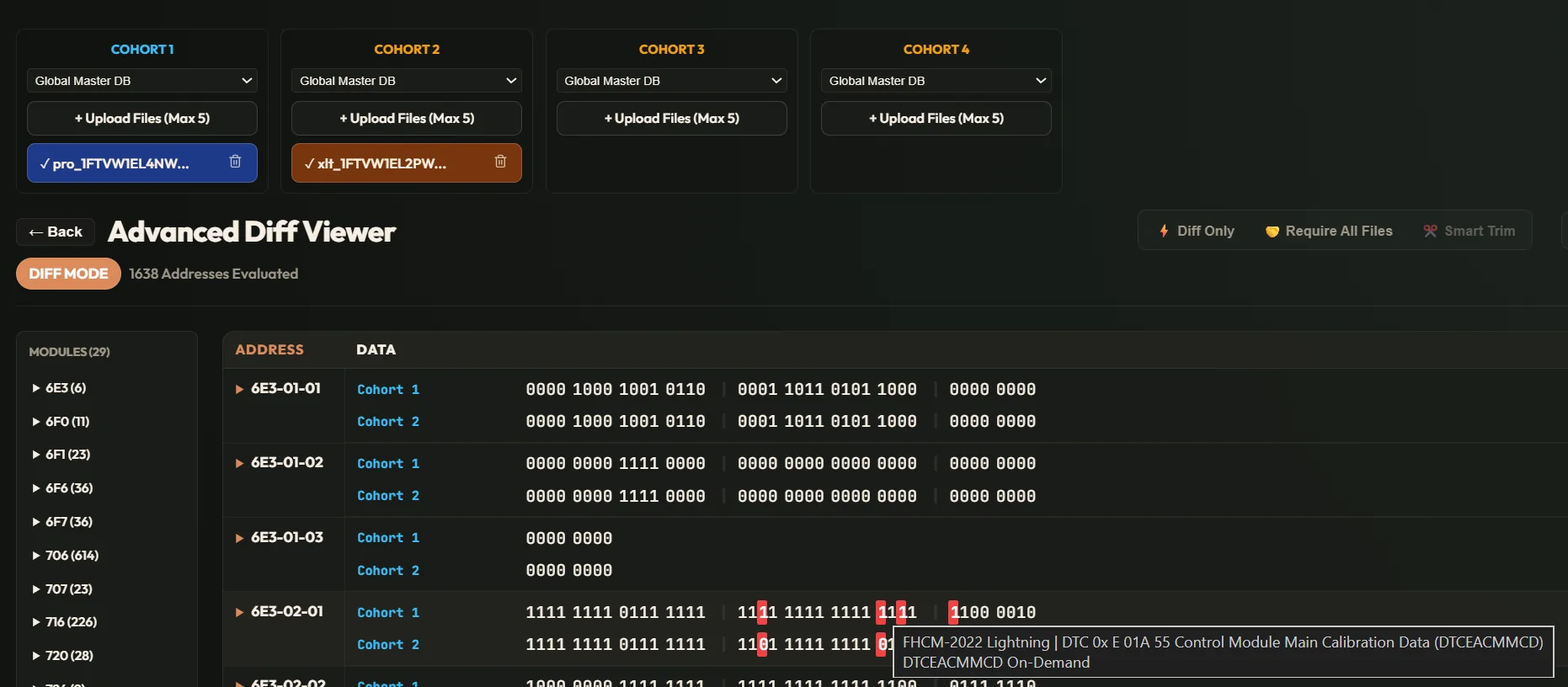
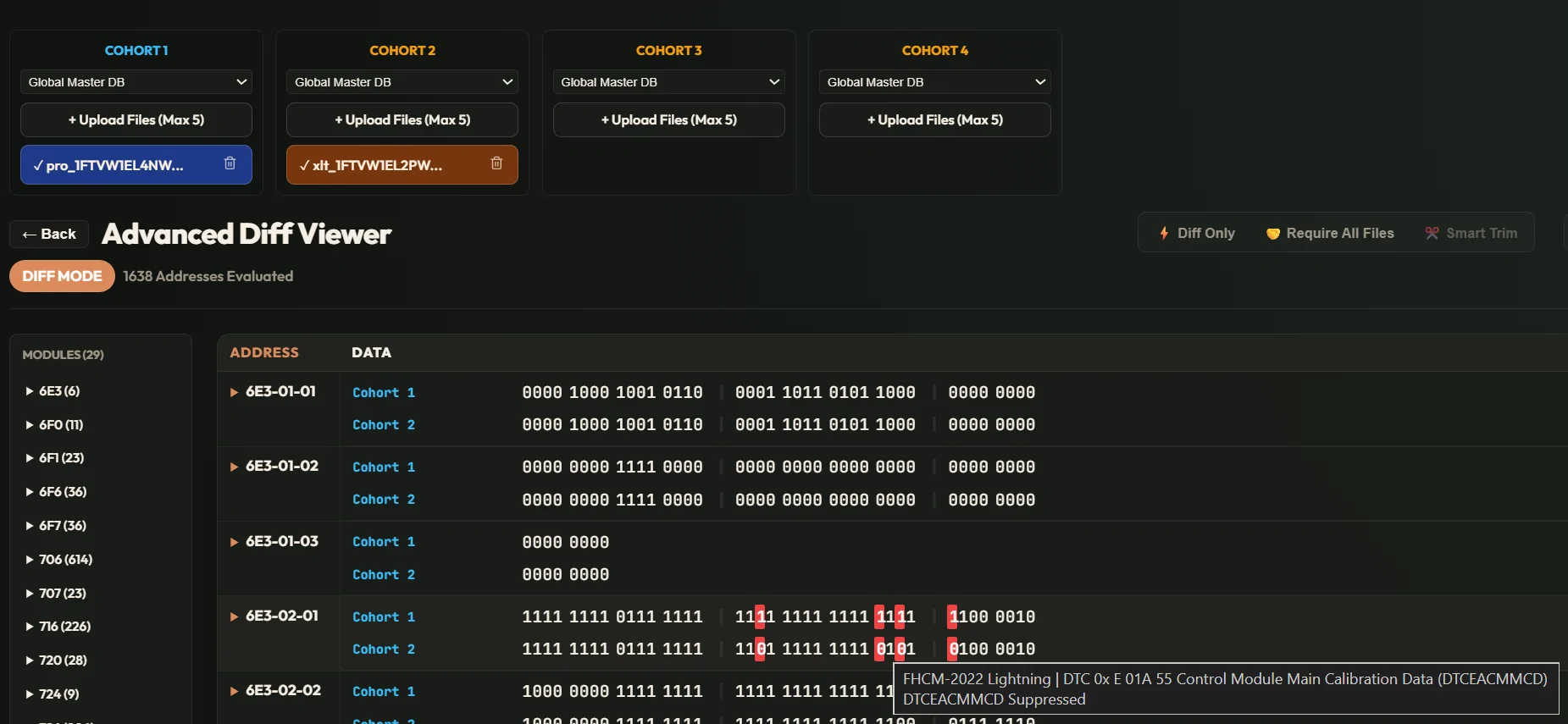
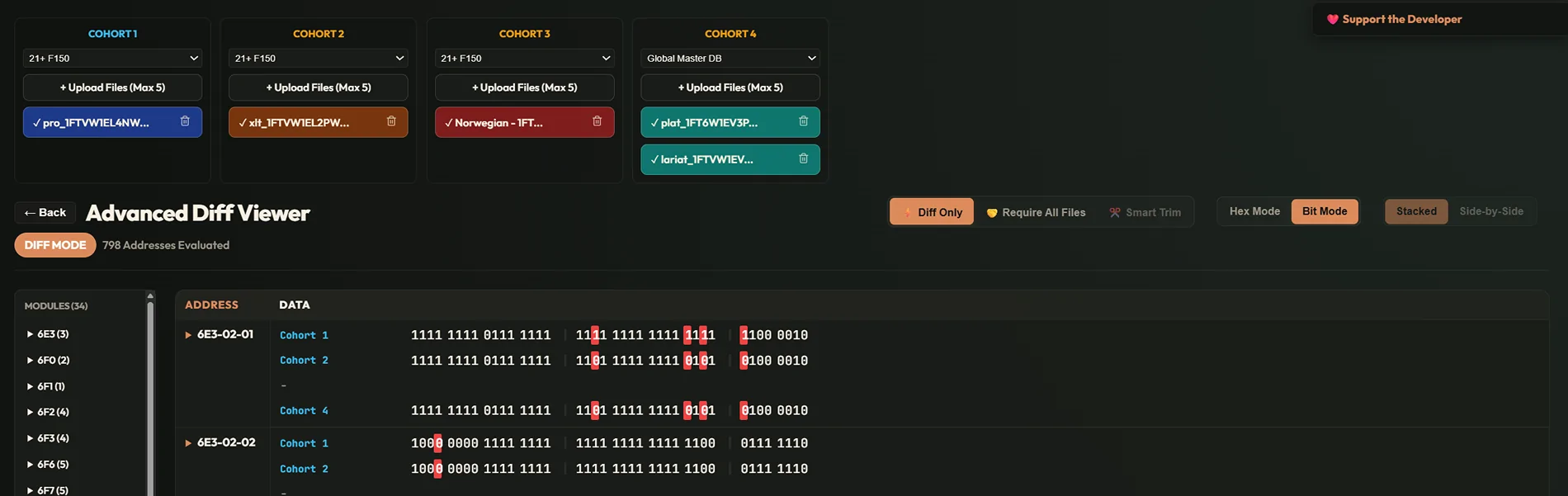
  • Hex vs. Bit Mode: With the click of a button, unwrap the standard Hex blocks into their raw 40-bit binary strings so you can see exactly which 1s and 0s are flipping between your cohorts.
  • Show Diffs Only: A "Focus Mode" toggle that completely hides any address row that is a 100% match across the board, leaving you with a highly targeted hit-list of variances.
📚 Smart Context Hovers & Minimap

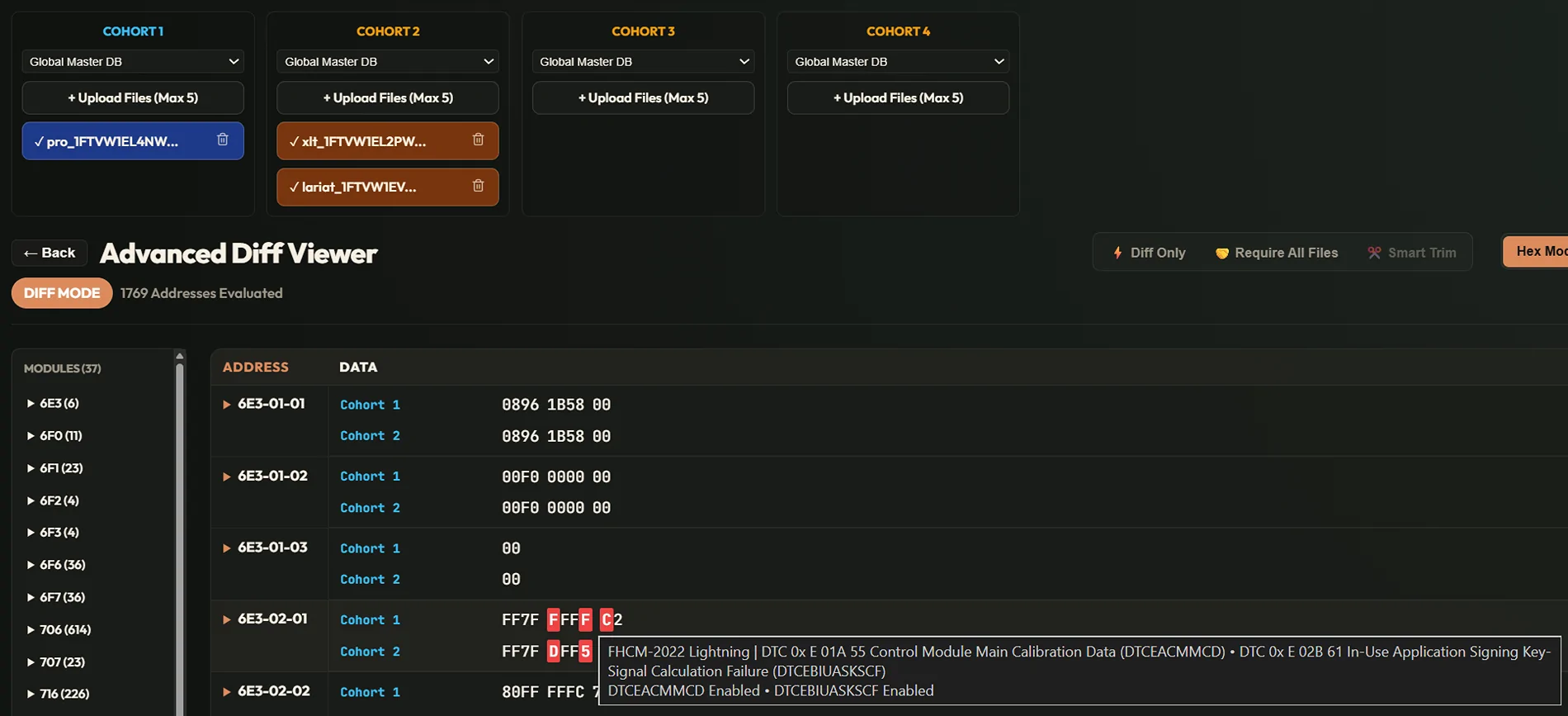
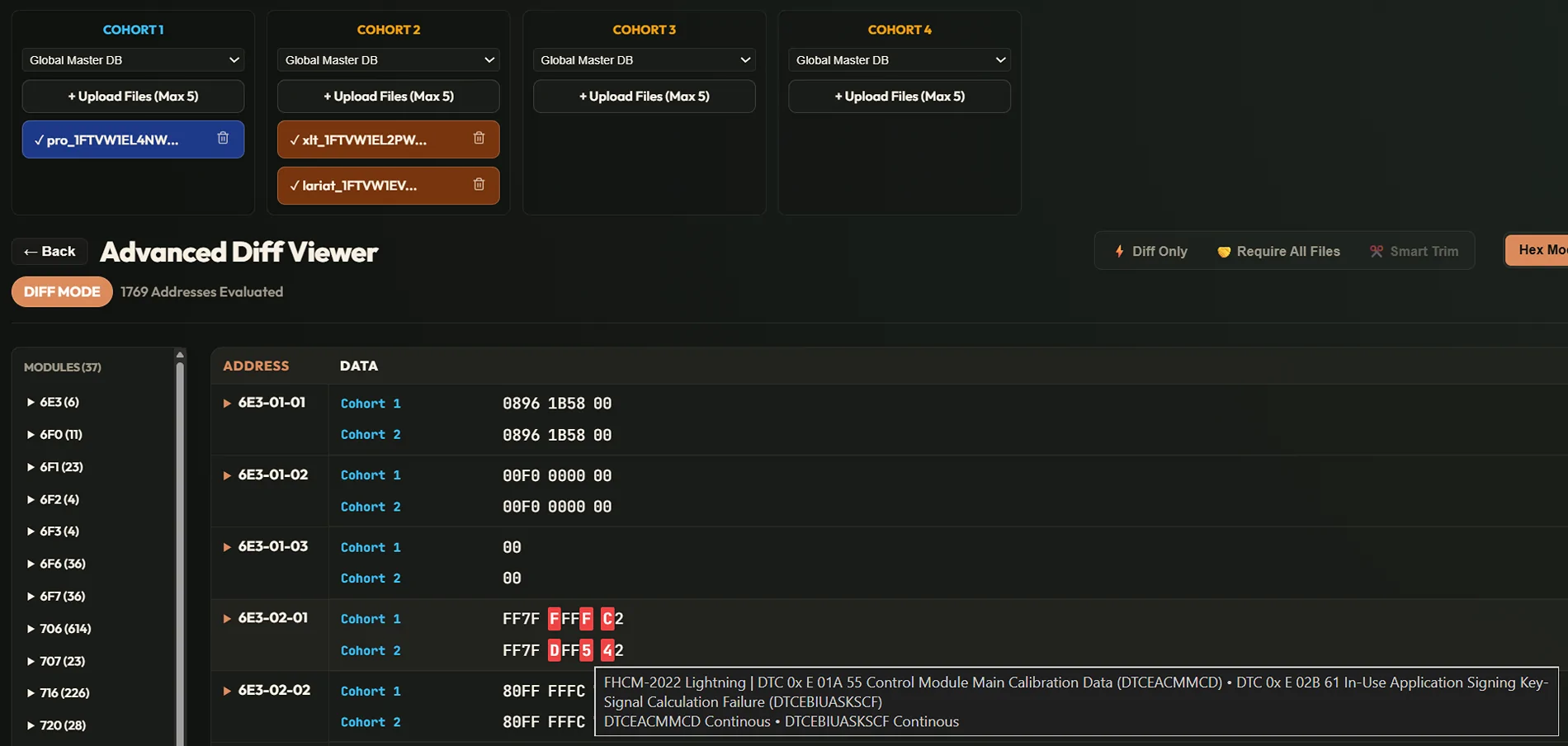
  • Context-Aware Hover Decoders:The tooltips pull plain-text definitions from the Master Database on the fly, and they adapt to your view mode:
    • In Hex Mode: Hovering over a nibble shows you the values for the hex (up to 4 mapped features) and the exact active state based on the current value of that nibble.
    • In Bit Mode: Hovering over a single 1 or 0 isolates the definition, showing you strictly that individual feature and its exact active state based upon that specific bit.
  • (Note on Databases: You can manually swap which Master Database is loaded to drive these tooltips, but it isn't highly recommended unless you know what you are doing, as different databases can lead to address/module mismatches).
  • Scrollbar Minimap: A new interactive track next to your scrollbar paints ticks wherever a difference physically exists in the file. Just click a tick to jump straight to that variance.
Check it out and give the new workspace a test run here: [Link to your site]

Let me know if you manage to break anything, or drop any feedback below on how the new drag-and-drop cohort logic is working for you!

Bit Hover over
Ford F-150 Lightning New Web Tool: FORScan Viewer & As-Built Diff Tool Screenshot 2026-06-09 171200

Ford F-150 Lightning New Web Tool: FORScan Viewer & As-Built Diff Tool Screenshot 2026-06-09 171214


Hex hover over
Ford F-150 Lightning New Web Tool: FORScan Viewer & As-Built Diff Tool Screenshot 2026-06-09 171330

Ford F-150 Lightning New Web Tool: FORScan Viewer & As-Built Diff Tool Screenshot 2026-06-09 171341


Side by side
Ford F-150 Lightning New Web Tool: FORScan Viewer & As-Built Diff Tool Screenshot 2026-06-08 215633


Stacked
Ford F-150 Lightning New Web Tool: FORScan Viewer & As-Built Diff Tool Screenshot 2026-06-08 215713


Bitwise Stacked
Ford F-150 Lightning New Web Tool: FORScan Viewer & As-Built Diff Tool Screenshot 2026-06-08 215748
Sponsored

 
Last edited:


Top