

Sponsored

BluesClues
Well-known member
In addition to EVO's notes, you should make sure you're not using experimental or alpha long. The Ford ACC is better (according to everyone else, I haven't actually tried alpha long).
For those that fear "lat tuning" - I vibecoded this to help you understand how it works in your device.
It's a lot easier than you think! All credit to @Ajzride youtube as my agent built off that. It is (allegedly) referencing the exact code and logic from Bluepilot.
https://lat-tuning-sim.pages.dev/
If you struggle to keep track of commit changes, I'll also keep this page updated:
https://bp70-commits.pages.dev/
For those that fear "lat tuning" - I vibecoded this to help you understand how it works in your device.
It's a lot easier than you think! All credit to @Ajzride youtube as my agent built off that. It is (allegedly) referencing the exact code and logic from Bluepilot.
https://lat-tuning-sim.pages.dev/
If you struggle to keep track of commit changes, I'll also keep this page updated:
https://bp70-commits.pages.dev/
Last edited:
25StarWhiteLightning
Well-known member
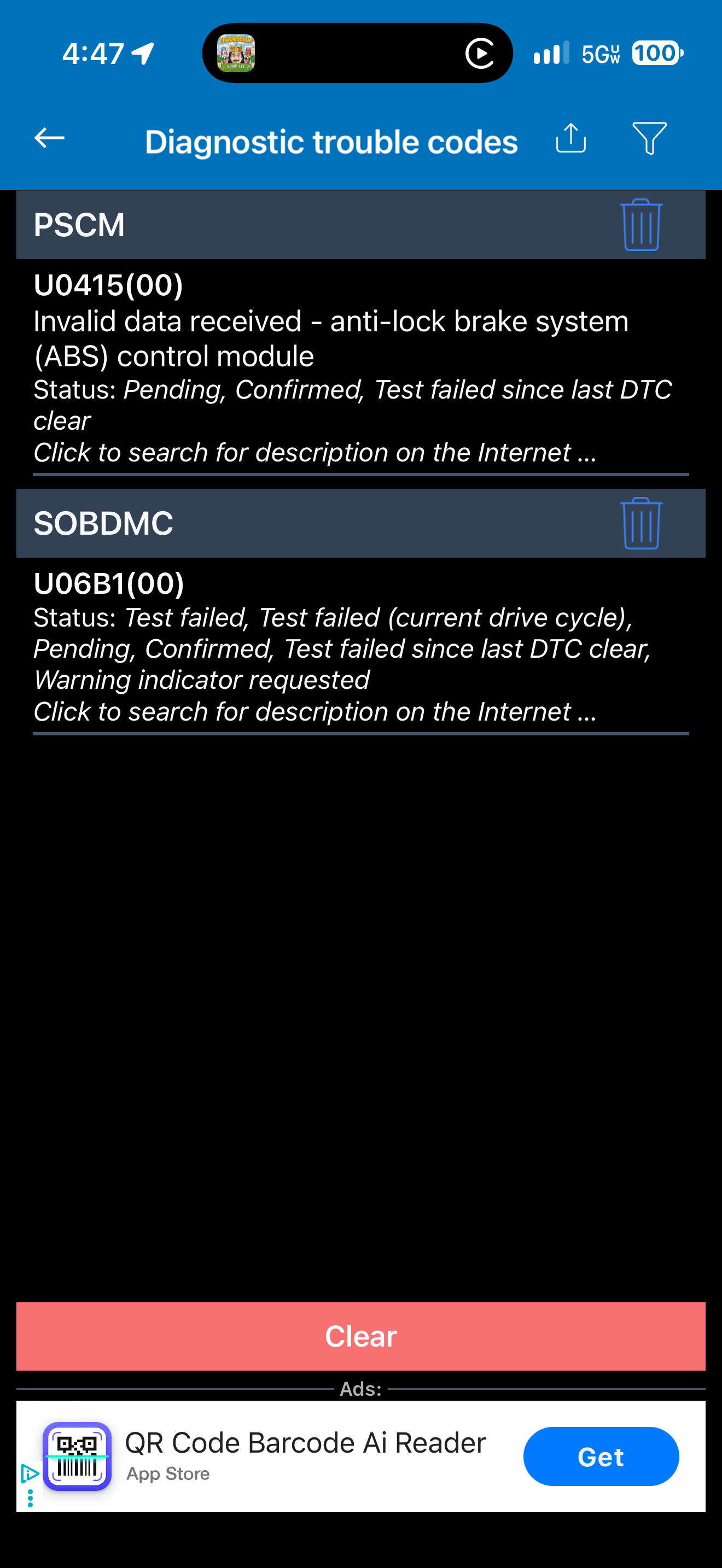
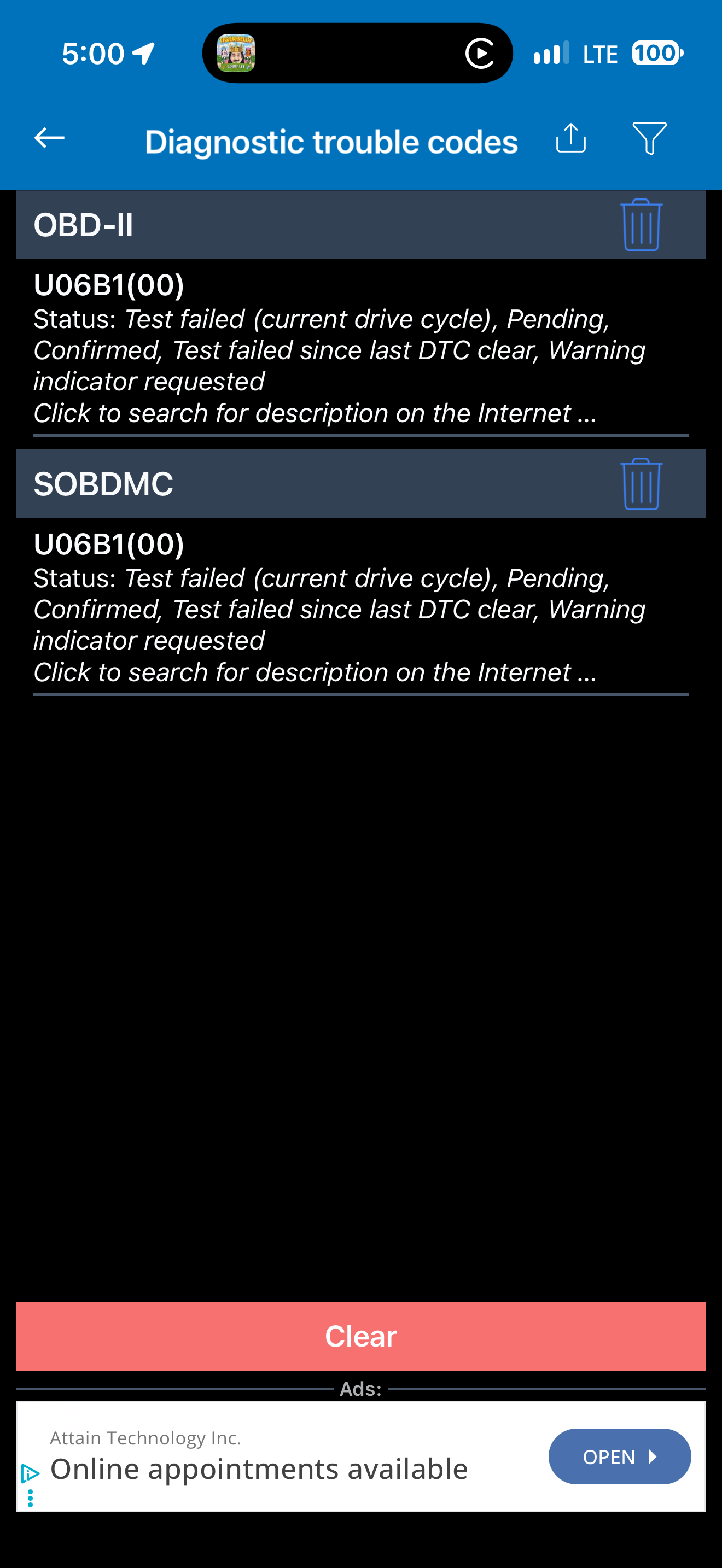
Have a recurring DTC that keeps popping up that coincides with my Comma4 install.
I think I accidentally turned the truck on while having the IPMA disconnected. Or at least the IPMA adapter plugged in but not the IPMA cable into the adapter. I cleared that right after install (forgot to save what code it was, oops) and drove the truck a few times. I installed the OBDII power port as well and left it at the default battery voltage level (12.1V?
Unfortunately, I didn't get an opportunity to drive it for 2 days because of travel but when I came back the truck acted like the 12V battery was dead. I was able to use PAAK and get the truck open but the chimes were the old fashioned kind.
When I started it up, there was a powertrain malfunction DTC that I had to clear. Again, drove it a few times and seemed to be fine.
Put the truck on the charger when I got home and charged to 90% and the next day when I went to leave, same DTC again and the A/C wouldn't work (blowing air but no A/C). On the drive back, I cleared the DTC and the A/C started working again.
Is my 12V battery toast? I have less than 4,000 miles but I drive sporadically through the week and only for 30 minutes at a time less than 30 miles.
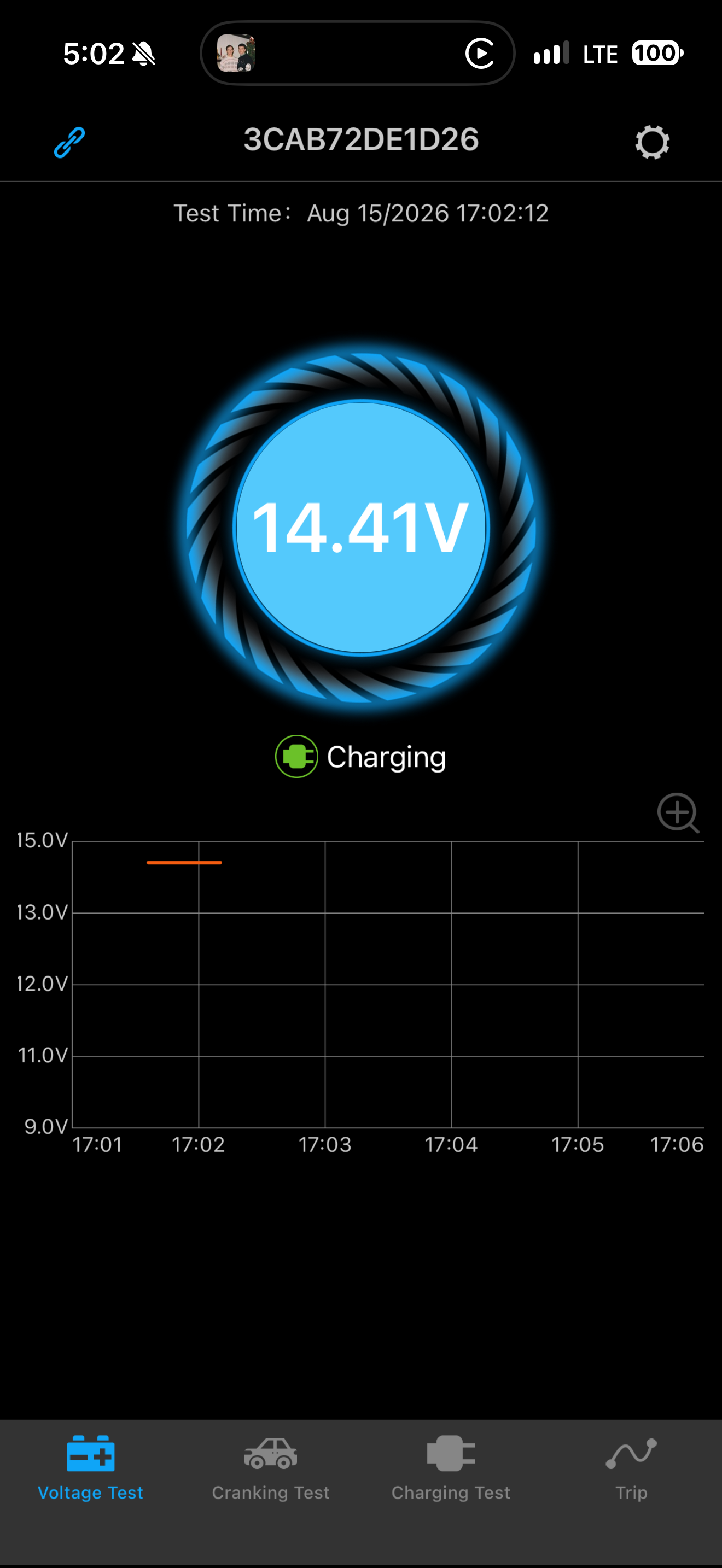
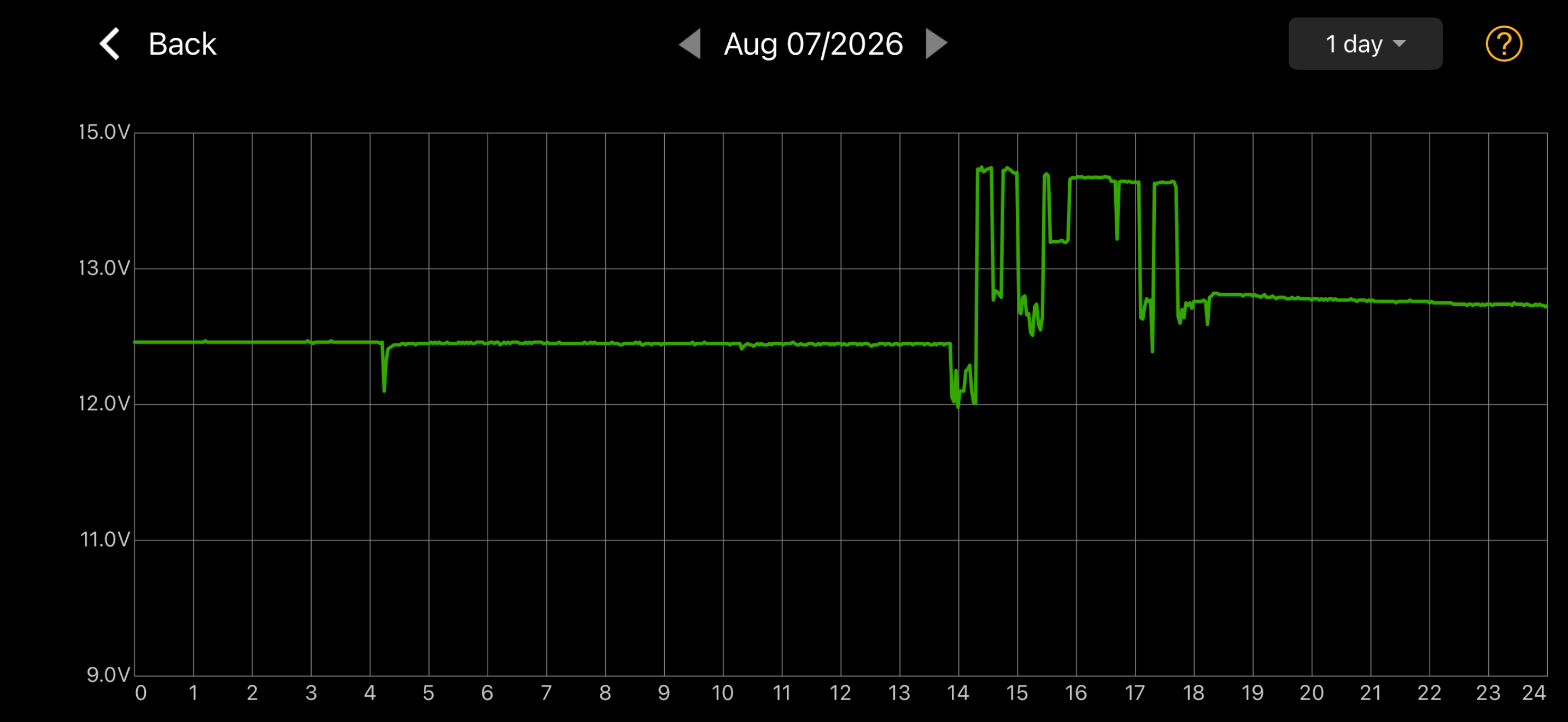
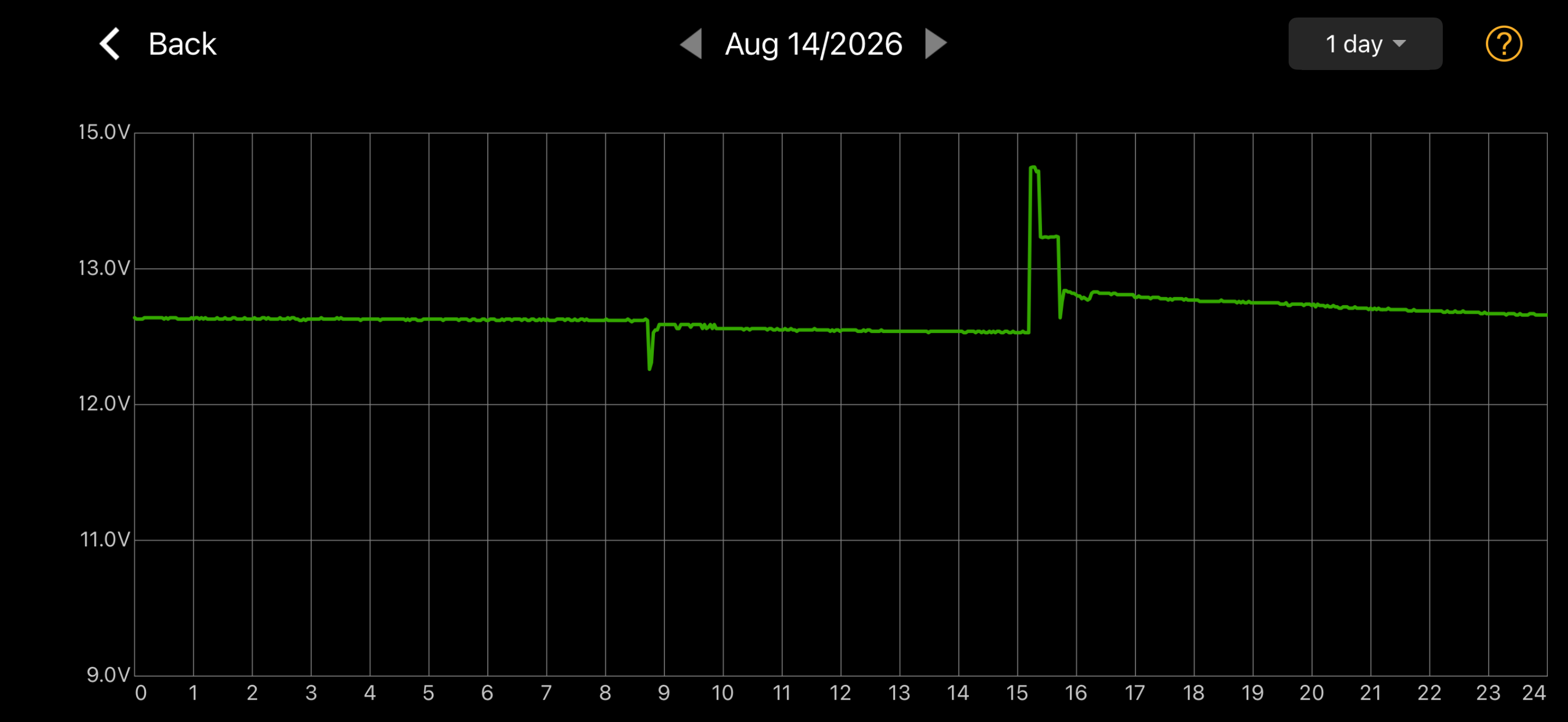
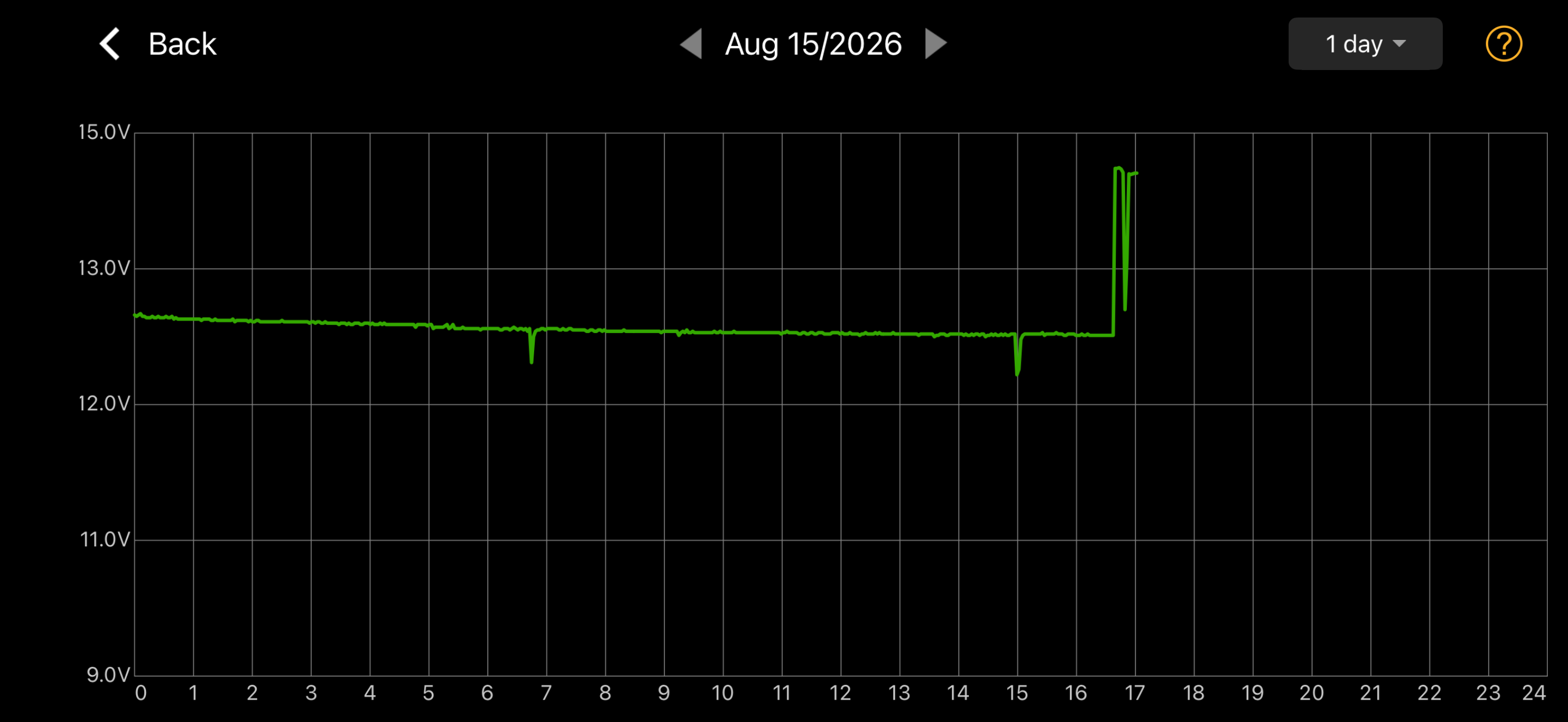
I will put a battery tester on the battery to see what it says. My battery monitor shows it never got below 12V and charges find at 14.4V.
Thoughts? Coincidence? Related to my install? Related to the OBDII 12V battery low level voltage in BP? Related to my generally short trips I take?
Sorry for giant photos, not sure how to make them smaller or collapsible.


I think I accidentally turned the truck on while having the IPMA disconnected. Or at least the IPMA adapter plugged in but not the IPMA cable into the adapter. I cleared that right after install (forgot to save what code it was, oops) and drove the truck a few times. I installed the OBDII power port as well and left it at the default battery voltage level (12.1V?
Unfortunately, I didn't get an opportunity to drive it for 2 days because of travel but when I came back the truck acted like the 12V battery was dead. I was able to use PAAK and get the truck open but the chimes were the old fashioned kind.
When I started it up, there was a powertrain malfunction DTC that I had to clear. Again, drove it a few times and seemed to be fine.
Put the truck on the charger when I got home and charged to 90% and the next day when I went to leave, same DTC again and the A/C wouldn't work (blowing air but no A/C). On the drive back, I cleared the DTC and the A/C started working again.
Is my 12V battery toast? I have less than 4,000 miles but I drive sporadically through the week and only for 30 minutes at a time less than 30 miles.
I will put a battery tester on the battery to see what it says. My battery monitor shows it never got below 12V and charges find at 14.4V.
Thoughts? Coincidence? Related to my install? Related to the OBDII 12V battery low level voltage in BP? Related to my generally short trips I take?
Sorry for giant photos, not sure how to make them smaller or collapsible.
B177y
Well-known member
- First Name
- Bill
- Joined
- Jul 16, 2024
- Threads
- 18
- Messages
- 853
- Reaction score
- 1,183
- Location
- Olympic Peninsula, WA
- Vehicles
- '24 Pro SSV ER Max Tow, '23 MME Premium, '20 Bolt
Check that the direction of your Lightning coupler is facing the correct way - Lightning bolt towards the IPMA and the the comma towards the Comma.Have a recurring DTC that keeps popping up that coincides with my Comma4 install.
I think I accidentally turned the truck on while having the IPMA disconnected. Or at least the IPMA adapter plugged in but not the IPMA cable into the adapter. I cleared that right after install (forgot to save what code it was, oops) and drove the truck a few times. I installed the OBDII power port as well and left it at the default battery voltage level (12.1V?
Unfortunately, I didn't get an opportunity to drive it for 2 days because of travel but when I came back the truck acted like the 12V battery was dead. I was able to use PAAK and get the truck open but the chimes were the old fashioned kind.
When I started it up, there was a powertrain malfunction DTC that I had to clear. Again, drove it a few times and seemed to be fine.
Put the truck on the charger when I got home and charged to 90% and the next day when I went to leave, same DTC again and the A/C wouldn't work (blowing air but no A/C). On the drive back, I cleared the DTC and the A/C started working again.
Is my 12V battery toast? I have less than 4,000 miles but I drive sporadically through the week and only for 30 minutes at a time less than 30 miles.
I will put a battery tester on the battery to see what it says. My battery monitor shows it never got below 12V and charges find at 14.4V.
Thoughts? Coincidence? Related to my install? Related to the OBDII 12V battery low level voltage in BP? Related to my generally short trips I take?
Sorry for giant photos, not sure how to make them smaller or collapsible.
Make sure all USBs are fully seated. Push hard until the "click". Check the IPMA and harness plug as well.
If still having DTCs, rotate the USB ends 180 deg, one at a time and test each time, on each end of the coupler. Sounds weird, but it's been documented to work.
If still having DTCs, try plugging the Comma directly into the short cable in the footwell after the coupler - bypass the long cable. If no error, you have a bad long cable.
If none of those, then it's something else....
Laphuks
Well-known member
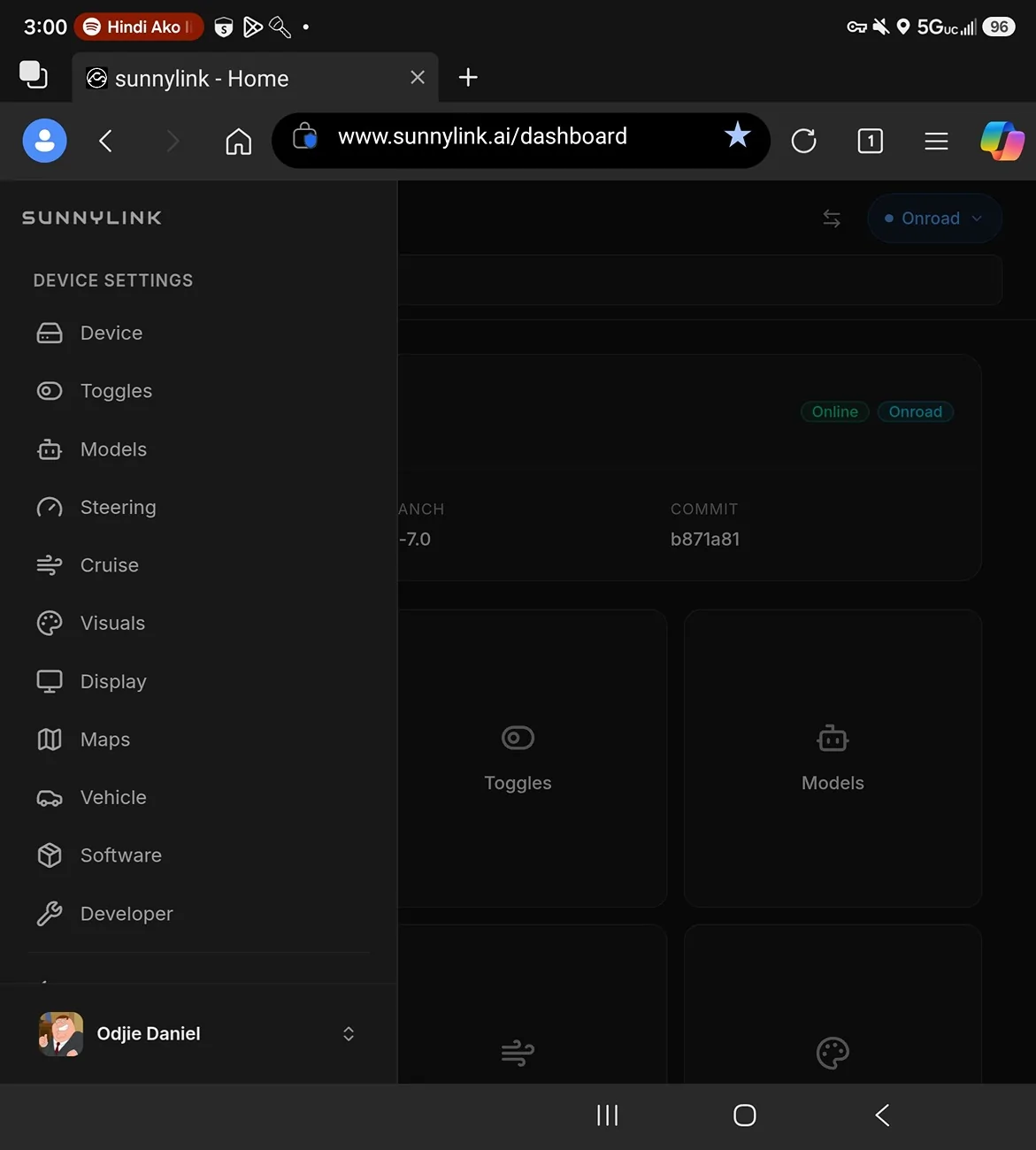
Any one here willing to share the whole setup they have for Comma 4, running Blue Pilot 7? Values that they currently have for different modules in blue pilot 7. Like Device? Toggles? Models? Steering? Cruise? ETC? No short cuts please. THANKS IN ADVANCE!!!

Sponsored
25StarWhiteLightning
Well-known member
I reseated both IPMA and the adapter cables and pushed in both USB C cables. Still got error.Check that the direction of your Lightning coupler is facing the correct way - Lightning bolt towards the IPMA and the the comma towards the Comma.
Make sure all USBs are fully seated. Push hard until the "click". Check the IPMA and harness plug as well.
If still having DTCs, rotate the USB ends 180 deg, one at a time and test each time, on each end of the coupler. Sounds weird, but it's been documented to work.
If still having DTCs, try plugging the Comma directly into the short cable in the footwell after the coupler - bypass the long cable. If no error, you have a bad long cable.
If none of those, then it's something else....
I rotated the long cable down underneath at the adapter 180° and did nothing else, started it up and took a test drive and the error seems to be gone. So strange, but good to know.
Thanks for the reminder on the quirkyness of the cables.

Bandit216
Well-known member
I sent you a direct message with Comma 4 BP 7 for Lightning screen captures attached as a zip file (using dark souls model).Any one here willing to share the whole setup they have for Comma 4, running Blue Pilot 7? Values that they currently have for different modules in blue pilot 7. Like Device? Toggles? Models? Steering? Cruise? ETC? No short cuts please. THANKS IN ADVANCE!!!

Whisper
Member
- First Name
- Aaran
- Joined
- Jul 13, 2026
- Threads
- 0
- Messages
- 22
- Reaction score
- 18
- Location
- Upper Midwest
- Vehicles
- 2022 F150 Lightning Platinum, 2023 MachE Premium
Thanks for that recommendation! I was out of the states last week, but switched to the SC model on Saturday. Yes, it just "feels" better. Best way to put it is that the SC model is more natural to my driving style.did a ninja edit there to get caught up on recent commits - I'm testing SCM now and it's equally good or better! cd210 is based on WMI V12 and SCM is NOT

https://sunnylink.wiki/models
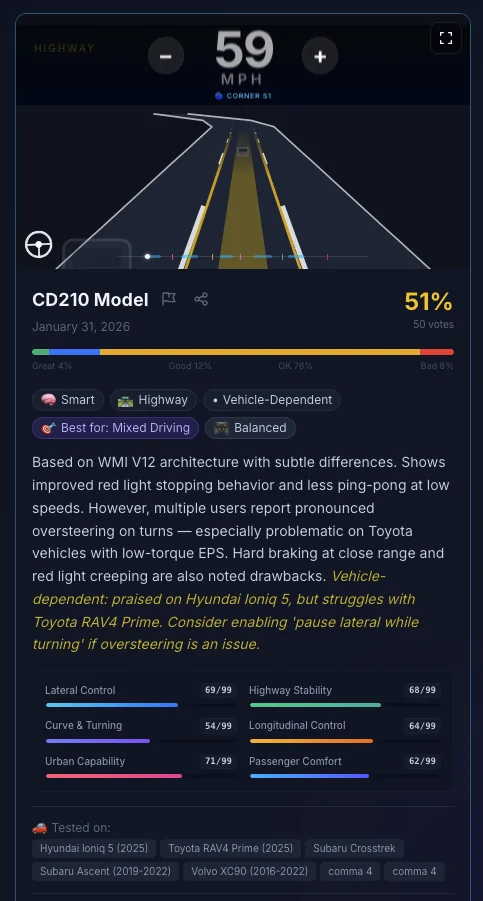
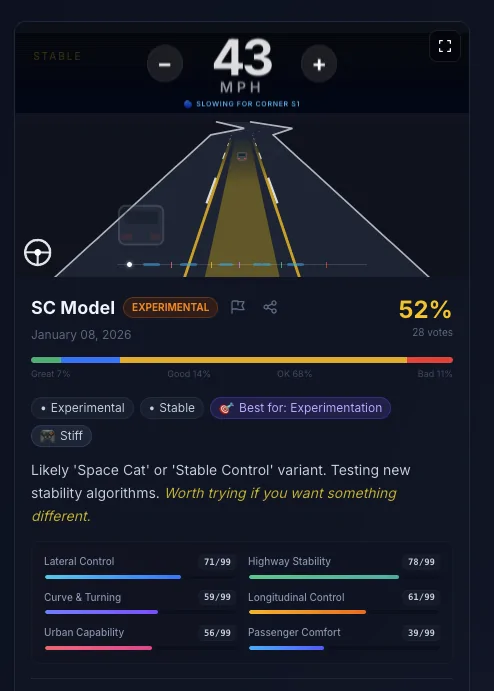
So far the only adjustment I need is to tone down the lane change, that initiates a little abruptly - I will play with that over the next couple days

EVO
Well-known member
- First Name
- Randy
- Joined
- Mar 8, 2025
- Threads
- 2
- Messages
- 108
- Reaction score
- 78
- Location
- Leavenworth, Kansas
- Vehicles
- 2024 lightning flash
- Occupation
- electrician
My only complaint using SC Model is on the highway it gives too much space between me and the vehicle in front of me. SC is by far the best Model I have found for the lightning.
Sponsored
Ajzride
Well-known member
Are you even using OpenPilot Longitudinal Control?My only complaint using SC Model is on the highway it gives too much space between me and the vehicle in front of me. SC is by far the best Model I have found for the lightning.
EVO
Well-known member
- First Name
- Randy
- Joined
- Mar 8, 2025
- Threads
- 2
- Messages
- 108
- Reaction score
- 78
- Location
- Leavenworth, Kansas
- Vehicles
- 2024 lightning flash
- Occupation
- electrician
No. I'm using blue pilot 7 everything is stock settings except I'm using angle. Low speed @ 1 high spd @ .96 using SC Model.Are you even using OpenPilot Longitudinal Control?
Last edited:
Ajzride
Well-known member
If this is true it is 100% impossible for the model to affect follow distance. yoi Are using ford ACC. Double check the gap setting using the button on the steering wheelNo. I'm using blue pilot 7 everything is stock settings except I'm using angle. Low speed @ 1 high spd @ .96 using SC Model.
EVO
Well-known member
- First Name
- Randy
- Joined
- Mar 8, 2025
- Threads
- 2
- Messages
- 108
- Reaction score
- 78
- Location
- Leavenworth, Kansas
- Vehicles
- 2024 lightning flash
- Occupation
- electrician
Ok, I guess it's just my imagination. Thanks for the info.If this is true it is 100% impossible for the model to affect follow distance. yoi Are using ford ACC. Double check the gap setting using the button on the steering wheel
Ajzride
Well-known member
toggle on the radar overlay and it will show you distance and time to the vehicle in front of youOk, I guess it's just my imagination. Thanks for the info.
Sponsored
Similar threads

- Replies
- 63
- Views
- 24,302


