

Sponsored
- Status
- Not open for further replies.
Loading
22Platinum
Active member
- Joined
- Feb 9, 2022
- Threads
- 0
- Messages
- 29
- Reaction score
- 3
- Location
- Washington dc
- Vehicles
- 2022 F150 (on order), 2003 Lincoln Town car
- Occupation
- software engineer
When you are done in electron, what will you have? An .exe? .msi?In the meantime, I think I can make an electron app that does what you are asking.

tonesto7
Well-known member
Let's just forget about that appWhen you are done in electron, what will you have? An .exe? .msi?

Someone gave me a much better idea. Now I just need to make it work.
Sponsored
22Platinum
Active member
- Joined
- Feb 9, 2022
- Threads
- 0
- Messages
- 29
- Reaction score
- 3
- Location
- Washington dc
- Vehicles
- 2022 F150 (on order), 2003 Lincoln Town car
- Occupation
- software engineer
HA well dang, i installed electron and had the xml parsed to JSON and was fixing to make the requested changes, but was leery about asking others to install some random guy from the net's exe on their computerLet's just forget about that app
Someone gave me a much better idea. Now I just need to make it work.

speedracercjr
Well-known member
Extremely frustrated here getting my TCU to update. The good news is my usb kicks off every single time so at least I'm over that problem. Currently sitting at OTA equivalent of 2.1. Here's what I've tried to get past the "restart truck to complete install" loop
Any ideas? This one is really pissing me off.
- Left the usb in and restarted truck Power On/Engine On
- Left the usb in and restarted truck Power On/Engine Off
- Variations of both with the parking brake on, door left open for 10, 20, 30, 60 minutes
- Disconnected battery for 15, 30, 60 minutes
- Pull usb in between restarting truck
- Pull usb while truck is on after restart message pops up
- Pull usb during update (fuck it method)
- Locked doors during variations of above
- Master reset a couple of times, reset module via Forscan a couple of times
- Since the TCU and APIM are tied together for this update I tried to skip the TCU and do APIM, get in the same restart loop
- Tried updating via CAN and it insta fails with no error given why
- Tried multiple USB sticks, freshly formatted Exfat
- And of course the set it and forget it method the last week.
Any ideas? This one is really pissing me off.
iceman77
Well-known member
- Thread starter
- #713
At this point I think you would have saved yourself time and sanity by going to CAN-bus update routeExtremely frustrated here getting my TCU to update. The good news is my usb kicks off every single time so at least I'm over that problem. Currently sitting at OTA equivalent of 2.1. Here's what I've tried to get past the "restart truck to complete install" loop
- Left the usb in and restarted truck Power On/Engine On
- Left the usb in and restarted truck Power On/Engine Off
- Variations of both with the parking brake on, door left open for 10, 20, 30, 60 minutes
- Disconnected battery for 15, 30, 60 minutes
- Pull usb in between restarting truck
- Pull usb while truck is on after restart message pops up
- Pull usb during update (fuck it method)
- Locked doors during variations of above
- Master reset a couple of times, reset module via Forscan a couple of times
- Since the TCU and APIM are tied together for this update I tried to skip the TCU and do APIM, get in the same restart loop
- Tried updating via CAN and it insta fails with no error given why
- Tried multiple USB sticks, freshly formatted Exfat
- And of course the set it and forget it method the last week.
Any ideas? This one is really pissing me off.
Snakebitten
Well-known member
- First Name
- Bruce
- Joined
- Jun 19, 2021
- Threads
- 3
- Messages
- 1,521
- Reaction score
- 923
- Location
- Coastal Texas
- Vehicles
- 2021 F150 Powerboost Platinum
Sounds almost identical to what I experienced just about 1 month ago.
Except I got lucky with the turn truck off (completely) and yank the stick. Start truck and notice the Sync screen do some kind of weird squish to one side, and then go dark and come back with a nice fresh perfect scaling.
Obviously this was not the official procedure, but technically all files on the USB stick have successfully been copied onboard by the time you are requested to restart the truck.
Perhaps you could, since you have nothing to lose, get back to the restart truck point of the update, shut the truck down, pull the stick, and then just live with it for a while. Similar to the strategy of driving the truck a few days with the stick in to get the update to kick off, but instead you are driving the truck a few days without the stick in hoping it will kick-off the last step, which is booting to the new files that ARE assumed to be onboard and available.
Except I got lucky with the turn truck off (completely) and yank the stick. Start truck and notice the Sync screen do some kind of weird squish to one side, and then go dark and come back with a nice fresh perfect scaling.
Obviously this was not the official procedure, but technically all files on the USB stick have successfully been copied onboard by the time you are requested to restart the truck.
Perhaps you could, since you have nothing to lose, get back to the restart truck point of the update, shut the truck down, pull the stick, and then just live with it for a while. Similar to the strategy of driving the truck a few days with the stick in to get the update to kick off, but instead you are driving the truck a few days without the stick in hoping it will kick-off the last step, which is booting to the new files that ARE assumed to be onboard and available.
JScaro
Well-known member
@speedracercjr Since you seem to have lots of time into doing thiese updates I'm looking for some guidance.
I'm going to tackle my updates this weekend, could you give me a timeframe each one of these updates should take?
Also do you stay with the truck while doing? Does it matter if I leave the door open while I'm doing the updates? Need to prepare myself if I'll be in the truck a while.....
Going to read through all 48 pages again to re-freshen myself on this.
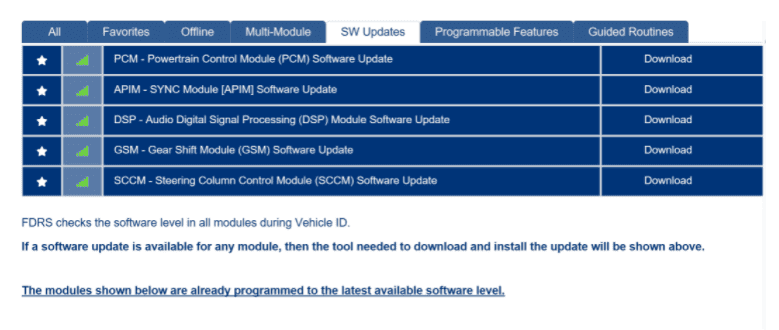
Here's my list thanks to @Bob_Mac

I'm going to tackle my updates this weekend, could you give me a timeframe each one of these updates should take?
Also do you stay with the truck while doing? Does it matter if I leave the door open while I'm doing the updates? Need to prepare myself if I'll be in the truck a while.....
Going to read through all 48 pages again to re-freshen myself on this.
Here's my list thanks to @Bob_Mac
Sponsored
Bob_Mac
Well-known member
- First Name
- Bob
- Joined
- Feb 6, 2022
- Threads
- 2
- Messages
- 370
- Reaction score
- 231
- Location
- North Carolina
- Vehicles
- 2021 Ford F-150 Platinum
- Occupation
- Cyber Security | Developer
When you're at the step in the pic, touch the "System Updating..." and see if the progress is actually updating.Extremely frustrated here getting my TCU to update. The good news is my usb kicks off every single time so at least I'm over that problem. Currently sitting at OTA equivalent of 2.1. Here's what I've tried to get past the "restart truck to complete install" loop
- Left the usb in and restarted truck Power On/Engine On
- Left the usb in and restarted truck Power On/Engine Off
- Variations of both with the parking brake on, door left open for 10, 20, 30, 60 minutes
- Disconnected battery for 15, 30, 60 minutes
- Pull usb in between restarting truck
- Pull usb while truck is on after restart message pops up
- Pull usb during update (fuck it method)
- Locked doors during variations of above
- Master reset a couple of times, reset module via Forscan a couple of times
- Since the TCU and APIM are tied together for this update I tried to skip the TCU and do APIM, get in the same restart loop
- Tried updating via CAN and it insta fails with no error given why
- Tried multiple USB sticks, freshly formatted Exfat
- And of course the set it and forget it method the last week.
Any ideas? This one is really pissing me off.
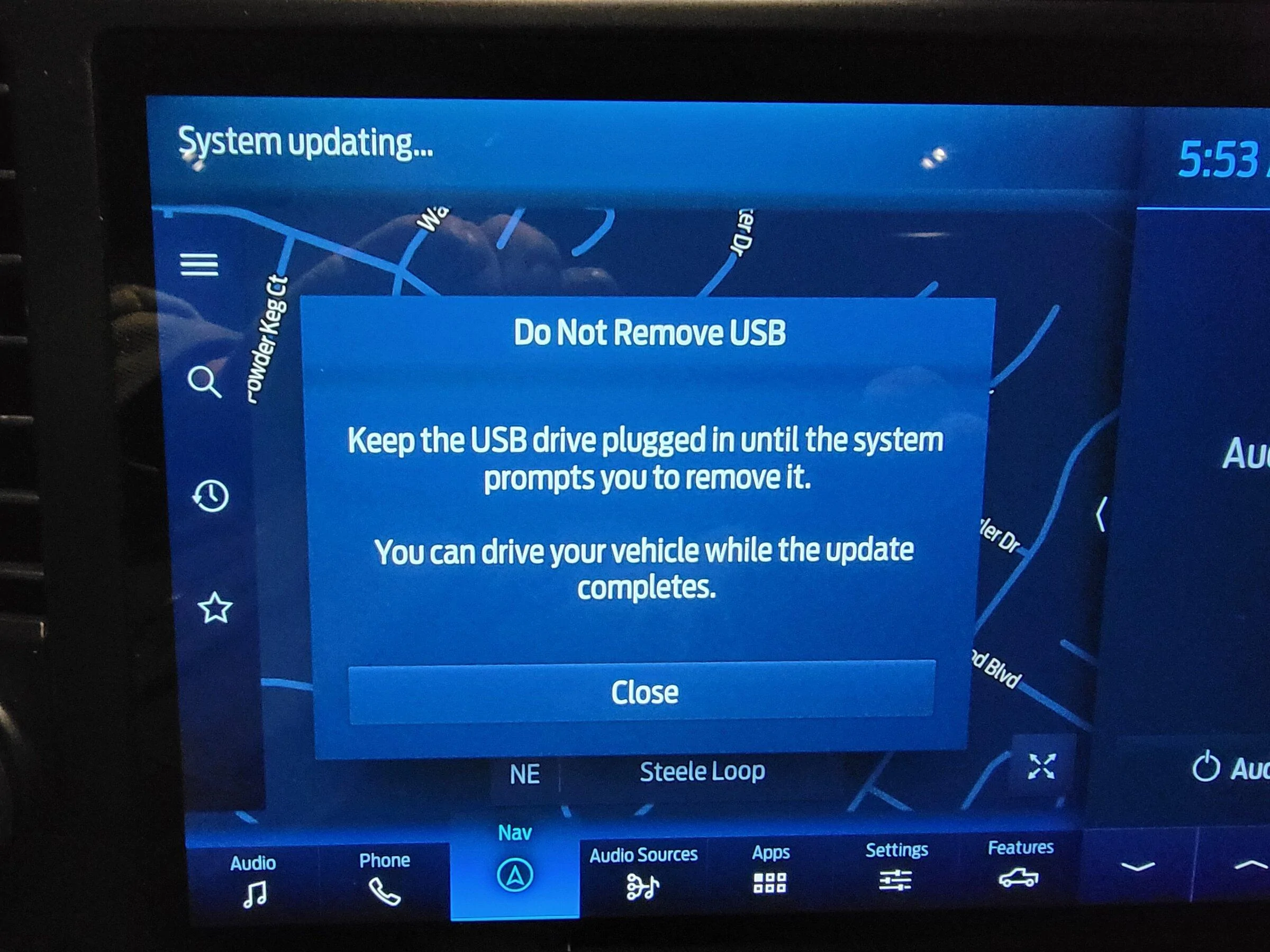
speedracercjr
Well-known member
Like literally click on "System Updating"? Does it show a progress bar?When you're at the step in the pic, touch the "System Updating..." and see if the progress is actually updating.

speedracercjr
Well-known member
LOL @ lots of time, it's not time I've been enjoying. Out of your list only APIM will take the longest, everything else goes pretty quick (15-ish mins). Just follow the instructions that FDRS gives you (Engine On or Off) and you should be fine unless your truck is a horses ass like mine.@speedracercjr Since you seem to have lots of time into doing thiese updates I'm looking for some guidance.
I'm going to tackle my updates this weekend, could you give me a timeframe each one of these updates should take?
Also do you stay with the truck while doing? Does it matter if I leave the door open while I'm doing the updates? Need to prepare myself if I'll be in the truck a while.....
Going to read through all 48 pages again to re-freshen myself on this.
Here's my list thanks to @Bob_Mac
Bob_Mac
Well-known member
- First Name
- Bob
- Joined
- Feb 6, 2022
- Threads
- 2
- Messages
- 370
- Reaction score
- 231
- Location
- North Carolina
- Vehicles
- 2021 Ford F-150 Platinum
- Occupation
- Cyber Security | Developer
There is no way to provide a time for the APIM since so many are having issues, mine didn't complete until the following morning after sitting all night with the USB stick still in. The others however, have been fine. Here's an updated doc you can print to keep at your side when doing the updates, waiting on @iceman77 to update the link in the first post. https://docs.google.com/document/d/1xX3ApbprgKx6y-IRVDpJdCwz6IqL3kHJ1BQSAxX4wKE@speedracercjr Since you seem to have lots of time into doing thiese updates I'm looking for some guidance.
I'm going to tackle my updates this weekend, could you give me a timeframe each one of these updates should take?
Also do you stay with the truck while doing? Does it matter if I leave the door open while I'm doing the updates? Need to prepare myself if I'll be in the truck a while.....
Going to read through all 48 pages again to re-freshen myself on this.
Here's my list thanks to @Bob_Mac
Bob_Mac
Well-known member
- First Name
- Bob
- Joined
- Feb 6, 2022
- Threads
- 2
- Messages
- 370
- Reaction score
- 231
- Location
- North Carolina
- Vehicles
- 2021 Ford F-150 Platinum
- Occupation
- Cyber Security | Developer
Yes it doesLike literally click on "System Updating"? Does it show a progress bar?
Sponsored
- Status
- Not open for further replies.
Similar threads

- Replies
- 1,917
- Views
- 468,383


