Sponsored

F150 Lightning FORScan thread - Version 2

OP
OP
bmwhitetx

bmwhitetx

Well-known member
First Name
Bruce
Joined
May 21, 2021
Threads
48
Messages
3,179
Reaction score
4,603
Location
DFW-Texas
Vehicles
2022 F150 Lightning Lariat ER
Occupation
Retired engineer
Our blinkers are bright - when I am stopped at night with one on I see everything light up around - you can see the reflection everywhere.
I noticed that early on also! I was first in line at a traffic light at dusk. Six lane intersection and I was lighting up the signs on the other side with bright blinking yellow!

At double lefts I sometimes turn off my signal to see if the car next to me is also bright. I “win” every time in blinker brightness - by a mile. ?
Sponsored
 

BlakeGJ

Active member
First Name
Blake
Joined
Jan 3, 2024
Threads
7
Messages
39
Reaction score
79
Location
Chandler, AZ
Vehicles
2023 XLT ER
If there isn't a WRITE option next to a line changed (remove box on reverse cam) do you just "write all" at the bottom?

Reset apim- is that hold volume and next for restart?

Thanks!
 
OP
OP
bmwhitetx

bmwhitetx

Well-known member
First Name
Bruce
Joined
May 21, 2021
Threads
48
Messages
3,179
Reaction score
4,603
Location
DFW-Texas
Vehicles
2022 F150 Lightning Lariat ER
Occupation
Retired engineer
If there isn't a WRITE option next to a line changed (remove box on reverse cam) do you just "write all" at the bottom?

Reset apim- is that hold volume and next for restart?

Thanks!
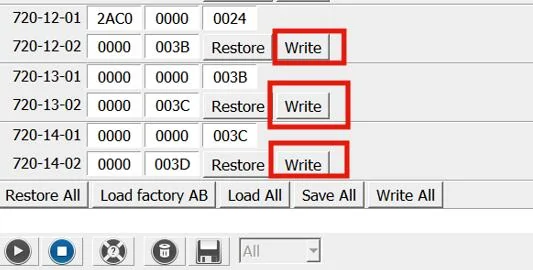
Each subsection should have a Write button. For example 720-12 has a section that includes -01 and -02 like so:
Ford F-150 Lightning F150 Lightning FORScan thread - Version 2 1738162075787-hn

But if you change several sections them you can just do the Write All at the bottom.

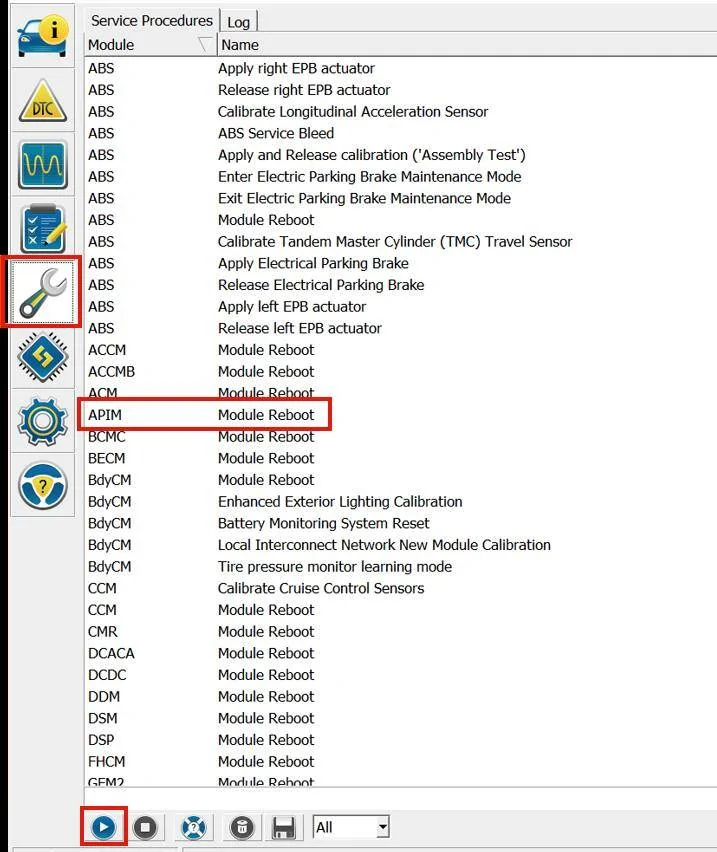
To reset the APIM or any module go to the wrench icon and choose APIM - Module Reboot and then hit Play at the bottom. Follow the instructions in the popups to turn off truck and wait 10 seconds.

Ford F-150 Lightning F150 Lightning FORScan thread - Version 2 1751464032047-06
 
Last edited:

astrand1

Well-known member
First Name
Alex
Joined
Dec 16, 2021
Threads
9
Messages
758
Reaction score
807
Location
Michigan
Vehicles
2023 Ford F150 Lightning lariat ER
Occupation
Studio truck driver
So I applied the beosonic and it does show up in settings and the little bubble moves around and I can choose some of the preset sound settings but there is absolutely no difference in sound. No matter which one I choose or move the bubble around there is no change. I’ve got a 23 lariat 8/23 build. I added the 50/50 mirror cam split which is cool. I have a question. While moving at speed I can choose my rear cam, hitch close up, 50/50 split, aux camera but if I try to choose the bed camera nothing happens. It’s there but when I click on it I get nothing. Only when stopped does it work. Over 8mph and it goes away. On my 22pb I could see the bed cam at speed. Any thoughts?
 
OP
OP
bmwhitetx

bmwhitetx

Well-known member
First Name
Bruce
Joined
May 21, 2021
Threads
48
Messages
3,179
Reaction score
4,603
Location
DFW-Texas
Vehicles
2022 F150 Lightning Lariat ER
Occupation
Retired engineer
So I applied the beosonic and it does show up in settings and the little bubble moves around and I can choose some of the preset sound settings but there is absolutely no difference in sound. No matter which one I choose or move the bubble around there is no change. I’ve got a 23 lariat 8/23 build. I added the 50/50 mirror cam split which is cool. I have a question. While moving at speed I can choose my rear cam, hitch close up, 50/50 split, aux camera but if I try to choose the bed camera nothing happens. It’s there but when I click on it I get nothing. Only when stopped does it work. Over 8mph and it goes away. On my 22pb I could see the bed cam at speed. Any thoughts?
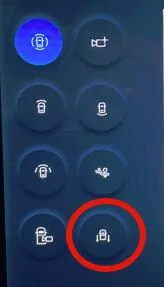
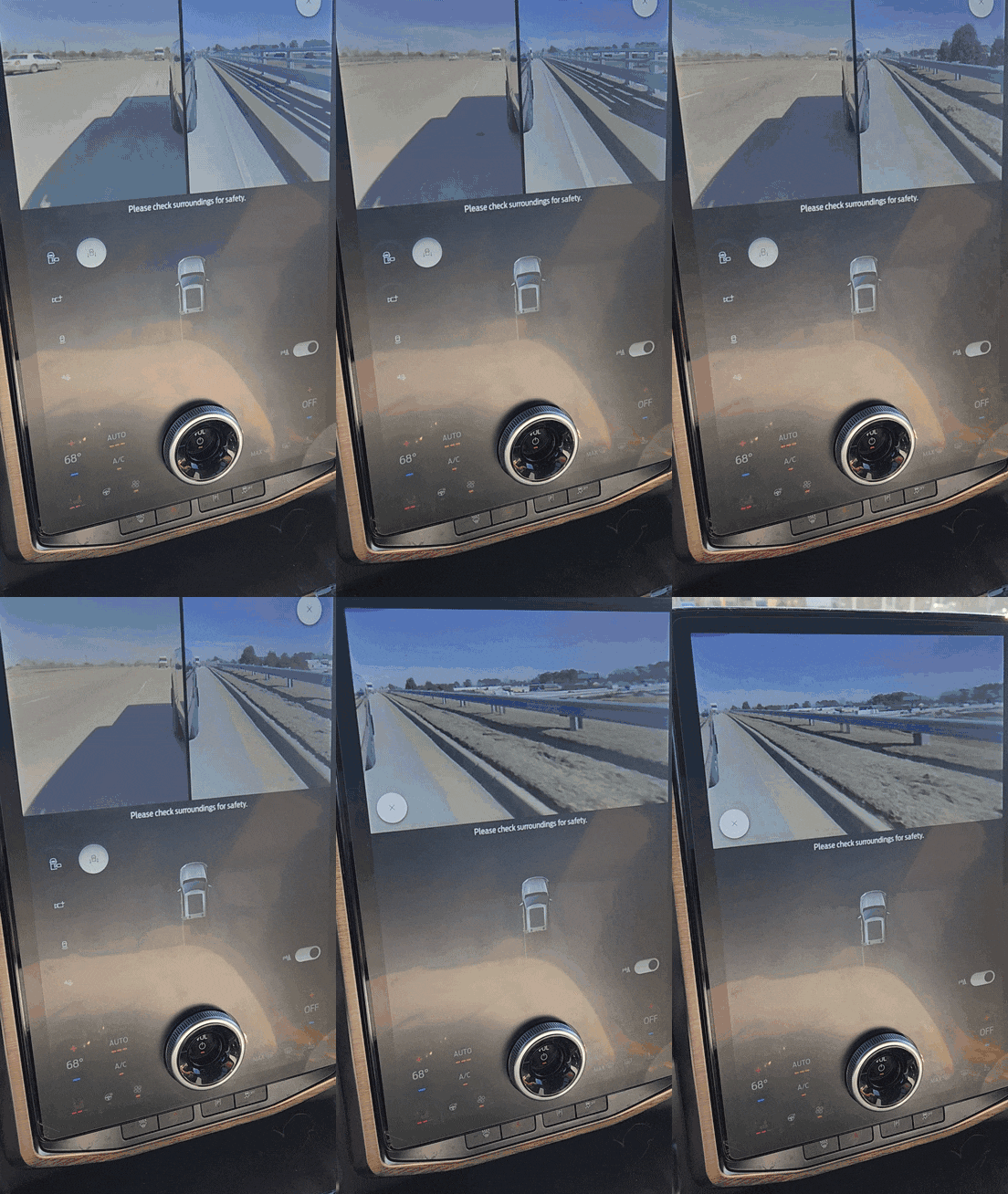
I actually tested it out today. With the 50/50 mod I get the following views when not moving:
Ford F-150 Lightning F150 Lightning FORScan thread - Version 2 1738209763979-nh


Once moving the two forward facing views and the 360 disappear (the first three in column 1). The top right icon is the optional add-on trailer cam which I don't have. So when moving I have bed, tailgate, 50/50, and hitch icons - and the first three work at speed (I didn't test hitch - kinda useless when going 40 mph).

So maybe when you enabled 50/50 or removed the Full View not available message, something got mixed up. The values in post 1 are Lightning specific. If you used values from the original thread or somewhere else, you may have killed bed camera at speed.

There is a setting for cameras at speed in the ICE F-150 spreadsheet I need to investigate it more. I'm pretty sure I didn't do any mod to get cameras at speed but I could be wrong about that.
 

Sponsored

astrand1

Well-known member
First Name
Alex
Joined
Dec 16, 2021
Threads
9
Messages
758
Reaction score
807
Location
Michigan
Vehicles
2023 Ford F150 Lightning lariat ER
Occupation
Studio truck driver
I did the full view removal back in august when I bought the truck so I was using the ice spreadsheet as that’s all that was available. Tomorrow I will check my values against what you have here and see if it’s different or if somehow fat fingered something. Thanks!
 

21st Century Truck

Well-known member
First Name
Martin
Joined
Jul 11, 2024
Threads
20
Messages
1,177
Reaction score
1,498
Location
Virginia
Vehicles
Ford 150 Lightning 2023 XLT ER pkg. 312A
So I applied the beosonic and it does show up in settings and the little bubble moves around and I can choose some of the preset sound settings but there is absolutely no difference in sound. No matter which one I choose or move the bubble around there is no change. ...
I helped another member here with turning on the glare-free headlights, and just as a side lark we played with turning on his Beosonic digital equalizer afterwards. We could instantly hear the difference in his truck.

I note that his truck is the Platinum trim, the one with the most speakers and with the B&O audio components.

I understand that for Beosonic to work, the truck needs to have the DSP module. My XLT does not have it. Maybe this is the missing link on Your Lariat? ...or perhaps there is another (B&O-related??) variable between the Lariat and the Platinum trims.
 

astrand1

Well-known member
First Name
Alex
Joined
Dec 16, 2021
Threads
9
Messages
758
Reaction score
807
Location
Michigan
Vehicles
2023 Ford F150 Lightning lariat ER
Occupation
Studio truck driver
I helped another member here with turning on the glare-free headlights, and just as a side lark we played with turning on his Beosonic digital equalizer afterwards. We could instantly hear the difference in his truck.

I note that his truck is the Platinum trim, the one with the most speakers and with the B&O audio components.

I understand that for Beosonic to work, the truck needs to have the DSP module. My XLT does not have it. Maybe this is the missing link on Your Lariat? ...or perhaps there is another (B&O-related??) variable between the Lariat and the Platinum trims.
Mine has the b&o and has a DSP. I’m going to double check the settings again today but yeah there was absolutely no difference in sound. Which kinda makes me think there might be a setting off or something. Yeah those glare free headlights are amazing!
 
OP
OP
bmwhitetx

bmwhitetx

Well-known member
First Name
Bruce
Joined
May 21, 2021
Threads
48
Messages
3,179
Reaction score
4,603
Location
DFW-Texas
Vehicles
2022 F150 Lightning Lariat ER
Occupation
Retired engineer
Mine has the b&o and has a DSP. I’m going to double check the settings again today but yeah there was absolutely no difference in sound. Which kinda makes me think there might be a setting off or something. Yeah those glare free headlights are amazing!
This mod came from the Mach-E folks and IIRC there was a comment that effectiveness may be somewhat dependent on the file type. I would think it would work for all source types, even FM radio, but maybe it's only for high-quality USB files. Keep us posted.
 

astrand1

Well-known member
First Name
Alex
Joined
Dec 16, 2021
Threads
9
Messages
758
Reaction score
807
Location
Michigan
Vehicles
2023 Ford F150 Lightning lariat ER
Occupation
Studio truck driver
This mod came from the Mach-E folks and IIRC there was a comment that effectiveness may be somewhat dependent on the file type. I would think it would work for all source types, even FM radio, but maybe it's only for high-quality USB files. Keep us posted.
Oh shit I might have missed that part. I was listening to Sirius at the time. I will try some different sources to see.
 

Sponsored

CRAIGC540

Well-known member
First Name
Craig
Joined
Dec 9, 2021
Threads
23
Messages
892
Reaction score
777
Location
Moreno valley
Vehicles
F150 Lariat F150 Lariat lightning 2022
Occupation
Technician
Oh shit I might have missed that part. I was listening to Sirius at the time. I will try some different sources to see.
Sirius is the most compressed / low quality music you can listen too...
I get in my wife's car and she has Sirius on and I notice the song thats on sounds bad, I put on the same song on YouTube music and and the base and mids come back. Sadly my wife dosnt seem to care. :)
 

astrand1

Well-known member
First Name
Alex
Joined
Dec 16, 2021
Threads
9
Messages
758
Reaction score
807
Location
Michigan
Vehicles
2023 Ford F150 Lightning lariat ER
Occupation
Studio truck driver
Sirius is the most compressed / low quality music you can listen too...
I get in my wife's car and she has Sirius on and I notice the song thats on sounds bad, I put on the same song on YouTube music and and the base and mids come back. Sadly my wife dosnt seem to care. :)
I’m aware of that. Although will say in the past few years the quality has gotten better on Sirius. But yes YouTube music is much better and I always have it on the highest quality setting. That said if I’m comparing the same song but just choosing different sound settings I’m still going to hear a difference. Meaning if I’m on the standard page and turn up or down bass and treble I’m going to hear a difference. But using the the new beosonic settings there was no change. In fact it sounded flat. Then the minute I hit the equalizer choice then the sound immediately changed and was much more full so to speak. So I get the quality difference of different sources but when just comparing apples to apples there was no change. I will try some other sources though to see if it has to do with what source is chosen.
 

PJnc284

Well-known member
Joined
Sep 30, 2024
Threads
0
Messages
1,220
Reaction score
1,390
Location
Garner, NC
Vehicles
2023 Ford F150 Lightning Lariat ER
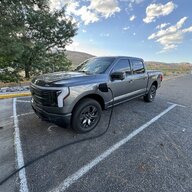
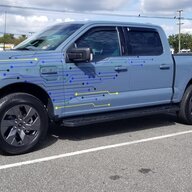
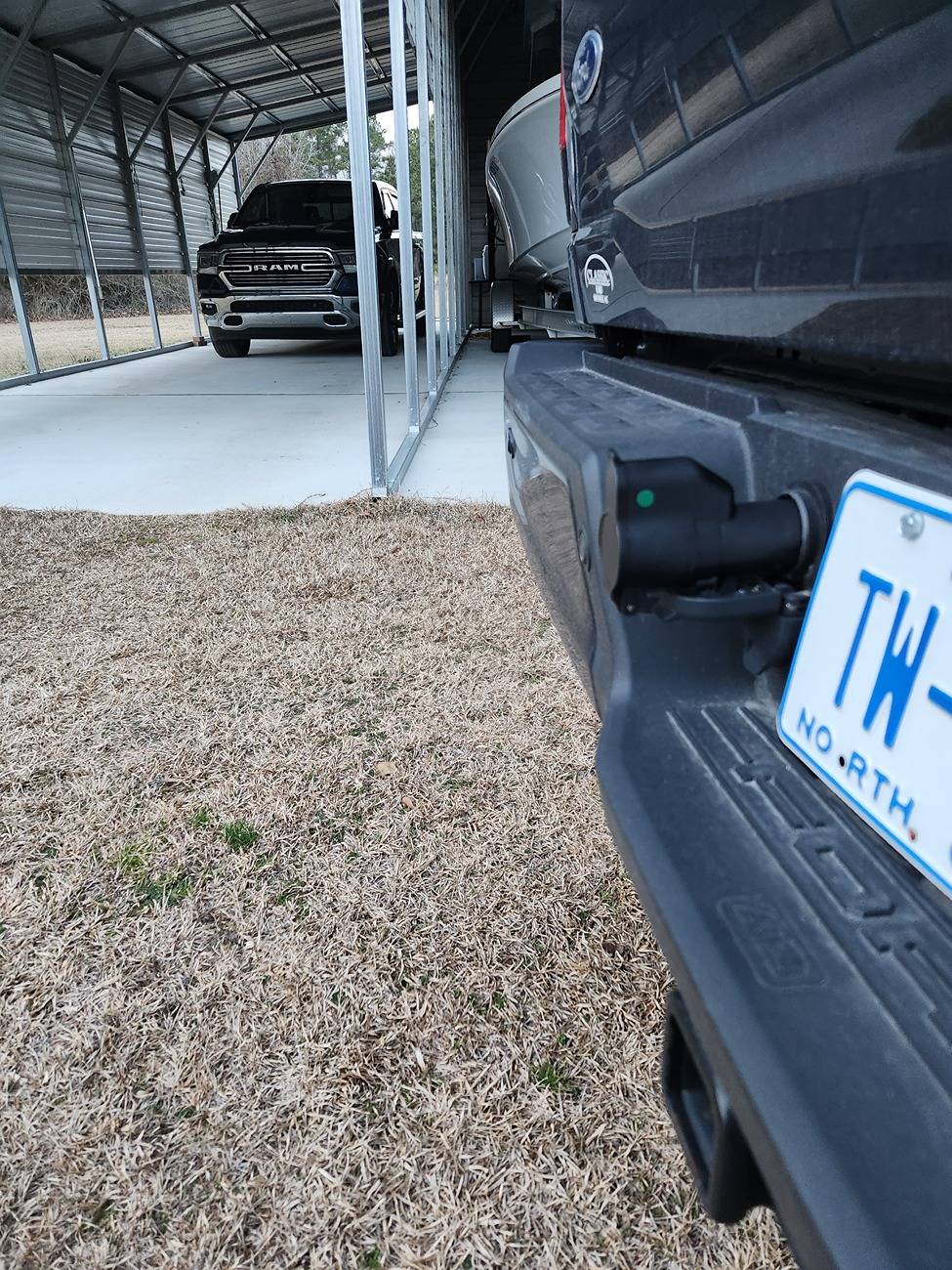
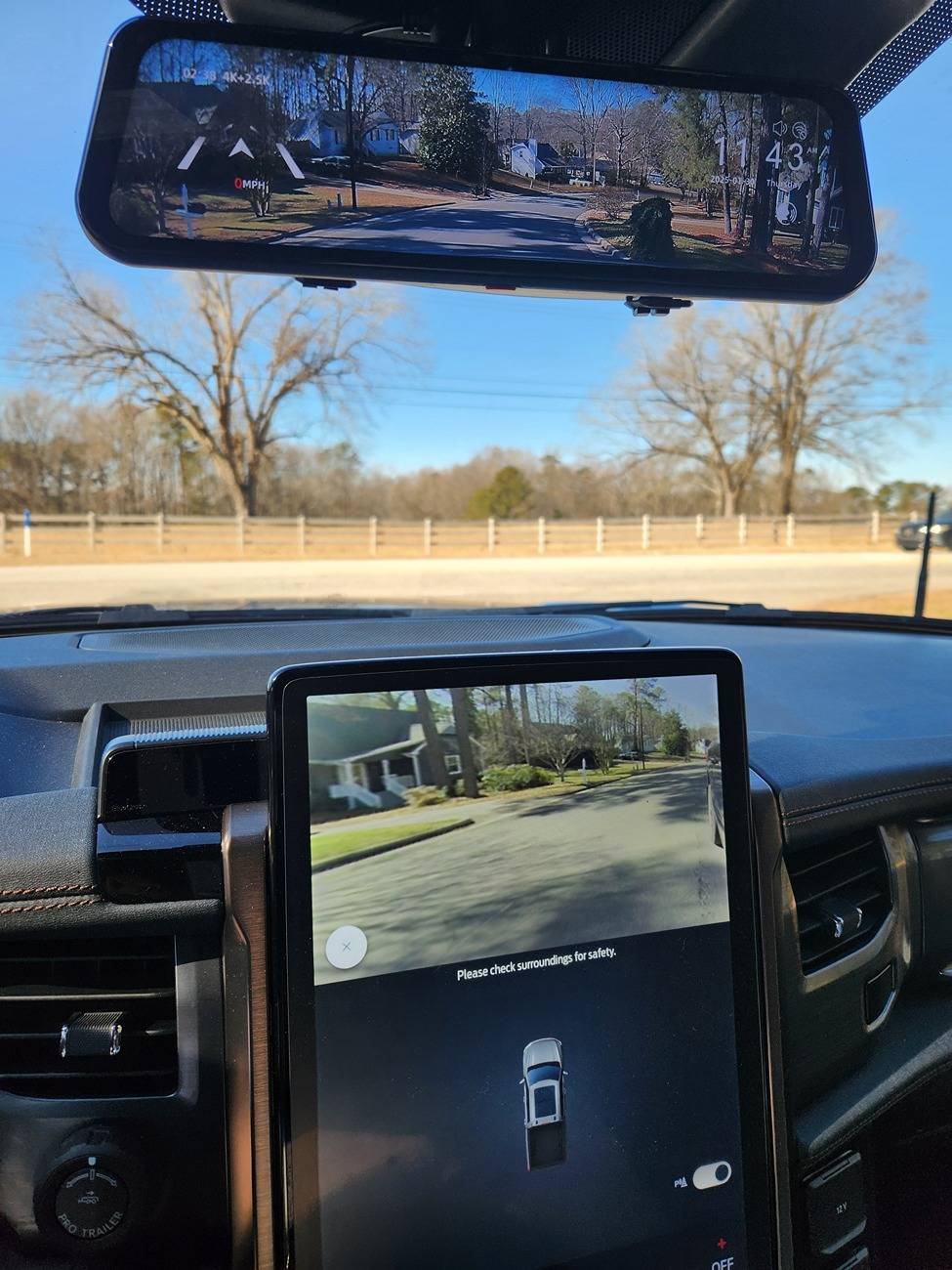
Well got one of the adapters to fool the truck into thinking I'm towing a trailer to enable the turn signal camera. Gif shows the 50/50 view and then the right turn signal.

After plugging in, it detects a trailer and you'll see a message that says blind spot and cross traffic disabled. I set it up as the smallest trailer possible which re-enabled the blind spot monitor (think that works on anything set up as less than 30ft) Blue Cruise and cross traffic alerts are obviously still disabled along with regular hands-on steering assist. It still pulls back if you hit a line but doesn't actively steer. Also disables the keep your eyes on the road message if you happen to be trying to drink anything.

Ford F-150 Lightning F150 Lightning FORScan thread - Version 2 1000008562


Ford F-150 Lightning F150 Lightning FORScan thread - Version 2 1000008561


Ford F-150 Lightning F150 Lightning FORScan thread - Version 2 1000008546
 
Last edited:

NPalumbo89

Active member
First Name
Nick
Joined
May 16, 2024
Threads
1
Messages
29
Reaction score
17
Location
Columbus, OH
Vehicles
F150Lightning
Occupation
IT
Well got one of the adapters to fool the truck into thinking I'm towing a trailer to enable the turn signal camera. Gif shows the 50/50 view and then the right turn signal.

After plugging in, it detects a trailer and you'll see a message that says blind spot and cross traffic disabled. I set it up as the smallest trailer possible which re-enabled the blind spot monitor (think that works on anything set up as less than 30ft) Blue Cruise and cross traffic alerts are obviously still disabled along with regular hands-on steering assist. It still pulls back if you hit a line but doesn't actively steer. Also disables the keep your eyes on the road message if you happen to be trying to drink anything.

1000008562.jpg


1000008561.gif


1000008546.jpg
Damn I may do this change tomorrow. Also what's that rear view mirror you're using?
 

NPalumbo89

Active member
First Name
Nick
Joined
May 16, 2024
Threads
1
Messages
29
Reaction score
17
Location
Columbus, OH
Vehicles
F150Lightning
Occupation
IT


Top