Sponsored

F150 Lightning FORScan thread - Version 2

OP
OP
bmwhitetx

bmwhitetx

Well-known member
First Name
Bruce
Joined
May 21, 2021
Threads
48
Messages
3,177
Reaction score
4,596
Location
DFW-Texas
Vehicles
2022 F150 Lightning Lariat ER
Occupation
Retired engineer
I appreciate that. I guess I will try to enable it and see if it does anything for me. I think I only have 8 speakers though, but it does have that brand marked on the speakers. Even with the tone only adjustment it does sound pretty good. I would like to tweak that in a little more so just the equalizer working would be OK with me.
Curious what you discover. I think at least a couple of folks with a 2024 Flash could not get the Beosonic tab to work.
Sponsored


moodinsk

Member
First Name
Tyler
Joined
Jan 2, 2025
Threads
0
Messages
15
Reaction score
22
Location
Michigan
Vehicles
2024 F150 Lightning Flash
Occupation
IT
Curious what you discover. I think at least a couple of folks with a 2024 Flash could not get the Beosonic tab to work.
I have a 2024 Flash that I got in Dec 2024 as indicated in my post. I gave up trying to get the beosonic menu to work in my truck.

I have yet to receive any OTA updates, but my current SYNC4 version is 24145 rev 1286. Beyond that, I am not sure how to tell what other potential version changes in the software that might cause it to not work vs the 2022-2023. I know there was at least one other person that posted with the same issue I have that had a 2024.
 

evowner

Well-known member
First Name
Frank
Joined
Jan 20, 2025
Threads
7
Messages
203
Reaction score
225
Location
SW Ohio
Vehicles
2024 Ford F150 Lightning Lariot
Occupation
Retired EE
I have a 2024 Flash that I got in Dec 2024 as indicated in my post. I gave up trying to get the beosonic menu to work in my truck.

I have yet to receive any OTA updates, but my current SYNC4 version is 24145 rev 1286. Beyond that, I am not sure how to tell what other potential version changes in the software that might cause it to not work vs the 2022-2023. I know there was at least one other person that posted with the same issue I have that had a 2024.
I am new to forscan and I do not have any experience with the CAN buss for communications and register modifications. I just got my cable, and I will try to get up and running with this stuff. I am wondering if something else has to be enabled? Maybe it is not only a software enable, but something in the amplifier too? Although from what I have read it does seem like the software is the problem. I also need to download as many wiring diagrams as possible with a 3 day pass. I hope I can teach my 70 yr old brain new tricks.
 

brtnstrns

Well-known member
Joined
Jul 23, 2023
Threads
3
Messages
66
Reaction score
101
Location
Seattle
Vehicles
2024 Lightning Platinum; 2022 Polestar 2 LRDM
I appreciate that. I guess I will try to enable it and see if it does anything for me. I think I only have 8 speakers though, but it does have that brand marked on the speakers. Even with the tone only adjustment it does sound pretty good. I would like to tweak that in a little more so just the equalizer working would be OK with me.
Curious what you discover. I think at least a couple of folks with a 2024 Flash could not get the Beosonic tab to work.
I have a 2024 Flash that I got in Dec 2024 as indicated in my post. I gave up trying to get the beosonic menu to work in my truck.

I have yet to receive any OTA updates, but my current SYNC4 version is 24145 rev 1286. Beyond that, I am not sure how to tell what other potential version changes in the software that might cause it to not work vs the 2022-2023. I know there was at least one other person that posted with the same issue I have that had a 2024.
I have a 2024 Platinum and the Beosonic change did not work for me either.
 

Sponsored

scruvs

Well-known member
Joined
Aug 7, 2023
Threads
8
Messages
102
Reaction score
84
Location
Florida
Vehicles
2023 F-150 Lightning XLT Standard Range
This was one of my biggest frustrations with the majority of FORSCAN tutorials and videos out there, inclyding livinigitup's own tutorials. When you just get stated most changes, instructions, and videos just say to change value X to value Y.

In truth EVERY change should be evaluated and you need to take your original value, compare against the spreadsheet, and determine exactly what the resulting value should be. This is not expressed enough, especially to new users. The number of members who have not read the spreadsheets is concerning.

In many cases the numbers you see online will be different if you have an XL, XLT, or Lariat trim with an ICE engine, and then again completely different for Pro, vs XLT, vs Flash, vs Lariat in the lightning.
I appreciate your comment on this frustration. I was aware of the spreadsheets, but didn't really know how to read them. I was blindly following this thread's instructions to change a to b, or if you have w change to x, else y to z. I realize it was safer following these vetted Lightning changes vs. using ICE settings, but it is so much more comforting to see the setting I had before and what feature was enabled after the change.
 

Scorpio3d

Well-known member
First Name
Chris
Joined
Mar 18, 2024
Threads
33
Messages
1,318
Reaction score
1,748
Location
Texas
Vehicles
2023 Ford F150 Lightning Lariat ER
Occupation
SS/IBA car wash owner
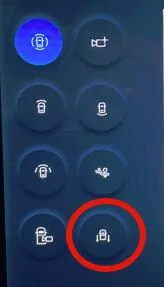
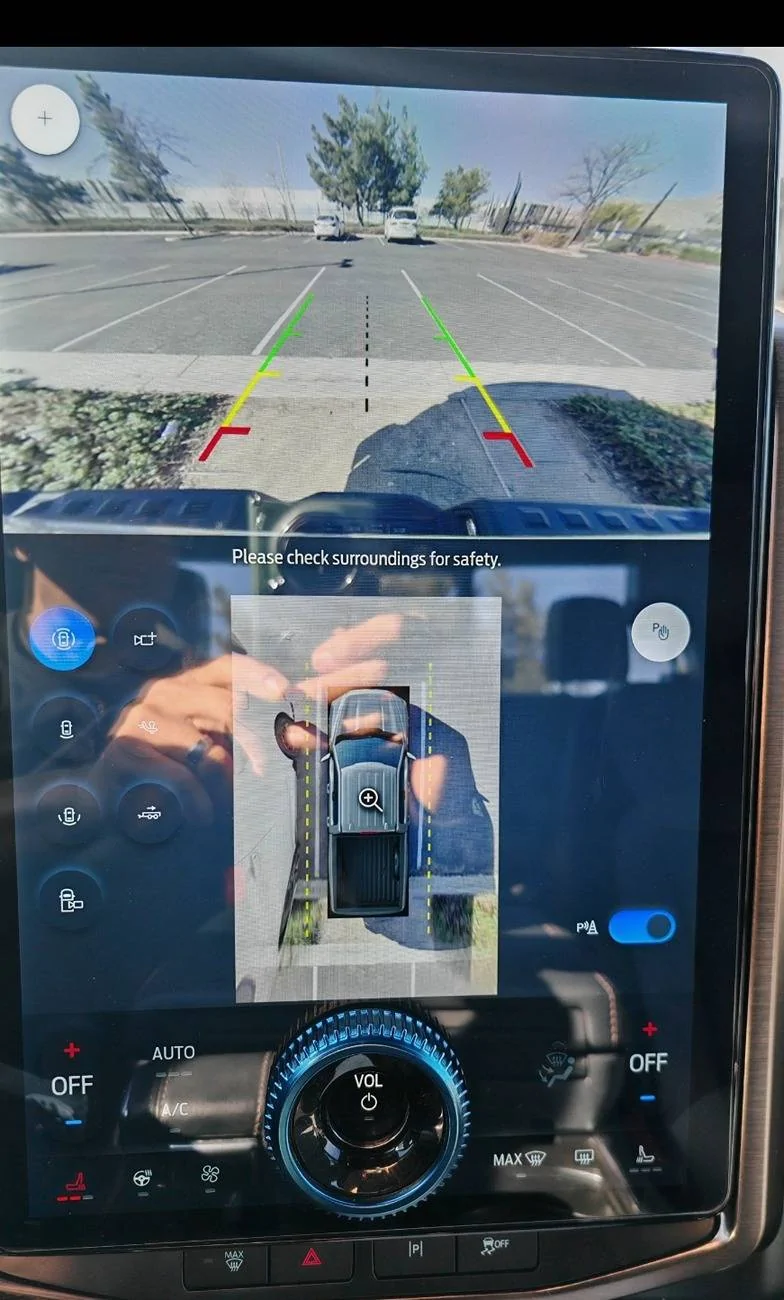
I actually tested it out today. With the 50/50 mod I get the following views when not moving:
1738209763979-nh.jpg


Once moving the two forward facing views and the 360 disappear (the first three in column 1). The top right icon is the optional add-on trailer cam which I don't have. So when moving I have bed, tailgate, 50/50, and hitch icons - and the first three work at speed (I didn't test hitch - kinda useless when going 40 mph).

So maybe when you enabled 50/50 or removed the Full View not available message, something got mixed up. The values in post 1 are Lightning specific. If you used values from the original thread or somewhere else, you may have killed bed camera at speed.

There is a setting for cameras at speed in the ICE F-150 spreadsheet I need to investigate it more. I'm pretty sure I didn't do any mod to get cameras at speed but I could be wrong about that.
First off, I have not done any of the updates except for glare free and BC 1.x and I was trying to use my cameras the other day and my bed camera (all cameras )did not work except when I was stopped??
I thought maybe it was one of the other updates from FDRS/OTA??
 

CRAIGC540

Well-known member
First Name
Craig
Joined
Dec 9, 2021
Threads
23
Messages
892
Reaction score
777
Location
Moreno valley
Vehicles
F150 Lariat F150 Lariat lightning 2022
Occupation
Technician
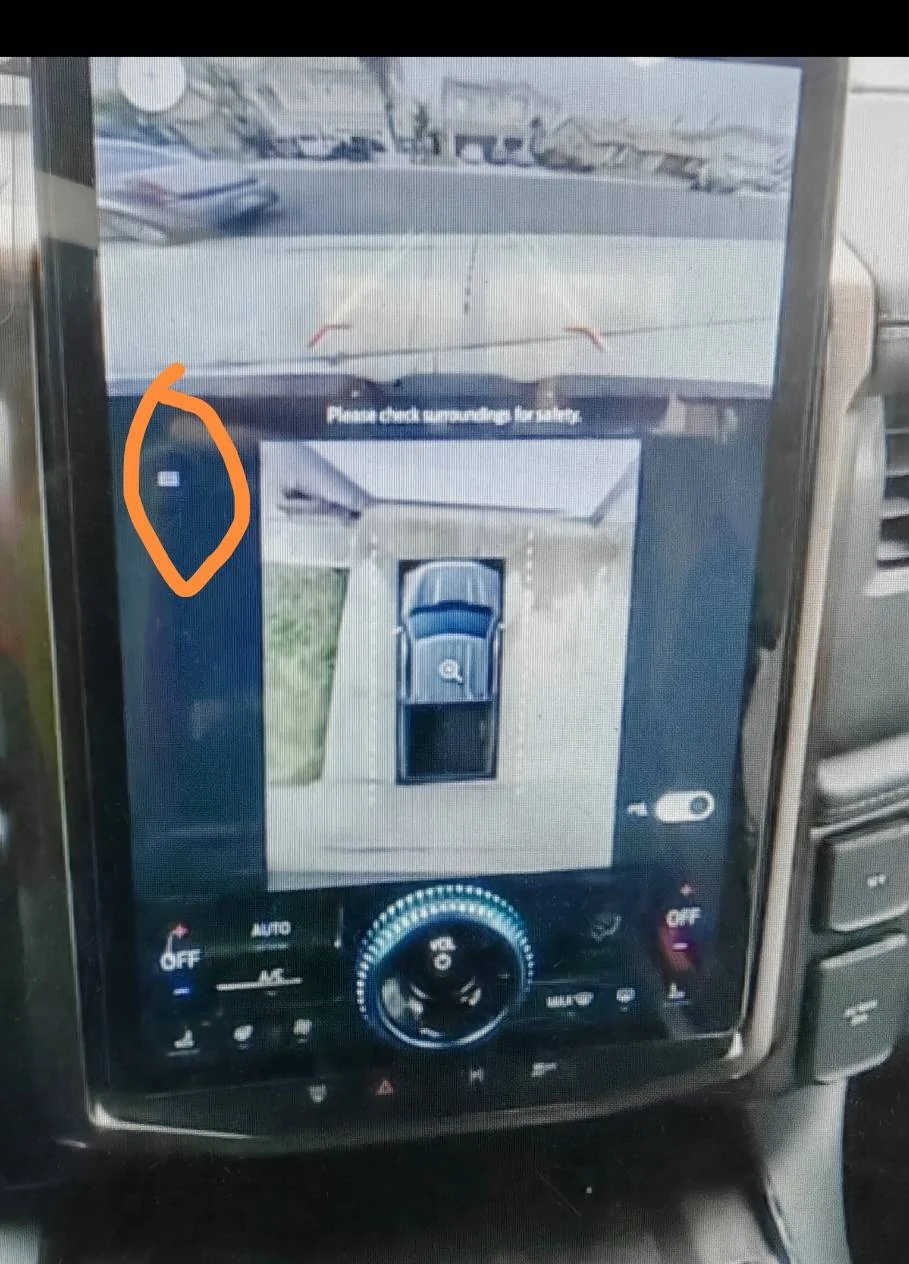
I just noticed after looking at a old photo of my screen that the 360 cam view is smaller, I'm not taking about small like after the front sensor update because that was even smaller. I'm wondering if it's smaller after the 50/50 view forscan change. Notice the menu button to select which camera view you want. Now the camera view is always in view.

Ford F-150 Lightning F150 Lightning FORScan thread - Version 2 1000005072
Ford F-150 Lightning F150 Lightning FORScan thread - Version 2 1000005069
 

Henry Ford

Well-known member
First Name
John
Joined
Dec 21, 2022
Threads
9
Messages
1,753
Reaction score
2,656
Location
Michigan
Vehicles
2022 F150 Lightning Platinum
I just noticed after looking at a old photo of my screen that the 360 cam view is smaller, I'm not taking about small like after the front sensor update because that was even smaller. I'm wondering if it's smaller after the 50/50 view forscan change. Notice the menu button to select which camera view you want. Now the camera view is always in view.

1000005072.jpg
1000005069.jpg
I think that happened after a Ford update, not ForScan. I played around with different views and the one shown in the second photo is the best one.
 
OP
OP
bmwhitetx

bmwhitetx

Well-known member
First Name
Bruce
Joined
May 21, 2021
Threads
48
Messages
3,177
Reaction score
4,596
Location
DFW-Texas
Vehicles
2022 F150 Lightning Lariat ER
Occupation
Retired engineer
I just noticed after looking at a old photo of my screen that the 360 cam view is smaller, I'm not taking about small like after the front sensor update because that was even smaller. I'm wondering if it's smaller after the 50/50 view forscan change. Notice the menu button to select which camera view you want. Now the camera view is always in view.

1000005072.jpg
1000005069.jpg
Not sure the FORScan 50/50 changed caused that. Look at my post 113. The icon style was the same before and after I added 50/50. The only difference was the new icon appeared. The 2024s have this style out of the box so it may have been a Sync update that changed this.
 

Sponsored

The Weatherman

Well-known member
First Name
Dean
Joined
Apr 20, 2023
Threads
35
Messages
2,004
Reaction score
2,950
Location
South Central KY
Vehicles
2022 RR F150 Lightning Lariat ER, 2020 Explorer PL
Occupation
Retired
I am looking forw someone in KY or TN that would be interested in enabling BC 1.4 in my 2022 Lariat ER. I have had all the updates need to enable turning it on via Forscan, but don’t have it and don’t feel comfortable in doing it myself. I’m old and prone to forgetting things.

Feel free to DM, if you can help. Thanks.
 
OP
OP
bmwhitetx

bmwhitetx

Well-known member
First Name
Bruce
Joined
May 21, 2021
Threads
48
Messages
3,177
Reaction score
4,596
Location
DFW-Texas
Vehicles
2022 F150 Lightning Lariat ER
Occupation
Retired engineer
First off, I have not done any of the updates except for glare free and BC 1.x and I was trying to use my cameras the other day and my bed camera (all cameras )did not work except when I was stopped??
I thought maybe it was one of the other updates from FDRS/OTA??
I have a to-do on post 1 to sort this out. I have cameras at speed (in motion) but I don't have any notes on how I enabled that. While stopped I get the 8 camera choices shown above in post 164 but when in motion the two front views and the 360 disappear. So in motion I just get bed, hitch, tailgate, and 50/50. You are seeing something different while in motion?

EDIT: did you try the one line mod for Remove "Full view not available" message on reverse camera screen while in motion?
 

Henry Ford

Well-known member
First Name
John
Joined
Dec 21, 2022
Threads
9
Messages
1,753
Reaction score
2,656
Location
Michigan
Vehicles
2022 F150 Lightning Platinum
I am looking forw someone in KY or TN that would be interested in enabling BC 1.4 in my 2022 Lariat ER. I have had all the updates need to enable turning it on via Forscan, but don’t have it and don’t feel comfortable in doing it myself. I’m old and prone to forgetting things.

Feel free to DM, if you can help. Thanks.
Do you have a computer? Forgetting things isn't really the issue, inputting the wrong thing would be an issue. If you want to dip your toes into Forscan start with something simple like removing the "Full View Not Available" box in the backup cam.

There are a lot of YouTube videos about how to use Forscan including a Lightning specific video by one of this forum's members whose name escapes me.
 

The Weatherman

Well-known member
First Name
Dean
Joined
Apr 20, 2023
Threads
35
Messages
2,004
Reaction score
2,950
Location
South Central KY
Vehicles
2022 RR F150 Lightning Lariat ER, 2020 Explorer PL
Occupation
Retired
Do you have a computer? Forgetting things isn't really the issue, inputting the wrong thing would be an issue. If you want to dip your toes into Forscan start with something simple like removing the "Full View Not Available" box in the backup cam.

There are a lot of YouTube videos about how to use Forscan including a Lightning specific video by one of this forum's members whose name escapes me.
Nope. No computers in my house since I retired from the IT industry 16 yrs ago.
 

21st Century Truck

Well-known member
First Name
Martin
Joined
Jul 11, 2024
Threads
20
Messages
1,167
Reaction score
1,466
Location
Virginia
Vehicles
Ford 150 Lightning 2023 XLT ER pkg. 312A
Nope. No computers in my house since I retired from the IT industry 16 yrs ago.
Weatherman, the next time I'll visit Sonny Boy in Louisville I'll ping You about this. I have a perpetual FORScan license and am fairly handy with it (through four Ford cars in the family and several friends' cars).

It might be two months away though... maybe You'll resolve it by then.
Sponsored


Top