Sponsored

F150 Lightning FORScan thread - Version 2

TrojanThor

Active member
Joined
Aug 30, 2025
Threads
0
Messages
25
Reaction score
46
Location
78645
Vehicles
2025 F150 Lightning Flash, Genesis GV60 Advanced
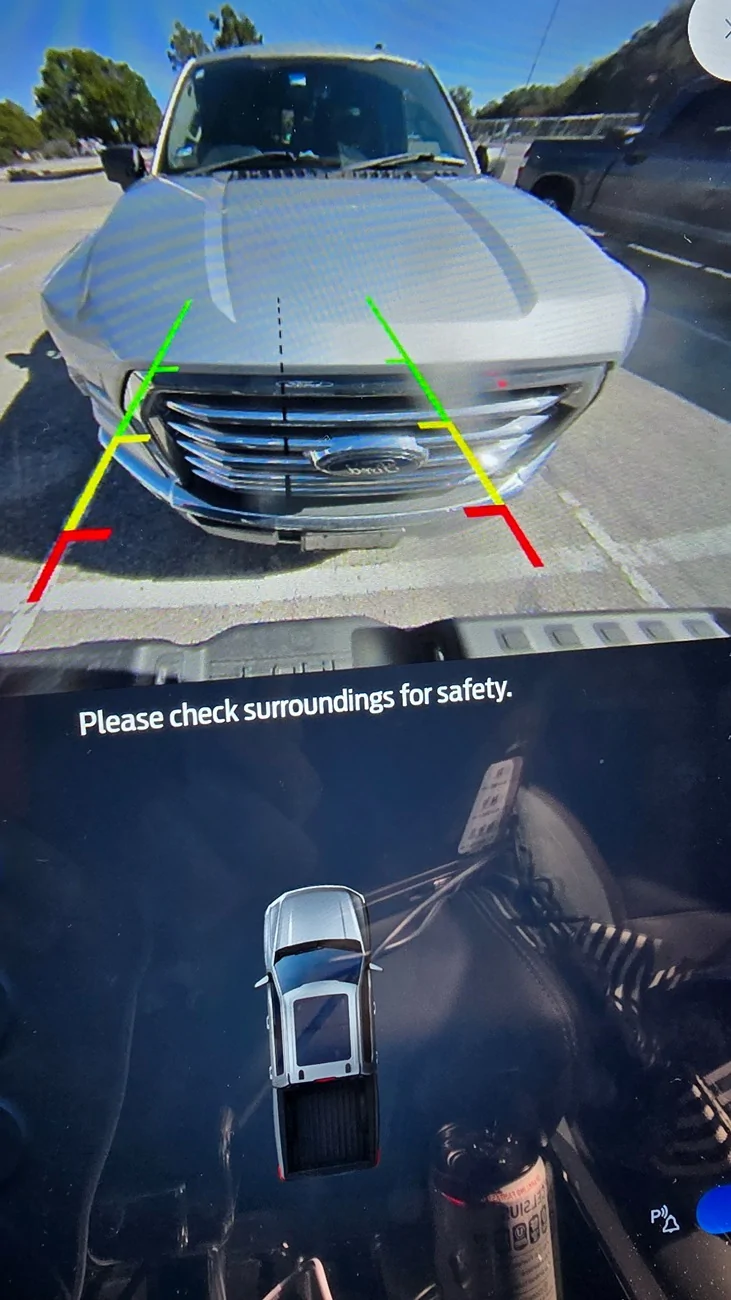
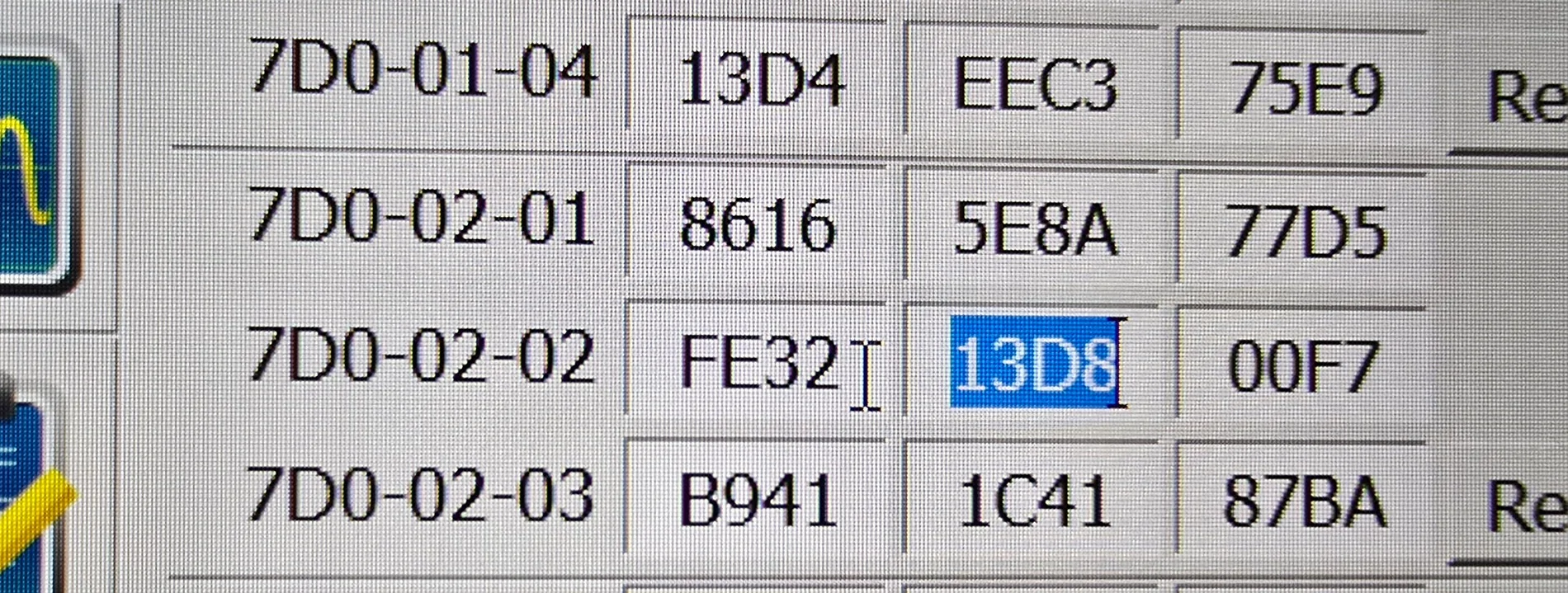
Removed Full View message from rear camera while in Drive. Changed 4th digit in 7DO-02-02 first box to one number lower.
Mine was FE33 for the first box.
Ford F-150 Lightning F150 Lightning FORScan thread - Version 2 20251206_121951


Ford F-150 Lightning F150 Lightning FORScan thread - Version 2 20251206_121825
Sponsored

 
Last edited:
OP
OP
bmwhitetx

bmwhitetx

Well-known member
First Name
Bruce
Joined
May 21, 2021
Threads
48
Messages
3,178
Reaction score
4,602
Location
DFW-Texas
Vehicles
2022 F150 Lightning Lariat ER
Occupation
Retired engineer
Could we add these to the first post?

I would like to apply them as well.
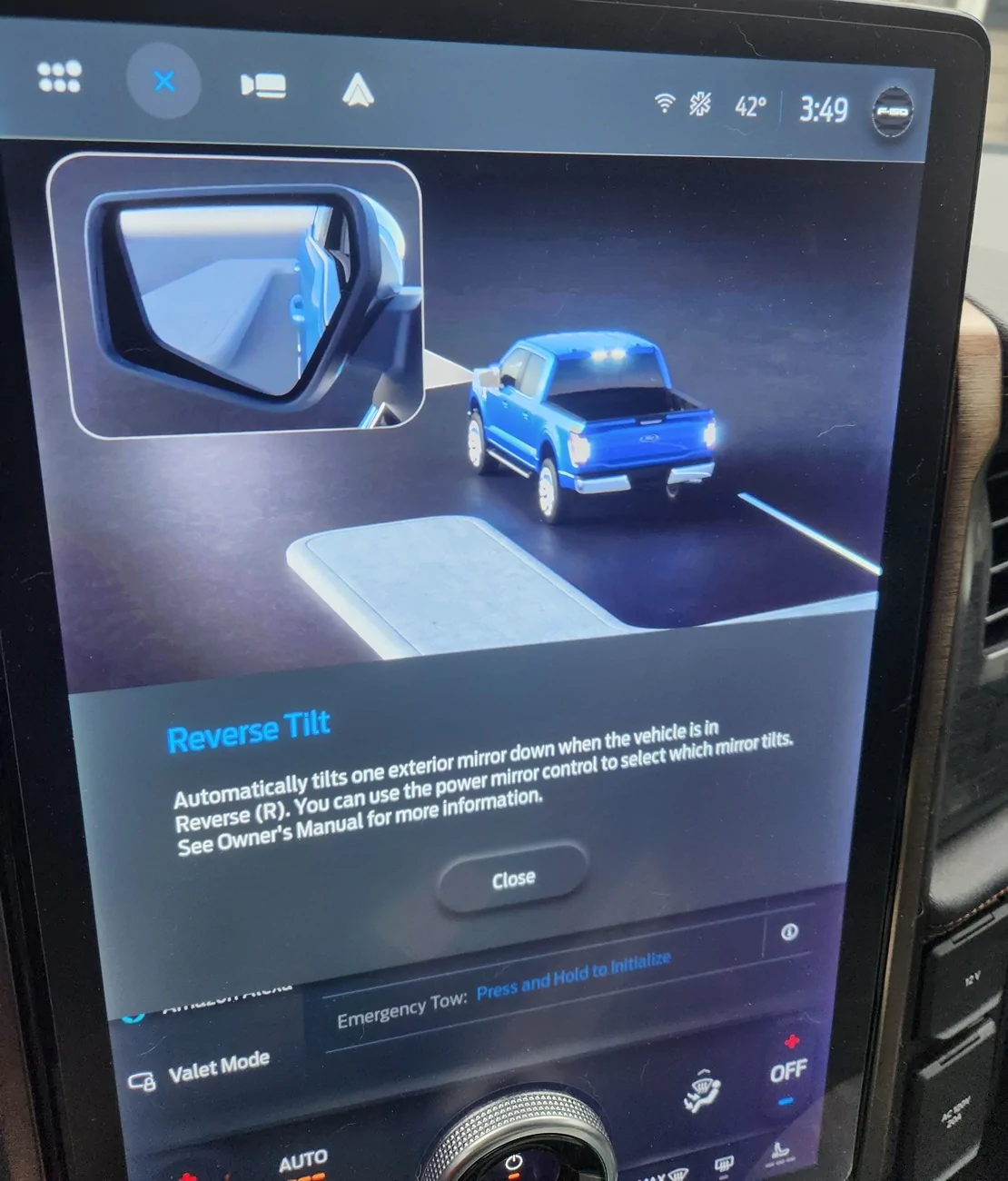
He stated he hasn't tested all of these. For example I thought Mirrors down on reverse wasn't working.

More camera views is already there in post 1 (trailer side view, etc.)

@TrojanThor - it looks like from one of your pics you were using Easy mode for some of the mods. Note, just because it is listed there doesn't mean it is implemented or works on Lightnings. EDIT- I see you discovered mirrors down doesn't work as I suspected.

Would be nice if you could test the list @hb.sagen posted and tell us what you changed. Thanks!
 
Last edited:
OP
OP
bmwhitetx

bmwhitetx

Well-known member
First Name
Bruce
Joined
May 21, 2021
Threads
48
Messages
3,178
Reaction score
4,602
Location
DFW-Texas
Vehicles
2022 F150 Lightning Lariat ER
Occupation
Retired engineer
Did you look at the individual results on virus total? How many flagged it as malware?
It said 6/61 but only three were listed

Ford F-150 Lightning F150 Lightning FORScan thread - Version 2 1765056206433-zt
 

PJnc284

Well-known member
Joined
Sep 30, 2024
Threads
0
Messages
1,218
Reaction score
1,390
Location
Garner, NC
Vehicles
2023 Ford F150 Lightning Lariat ER
Messed around with the mirror tilt function and think you're better off just using the 3rd memory setting if you're not using it or adjust it manually when needed.. There's a long drawn out programming procedure that a video that someone made for the mach e but it doesn't seem to work or at least not on my 23 Lariat. The mirror tilts but never stops and keeps trying to tilt during the "programming process" and still does the same thing after. My default value was A so I changed it to E but it also should be in Easy Mode for anyone that wants to pull their hair out.

Ford F-150 Lightning F150 Lightning FORScan thread - Version 2 1765057330349-zu


Ford F-150 Lightning F150 Lightning FORScan thread - Version 2 20251206_155000
 

21st Century Truck

Well-known member
First Name
Martin
Joined
Jul 11, 2024
Threads
20
Messages
1,176
Reaction score
1,491
Location
Virginia
Vehicles
Ford 150 Lightning 2023 XLT ER pkg. 312A
Messed around with the mirror tilt function and think you're better off just using the 3rd memory setting if you're not using it or adjust it manually when needed.. There's a long drawn out programming procedure that a video that someone made for the mach e but it doesn't seem to work or at least not on my 23 Lariat. The mirror tilts but never stops and keeps trying to tilt during the "programming process" and still does the same thing after. My default value was A so I changed it to E but it also should be in Easy Mode for anyone that wants to pull their hair out.

1765057330349-zu.webp


20251206_155000.webp
Ha ha ha - I and Connor (Connoisseurr) made that procedure together. I had brought some knowledge, FORScan and otherwise, from my Ford Fusion Energi days and over from the 2gfusions.net blog. We messed around and codified the steps, and Conor, now long-gone from the Mach E blog and enjoying his Rivian, posted it on the Mach E blog.

As far as I remember the details, several things must be present... and perhaps this translates over to the Lightning as well (don't know because I'm missing one of these things on my XLT):

1. motors in mirror housings
2. selective seat position memory in the in-the-door modules (DDM and PDM).
3. memory selector buttons on the door panel for different mirror positions for different drivers (I'm missing this and do not feel like replacing my entire inner door panel just to put that mirror memory switch in).

So, based on my old Fusion Energi and on our work with the two Mach Es, this tilt-in-reverse function is certainly unavailable / unreachable on those Lightnings which do not have mirror memory selector buttons, and might not be available at all if the DDM and PDM modules weren't built the same way the Fusion and Mach E door modules were built.
 

Sponsored
OP
OP
bmwhitetx

bmwhitetx

Well-known member
First Name
Bruce
Joined
May 21, 2021
Threads
48
Messages
3,178
Reaction score
4,602
Location
DFW-Texas
Vehicles
2022 F150 Lightning Lariat ER
Occupation
Retired engineer
Update: plugged in led brake light from Amazon to trailer pin to see if I could activate Cross Traffic Alert. Setting now selectable but reverts after a few seconds. Menu prompts that it recognizes trailer connected (led brake light), I set to No trailer it setting and no more notifications (trailer connected) after I disabled them in Forscan.
When you plug in a trailer (or spoof one with a Brake light), the truck disables Cross-Traffic Alerts and Blue Cruise. On the plus side you get turn signal camera view if enabled.
 
  • Like
Reactions: GDN

RSMLightning25

Well-known member
First Name
Richard
Joined
Aug 3, 2025
Threads
5
Messages
52
Reaction score
59
Location
Schertz, TX
Vehicles
2011 FX2 F-150 5.0 Blue Flame, 2025 Lariat Lightning Anti-Matter Blue
Occupation
Network Security
Glare Free headlights - working, required AB mode - What is AB mode?

Enabled BeoSonic - working - Please tell me more about this. Is it an improvement?

Enabled Bambi mode - How does this work? I know on my 2018 I did this to keep the fog lights on with the high beams. How does it work on the lightning?
 

Sentinal

Member
First Name
Leigh
Joined
Jul 28, 2025
Threads
0
Messages
7
Reaction score
19
Vehicles
2023 F-150 Lightning XLT
Blind spot camera activation with turn signals in action.

I wish we could get this without having to real trailer or spoof a trailer being attached.
 

bc1

Well-known member
Joined
Oct 25, 2025
Threads
12
Messages
452
Reaction score
328
Location
McPherson, KS
Vehicles
2025 Ford f150 Lightning Flash
Hello guys. Got my dongle. Just need to open up the downloaded forscan and get signed up and then go try it out assuming it runs ok on this laptop. All I want to do for now on my 2025 Flash is the glare free headlights and I've printed off a bunch of values and figures from post # 2 but I'm not sure how I will find it all when I run the program.

Just wondering if anyone has done a short video of doing this and/or any of the other procedures? I can figure out how to hook up I believe with the vehicle running, then the instructions say to click the wrench icon of the forscan program, then choose APIM module reboot and hit the play button which will turn the vehicle off and then I am to wait 10 seconds. After that I don't know for sure how to find the glare free setup. Thanks.

I might add I can't find an execute file to run the program except for the uninstall. Does this just come up after I plug it in or what?
 
Last edited:

Sponsored
OP
OP
bmwhitetx

bmwhitetx

Well-known member
First Name
Bruce
Joined
May 21, 2021
Threads
48
Messages
3,178
Reaction score
4,602
Location
DFW-Texas
Vehicles
2022 F150 Lightning Lariat ER
Occupation
Retired engineer
Hello guys. Got my dongle. Just need to open up the downloaded forscan and get signed up and then go try it out assuming it runs ok on this laptop. All I want to do for now on my 2025 Flash is the glare free headlights and I've printed off a bunch of values and figures from post # 2 but I'm not sure how I will find it all when I run the program.

Just wondering if anyone has done a short video of doing this and/or any of the other procedures? I can figure out how to hook up I believe with the vehicle running, then the instructions say to click the wrench icon of the forscan program, then choose APIM module reboot and hit the play button which will turn the vehicle off and then I am to wait 10 seconds. After that I don't know for sure how to find the glare free setup. Thanks.

I might add I can't find an execute file to run the program except for the uninstall. Does this just come up after I plug it in or what?
After you download the file (e.g., FORScanSetup2.3.65.release), you run that file and it installs the program like any other windows program. Then you just click Windows Start icon, find the new program called FORScan, and click it to run.

Did you look at post 2? It has other resources. I would start with the tutorial mentioned:
https://docs.google.com/document/d/1-8dKaS_Spu4Zw4hV_CrKC4tLoP9G8yejqegF1wxIqxY/edit?tab=t.0

For Programming you want to use what he calls Programming - Advanced Method.

Make sure you make backups (and also I like to separately write down the current values before changing).
 

Aminorjourney

Well-known member
First Name
Nikki
Joined
Jun 6, 2022
Threads
21
Messages
430
Reaction score
1,080
Location
Internet
Website
www.transportevolved.com
Vehicles
2023 F150 Lightning Lariat, 2017 Chevrolet Bolt EV, 2006 Vectrix VX-1
  • Like
Reactions: GDN

GDN

Well-known member
First Name
Greg
Joined
Feb 15, 2022
Threads
94
Messages
3,774
Reaction score
4,855
Location
Dallas, TX
Vehicles
Lightning Lariat ER, Performance Y
Occupation
IT
ALWAYS download your as built BEFORE doing ANYTHING else.

Know that, eventually, your changes will propagate to Ford's servers for As-Built. Ask me how I know ;)
Having this download will let you verify any setting and is good to have on hand. To make it easy, always backup every module through Forscan (part of the procedures noted in the first few posts) before making any changes. That makes an easy restore point for every module you touch and you don't have to worry if you corrected any potential mistakes manually.
 

Aminorjourney

Well-known member
First Name
Nikki
Joined
Jun 6, 2022
Threads
21
Messages
430
Reaction score
1,080
Location
Internet
Website
www.transportevolved.com
Vehicles
2023 F150 Lightning Lariat, 2017 Chevrolet Bolt EV, 2006 Vectrix VX-1
Having this download will let you verify any setting and is good to have on hand. To make it easy, always backup every module through Forscan (part of the procedures noted in the first few posts) before making any changes. That makes an easy restore point for every module you touch and you don't have to worry if you corrected any potential mistakes manually.
Exactly!

Just earlier today I needed to use it to roll back something I was trying ;)

*I still don't understand the in-IPC clock settings, and still don't seem to be able to get them displaying... *
Sponsored


Top