Sponsored

Connecting IPod Classic to Truck?

Rayden

Well-known member
Joined
Aug 11, 2025
Threads
6
Messages
110
Reaction score
111
Vehicles
'23 Lightning Lariat ER
I’ve done the search and can’t find anything here. Is it possible to connect an IPod Classic to the truck via USB? Plugging into the USB port next to the wireless charging pad does nothing. Anyone else had success here? Can’t connect device under the “Media”app, as nothing shows available to add.
Sponsored

 

Timeless Epoch

Well-known member
First Name
Chad
Joined
Mar 3, 2025
Threads
5
Messages
206
Reaction score
319
Vehicles
2024 F150 Lightning Platinum
Occupation
Professionally: Disaster Recovery - Recreationally: Watchmaker
Amazon sells iPod 30 pin to bluetooth adapters.
 

FloridaMan655321

Well-known member
Joined
Jul 7, 2024
Threads
28
Messages
525
Reaction score
623
Location
Florida
Vehicles
1973 F100, 2024 Flash
Nice on still rocking the iPod classic. I believe that one had the disk drive, right? It’s a shame there wasn’t just a headphone jack in on the Lightning.
Bluetooth adapter is probably going to work best for you. I’d suggest not buying the absolute cheapest out there as you will have issues connecting.

Good luck, and I’d love to see your solution.
 

PrimeRisk

Well-known member
First Name
Mark
Joined
Aug 4, 2024
Threads
9
Messages
352
Reaction score
375
Location
Denver-Metro
Vehicles
2024 F-150 L Lariat, 2023 Tesla MY, 2021 Tesla MYP
Occupation
Technonerd
My iPod died an eon ago (or so it seems). You should be able to plug it into the USB port then go to sources in SYNC and select USB. You may need to put the iPod into Disk Mode via iTunes. It's all a PITA dealing with this Apple stuff now. Frankly I suggest ditching the iPod world and buy a quality micro USB stick and just put your music on it to plug into the USB port in the truck. If you must stay in the Apple ecosystem, then buy an older gen iPhone (probably 7 or higher) for $100 or so and leave it in the truck with your music on it.
 

Sponsored

bmwhitetx

Well-known member
First Name
Bruce
Joined
May 21, 2021
Threads
46
Messages
2,998
Reaction score
4,295
Location
DFW-Texas
Vehicles
2022 F150 Lightning Lariat ER
Occupation
Retired engineer
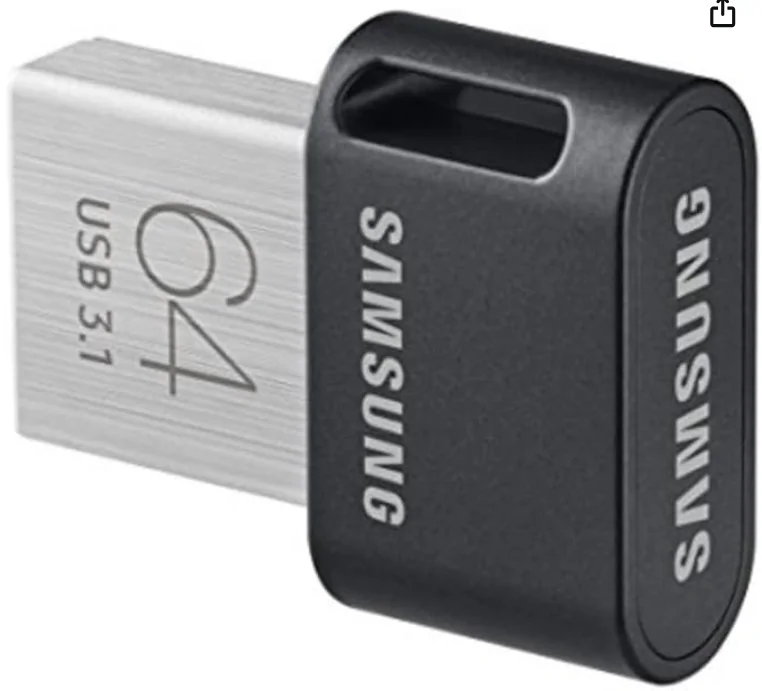
I bought one of these, plugs into the USB-A port leaving the USB-C available for my phone if needed. Super small, holds a ton of music, and control it with the Sync screen. Sync UI not as polished as Apple but works for me. https://a.co/d/dNTdhqd

Ford F-150 Lightning Connecting IPod Classic to Truck? 1767136019453-o9
 
OP
OP
Rayden

Rayden

Well-known member
Joined
Aug 11, 2025
Threads
6
Messages
110
Reaction score
111
Vehicles
'23 Lightning Lariat ER
Yeah, I just thought it might connect via USB. I just got an OTA update and one of the things it mentions is connecting devices via USB. So I figured it would work. Has anyone connected via USB and if so, which port did you use?
 
OP
OP
Rayden

Rayden

Well-known member
Joined
Aug 11, 2025
Threads
6
Messages
110
Reaction score
111
Vehicles
'23 Lightning Lariat ER
Nice on still rocking the iPod classic. I believe that one had the disk drive, right? It’s a shame there wasn’t just a headphone jack in on the Lightning.
Bluetooth adapter is probably going to work best for you. I’d suggest not buying the absolute cheapest out there as you will have issues connecting.

Good luck, and I’d love to see your solution.
Yeah, this thing has been with me for a long time. I’ve primarily been using it to practice my bass guitar to, but wanted to test out how good this B&O system sounds on songs that would push it. Coincidentally, my wife just asked for (and got) for Christmas a Bluetooth adapter for her iPhone in her car. Cheap is definitely not the way to go.
 
OP
OP
Rayden

Rayden

Well-known member
Joined
Aug 11, 2025
Threads
6
Messages
110
Reaction score
111
Vehicles
'23 Lightning Lariat ER
I bought one of these, plugs into the USB-A port leaving the USB-C available for my phone if needed. Super small, holds a ton of music, and control it with the Sync screen. Sync UI not as polished as Apple but works for me. https://a.co/d/dNTdhqd

1767136019453-o9.webp
Now I need to check and see what size this thing is! It was 256, I think. Would that have been 256G? Surely not 256M?! 🤔
 

B177y

Well-known member
First Name
Bill
Joined
Jul 16, 2024
Threads
13
Messages
662
Reaction score
839
Location
Olympic Peninsula, WA
Vehicles
2024 Pro SSV ER Max Tow
...which port did you use?
Either of the ports in the front console (the A or C) will read music on a thumb drive and use the Sync screen to control it.

The USB ports in the center console are just for charging only. They do not connect to the Sync system.

I'm pretty sure that when Ford says "USB devices", they only mean USB thumb drives or SSD's/hard drives. The suggestion above by @PrimeRisk to put your iPod into "Disk Mode" might be the ticket.
 

Sponsored
OP
OP
Rayden

Rayden

Well-known member
Joined
Aug 11, 2025
Threads
6
Messages
110
Reaction score
111
Vehicles
'23 Lightning Lariat ER
Either of the ports in the front console (the A or C) will read music on a thumb drive and use the Sync screen to control it.

The USB ports in the center console are just for charging only. They do not connect to the Sync system.

I'm pretty sure that when Ford says "USB devices", they only mean USB thumb drives or SSD's/hard drives. The suggestion above by @PrimeRisk to put your iPod into "Disk Mode" might be the ticket.
Thank you for all of that. I’ll have to see if I can do the Disk Mode or not.
 

On the Road with Ralph

Well-known member
First Name
Ralph
Joined
Feb 6, 2023
Threads
19
Messages
323
Reaction score
874
Location
Mojave Desert, California
Vehicles
2023 Ford Lightning Pro
Occupation
Real estate/biz consultant
Either of the ports in the front console (the A or C) will read music on a thumb drive and use the Sync screen to control it.

The USB ports in the center console are just for charging only. They do not connect to the Sync system.

I'm pretty sure that when Ford says "USB devices", they only mean USB thumb drives or SSD's/hard drives. The suggestion above by @PrimeRisk to put your iPod into "Disk Mode" might be the ticket.
This is an interesting thread - of limited utility, but interesting nonetheless.

Three notes:

1) For years, I kept an old iPhone 4S in my car, connected by cable, as my music source. But vehicles stopped supporting whatever protocol was used to interface to the old iPhones, so I abandoned it and just switched to using my daily (and much more current) iPhone.

2) In my Lightning, my iPhone 16 Pro ONLY connects to CarPlay wirelessly; I can plug it in via USB to charge, but it doesn't recognize wired CarPlay as an option. To be clear, I use a data-rated cable to connect the iPhone to the truck, but it doesn't make a difference.

3) I have an iPod in a drawer somewhere. I might waste an hour or two seeing if I can get it to connect to the Lightning in disk mode.
 

chriserx

Well-known member
First Name
Chris
Joined
Oct 3, 2025
Threads
1
Messages
566
Reaction score
404
Location
Louisiana
Vehicles
2025 Ford Lightning Flash Job 2 😭
1) For years, I kept an old iPhone 4S in my car, connected by cable, as my music source. But vehicles stopped supporting whatever protocol was used to interface to the old iPhones, so I abandoned it and just switched to using my daily (and much more current) iPhone
Did they? I don't remember this.
2) In my Lightning, my iPhone 16 Pro ONLY connects to CarPlay wirelessly; I can plug it in via USB to charge, but it doesn't recognize wired CarPlay as an option. To be clear, I use a data-rated cable to connect the iPhone to the truck, but it doesn't make a difference
You use the center console one? Because it wouldn't. It's dumb, but understandable only the ports nearest the Sync screen work.

Edit: I went and looked up number 1, if the system doesn't fall back this is correct. It's been so long I don't remember if I connected by bluetooth or USB anymore. 😂
 
Last edited:

DavidS

Member
First Name
DAVID
Joined
Dec 27, 2025
Threads
0
Messages
19
Reaction score
18
Location
Green Bay, WI
Vehicles
F150 Lightning Lariat
Yeah, this thing has been with me for a long time. I’ve primarily been using it to practice my bass guitar to, but wanted to test out how good this B&O system sounds on songs that would push it. Coincidentally, my wife just asked for (and got) for Christmas a Bluetooth adapter for her iPhone in her car. Cheap is definitely not the way to go.
Bluetooth is then not the way to go. Tidal over CarPlay which also uses WiFi does a good job of maximizing the B&O sound system quality. I would say it’s above average. It’s about on par with the B&O I had in my 2012 Audi. Not as good as the premium sound system playing Tidal in a Tesla however where acoustic guitar reproduction is amazing.
 

On the Road with Ralph

Well-known member
First Name
Ralph
Joined
Feb 6, 2023
Threads
19
Messages
323
Reaction score
874
Location
Mojave Desert, California
Vehicles
2023 Ford Lightning Pro
Occupation
Real estate/biz consultant
You use the center console one? Because it wouldn't. It's dumb, but understandable only the ports nearest the Sync screen work.
I'm plugged into the ports under the screen (Pro/12-inch). I'm using the USB-A port. I'm not sure I've ever tried the USB-C connection; might give that a try.

I understand that the ports buried in the console are charging-only, like the ones in the frunk.
Sponsored


Top