Sponsored

Comma AI self driver assistant

kzoojason76

Active member
First Name
Jason
Joined
Jan 1, 2025
Threads
0
Messages
29
Reaction score
13
Vehicles
2024 F150 Lightning Flash
Yeah, the dock integration would be a separate product since it has to be built into the docks mounting system anyways. If there is enough interest, I can add it as an option on the ordering forums. Otherwise, I can work it out individually.
Perfect!! I already have one of the original couplers on order. That can get me through while you get an order together for a “dock” version.
Sponsored


UncleTony

Well-known member
First Name
Tony
Joined
Apr 18, 2025
Threads
2
Messages
370
Reaction score
422
Location
Texas
Vehicles
2023 Lightning Lariat
Occupation
Cybersecurity Engineer
Perfect!! I already have one of the original couplers on order. That can get me through while you get an order together for a “dock” version.
I ordered 20 since there wasn't a lot of response. After the recent changes in import laws, these will probably take a little bit to make it to me. I will post when they are available, as the import times are becoming drastically longer and I don't want to provide a false time frame.
 

mmarchand

Active member
First Name
Matt
Joined
May 25, 2025
Threads
2
Messages
44
Reaction score
8
Vehicles
F150 Lightning
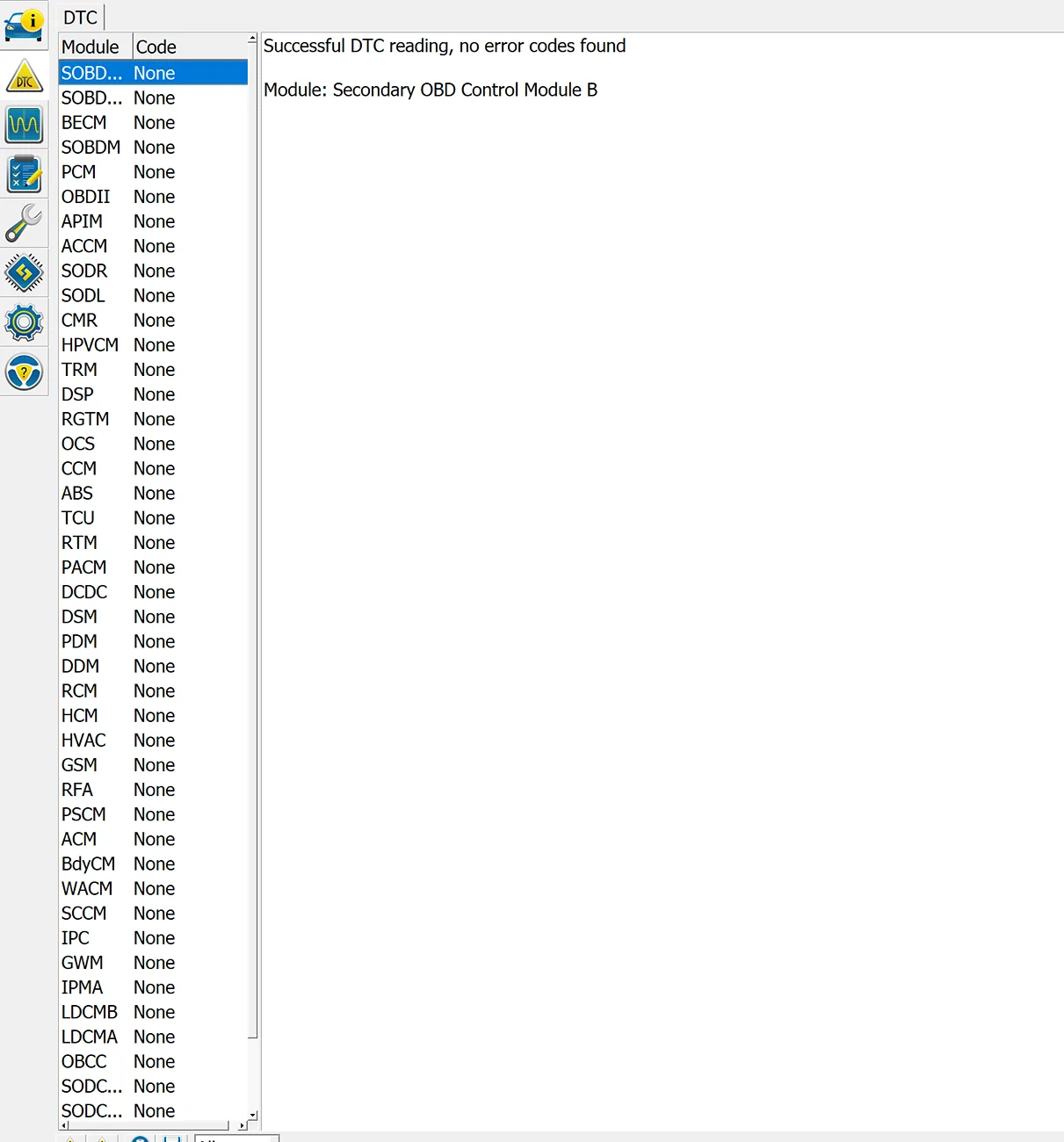
Got my coupler in the mail and installed it. The initial system faults no longer show up, which is great. But I have a lingering "Service Vehicle Soon" warning after the comma starts up. The warning does not show up right at start up, only after the comma is fully powered up. I've checked the DTCs and have cleared all from the previous errors and it's all reading as "None" but I'm still getting the service vehicle soon warning.

In the app, I get Powertrain Malfunction/Reduced Power warning on the service page but I don't have any reduced power and no other issues. Where can I look to reset this code and get the wrench/service vehicle soon off the dashboard?
Ford F-150 Lightning Comma AI self driver assistant Screenshot 2025-09-27 at 9.45.03 AM
 

kzoojason76

Active member
First Name
Jason
Joined
Jan 1, 2025
Threads
0
Messages
29
Reaction score
13
Vehicles
2024 F150 Lightning Flash
Got my coupler in the mail and installed it.
Mine is still “lost” in the mail. As soon and I get it, I can install and see if I get the same results. I can’t wait to get rid of all of the errors and warnings when starting up. Loving my Comma so far!!
 

Sponsored

B177y

Well-known member
First Name
Bill
Joined
Jul 16, 2024
Threads
17
Messages
795
Reaction score
1,084
Location
Olympic Peninsula, WA
Vehicles
'24 Pro SSV ER Max Tow, '23 MME Premium, '20 Bolt
Got my coupler in the mail and installed it. The initial system faults no longer show up, which is great. But I have a lingering "Service Vehicle Soon" warning after the comma starts up. The warning does not show up right at start up, only after the comma is fully powered up. I've checked the DTCs and have cleared all from the previous errors and it's all reading as "None" but I'm still getting the service vehicle soon warning.

In the app, I get Powertrain Malfunction/Reduced Power warning on the service page but I don't have any reduced power and no other issues. Where can I look to reset this code and get the wrench/service vehicle soon off the dashboard?
Screenshot 2025-09-27 at 9.45.03 AM.webp
I would try to remove the 12 volt negative for 20 minutes at this point to see if you can reset whatever module is still holding your SSN warning. It won't hurt anything and might fix it.
 

mmarchand

Active member
First Name
Matt
Joined
May 25, 2025
Threads
2
Messages
44
Reaction score
8
Vehicles
F150 Lightning
I would try to remove the 12 volt negative for 20 minutes at this point to see if you can reset whatever module is still holding your SSN warning. It won't hurt anything and might fix it.
it’s only with the Comma installed. If I disconnect the USB C and start the truck, I don’t get the service vehicle soon alert on the dashboard. It’s persistent in the FordPass app though.
 

UncleTony

Well-known member
First Name
Tony
Joined
Apr 18, 2025
Threads
2
Messages
370
Reaction score
422
Location
Texas
Vehicles
2023 Lightning Lariat
Occupation
Cybersecurity Engineer
it’s only with the Comma installed. If I disconnect the USB C and start the truck, I don’t get the service vehicle soon alert on the dashboard. It’s persistent in the FordPass app though.
Try installing the comma with just the short USB C cable directly to the comma harness and see if the error stays.
 

mmarchand

Active member
First Name
Matt
Joined
May 25, 2025
Threads
2
Messages
44
Reaction score
8
Vehicles
F150 Lightning
Try installing the comma with just the short USB C cable directly to the comma harness and see if the error stays.
with only short usb and connector, I did not get the service vehicle warning. I re-attached via long cable and got the warning again.

Some additional details is I’m using azj’s sliding dock too.
 

UncleTony

Well-known member
First Name
Tony
Joined
Apr 18, 2025
Threads
2
Messages
370
Reaction score
422
Location
Texas
Vehicles
2023 Lightning Lariat
Occupation
Cybersecurity Engineer
with only short usb and connector, I did not get the service vehicle warning. I re-attached via long cable and got the warning again.

Some additional details is I’m using azj’s sliding dock too.
Try with the long cable and bypass the dock.
 

Sponsored

UncleTony

Well-known member
First Name
Tony
Joined
Apr 18, 2025
Threads
2
Messages
370
Reaction score
422
Location
Texas
Vehicles
2023 Lightning Lariat
Occupation
Cybersecurity Engineer
still get the error when bypassing the dock. I did another test with just the short USB and no error that way still.
When you did the long cable, it was just the long cable straight to the comma?
 

mmarchand

Active member
First Name
Matt
Joined
May 25, 2025
Threads
2
Messages
44
Reaction score
8
Vehicles
F150 Lightning
When you did the long cable, it was just the long cable straight to the comma?
Straight to the dock. No double female connector and no short USB. I added the short USB when I got your connector because there was no other way I could see to connect the connector without it. Right now it’s going from the harness to the short USB to the lightning connector to the long USB to the sliding dock.
 

UncleTony

Well-known member
First Name
Tony
Joined
Apr 18, 2025
Threads
2
Messages
370
Reaction score
422
Location
Texas
Vehicles
2023 Lightning Lariat
Occupation
Cybersecurity Engineer
Straight to the dock. No double female connector and no short USB. I added the short USB when I got your connector because there was no other way I could see to connect the connector without it. Right now it’s going from the harness to the short USB to the lightning connector to the long USB to the sliding dock.
Try rotating the long usb c. Not end over end, just 180 the connectors and make sure it clicks.
 

mmarchand

Active member
First Name
Matt
Joined
May 25, 2025
Threads
2
Messages
44
Reaction score
8
Vehicles
F150 Lightning
Try rotating the long usb c. Not end over end, just 180 the connectors and make sure it clicks.
Still no luck. Switched only the connector end, then the dock end so that both ends had been rotated. Then rotated the connector end back so that only the dock end was rotated and all 3 still gave the error
Sponsored


Top