Sponsored

F150 Lightning FORScan thread - Version 2

NeuroDawg

Member
Joined
Apr 25, 2024
Threads
4
Messages
22
Reaction score
6
Location
Puget Sound, WA
Vehicles
'24 Flash ER (previously '23 XLT ER)
Well, I don't have the "Glare-free" on/off button on the Lighting screen for starters. I do get the all green glare free symbol.
That happened to me when I programmed my truck. Turns out I had screwed up the APIM settings, mistyping a setting in the wrong place. It took me a couple times through to spot the error. If you need a second set of eyes, download your APIM settings and show the file here (it's a plain-text file that's quite easy to read).
Sponsored


mxracer

Well-known member
First Name
Dan
Joined
Dec 18, 2024
Threads
3
Messages
57
Reaction score
57
Vehicles
2024 F-150 Lightning Flash
Before this goes sideways: I am an adult that does wear a seat belt when on the road. I however spend time in the hay/cattle fields as well as have a 1/4 mile long driveway where I don't wear them.

Disclaimer: Not my work, I pulled this from a Maverick forum here, which seems to be pulled from a Super Duty forum. Thanks to the guys that figured this out.

I don't like the seat belt graphics that pop up when someone unbuckles. I tried the owners manual method at least a dozen times to no avail, but that was after disabling chimes so maybe that's why it didn't work.

Anyway I went looking for a Forscan solution and turns out the Maverick guys figured it out for their vehicles. I figured I'd give it a shot and it worked on my 24 Flash.

DISABLE SEATBELT INFORMATION SCREEN
1. Open IPC AS BUILT
2. Change line 720-13-01 and 720-13-02 to ALL ZEROS. And WRITE the changes. Click yes to let Forscan correct the checksum.
3. Change line 720-14-01 and 720-14-02 to ALL ZEROS. And WRITE the changes. Click yes to let Forscan correct the checksum.

This also disables all chimes according to the Maverick post but I already had those disabled so I can't confirm that point.

Once this is done and working there is ZERO indication of seat belts, NONE, not even the little red person with seat belt on.

Note that I had to write the data a couple of times. The first time there are a couple of blocks that are not editable, but after you write the ones that are editable the non-editable blocks become editable and you can then zero them out and write again.
 

B177y

Well-known member
First Name
Bill
Joined
Jul 16, 2024
Threads
16
Messages
782
Reaction score
1,077
Location
Olympic Peninsula, WA
Vehicles
'24 Pro SSV ER Max Tow, '23 MME Premium, '20 Bolt
Before this goes sideways: I am an adult that does wear a seat belt when on the road. I however spend time in the hay/cattle fields as well as have a 1/4 mile long driveway where I don't wear them.

Disclaimer: Not my work, I pulled this from a Maverick forum here, which seems to be pulled from a Super Duty forum. Thanks to the guys that figured this out.

I don't like the seat belt graphics that pop up when someone unbuckles. I tried the owners manual method at least a dozen times to no avail, but that was after disabling chimes so maybe that's why it didn't work.

Anyway I went looking for a Forscan solution and turns out the Maverick guys figured it out for their vehicles. I figured I'd give it a shot and it worked on my 24 Flash.

DISABLE SEATBELT INFORMATION SCREEN
1. Open IPC AS BUILT
2. Change line 720-13-01 and 720-13-02 to ALL ZEROS. And WRITE the changes. Click yes to let Forscan correct the checksum.
3. Change line 720-14-01 and 720-14-02 to ALL ZEROS. And WRITE the changes. Click yes to let Forscan correct the checksum.

This also disables all chimes according to the Maverick post but I already had those disabled so I can't confirm that point.

Once this is done and working there is ZERO indication of seat belts, NONE, not even the little red person with seat belt on.

Note that I had to write the data a couple of times. The first time there are a couple of blocks that are not editable, but after you write the ones that are editable the non-editable blocks become editable and you can then zero them out and write again.
If I'm reading the Livitup spreadsheet correctly it looks like all zeros in these lines makes the truck think that there are no seats installed :LOL:
 

mxracer

Well-known member
First Name
Dan
Joined
Dec 18, 2024
Threads
3
Messages
57
Reaction score
57
Vehicles
2024 F-150 Lightning Flash
If I'm reading the Livitup spreadsheet correctly it looks like all zeros in these lines makes the truck think that there are no seats installed :LOL:
Yeah, good point. I did verify my seat heaters and power seats still work on both sides.

If I have time I'll play a bit with those values and see if the " without Buckle Sensor" values work
 
OP
OP
bmwhitetx

bmwhitetx

Well-known member
First Name
Bruce
Joined
May 21, 2021
Threads
48
Messages
3,177
Reaction score
4,596
Location
DFW-Texas
Vehicles
2022 F150 Lightning Lariat ER
Occupation
Retired engineer
That happened to me when I programmed my truck. Turns out I had screwed up the APIM settings, mistyping a setting in the wrong place. It took me a couple times through to spot the error. If you need a second set of eyes, download your APIM settings and show the file here (it's a plain-text file that's quite easy to read).
I got @Karlos back on track. Just needed a second set of eyes!
 

Sponsored

jnoahr

Member
First Name
Jason
Joined
Jan 8, 2025
Threads
1
Messages
5
Reaction score
0
Vehicles
2024 F-150 Lightning Flash 9.6kw
When I park my lightning the lights stay on for 10 minutes. I screwed something up. How do I fix it.
 

jnoahr

Member
First Name
Jason
Joined
Jan 8, 2025
Threads
1
Messages
5
Reaction score
0
Vehicles
2024 F-150 Lightning Flash 9.6kw
The code for?
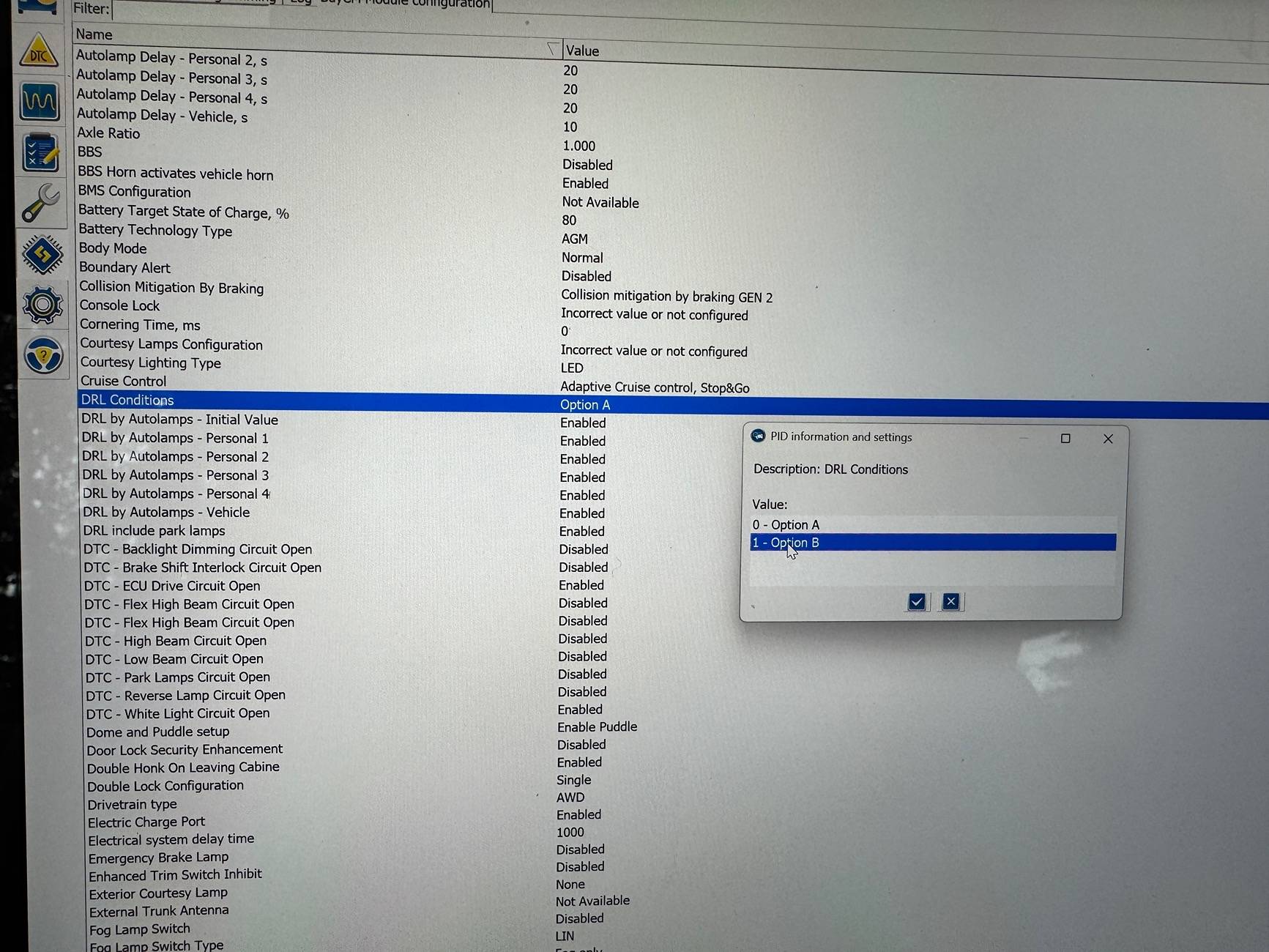
When I park my lightning and walk away from it, the headlights stay on for 10 minutes. I wanna shorten that down to like a minute.
 

Sponsored

B177y

Well-known member
First Name
Bill
Joined
Jul 16, 2024
Threads
16
Messages
782
Reaction score
1,077
Location
Olympic Peninsula, WA
Vehicles
'24 Pro SSV ER Max Tow, '23 MME Premium, '20 Bolt
When I park my lightning and walk away from it, the headlights stay on for 10 minutes. I wanna shorten that down to like a minute.
Did you make changes that caused this behavior? If so, which module did you make changes to? If you "screwed something up" as your post says, what line in Forscan did you "screw up"? You have to go back to that line and change the value, based on the values in the spreadsheet. Use this spreadsheet to figure out what you did and what your stock values should be:

Livitup Forscan spreadsheet

Best practice is to make backups before you make any changes in forscan so that you can always restore your original values.

If you can't figure out what you did, there is an option in forscan to download as-built data that may help you restore some normal settings, or it may not. I have no experience doing that.
 

jnoahr

Member
First Name
Jason
Joined
Jan 8, 2025
Threads
1
Messages
5
Reaction score
0
Vehicles
2024 F-150 Lightning Flash 9.6kw
I figured it out and saved the original profile

Ford F-150 Lightning F150 Lightning FORScan thread - Version 2 IMG_3717
 
OP
OP
bmwhitetx

bmwhitetx

Well-known member
First Name
Bruce
Joined
May 21, 2021
Threads
48
Messages
3,177
Reaction score
4,596
Location
DFW-Texas
Vehicles
2022 F150 Lightning Lariat ER
Occupation
Retired engineer
I figured it out and saved the original profile

IMG_3717.jpeg
Glad you recovered. I'm not familiar with that parameter. The spreadsheet doesn't explain the difference between Options A and B.

Ford F-150 Lightning F150 Lightning FORScan thread - Version 2 1740440855004-j
 

Karlos

Well-known member
First Name
Karl
Joined
Dec 4, 2022
Threads
2
Messages
178
Reaction score
165
Location
DFW & Kerrville Tx
Vehicles
2022 Ice Blue & 2023 Silver ER Lariat Lightnings, 2024 Mach-e Premium ER
Occupation
Retired CPA, active pilot
I got @Karlos back on track. Just needed a second set of eyes!
Yes you did !! Last night I went thru the same process on my 2022 LER, got the buttons and the Glare Free to work without any issues, but I was getting "Reverse Brake Assis not available" message. Went back thru everything this morning, then read a post that this could be a temporary issue that would resolve itself after a bit of driving. Sure enuf, that message has disappeared and all appears well with the 2022 LER as well.

Now if we could just get Sport Mode to stay on .....

Thanks again !!
 

richguy82

Well-known member
First Name
Richard
Joined
Feb 20, 2025
Threads
14
Messages
183
Reaction score
139
Vehicles
2023 Ford Lightning Lariat
Which setting in BCM in the text version do I need to change for global open and close windows?
Sponsored


Top