Sponsored

F150 Lightning FORScan thread - Version 2

OP
OP
bmwhitetx

bmwhitetx

Well-known member
First Name
Bruce
Joined
May 21, 2021
Threads
46
Messages
2,892
Reaction score
4,107
Location
DFW-Texas
Vehicles
2022 F150 Lightning Lariat ER
Occupation
Retired engineer
“Sped up power frunk and tailgate one notch - working”

What do you change for this?
We all get excited when there is something else we can modify. But is this one really fabulous and useful? Or is it a shiny object that we must have?

My concern is that there may be downsides we don’t understand. Are you causing too much force on close that can damage something over time? Or will the pinch sensor not have enough time to react if a hand is in the way?

Sorry, I’m starting to sound like Ford Legal. Or your mom. :)
Sponsored


B177y

Well-known member
First Name
Bill
Joined
Jul 16, 2024
Threads
12
Messages
549
Reaction score
702
Location
Oly Pen, WA
Vehicles
2024 Pro ER Max Tow
We all get excited when there is something else we can modify. But is this one really fabulous and useful? Or is it a shiny object that we must have?

My concern is that there may be downsides we don’t understand. Are you causing too much force on close that can damage something over time? Or will the pinch sensor not have enough time to react if a hand is in the way?

Sorry, I’m starting to sound like Ford Legal. Or your mom. :)
Valid points, but the frunk is pathetically slow.

One of the reviews that I watched (linked from this forum somewhere) compared the Lightning frunk speed to the Chevy, Rivian, and CT frunks. The Lightning frunk was sooo slooow that the reviewers were cracking up 🤣
 

theaustinite

Member
First Name
Ben
Joined
Jul 30, 2025
Threads
0
Messages
14
Reaction score
11
Vehicles
2023 F-150 Lightning Lariat ER
Sorry, I’m starting to sound like Ford Legal. Or your mom. :)
You’re not my dad! :crackup:

But yeah, I like to mess with things. I use my frunk ALL the time (my refrigerated cooler is in there), and it seems so slow that sometimes I wonder if it’s as intended or if if it needs new AA batteries!
 

bc1

Well-known member
Joined
Oct 25, 2025
Threads
5
Messages
79
Reaction score
38
Location
McPherson, KS
Vehicles
2025 Ford f150 Lightning Flash
Well I tried and got part way on the glare free headlights. Got to go to south so I hope my headlights work.

When I got out there it was having trouble staying loaded and I finally had to put forscan.exe in as an exclusion to windows defender in Windows 10.

So I got started and got the first two changed in the APIM module and was having trouble changing modules. Played around and got to the SCCM line and changed that line. Then I couldn't change modules again. Got into something to do with IPMA and it was having me turn it on and off saying it was going from adaptive cruise to normal cruise. Then everything went south and the program won't load and run anymore. I have to go and come back tonight I hope or in the morning and reload and try again. If you have any ideas let me know. I didn't see any instructions on changing modules once in there.

Thanks.
 

TrojanThor

Member
Joined
Aug 30, 2025
Threads
0
Messages
22
Reaction score
42
Location
78645
Vehicles
2025 F150 Lightning Flash, Genesis GV60 Advanced
Well I tried and got part way on the glare free headlights. Got to go to south so I hope my headlights work.

When I got out there it was having trouble staying loaded and I finally had to put forscan.exe in as an exclusion to windows defender in Windows 10.

So I got started and got the first two changed in the APIM module and was having trouble changing modules. Played around and got to the SCCM line and changed that line. Then I couldn't change modules again. Got into something to do with IPMA and it was having me turn it on and off saying it was going from adaptive cruise to normal cruise. Then everything went south and the program won't load and run anymore. I have to go and come back tonight I hope or in the morning and reload and try again. If you have any ideas let me know. I didn't see any instructions on changing modules once in there.

Thanks.
Reset to factory AB then follow this in AB. Easy mode did not work for me.

Ford F-150 Lightning F150 Lightning FORScan thread - Version 2 Screenshot_20251209_150627_Chrom
 

Sponsored

bc1

Well-known member
Joined
Oct 25, 2025
Threads
5
Messages
79
Reaction score
38
Location
McPherson, KS
Vehicles
2025 Ford f150 Lightning Flash
Thanks. I have the list of codes printed out. I got through the first two and was able to write them. Then I couldn't figure out how to change back away from the APIM module I was in to go to a different one. I messed around and tried to get to the IPMA next on the list but settled for the SCCM module and changed it. Then everything kinda locked up. However I drove it last night with those three changes and I was seeing out very wide in the ditches. Thought maybe the distance on dim wasn't as far but not sure. Brights was like normal. Picking a spot around a hundred feet to the side and to the front of me in the ditch and going from dims to brights and back and there wasn't any change. So from what I can tell I am seeing a wider out further on dims as if it was on brights. Nobody flashed me on dims either. So I'm thinking the APIM module must control the headlights led's with one for the left and one for the right.

So I still need to reload the software and figure out why it is crashing. I'm not sure what the other modules do and if any of them add an on/off switch to the options and I haven't looked to see if one is there yet.

Guess I need help navigating around in the program switching modules and I assume I have to write after each module change which includes turning the truck off and on. Also does anyone know what each one of the modules on the list controls? Thanks.
 
OP
OP
bmwhitetx

bmwhitetx

Well-known member
First Name
Bruce
Joined
May 21, 2021
Threads
46
Messages
2,892
Reaction score
4,107
Location
DFW-Texas
Vehicles
2022 F150 Lightning Lariat ER
Occupation
Retired engineer
Thanks. I have the list of codes printed out. I got through the first two and was able to write them. Then I couldn't figure out how to change back away from the APIM module I was in to go to a different one. I messed around and tried to get to the IPMA next on the list but settled for the SCCM module and changed it. Then everything kinda locked up. However I drove it last night with those three changes and I was seeing out very wide in the ditches. Thought maybe the distance on dim wasn't as far but not sure. Brights was like normal. Picking a spot around a hundred feet to the side and to the front of me in the ditch and going from dims to brights and back and there wasn't any change. So from what I can tell I am seeing a wider out further on dims as if it was on brights. Nobody flashed me on dims either. So I'm thinking the APIM module must control the headlights led's with one for the left and one for the right.

So I still need to reload the software and figure out why it is crashing. I'm not sure what the other modules do and if any of them add an on/off switch to the options and I haven't looked to see if one is there yet.

Guess I need help navigating around in the program switching modules and I assume I have to write after each module change which includes turning the truck off and on. Also does anyone know what each one of the modules on the list controls? Thanks.
When you choose the chip icon (programming) on the left you are given all the module choices. Several will be listed twice. There will always be one that has (AS BUILT format) next to it. That’s what you should choose. Some modules will have an additional option with no additional text - that is what we call Easy Mode. But it’s not labeled easy mode.

Then at the bottom press the Play button and ok any warnings. You will get a screen with all the parameters and text boxes to change. IMPORTANT: at the bottom choose Save All. This is your first backup.

Find the first line that needs changing. Important: write down the address and existing value. This is your second backup. We may you for your existing value if there are any questions.

Now make the changes and either press Write for each section OR make all the changes for that module and then click Write All at the bottom. You will get warnings about checksums but you can continue. Forscan will calculate the new checksum.

Then press the Stop button at the bottom to exit programming mode for that module. Choose the next module and repeat above steps.

If you are getting Windows messages about security you should probably stop, uninstall that version, and install an older version. If an older version gives warnings then your Windows is too locked down.
 

bc1

Well-known member
Joined
Oct 25, 2025
Threads
5
Messages
79
Reaction score
38
Location
McPherson, KS
Vehicles
2025 Ford f150 Lightning Flash
OK thanks. I hope I fixed some problems. Rebooted my computer. I had done virus exclusions for that Packuwan and the forscan.exe files. When I try this again I can turn off real time virus protection in windows security if needed.

I was able to finally open that page of instructions that kept crashing when the popup appeared on top of it from the author. Also got to look at the video on using forscan when writing to more than one module and wrote the steps down which is what I need so I will type them here for someone else. If anyone sees something that needs to be edited and corrected then let me know and I will do so such as I believe the entire procedure is done using the on and off button without pushing on the brake which technically starts the vehicle so if this is wrong then let me know.

Edits: Bruce is helping me prepare this Glare-Free for Dummies Post a/k/a The Complete Idiot's Guide to Glare-Free which is what I always need. Still have more to add and number them later.

Modules affected:

APIM = Sync Screen = To reboot it you have to connect to Forscan on your laptop and click on the square wrench button on the left side.

IPC = Dash Screen

IPMA = Image Processing Module A = The camera behind the windshield.

SSCM = Steering Column Control Module = Tells the system the direction you are steering for headlight bending.

HCM = Headlight Control Module = Probably controls what particular led's are turned on and off inside each headlight along with working with the steering control module to make them move when oncoming cars and cars directly ahead of you are detected. Probably makes the headlight led's that look to the ditches stay on.


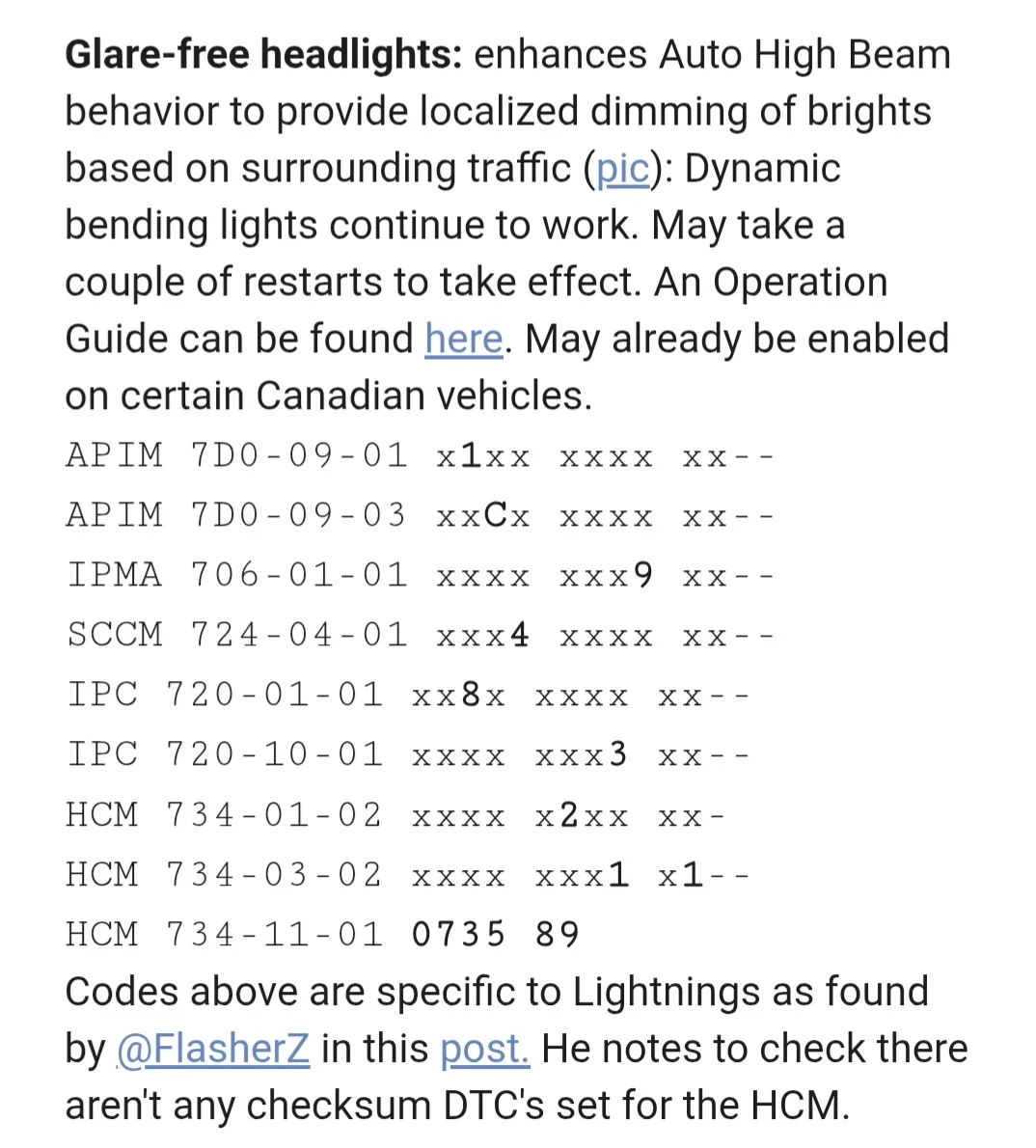
Glare-free headlights: enhances Auto High Beam behavior to provide localized dimming of brights based on surrounding traffic (pic): Dynamic bending lights continue to work. May take a couple of restarts to take effect. An Operation Guide can be found here. May already be enabled on certain Canadian vehicles.
APIM 7D0-09-01 x1xx xxxx xx--
APIM 7D0-09-03 xxCx xxxx xx--
IPMA 706-01-01 xxxx xxx9 xx--
SCCM 724-04-01 xxx4 xxxx xx--
IPC 720-01-01 xx8x xxxx xx--
IPC 720-10-01 xxxx xxx3 xx--
HCM 734-01-02 xxxx x2xx xx-
HCM 734-03-02 xxxx xxx1 x1--
HCM 734-11-01 0735 89
Codes above are specific to Lightnings as found by @FlasherZ in this post. He notes to check there aren't any checksum DTC's set for the HCM.


Step by step instructions to run more than one module in Forscan.

Turn on the pickup without pressing the brake and connect the cable to your pickup at lower left.

Run Forscan on your computer and plug in the cable.

Click on the cable/chain link button at lower left to begin link and it show linked.

Click on the Download Vehicle Information big I square button on the top left and it will download the vehicle data and list all the modules.

Once you open the module and before you change anything, click the SAVE ALL button at the bottom. Forscan will auto name the file with the module name and date/time. You can typically add to the file name such as "BEFORE glare-free" for example. If it is the very first time then same a copy as something like "As Built from Ford", etc.

Click on the Program square button under the wrench icon square to bring up programming mode.

Click on the module to change using the "as built" module".

Click on the green arrow button at the bottom left to bring up module contents.

Click on OK on the popup for changing configuration warning.

Make changes to the values in the command lines for what you are doing and make sure you write down what the prior value was before making that change. You may be making changes in more than one line and have to scroll down to find it.

When done with changes to the module then click on the write all button at the bottom.

Click on Yes on the popup for incorrect checksum warning.

When you get a popup that says Block program successfully - cycle ignition off & and back on then go ahead and push your ignition button off till the lights go out and push back on and then you can click the OK button on the popup.

Then click on the square to the right of the green arrow down at the bottom to get out of programming mode for that module.

If you need to program another module then click on the download vehicle information square button at the very top left and click on a new as built module and click on the green arrow to start the process again.

Once you are ready to quit after you are done writing, have cycled the ignition off and on, and clicked on the square button to get out of programming mode then go back and click on the Download vehicle information button on the top left and view everything to make sure it is all green arrows.

Once you are finished, click the SAVE ALL button at the bottom. Forscan will auto name the file with the module name and date/time. You can typically add to the file name such as "After glare-free" for example or "After whatever changes made".

Then click on the disconnect cable/chain link at the bottom to the right of the connect chain link and you can unhook your cable and may need to cycle the truck a couple times or more for changes to work.

Sync reset = May be needed it Glare-Free doesn't run right when done. It may not hurt do it after you have finished and saved your changes and disconnecting. Click on the APIM "as built" module that was previously updated and then click on the square wrench button icon on the left to start the reboot process.
 
Last edited:
OP
OP
bmwhitetx

bmwhitetx

Well-known member
First Name
Bruce
Joined
May 21, 2021
Threads
46
Messages
2,892
Reaction score
4,107
Location
DFW-Texas
Vehicles
2022 F150 Lightning Lariat ER
Occupation
Retired engineer
That's it. FYI, the "chain link" icons are really supposed to be two cables connecting or disconnecting. If you hover over them it even says Connect and Disconnect.

I would just add that once you open the module and before you change anything, to click the SAVE ALL button at the bottom. Forscan will auto name the file with the module name and date/time. I typically add to the file name "BEFORE glare-free" for example. This makes it handy to know what it was before. I do another SAVE ALL after I program (and add "AFTER glare-free"). You can then pull both files into AsBuilt Explorer and compare the two files to verify changes. This program does a great jobs displaying AB and ABT files.

You have to do the SAVE ALL for each module you program. FORScan does not have a command to save all modules at once.
 
Last edited:

Sponsored

chriserx

Well-known member
First Name
Chris
Joined
Oct 3, 2025
Threads
1
Messages
209
Reaction score
135
Location
Louisiana
Vehicles
2025 Ford Lightning Flash Job 2 😭
That's it. FYI, the "chain link" icons are really supposed to be two cables connecting or disconnecting. If you hover over them it even says Connect and Disconnect.

I would just add that once you open the module and before you change anything, to click the SAVE ALL button at the bottom. Forscan will auto name the file with the module name and date/time. I typically add to the file name "BEFORE glare-free" for example. This makes it handy to know what it was before. I do another SAVE ALL after I program (and add "AFTER glare-free"). You can then pull both files into AsBuilt Explorer and compare the two files to verify changes. This program does a great jobs displaying AB and ABT files.

You have to do the SAVE ALL for each module you program. FORScan does not have a command to save all modules at once.
I was all ready to manually save everything until I realized the program A) doesn't remember the last saved folder and B) there seemed to be a bunch of 'sub'modules, at that point I said fk it... I'll just do it as I need.
I had done virus exclusions for that Packuwan and the forscan.exe files. When I try this again I can turn off real time virus protection in windows security if needed.
Since if I remember correctly you quarantined or removed what the antivirus told you, you should download and reinstall forscan and mind your sources.
 

bc1

Well-known member
Joined
Oct 25, 2025
Threads
5
Messages
79
Reaction score
38
Location
McPherson, KS
Vehicles
2025 Ford f150 Lightning Flash
OK guys. I still can't get it to run very long now. I turned off all firewall and network protection in windows defender and downloaded forscan again and again and run it with windows defender turned off. It still comes up with the same thing. A popup box that says OS: Workstation. No Service Pack. Then it identifies the cpu and has a bunch of data below that it gives the option to copy the text before I click ok and the program crashes every time. I had gone in and allowed forscan.exe as an allowed program in the virus protection settings. I also identified that it had flagged a file called forscan.ink which may be the service pack it is looking for. It isn't an executable file so it can't be allowed in the virus settings and besides when I looked for the .ink file in windows explorer it wasn't in there and I reloaded forscan again without virus protection turned on and that file still doesn't appear or show as flagged.

So I've searched around forscan.org and can't find that file although others have had that problem in the forum with no fix. Guess I'd ask if anyone here can look in windows explorer and see if they have an ink file which is probably just a data file needed to run the program and post it here. Thanks.

PS. I looked and had Glare free turned on in my sync screen vehicle lighting settings but it obviously isn't working yet.
 

chriserx

Well-known member
First Name
Chris
Joined
Oct 3, 2025
Threads
1
Messages
209
Reaction score
135
Location
Louisiana
Vehicles
2025 Ford Lightning Flash Job 2 😭
What device are you running forscan on, and are you absolutely sure the download source is legit and that you haven't got the DNS requests hijacked, all of the problems encountered makes my spidey senses tingle
 

bc1

Well-known member
Joined
Oct 25, 2025
Threads
5
Messages
79
Reaction score
38
Location
McPherson, KS
Vehicles
2025 Ford f150 Lightning Flash
What device are you running forscan on, and are you absolutely sure the download source is legit and that you haven't got the DNS requests hijacked, all of the problems encountered makes my spidey senses tingle
Downloading on a standard windows 10 laptop from the forscan website listed in post # 2. Nothing hijacked. Windows defender set on medium security. If my wife was here I'd download it on her computer.
 

ragj1976

Well-known member
Joined
Nov 21, 2022
Threads
10
Messages
81
Reaction score
55
Location
USA
Vehicles
F150 Lightning
So for the front camera not popping up on approach, if my value is B, I am SOL? Sucks because it worked before I brought the truck in for firmware updates this summer..
Sponsored


Top