Sponsored

FCSP root access over SSH

cjueden

Active member
Joined
May 29, 2024
Threads
3
Messages
31
Reaction score
43
Location
USA
Vehicles
23 ER XLT
Hi all. It's been a while since I've been able to get back to gaining local control of the FCSP. But I was able to make some real progress and gain root access. After a factory reset ( not 100% sure a factory reset is required ), I got root off the SD-card boot path on the AM335x on the back of the device. It's the only way in since every account in `/etc/shadow` ships locked, so there's nothing to guess and no SSH until you modify the password and enable login.

The serial console is on the A8 UART connector 115200 8N1.

The stock U-Boot is locked, so let the chip's boot ROM do the work. The AM335x checks the SD slot before the internal eMMC, so I threw MLO and u-boot.img on a FAT SD card, popped it in, and it booted my U-Boot instead of the vendor's. From there I just added `init=/bin/sh` to the boot args and pointed it at the real kernel and rootfs on eMMC. That drops you to a root shell on the actual filesystem with no login.

Then it's quick housekeeping:

- mount -o remount,rw /
- passwd root — sets a fresh password and unlocks the account
- allow root login
- make sure the ssh service is enabled on boot

sync, pull the SD, and let it boot normal. There's no onboard ethernet. The network comes off the USB port through a USB-to-ethernet dongle. So once it's up you just SSH in as root over that, no UART needed anymore.

Once I had SSH I went back to look at the RS485/Modbus side with way more visibility, since I could read the config and watch the firmware live. I'm getting close to full control, but am currently having issues with the usb ethernet adapter getting on the network. So I thought I would throw this up here and see what others can do while I sort out my network connection issue.
Sponsored

 

Aminorjourney

Well-known member
First Name
Nikki
Joined
Jun 6, 2022
Threads
21
Messages
450
Reaction score
1,134
Location
Internet
Website
www.transportevolved.com
Vehicles
2023 F150 Lightning Lariat, 2017 Chevrolet Bolt EV, 2006 Vectrix VX-1
OH HOLY MOLY HOW DID I MISS THIS?

So, interesting - great work. Also, let's also talk about what I think is happening with our dying units. I think they're getting their file systems filled up to the point they won't restore.

I've got a 'dead' unit upstairs in my lab, and by appending "Host: commission.versichargesg.net" to any request made over http, I can get the Django server to respond as if it were on Wifi. I have some ideas as to how we can get wired networks running - but if you've got root, that's a moot point.

I'm too exhausted to think straight (ha, not that I ever do) - but more questions this weekend.

Seriously. Congratulations. I owe you a lovely beverage!
 

hb.sagen

Well-known member
First Name
Henning
Joined
Jul 17, 2025
Threads
31
Messages
310
Reaction score
201
Location
Norway
Vehicles
F150 Lightning 2023 Lariat
Fire up Codex or an alternative and ask it to probe the FCSP, it will generate an extensive report. Just found out it can talk directly to most systems. After you have established SSH of course.
 

Aminorjourney

Well-known member
First Name
Nikki
Joined
Jun 6, 2022
Threads
21
Messages
450
Reaction score
1,134
Location
Internet
Website
www.transportevolved.com
Vehicles
2023 F150 Lightning Lariat, 2017 Chevrolet Bolt EV, 2006 Vectrix VX-1
Hi all. It's been a while since I've been able to get back to gaining local control of the FCSP. But I was able to make some real progress and gain root access. After a factory reset ( not 100% sure a factory reset is required ), I got root off the SD-card boot path on the AM335x on the back of the device. It's the only way in since every account in `/etc/shadow` ships locked, so there's nothing to guess and no SSH until you modify the password and enable login.

The serial console is on the A8 UART connector 115200 8N1.

The stock U-Boot is locked, so let the chip's boot ROM do the work. The AM335x checks the SD slot before the internal eMMC, so I threw MLO and u-boot.img on a FAT SD card, popped it in, and it booted my U-Boot instead of the vendor's. From there I just added `init=/bin/sh` to the boot args and pointed it at the real kernel and rootfs on eMMC. That drops you to a root shell on the actual filesystem with no login.

Then it's quick housekeeping:

- mount -o remount,rw /
- passwd root — sets a fresh password and unlocks the account
- allow root login
- make sure the ssh service is enabled on boot

sync, pull the SD, and let it boot normal. There's no onboard ethernet. The network comes off the USB port through a USB-to-ethernet dongle. So once it's up you just SSH in as root over that, no UART needed anymore.

Once I had SSH I went back to look at the RS485/Modbus side with way more visibility, since I could read the config and watch the firmware live. I'm getting close to full control, but am currently having issues with the usb ethernet adapter getting on the network. So I thought I would throw this up here and see what others can do while I sort out my network connection issue.

So, I'm drawing a blank. I'm not getting it to boot into the U-Boot we need.

Did you use a specific u-boot.img? or MLO?
 
OP
OP

cjueden

Active member
Joined
May 29, 2024
Threads
3
Messages
31
Reaction score
43
Location
USA
Vehicles
23 ER XLT
u-boot on device is locked and cant be interrupted on boot via the uart connection. The FCSP will boot from the SD first if present. I put the u-boot img on that and that stopped loading from memory and you're able to mount the file system and modify user/password and enable ssh access.

I used the generic u-boot img that can be grab directly or with apt. I can send you the one's I used if you send me a DM.

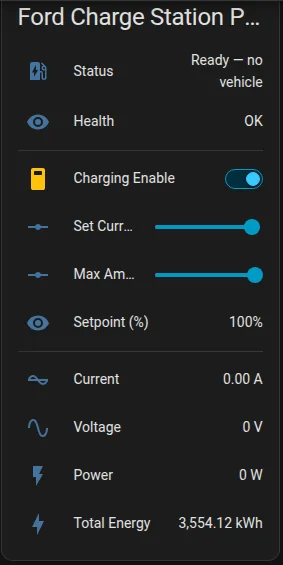
I threw claude code at it and after a few modification I was able to get full local control over modbus tcp. I added it to home assistant and it's been working flawlessly.

Ford F-150 Lightning FCSP root access over SSH 1786552528872-v2


There is a lot of connectivity on device that is locked down. MODBUS/TCP MODBUS/RTU OCPP . I never got OCPP to work as it functions differently than how my current OCPP instance is setup for another charger and didn't want to lose connectivity for that so I settled on the modbus/tcp. Modbus/rtu is also an options that gains full control, but I haven't gotten around to written that one up yet.
Sponsored


Top