Sponsored
OP
OP
Mike G

Mike G

Well-known member
First Name
Mike
Joined
Jan 6, 2022
Threads
34
Messages
1,886
Reaction score
2,784
Location
N. AL, USA
Vehicles
2022 F-150 Lightning, 2023(J1) Mach-E GT-PE, '24 Bronco HLE 2Dr
Ha the AI notes generated in FDRS are pretty amusing.

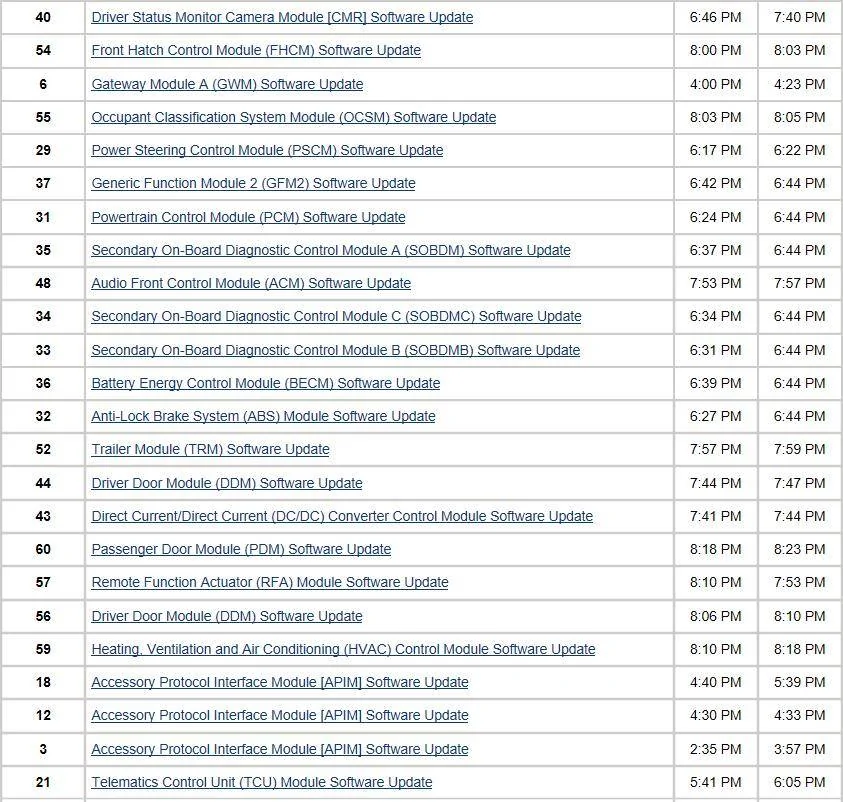
On 10/5/2024, the vehicle underwent multiple software updates across various modules. The updates began at 2:27 PM with initial network and self-tests confirming the functionality of numerous systems such as ABS, ACM, APIM, BCM, and others. The Accessory Protocol Interface Module (APIM) experienced repeated software update attempts due to a failure to locate the manifest file in FENIX responses, necessitating multiple retries and adjustments including turning the ignition on and off and ensuring power stability with an external power supply. All APIM updates essentially followed the procedure of updating using USB software, which required ensuring the ignition settings were correct and patience for the SYNC system to confirm the update’s installation which was successful as per the last button press confirmed by the user.

Subsequently, the Gateway Module A (GWM) and Telematics Control Unit (TCU) underwent similar updates, involving USB software application, selecting drive options, and waiting for SYNC responses. Each module required the vehicle's ignition to be toggled between off and on states strategically according to the update’s needs. For GWM, after the update, a key aspect was to leave the vehicle off to ensure completion. The final update steps involved confirming the installation success before finishing each module's application.

Moreover, the Power Steering Control Module (PSCM), Powertrain Control Module (PCM), Anti-Lock Brake System (ABS) Module, and various other control modules including SOBDM, SOBDMC, SOBDMB, BECM, GFM2, CMR, DDCM, HVAC, and PDM all underwent software updates following the structured protocol of connecting to an external power supply, appropriate ignition toggling, and update application through USB system responses. Each component's update concluded with a series of network tests and self-tests to ensure complete systemic functionality and update integration without errors, confirming the updates' successes systematically. The final network and self-test at 8:26 PM verified that all systems were operational.
--------------------------------------------------------------------

And here was my Friday afternoon. Out of order but was trying to get it on 1 page and avoid all the self/network tests. Was up to 6.8 in a Dec 2023 Built Lariat prior to Friday.

1728186693814-5j.webp
Ya know, I had the "failed to get manifest from FENIX" thing several times during my last two APIM updates, but I eventually got the downloads to work. They say it's a network issue when that happens, but it must be on Ford's end, cause every other update done during the same session seems to download fine. Just not the APIM.
Sponsored


21st Century Truck

Well-known member
First Name
Martin
Joined
Jul 11, 2024
Threads
20
Messages
1,162
Reaction score
1,456
Location
Virginia
Vehicles
Ford 150 Lightning 2023 XLT ER pkg. 312A
This has been said before and it's worth repeating:

For those FDRS updates that need a USB, using a small portable SSD with a USB dongle can save a LOT of time when coupled with a hardwired Internet connection to the laptop because of the SSD's much faster read / write speed for really large files like the IPMA and some APIM updates.
 

21st Century Truck

Well-known member
First Name
Martin
Joined
Jul 11, 2024
Threads
20
Messages
1,162
Reaction score
1,456
Location
Virginia
Vehicles
Ford 150 Lightning 2023 XLT ER pkg. 312A
Oh believe me, it does speed the USB updates up by a lot.

I now keep the dedicated SSD in the glove compartment, just for such times.
 

USA414

Member
First Name
John
Joined
Jun 16, 2023
Threads
0
Messages
15
Reaction score
21
Location
NJ, USA
Vehicles
2022 F-150 Lightning Platinum, 2012 Boss 302
Well, this is a really tough first post here, but it seems I may be in a situation where my IPMA might be bricked and am now in need of a service appointment.

Short story on this one is, I was in the process of updating modules back on 9/27 via FDRS and the application crashed on the laptop I was using towards the end of the update, and was therefor never able to push/check final configurations, or collect any data from the module/update and report back. Since that point, my power steering has been finicky, truck has been acting strange (chimes/noises), and after today's round of troubleshooting, I now have a front camera fault, service required message.

Slightly longer version is I performed several other updates without issue before attempting to update the IPMA with two Clore PL2320's, and had no issues with voltage drop until almost half way through the IPMA update where at points it hit the low to mid 9 voltage range. Not sure if this is what made FDRS crash, or simply coincidental.

Fast forward to today, I purchased a more substantial power supply (75 amps) for programming, got a newer/more capable laptop for FDRS, and attempted to perform a PMI on the IPMA which just resulted in a bunch of errors, and now a front camera fault, service required message.

VIN is 1FT6W1EV3NWG02334 for anyone with FDRS who can see the vehicle history/logs.

I've tried just about IPMA related configuration option in FDRS, resetting the the truck by disconnecting 12v power for 30 mins, rebooted the IPMA module in FORScan three times, scanned and reset codes multiple times in FDRS, but still cannot perform a PMI on the IPMA.

Anytime I do, I receive an initial message stating, "The module configuration has failed, Would you like to retry?" followed by "Procedure Unsuccessful - WriteDirectConfig, Exception writing configuration to module" leaving me completely stumped and feeling like I am out of options other than it needing to be seen by the dealer.

Thanks in advance!
 

rugedraw

Well-known member
First Name
Javier
Joined
Dec 14, 2021
Threads
4
Messages
1,896
Reaction score
2,320
Location
Miami
Vehicles
2021 Ford F150 Platinum FX4 EB/2023 Bronco Sport Badlands/1991 Mustang 5.0 coupe
Occupation
Auto Sales
Well, this is a really tough first post here, but it seems I may be in a situation where my IPMA might be bricked and am now in need of a service appointment.

Short story on this one is, I was in the process of updating modules back on 9/27 via FDRS and the application crashed on the laptop I was using towards the end of the update, and was therefor never able to push/check final configurations, or collect any data from the module/update and report back. Since that point, my power steering has been finicky, truck has been acting strange (chimes/noises), and after today's round of troubleshooting, I now have a front camera fault, service required message.

Slightly longer version is I performed several other updates without issue before attempting to update the IPMA with two Clore PL2320's, and had no issues with voltage drop until almost half way through the IPMA update where at points it hit the low to mid 9 voltage range. Not sure if this is what made FDRS crash, or simply coincidental.

Fast forward to today, I purchased a more substantial power supply (75 amps) for programming, got a newer/more capable laptop for FDRS, and attempted to perform a PMI on the IPMA which just resulted in a bunch of errors, and now a front camera fault, service required message.

VIN is 1FT6W1EV3NWG02334 for anyone with FDRS who can see the vehicle history/logs.

I've tried just about IPMA related configuration option in FDRS, resetting the the truck by disconnecting 12v power for 30 mins, rebooted the IPMA module in FORScan three times, scanned and reset codes multiple times in FDRS, but still cannot perform a PMI on the IPMA.

Anytime I do, I receive an initial message stating, "The module configuration has failed, Would you like to retry?" followed by "Procedure Unsuccessful - WriteDirectConfig, Exception writing configuration to module" leaving me completely stumped and feeling like I am out of options other than it needing to be seen by the dealer.

Thanks in advance!
Is the IPMA purple in FDRS?
 

Sponsored

rugedraw

Well-known member
First Name
Javier
Joined
Dec 14, 2021
Threads
4
Messages
1,896
Reaction score
2,320
Location
Miami
Vehicles
2021 Ford F150 Platinum FX4 EB/2023 Bronco Sport Badlands/1991 Mustang 5.0 coupe
Occupation
Auto Sales

rugedraw

Well-known member
First Name
Javier
Joined
Dec 14, 2021
Threads
4
Messages
1,896
Reaction score
2,320
Location
Miami
Vehicles
2021 Ford F150 Platinum FX4 EB/2023 Bronco Sport Badlands/1991 Mustang 5.0 coupe
Occupation
Auto Sales
I thought I did, but can't confirm 100%
I would do that and try the PMI selecting "no" again.

It will take 2-3 hours like the update does. Fully charge the LVB first.
 

Sponsored

USA414

Member
First Name
John
Joined
Jun 16, 2023
Threads
0
Messages
15
Reaction score
21
Location
NJ, USA
Vehicles
2022 F-150 Lightning Platinum, 2012 Boss 302
I would do that and try the PMI selecting "no" again.

It will take 2-3 hours like the update does. Fully charge the LVB first.
OK, thanks - I will try that.

QQ - When I performed the "Reset the IPMA Learned Values" function, it stated that I had to run the service alignment drive cycle, while driving. I think that's why I have that one fault code for the IPMA.

Do you know if this should be/has to be done prior to the PMI for the IPMA?
 

PJnc284

Well-known member
Joined
Sep 30, 2024
Threads
0
Messages
1,217
Reaction score
1,389
Location
Garner, NC
Vehicles
2023 Ford F150 Lightning Lariat ER
I had the app crash on me several times but luckily it wasn't long after clicking run. Seems it's just temperamental sometimes.
 

rugedraw

Well-known member
First Name
Javier
Joined
Dec 14, 2021
Threads
4
Messages
1,896
Reaction score
2,320
Location
Miami
Vehicles
2021 Ford F150 Platinum FX4 EB/2023 Bronco Sport Badlands/1991 Mustang 5.0 coupe
Occupation
Auto Sales
OK, thanks - I will try that.

QQ - When I performed the "Reset the IPMA Learned Values" function, it stated that I had to run the service alignment drive cycle, while driving. I think that's why I have that one fault code for the IPMA.

Do you know if this should be/has to be done prior to the PMI for the IPMA?
Oh, yea....you may need to do that at this point. You have to drive it for a bit while plugged into FDRS on a road with well-painted lines.

Looking a little bit deeper, it seems your IPMA is already on the ACJ software. It seems the update went through. It's not reporting any config errors.
 

USA414

Member
First Name
John
Joined
Jun 16, 2023
Threads
0
Messages
15
Reaction score
21
Location
NJ, USA
Vehicles
2022 F-150 Lightning Platinum, 2012 Boss 302
Oh, yea....you may need to do that at this point. You have to drive it for a bit while plugged into FDRS on a road with well-painted lines.

Looking a little bit deeper, it seems your IPMA is already on the ACJ software. It seems the update went through. It's not reporting any config errors.
Thanks for digging deeper into this, initially I thought the update went through, but I've been having a number of issues with the truck since.
  • Lane assist always turns itself on now, even though I usually keep it off.
  • The PSCS module will randomly go gray in FDRS.
  • I usually drive in Sport mode which has a "heavier steering feel". That no longer happens. The steering rack feels like it's in some sort of limp mode, or default mode, more similarly to normal drive mode.
  • On the highway, the truck feels darty, I think as a result of whatever is going on with the steering.

I just got back from trying to perform a IPMA alignment which failed twice, stating, "Module configuration unsuccessful. If the error continues contact the Hotline for assistance"
 

ChrisCon

Well-known member
First Name
Chris
Joined
Jan 7, 2022
Threads
31
Messages
517
Reaction score
961
Location
The Hamptons, NY
Vehicles
'22 Carbonized Grey Lightning Lariat ER
So I'm looking at your updates ...
On October 1, I see no issues at the end except you did the ACM and RFA updates many of us have done. They don't actually update on your truck as it only takes 2 minutes per udate and then afterwards you run Programmable Module Installation. Just curious, but why did you run this? That isn't needed for software updates. You then run 360 Degree Camera Alignment which is another thing not needed for software updates. You then run the 360 Degree Camera Alignment thing another two times on October 2nd.. It looks like most of your problems are repeated running of these alignments.

Then today you didn't actually update anything but ran the PMI program multiple times and the IPMA programs (like configuration and data collector) but not the update ones.
Then Rugedraw looked at your truck through PTS
and after he did you are just running alignment programs again.


Here's the part I don't know about, but may be your issue- I know some camera alignments require either A. driving or B. using special symbols and colors placed around the truck. I think you may have gotten yourself into an issue by not following those steps and then just repeatedly running alignment programs.
Can someone else more knowledgable then me, confirm or refute that you need special tools to do the alignments?


It looks like you could have just cleared your DTC's in FDRS and your truck would have been fine with what you were doing up to October 1. My steps whenever my truck runs out of juice during an update (doesn't really happen anymore since I've spent money on tenders), are to just click retry after charging the LVB to 100% and then just clearing all the DTCs in FDRS when done.

As far as I can tell all of your updates have gone through successfully and all errors are because of the alignment programs you keep running.

The only updates you should run again are the RFA and ACM updates as the completed to quickly.. They won't clear when done, but the RFA should take 30 minutes to complete. That's how you know it worked.
Sponsored


Top