Sponsored

USA414

Member
First Name
John
Joined
Jun 16, 2023
Threads
0
Messages
15
Reaction score
21
Location
NJ, USA
Vehicles
2022 F-150 Lightning Platinum, 2012 Boss 302
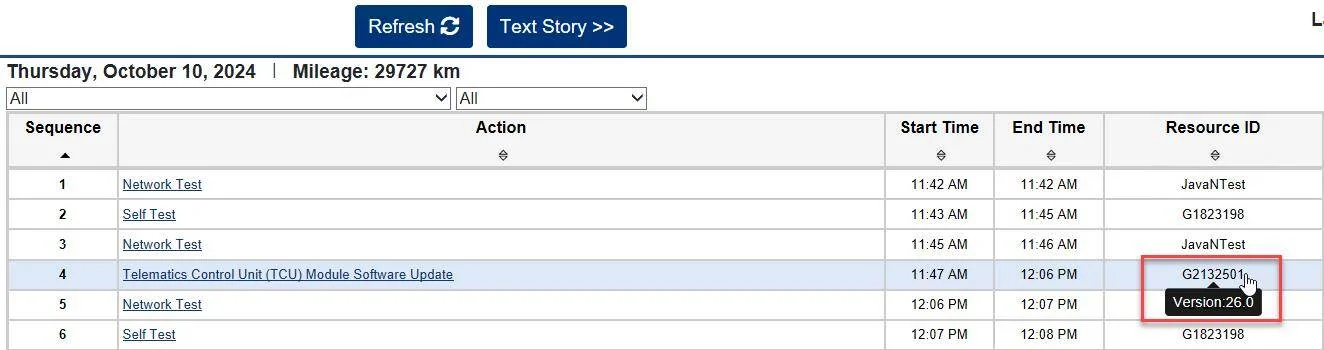
I also noticed something in FDRS when looking through the vehicle history. If you hover over the "Resource ID" column over the GXXXXXXX string, it will show you a version number. It only seems to do this for more recent updates, but I thought this was interesting in being able to identify the module and version details.

I didn't see this mentioned anywhere else on the thread, so sorry if someone else already spotted this and called it out.
Ford F-150 Lightning Lightning Software Updates using FDRS 1728585833786-mg
Sponsored

 
OP
OP
Mike G

Mike G

Well-known member
First Name
Mike
Joined
Jan 6, 2022
Threads
34
Messages
1,885
Reaction score
2,785
Location
N. AL, USA
Vehicles
2022 F-150 Lightning, 2023(J1) Mach-E GT-PE, '24 Bronco HLE 2Dr
I also noticed something in FDRS when looking through the vehicle history. If you hover over the "Resource ID" column over the GXXXXXXX string, it will show you a version number. It only seems to do this for more recent updates, but I thought this was interesting in being able to identify the module and version details.

I didn't see this mentioned anywhere else on the thread, so sorry if someone else already spotted this and called it out.
1728585833786-mg.webp
It does the same thing if you hover your pointer over the update in the list of available software. But that ‘version’ number isn’t really that useful as a reference.
 

Jim Lewis

Well-known member
First Name
Jim
Joined
Jan 10, 2023
Threads
56
Messages
1,080
Reaction score
1,060
Location
San Antonio, TX
Vehicles
Honda Accord 2017; 2023 Lariat ER
Occupation
Retired
Dumb Newbie Question: I asked ChatGPT about the order in which modules should be updated in FDRS. It mentioned the guidance features of FDRS. But the advice I liked best was the last tip it gave me:
  1. Update All Modules Prompt:
    • FDRS often has a feature that allows you to update all modules with available updates. If you select this option, FDRS will automatically update them in the proper order.
    • This is the easiest and most reliable way to ensure everything is done correctly without worrying about individual sequences.
Wanted to ask you FDRS experts if this is pretty good advice or an AI hallucination. Also, the first subitem says, "FDRS often has a feature that allows you to update all modules..." Does there have to be a number of modules with different dependencies, or does Ford have to prime a module update for this feature to show up? At $50 for a two-day session, I haven't been motivated to try FDRS more than once, but the UPDATE ALL MODULES prompt sounds about my speed, something that would ease my concerns about screwing up! :)
 

USA414

Member
First Name
John
Joined
Jun 16, 2023
Threads
0
Messages
15
Reaction score
21
Location
NJ, USA
Vehicles
2022 F-150 Lightning Platinum, 2012 Boss 302
Dumb Newbie Question: I asked ChatGPT about the order in which modules should be updated in FDRS. It mentioned the guidance features of FDRS. But the advice I liked best was the last tip it gave me:
  1. Update All Modules Prompt:
    • FDRS often has a feature that allows you to update all modules with available updates. If you select this option, FDRS will automatically update them in the proper order.
    • This is the easiest and most reliable way to ensure everything is done correctly without worrying about individual sequences.
Wanted to ask you FDRS experts if this is pretty good advice or an AI hallucination. Also, the first subitem says, "FDRS often has a feature that allows you to update all modules..." Does there have to be a number of modules with different dependencies, or does Ford have to prime a module update for this feature to show up? At $50 for a two-day session, I haven't been motivated to try FDRS more than once, but the UPDATE ALL MODULES prompt sounds about my speed, something that would ease my concerns about screwing up! :)
While I'm not an expert, and will defer to those here with more experience, I'm happy to share my thoughts/notes as I understand the process.

I do not believe there is a "scripted" way to kick off an "update all modules" process in FDRS. I know there is a "download all option" in the Toolbox tab/ribbon which requests FDRS downloads all available packages from Ford's servers to the laptop so there are locally cached copies. However, even if you do this, I believe you will still need to execute the updates in an order which may not be the same as how they're listed on the right hand side of the SW Updates screen.

Also, updates like PCM usually kick off a group or multi-module update and will have a specific sequence predefined by Ford. I think FDRS is smart enough to kick off the PCM parent module first even if you clicked on ABS module, so the updates are still applied in the correct order.

Here's an excerpt from the notes which I created for myself based upon lots of reading and research across the forums, and a bit of personal experience. I guess what I'm saying is YMMV and I'm simply offering up my opinion based on my experiences over the past year or so. There are lots of other folks on here with more experience who might have different thoughts, or even disagree.

FDRS Update Process (High Level)
  • All 3 modules below must be updated first, in order, GWM/APIM with flash drive (sometimes TCU is USB) in the order shown below as per Ford:
    • GWM (first) - USB, longer update (~30 mins)
    • APIM (second) - USB, very long update (~2 hours)
    • TCU (third) - usually USB, longer update (~20 mins)
  • Then check/update the rest as follows:
    • IPC - USB, longer update (~30 mins)
    • IPMA (group) - very long update (2+ hours)
      • PSCM (~5 mins)
      • CCM
      • CMR
    • PCM (group) ~20 mins for the whole group
      • ABS
      • SOBDMB
      • SOBDMC
      • SOBDM
      • BECM
      • GFM2
    • Whatever else remains, but just like the updates listed above, you should research/validate in forums for any known issues
      • BCM (~5 mins)
      • RFA (~20-30 mins)
      • DC/DC (~5 mins)
      • FHCM (~5 mins)
      • DDM (~5 mins)
      • DSM (~5 mins)
      • HVAC (~5 mins)
      • PDM (~10 mins)
      • RGTM (~5 mins)
      • ACM (~10 mins)
      • DSP (~5 mins)
      • TRM (~5 mins)
*You won't usually see updates for all of the modules at the same time (unless you've had your truck for a while and this is your first time using FDRS), but if multiple updates are available, I generally perform them in the order I listed above.

**Best practice is to "Rerun Network Test" (key on/engine off) after each module update and ensure there are no errors/codes - all modules should be green. If modules aren't initialing or testing clean, perform self tests, clear codes, then retest.
 

rugedraw

Well-known member
First Name
Javier
Joined
Dec 14, 2021
Threads
4
Messages
1,896
Reaction score
2,318
Location
Miami
Vehicles
2021 Ford F150 Platinum FX4 EB/2023 Bronco Sport Badlands/1991 Mustang 5.0 coupe
Occupation
Auto Sales
Dumb Newbie Question: I asked ChatGPT about the order in which modules should be updated in FDRS. It mentioned the guidance features of FDRS. But the advice I liked best was the last tip it gave me:
  1. Update All Modules Prompt:
    • FDRS often has a feature that allows you to update all modules with available updates. If you select this option, FDRS will automatically update them in the proper order.
    • This is the easiest and most reliable way to ensure everything is done correctly without worrying about individual sequences.
Wanted to ask you FDRS experts if this is pretty good advice or an AI hallucination. Also, the first subitem says, "FDRS often has a feature that allows you to update all modules..." Does there have to be a number of modules with different dependencies, or does Ford have to prime a module update for this feature to show up? At $50 for a two-day session, I haven't been motivated to try FDRS more than once, but the UPDATE ALL MODULES prompt sounds about my speed, something that would ease my concerns about screwing up! :)
Aside from the fact that I have never heard of this, I don't see how this would work since you are required to cycle the ignition on and off between updates. FDRS is fairly dummy proof. There is no reason to be timid about jumping in and doing the updates yourself, imo.

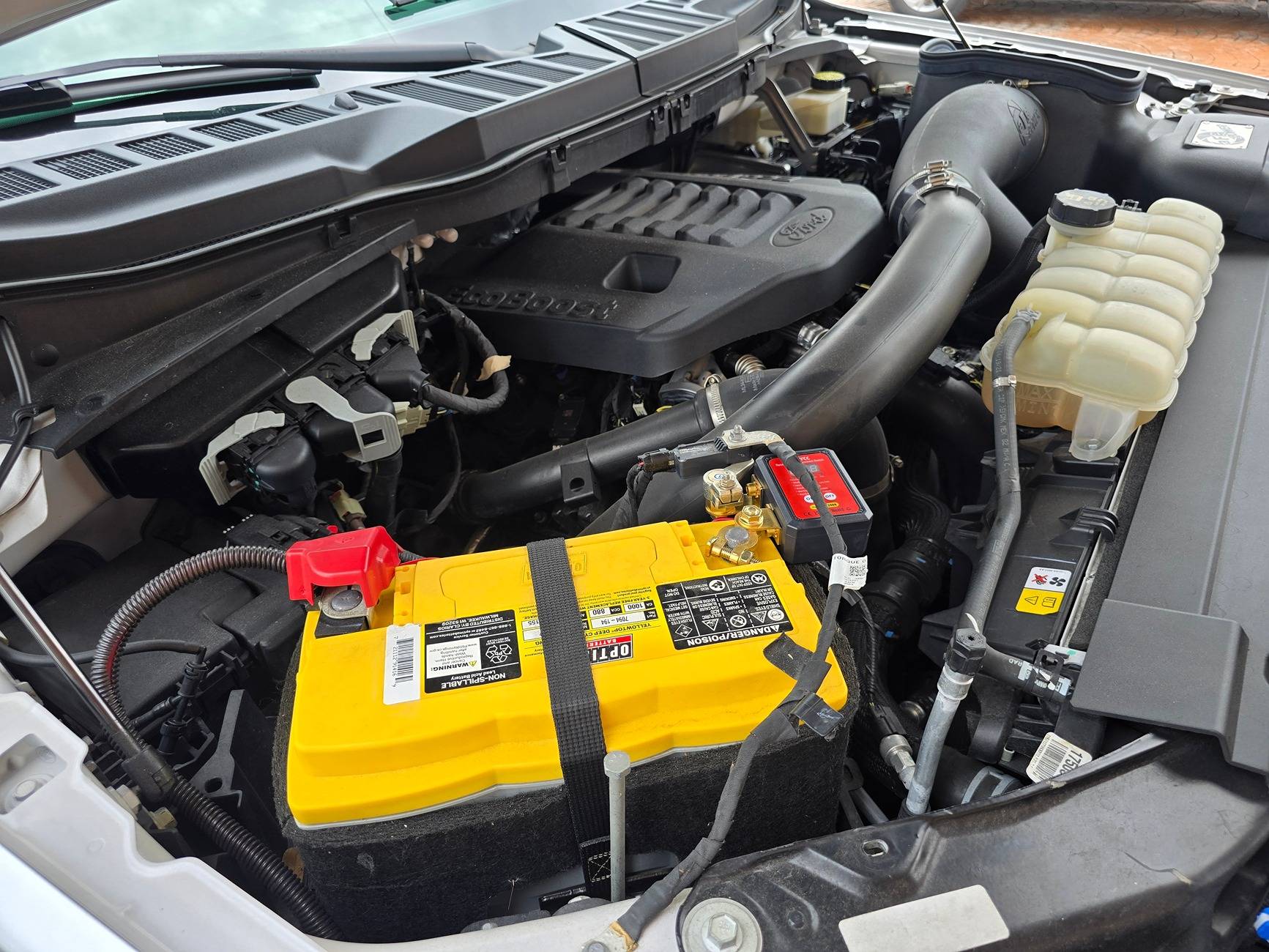
Off topic, but just wanted to post a follow-up regarding the battery cut-off switch I installed. It was super easy to do and even easier to use. I should have done it sooner.

Ford F-150 Lightning Lightning Software Updates using FDRS 20241009_144206
 

Sponsored
OP
OP
Mike G

Mike G

Well-known member
First Name
Mike
Joined
Jan 6, 2022
Threads
34
Messages
1,885
Reaction score
2,785
Location
N. AL, USA
Vehicles
2022 F-150 Lightning, 2023(J1) Mach-E GT-PE, '24 Bronco HLE 2Dr
What FDRS has as a feature is the ability to download all the available updates by hitting the "Download all" on the top right above the list.

But there is no option to have FDRS subsequently install them all in the proper order to avoid dependency issues.

GWM, APIM, TCU, and IPC should always be done before jumping into anything else like the powertrain or cruise control related updates (CCM, CMR, SCCM, IPMA, PSCM).

There are quite a few of standalone updates that are short and can be done in any order (doors, FHCM, HVAC, OBCC, ACM, RFA, TRM, etc.).
 

ChrisCon

Well-known member
First Name
Chris
Joined
Jan 7, 2022
Threads
31
Messages
517
Reaction score
962
Location
The Hamptons, NY
Vehicles
'22 Carbonized Grey Lightning Lariat ER
@Jim Lewis . I've been a premium Chat-GPT user and was just using the new strawberry model to research trends in current areas around me. I'm all about AI, but after reading a number of your posts, I think you understand that the LLMs are good with summaries but most of the time hallucinate with nuanced issues. I think you often read too much into the summaries you are fretting and remind you that when talking about things like FDRS, the main source of information for these models is in fact posts on forums like ours. With the data set for these niche issues being so small, I think for now it's time to stop relying or posting your copilot summaries because they are getting big picture correct, but you seem to get hung up on the things that are hallucinations/ guesses which are nearly always wrong . :)

Chat-GPT in its current state could not answer a highly technical, specific to model type , and variable to situation question like "what's the best order to update modules in FDRS?"
 

Jim Lewis

Well-known member
First Name
Jim
Joined
Jan 10, 2023
Threads
56
Messages
1,080
Reaction score
1,060
Location
San Antonio, TX
Vehicles
Honda Accord 2017; 2023 Lariat ER
Occupation
Retired
I think you often read too much into the summaries you are fretting and remind you that when talking about things like FDRS, the main source of information for these models is in fact posts on forums like ours.
A basic fact of life is few humans will want to read all the posts on the Lightning forum or wade through all the hits provided in the standard forum search interface. Microsoft apparently has bots regularly scanning this forum, and the AI interface does a pretty good job of finding forum posts and threads that address questions I pose to the A.I. So whether I want to believe the A.I. answer itself, at least the AI search typically provides a good place to start reading about a topic of interest on the forum, better than the forum's own search process.
Looking back on posts over the past half year or so, I don't see anything too flagrant that I've quoted an AI agent on (usually, it's Microsoft Copilot). If there were an Update All Modules command, which I doubted in my post to begin with, it would be sufficiently useful to ask about, whether the idea was suggested by an AI agent or not. And I did entitle my post: Dumb Newbie Question.

I think Copilot advice or ChatGPT advice is just like human advice on these forums: it could be wrong, and that's a given to start with. For example, there have been numerous declarations on this forum that one can't charge the LVB when the truck is running in full-accessory mode. Maybe many such posters never bothered plugging the truck into a charger while in accessory mode. Perhaps such erroneous answers that are totally human and not prompted by a machine (and are not even checked) are totally fine. :) To err is human, and we accept that, but machines be damned!
 

shelnian

Well-known member
First Name
Ian
Joined
Sep 15, 2022
Threads
0
Messages
99
Reaction score
52
Location
Seattle
Vehicles
2022 Mach-E Premium ER, 2023 Lightning XLT SR 312A
Occupation
Retired
This looks like the actual Ford VCM2. If so, this is a great price for someone who doesn't trust a Chinese 2 board clone like I use.
 
Last edited:
OP
OP
Mike G

Mike G

Well-known member
First Name
Mike
Joined
Jan 6, 2022
Threads
34
Messages
1,885
Reaction score
2,785
Location
N. AL, USA
Vehicles
2022 F-150 Lightning, 2023(J1) Mach-E GT-PE, '24 Bronco HLE 2Dr
This looks like the actual Ford VCM2. If so, this is a great price for someone who doesn't trust a Chinese 2 board clone like I use.
Does the VCM II require it's own power brick? I can't remember.
 

Sponsored
OP
OP
Mike G

Mike G

Well-known member
First Name
Mike
Joined
Jan 6, 2022
Threads
34
Messages
1,885
Reaction score
2,785
Location
N. AL, USA
Vehicles
2022 F-150 Lightning, 2023(J1) Mach-E GT-PE, '24 Bronco HLE 2Dr
Regardless...the VCM II is as fast as the current Mongoose + Ford adapter...so $259 vs the $585+/- that the Mongoose costs is no small thing. Good way to get in on the updates for a cheaper price. Well spotted @shelnian !!
 

shelnian

Well-known member
First Name
Ian
Joined
Sep 15, 2022
Threads
0
Messages
99
Reaction score
52
Location
Seattle
Vehicles
2022 Mach-E Premium ER, 2023 Lightning XLT SR 312A
Occupation
Retired
No power brick, uses USB power or the OBD2 port power depending on what it's plugged into.
 

mr.Magoo

Well-known member
Joined
May 27, 2022
Threads
26
Messages
1,110
Reaction score
1,416
Location
Michigan
Vehicles
2022 Lariat ER, AMB
This looks like the actual Ford VCM2. If so, this is a great price for someone who doesn't trust a Chinese 2 board clone like I use.
OK, maybe I'm overly skeptical, but what makes that the "Actual" VCM2 other than that they didn't erase "Rotunda" on the label ?
At $300 I personally doubt it's any more OEM/acutal than, say, this one: Chinese knockoff
 

PJnc284

Well-known member
Joined
Sep 30, 2024
Threads
0
Messages
1,214
Reaction score
1,390
Location
Garner, NC
Vehicles
2023 Ford F150 Lightning Lariat ER
OK, maybe I'm overly skeptical, but what makes that the "Actual" VCM2 other than that they didn't erase "Rotunda" on the label ?
At $300 I personally doubt it's any more OEM/acutal than, say, this one: Chinese knockoff
yeah, considering the cost of these trucks, why take a chance to save a few hundred bucks over the mongoose which seems to be tried and true.
 

shelnian

Well-known member
First Name
Ian
Joined
Sep 15, 2022
Threads
0
Messages
99
Reaction score
52
Location
Seattle
Vehicles
2022 Mach-E Premium ER, 2023 Lightning XLT SR 312A
Occupation
Retired
OK, maybe I'm overly skeptical, but what makes that the "Actual" VCM2 other than that they didn't erase "Rotunda" on the label ?
At $300 I personally doubt it's any more OEM/acutal than, say, this one: Chinese knockoff
It could be a clone because the second picture doesn't have the VCM II imbedded in the case. I use a 2 board Chinese clone and it works great. Not all Chinese clones are the equal, there are 2 board and 1 board clones. The 2 board clones that use the Bosch firmware work as well as the Mongoose at less than half the cost.
Sponsored


Top