Sponsored

Unable to Set Charge Limit

Sbpatel82

Member
Joined
Dec 5, 2025
Threads
1
Messages
7
Reaction score
0
Location
KS
Vehicles
'24 F150 Lightning Platinum
So I am new the the Lightning club and this is my first ever EV as well. It has been an interesting ride so far. I am really enjoying the truck, with one issue that I have no idea how to solve.

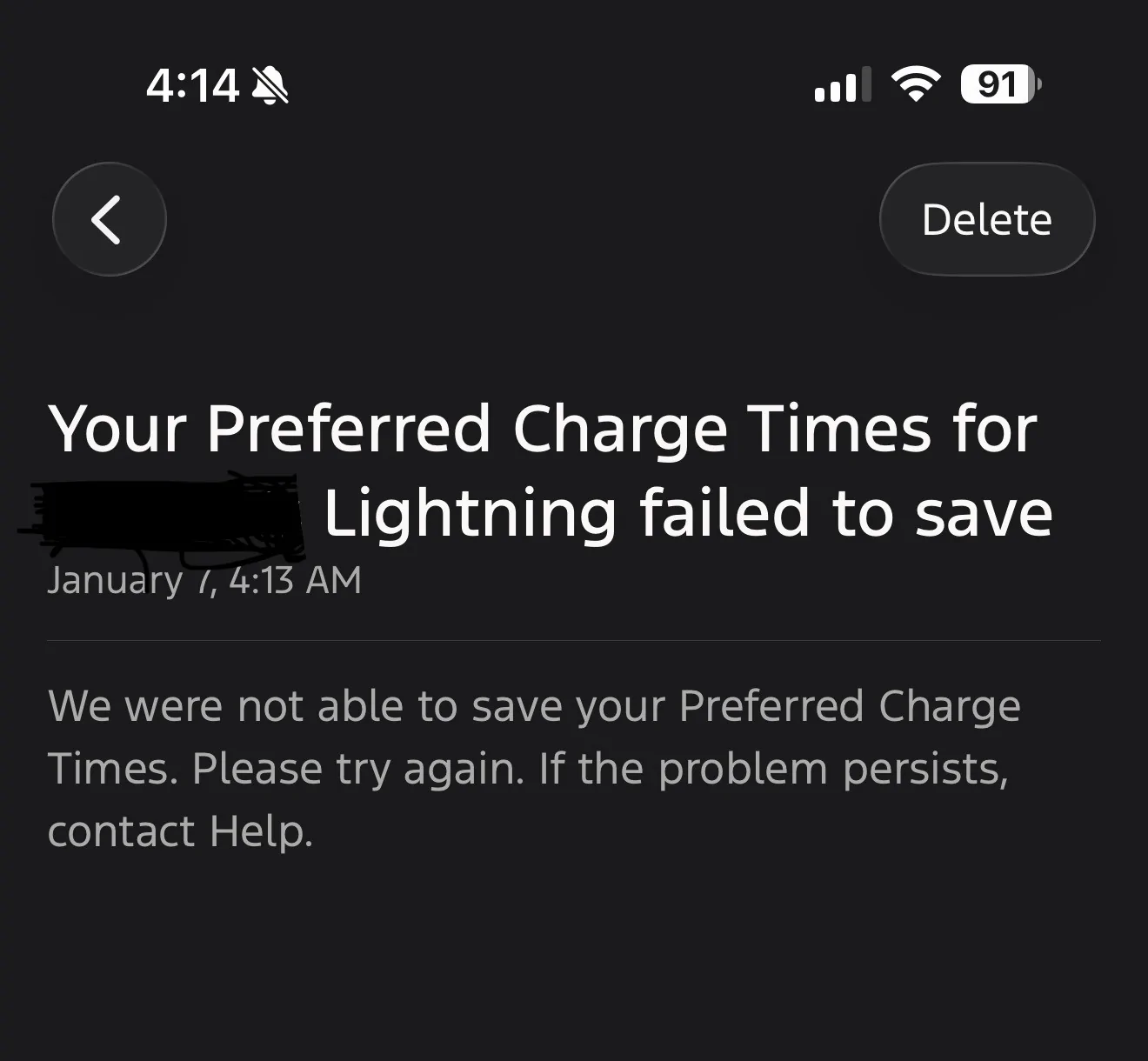
When I go to the set the charge limit either in the truck through the Sync4A system or through the app I am unable to set a charge limit. Every time I move the slider to say 80% after a few seconds of thinking it automatically resets to 100% If I try to change the slider percentage in the app it gives me an error: "We were not able to save your Preferred Charge Times. If the problem persists, contact Help."

I was also wondering if on your screen inside the vehicle, under set charge times for a given location, should there be a separate slider to set the charge limit at that location? I am not seeing how to set a charge limit at a location, for example, at my home. I have timings set at home to charge between midnight and 6am (I am on a time of use rate plan) but there is no option to set a charge limit at that location.

This all started after an update. I recently bought the truck, '24 Lightning Platinum, and once I received it, I set up the wifi so that it could do any OTA updates. Before the updates occurred I could only change the charge limit in the vehicle. I tried using the app and it didn't work. I figured it was a bug in the app, and I wasn't too worried about it since I could adjust it in the vehicle.

The next few days the vehicle did 2 or 3 OTA updates and after the last update I am no longer able to adjust the slider in the vehicle. I initially tried deleting the vehicle in my app and re adding it. I did a Sync reset through the vehicle software and had to set everything up all over again. I called Ford customer help line and I was advised to take it in for service. The service department at the dealership said they needed to get engineering involved. After having the vehicle for 10 days or so, they contacted me and told me it is just a bug in the software and that an OTA update will be released to fix it. This makes no sense to me. How long am I supposed to wait for what you would think is basic functionality for an EV. I don't want to damage the battery by charging to 100% every night.

The only thing I haven't tried is pulling the negative terminal off the 12V battery. I suggested it to the tech at the dealership and he recommending not doing that as it can cause a cascade of faults, ie if there is something wrong it can cause other issues to start popping up as well.

My concern here is that I have done a lot of poking around on the forums and through google and I haven't found anybody else with this issue. Right now, the vehicle is set to charge to 100% every time I plug it in. It is insanely frustrating to have to wake up in the middle of the night and check percentages on the app to stop charging so that I don't end up at 100% every time.

Does anybody have any suggestions or has anyone experienced similar issues? I can post pictures of any of the screens in the vehicle if needed.
Sponsored
 

PreservedSwine

Well-known member
Joined
Aug 5, 2023
Threads
30
Messages
424
Reaction score
551
Location
Fort Myers
Vehicles
2023 Lightning
I agree, this shouldn't be a wait around for an update.
Have you tried deleting the location and re-entering your home? Deleting all data, deleting your account, and re-establishing it?
Good luck!
 
OP
OP

Sbpatel82

Member
Joined
Dec 5, 2025
Threads
1
Messages
7
Reaction score
0
Location
KS
Vehicles
'24 F150 Lightning Platinum
Thanks, yeah, I have already tried deleting locations, and re adding. I deleted the account and re added, deleted all data as well. None of that worked.
 

Adventureboy

Well-known member
First Name
Jonathan
Joined
Jan 30, 2023
Threads
1
Messages
1,099
Reaction score
1,072
Location
Ontario
Vehicles
2023 F150 Lightning Lariat
Does other functions like Start Climate work? If so, that rules out connectivity as the issue. Even if the connectivity is down, this function should work on the truck even if it doesn't work on the App. The Onboard Charger handles the location scheduling and Target SOC. It sounds like the part that holds the location charge profiles is not responding. Sometimes updates just hang the module and the only way to clear it is to reboot the truck.
In your case, I'd also suggest the 12v reset.
 
OP
OP

Sbpatel82

Member
Joined
Dec 5, 2025
Threads
1
Messages
7
Reaction score
0
Location
KS
Vehicles
'24 F150 Lightning Platinum
Update:

Yes, I am able to remotely start climate before I get in the truck in the morning.

I was able to finally go in and remove the negative terminal on the 12v battery. I waited about 15 minutes and reconnected it. I then waited for 2 days before I needed to charge. When I finally plugged in the vehicle I went to change the Charge Target and the slider just resets to 100% no matter when I set the slider to.

Again, there is not a separate slider for my home location. It is just a single slider under charge settings. If I go into the location I am only able to set preferred charge times, but not a target charge for that location.

Now that I disconnected the 12v and reset it that way I will delete the location and see if that helps at all.

I read that I may need to go in and check all the consents for data sharing as well, but I don't think that would cause this issue. I can't even set the charge limit via the Sync screen inside the truck.

Any other suggestions? Would providing screen shots of the screen be helpful?

Thanks!
 

Sponsored

Scorpio3d

Well-known member
First Name
Chris
Joined
Mar 18, 2024
Threads
32
Messages
1,280
Reaction score
1,668
Location
Texas
Vehicles
2023 Ford F150 Lightning Lariat ER
Occupation
SS/IBA car wash owner
Update:

Yes, I am able to remotely start climate before I get in the truck in the morning.

I was able to finally go in and remove the negative terminal on the 12v battery. I waited about 15 minutes and reconnected it. I then waited for 2 days before I needed to charge. When I finally plugged in the vehicle I went to change the Charge Target and the slider just resets to 100% no matter when I set the slider to.

Again, there is not a separate slider for my home location. It is just a single slider under charge settings. If I go into the location I am only able to set preferred charge times, but not a target charge for that location.

Now that I disconnected the 12v and reset it that way I will delete the location and see if that helps at all.

I read that I may need to go in and check all the consents for data sharing as well, but I don't think that would cause this issue. I can't even set the charge limit via the Sync screen inside the truck.

Any other suggestions? Would providing screen shots of the screen be helpful?

Thanks!
Any and all information you can share would be helpful to help solve your problem… but no guarantees.
I think I remember having a similar issue at some point, but it was a long time ago and I don’t remember how it was resolved. It may have been after an update as well but rebooting the system should have fixed it I would think.
It shouldn’t matter, but what EVSE are you using?
 
OP
OP

Sbpatel82

Member
Joined
Dec 5, 2025
Threads
1
Messages
7
Reaction score
0
Location
KS
Vehicles
'24 F150 Lightning Platinum
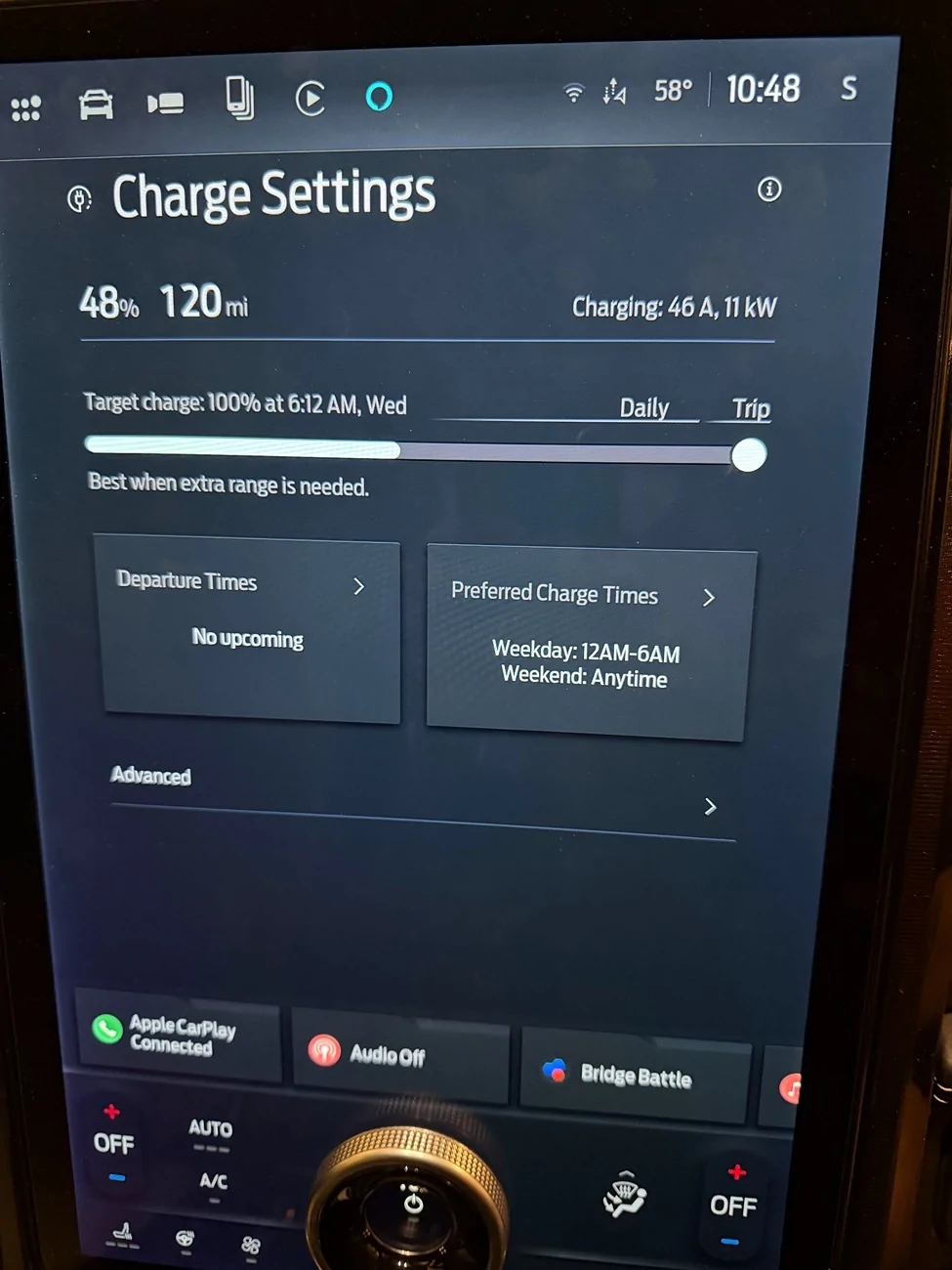
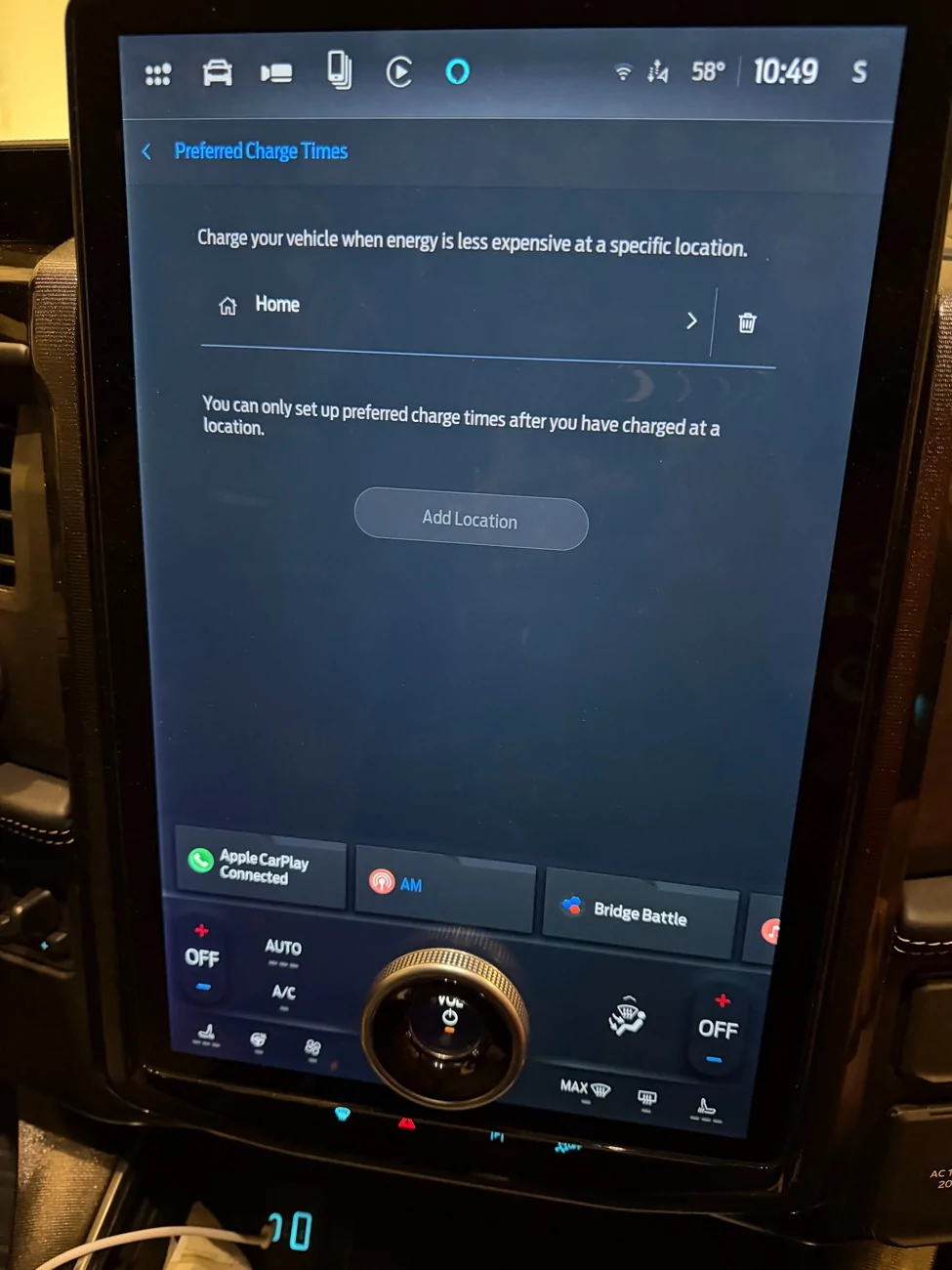
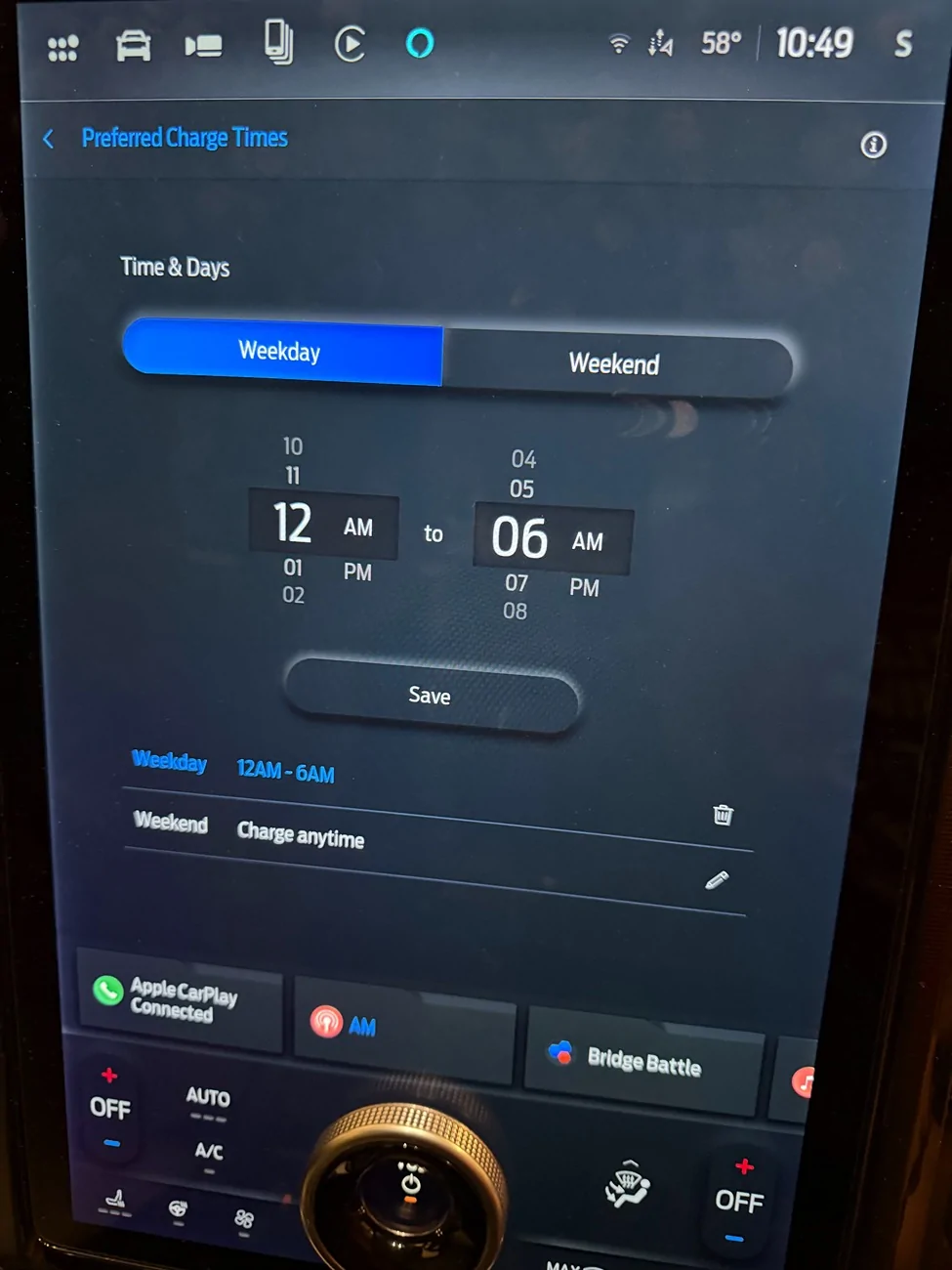
Here are a few screenshots, the first is of the charge settings, and the other two are the preferred charge times / location where the location does not have a slider to set the charge limit. I am not sure if that is normal or if this is how it is supposed to look like for everyone.

Ford F-150 Lightning Unable to Set Charge Limit IMG_1742
Ford F-150 Lightning Unable to Set Charge Limit IMG_1745
Ford F-150 Lightning Unable to Set Charge Limit IMG_1746
 
OP
OP

Sbpatel82

Member
Joined
Dec 5, 2025
Threads
1
Messages
7
Reaction score
0
Location
KS
Vehicles
'24 F150 Lightning Platinum
Here is a video of me changing the target charge to 80% while the truck is on a charger and charging, and you can see the slider just reset to 100% almost immediately.
 

Grumpy2

Well-known member
Joined
Nov 23, 2022
Threads
20
Messages
1,047
Reaction score
1,123
Location
Central Oregon Coast
Vehicles
23 F150 Pro SR
Occupation
Retired Hvy Construction
It isn't clear to me if you have plugged in the truck at home and charge the truck some, and disconnected, then you reconnected and and using the truck screen you have set your home as a charge location and set limits? All this worked as it should but now you go to the app and it doesn't allow you to change settings?
 

Sponsored
OP
OP

Sbpatel82

Member
Joined
Dec 5, 2025
Threads
1
Messages
7
Reaction score
0
Location
KS
Vehicles
'24 F150 Lightning Platinum
Yes, I have plugged the truck in at home and charged multiple times. I used the in truck screen to set the location and named it home. All of that worked fine, but it does not allow me to set a charge limit either in the truck or in the app. When I try to set it in the app, I experience the same as what happens in the truck, the slider just moves back to 100% after a second or two. At that point the app will give me the following error message:

Ford F-150 Lightning Unable to Set Charge Limit IMG_1747
 

Adventureboy

Well-known member
First Name
Jonathan
Joined
Jan 30, 2023
Threads
1
Messages
1,099
Reaction score
1,072
Location
Ontario
Vehicles
2023 F150 Lightning Lariat
I had this happen on the app, but not in the truck. You might want to call the Ford Help as it suggests. There may be something corrupted that we just can't see on the screens. The Help guys can do some troubleshooting with you.

The Help team can be contacted by going to your profile (top right corner) on the Ford App and scrolling to the bottom.

Update: I do remember a time a couple of years ago where an update corrupted the charge profiles. I had to delete them and recreate them. It looks like you have already done that.
 
Last edited:

Zprime29

Well-known member
First Name
Brandon
Joined
Jul 26, 2022
Threads
42
Messages
2,516
Reaction score
2,677
Location
Tucson, AZ
Vehicles
2022 Lightning ER, 2025 XC90 Recharge
Have you tried setting a charge limit at another location? I wonder if your home location is glitched and maybe setting a limit somewhere else might un-glitch it.
 

TaxmanHog

Moderator
Moderator
First Name
Noel
Joined
Jan 19, 2022
Threads
215
Messages
15,801
Reaction score
17,722
Location
SE. Mass.
Vehicles
2022 Lightning Lariat-ER & 2024 HD Road Glide CVO-ST
Occupation
Retired
The model year 24 screen is different than my 22!!!

Something says to me this is a database issue with the trucks account, the phone, the cloud and truck Sync are conflicting each other.

Try leaving the truck unplugged.
Power off your mobile device (Phone), have your FOB in the truck to allow it to start.
Via the Sync screen in the truck, go to Charging app.
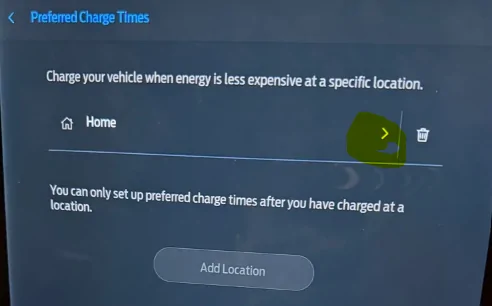
EDIT the established HOME scheme, by tapping the > symbol

Ford F-150 Lightning Unable to Set Charge Limit 1767796355723-1z


You should see the SOC setting screen, adjust to preference, see if it holds.

Then move to the time frame screen, set weekday & weekend start/stop values.

Save the configuration.

wait a few seconds, then review the edited values to confirm they've stored.

Power up your phone, wait a few minutes for all APPS to load and Ford App to Sync to the cloud, review the settings under the Energy TAB, do they match what has been recently stored?
 
OP
OP

Sbpatel82

Member
Joined
Dec 5, 2025
Threads
1
Messages
7
Reaction score
0
Location
KS
Vehicles
'24 F150 Lightning Platinum
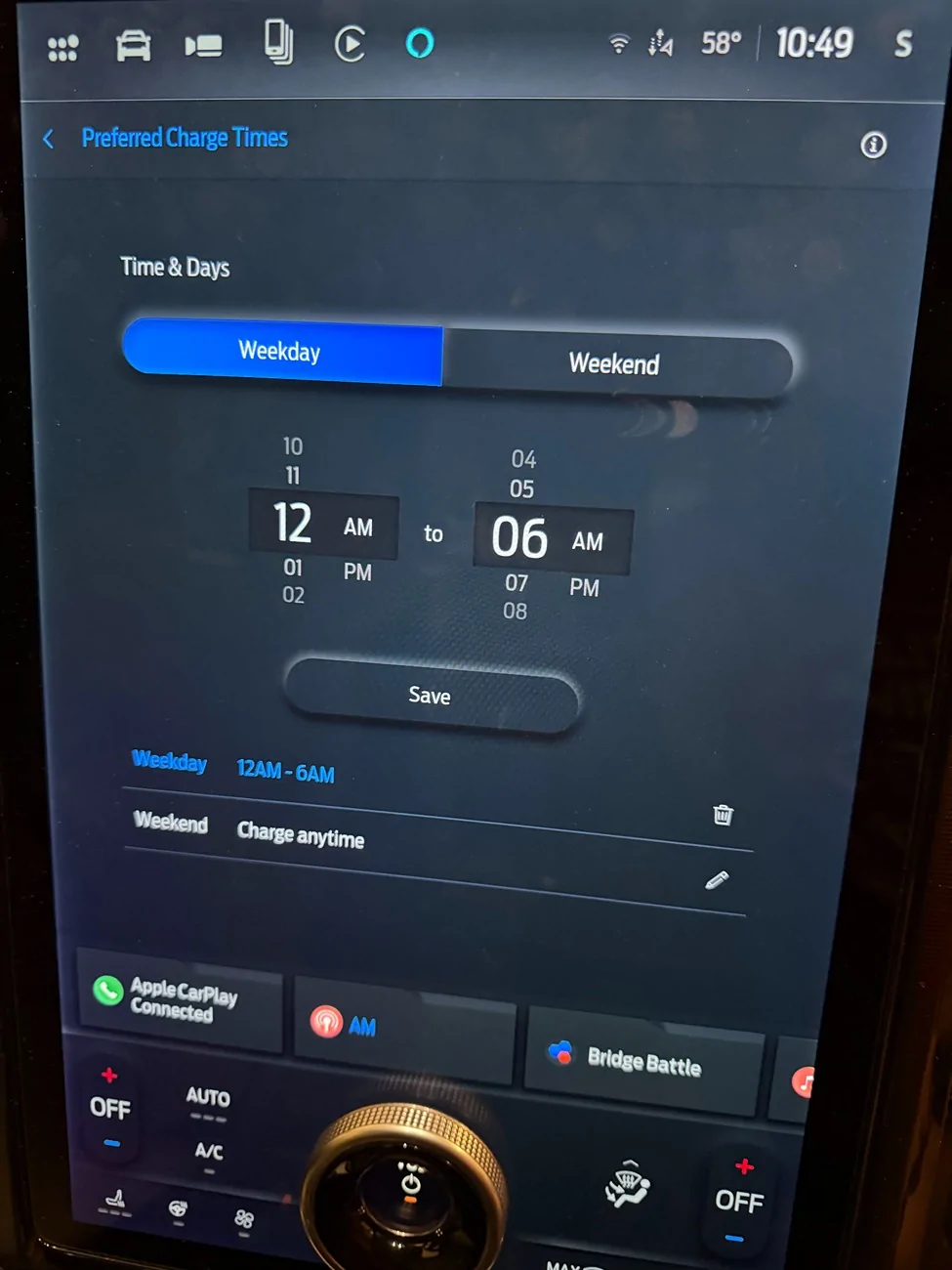
So currently when I press the arrow you highlighted to edit the home charge settings it takes me to this screen:

Ford F-150 Lightning Unable to Set Charge Limit IMG_1748


There is no state of charge settings in the home location. Only the ability to edit the time.
There is only a single place where I can attempt to change the target charge and that is the slider I show in the video above.

I will try using the key fob only while having the phone turned off, but I don’t think it will change anything. I will also try deleting and adding the location back now that I have done the 12v battery reset and see if that helps at all.

I feel like there is a ghost “charge to 100%” setting that used to be present in older versions of the software and somewhere or somehow that got turned on when it did the initial OTA update.

Does everyone’s screen not look the same? You mentioned that your ‘22 preferred charge location settings screen looked different. Is it different by model year? I would assume they would all be nearly identical. If I go to the dealership and sit in a lightning there it should look nearly identical to mine, no?
Sponsored


Top