Sponsored

F150 Lightning FORScan thread - Version 2

GarrettBlake

Well-known member
First Name
Garrett
Joined
Oct 23, 2023
Threads
5
Messages
53
Reaction score
66
Location
Santa Rosa
Vehicles
2023 Lightning
The hex display in forscan may be convenient, but is very misleading. Either the UI should be much smarter about the data being changed or it should be done in binary. In this day and age why data structures like this exist are beyond imagination.
Sponsored
 
OP
OP
bmwhitetx

bmwhitetx

Well-known member
First Name
Bruce
Joined
May 21, 2021
Threads
48
Messages
3,176
Reaction score
4,596
Location
DFW-Texas
Vehicles
2022 F150 Lightning Lariat ER
Occupation
Retired engineer
The hex display in forscan may be convenient, but is very misleading. Either the UI should be much smarter about the data being changed or it should be done in binary. In this day and age why data structures like this exist are beyond imagination.
Well first we shouldn't even know about this stuff or be able to change it. You have to remember this program was developed for/by Russians who needed to modify Fords decades ago. Ford would never condone this.

I think BMW's have some similar capability but our Hyundai, Pilot and Kia never did. So I'm thankful for what we got.

The FORScan folks have enabled a plain English mode for many of these changes so they are aware of the complexity. It does the hex math behind the scenes.

As for binary, I agree it would simplify many of these parameters. But the issue is that not everything is on/off. A lot of the values are integers. And some parameters have more than 2 possible values so use 2 or more bits.
 
Last edited:

EdNewman

Member
First Name
Edward
Joined
Feb 8, 2024
Threads
0
Messages
23
Reaction score
6
Location
Viera, Florida
Vehicles
24 F150 Lightning XLT, 22 Expedition 304A
Occupation
Firearms Manufacturer
Ok, so I went through your settings and your logic is sound. You do end up with some unicorn values. I am curious about it being a 2024 only problem. In looking at the As-Builts of 22-23's, it would seem that all 22-23 Pros and XLT w/o ACC would also not see the speed limit display on their dash. The values you enabled for your 24 are also disabled for the 22-23's.

So if true, this could also help 22-23 trucks that don't have ACC see speed limits.

Here is my additional analysis. If you're game you might change the first IPC back to original 4 to verify if it's needed. Maybe the second IPC also.


=============================== my notes in red
IPC
720-03-02
- Enable Traffic Sign Recognition (TSR) seemed logical, maybe not necessary?
As built C8(4)D 296A - change 4 to C
4 = TSR disabled • TS enabled • TBS disabled • TSP disabled
C = TSR enabled • TS enabled • TBS disabled • TSP disabled
Since all 22-24 Lightnings have a "4", I agree this change may not be needed.

720-09-01 Enable SLIF - again, maybe not necessary?
As Built 6062-1554-(1)975
1 = SLIF disabled • HUDC No_HUD • FCWARTTC ON
9 = SLIF enabled • HUDC No_HUD • FCWARTTC ON
SLIF= "speed limit information functions", matches trims with ACC so likely needed unless it's just used for the ACC part. So could change it back to As-Built and see what happens. Same for all 22-24.

APIM
7D0-09-02
- Traction Control/IVD/RSC (TCIVDRSC) • Adaptive Cruise (AC) • TSR NCAP Adaptations (TSRNCAPA) - This enabled the TSR, trucks with Adaptive cruise would probably be different
As Built C065-5(4)00-0560
4 = TCIVDRSC TC • AC Disabled • TSRNCAPA Disabled
5 = TCIVDRSC TC • AC Disabled • TSRNCAPA Enabled
7 = TCIVDRSC TC • AC Enabled • TSRNCAPA Enabled
22-24's with IACC have a 7.
22-24's w/o IACC have a 4.
Like you show, 5 would enable TSR but keep AC disabled.


Traffic Sign Recognition (TSR) • TPMS By Location (TPMSBL) • TPMS Placard Pressure Display (TPMSPPD) • Centerstack Settings (CS)
As Built C065-5400-0(5)60
5 = TSR Disabled • TPMSBL Enabled • TPMSPPD Disabled • CS Enabled
D = TSR Enabled • TPMSBL Enabled • TPMSPPD Disabled • CS Enabled
Matches 22-24 as-builts with and without ACC

IPMA
706-01-01

ModuleFeatureCfg_TSR (MFCTSR) • ModuleFeatureCfg_IACC (MFCIACC)
As Built 0E(0)0-8055-8E80
0 = MFCTSR Off • MFCIACC Disabled
4 = MFCTSR SLIF • MFCIACC Disabled
5 = MFCTSR SLIF • MFCIACC Enabled
22-24's with IACC have a 5.
22-24's w/o IACC have a 0.
Like you show, 4 would enable TSR SLIF but keep AC disabled.


706-02-01
FeatureCfg_TSRMode (FCTSRM) • FeatureCfg_LKSMyKey (FCLKSMK) • FeatureCfg_LKSStrategy (FCLKSS) • FeatureCfg_DPAC_WrdRemoteCamera (FCDPACWRC)
As Built (2)B67-FFCC-016E
2B = FCTSRM OFF • FCLKSMK OFF • FCLKSS Non_EuNCAP • FCDPACWRC Present
4B = FCTSRM CameraOnlyOn • FCLKSMK OFF • FCLKSS Non_EuNCAP • FCDPACWRC Present
6B = FCTSRM FusionOn • FCLKSMK OFF • FCLKSS Non_EuNCAP • FCDPACWRC Present

As Built for Lightnings
32 = FCTSRM OFF • FCLKSMK ON • FCLKSS Non_EuNCAP • FCDPACWRC Absent 22-23 Pro
33 = FCTSRM OFF • FCLKSMK ON • FCLKSS Non_EuNCAP • FCDPACWRC Present 22-23 XLT 311A
73 = FCTSRM FusionOn • FCLKSMK ON • FCLKSS Non_EuNCAP • FCDPACWRC Present 22-23 IACC
2B = FCTSRM OFF • FCLKSMK OFF • FCLKSS Non_EuNCAP • FCDPACWRC Present 24 XLT
6B = FCTSRM FusionOn • FCLKSMK OFF • FCLKSS Non_EuNCAP • FCDPACWRC Present 24 Flash and above
good morning, I was able to make the change on the IPC for 720-03–02 back to The as built of 4 and the speed limit sign detection and display still seem to be functioning properly. So my take away is that you were correct and that change is indeed unneeded. I will continue to work through them one at a time until we get this to 100%.
 

BryanX

New member
Joined
Dec 3, 2024
Threads
0
Messages
4
Reaction score
4
Vehicles
2024 F150 Lightning
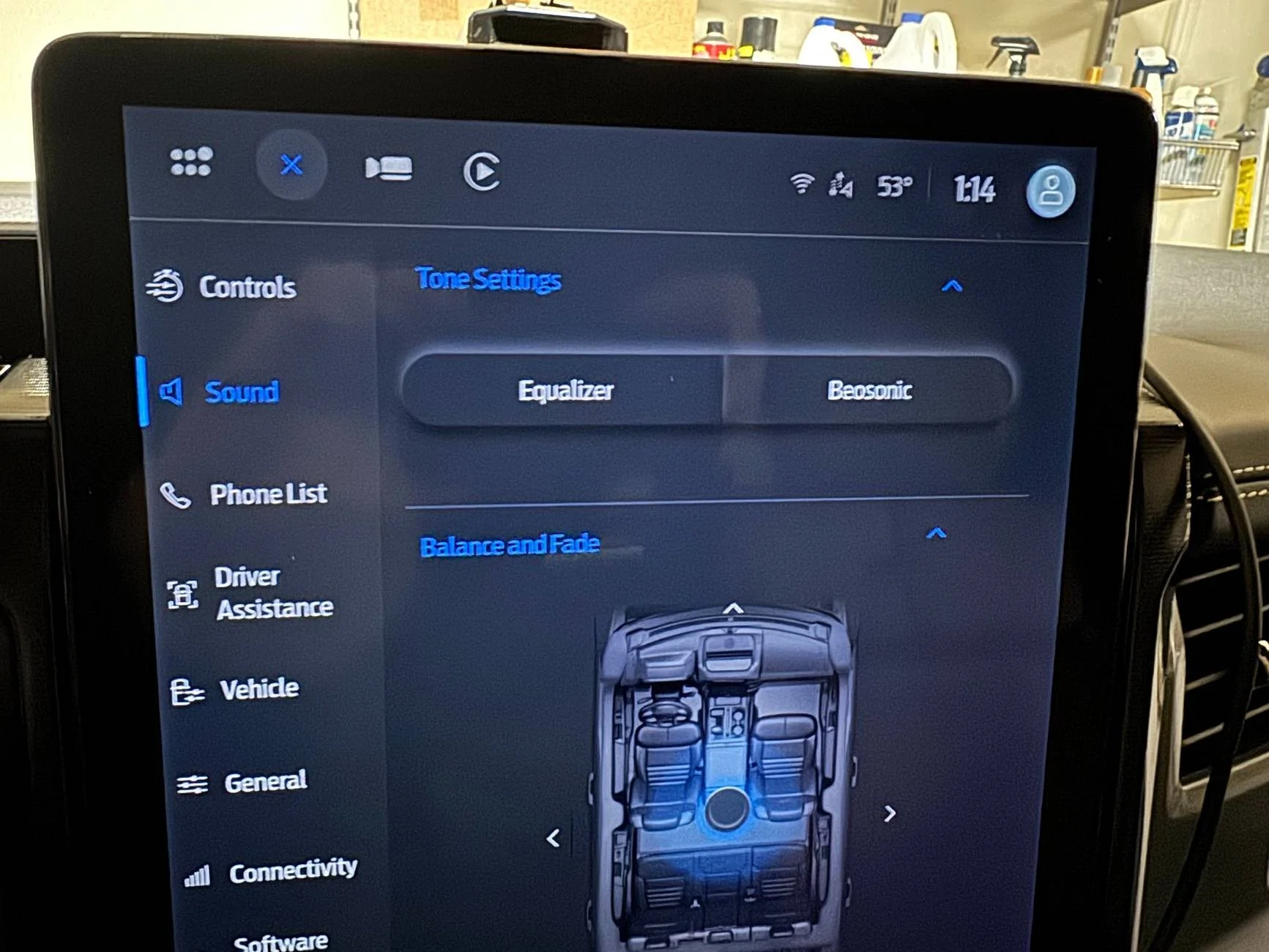
I have a 2024 Platinum and the Beosonic change did not work for me either.
Just want to add my 24 Platinum also doesn't seem to work with the Beosonic mod.
I get the menu tab for eq and Beosonic but I can't select either option, it just does nothing.

Might need to update the sheet, maybe 24's can't use this because of unknown changes? My truck is only about 4 months old and has nearly every module current even.
 

Karlos

Well-known member
First Name
Karl
Joined
Dec 4, 2022
Threads
2
Messages
178
Reaction score
165
Location
DFW & Kerrville Tx
Vehicles
2022 Ice Blue & 2023 Silver ER Lariat Lightnings, 2024 Mach-e Premium ER
Occupation
Retired CPA, active pilot
Did the Forscan glare free, trailer side & camera button on my 2023 LER successfully yesterday. Couple of evening trips show it working fine. The white headlight button with the green A has been replaced with all green. I notice also that you can't manually turn on the high beams over 30 mph, just turn the glare free on or off, but not complaining. Thanks @bmwhitetx for your help & advise !!
 

Sponsored

Karlos

Well-known member
First Name
Karl
Joined
Dec 4, 2022
Threads
2
Messages
178
Reaction score
165
Location
DFW & Kerrville Tx
Vehicles
2022 Ice Blue & 2023 Silver ER Lariat Lightnings, 2024 Mach-e Premium ER
Occupation
Retired CPA, active pilot
You can hold back on the stalk to get high beams (flash to pass style) if needed but to manually turn the high beams on or off you have to set the headlight selector to manual mode.
Don't think I couldn't get HB's at all, even to flash by pulling back or forward, but I could have just been pushing forward - I'll have to re-check that.
By "manual mode" I presume you're referring to Position D - Headlamps On ? I'll have to try that, hadn't noticed that option. Sounds like that might disengage the glare free feature ? Too many options, give me the old button in the floorboard :crackup:
 
OP
OP
bmwhitetx

bmwhitetx

Well-known member
First Name
Bruce
Joined
May 21, 2021
Threads
48
Messages
3,176
Reaction score
4,596
Location
DFW-Texas
Vehicles
2022 F150 Lightning Lariat ER
Occupation
Retired engineer
Don't think I couldn't get HB's at all, even to flash by pulling back or forward, but I could have just been pushing forward - I'll have to re-check that.
By "manual mode" I presume you're referring to Position D - Headlamps On ? I'll have to try that, hadn't noticed that option. Sounds like that might disengage the glare free feature ? Too many options, give me the old button in the floorboard :crackup:
Here is the glare-free operation manual including how to override
https://www.f150lightningforum.com/forum/threads/glare-free-light-operation.21435/post-477276
 

Karlos

Well-known member
First Name
Karl
Joined
Dec 4, 2022
Threads
2
Messages
178
Reaction score
165
Location
DFW & Kerrville Tx
Vehicles
2022 Ice Blue & 2023 Silver ER Lariat Lightnings, 2024 Mach-e Premium ER
Occupation
Retired CPA, active pilot
Well, I don't have the "Glare-free" on/off button on the Lighting screen for starters. I do get the all green glare free symbol.

The system worked as expected last two nights, you can see the typical left side high beam disappear, with some of the center lenses twitching on & off. GF also seems to react quicker on & off than the other auto high beam system, which sometimes would take 3-5 seconds to return.

I also get no response and never see the blue high beam symbol if I push the stalk forward with GF engaged. I can get the GF system to cycle on and off with repeated stalk pushes. I'll have to try the standard high beam setting.

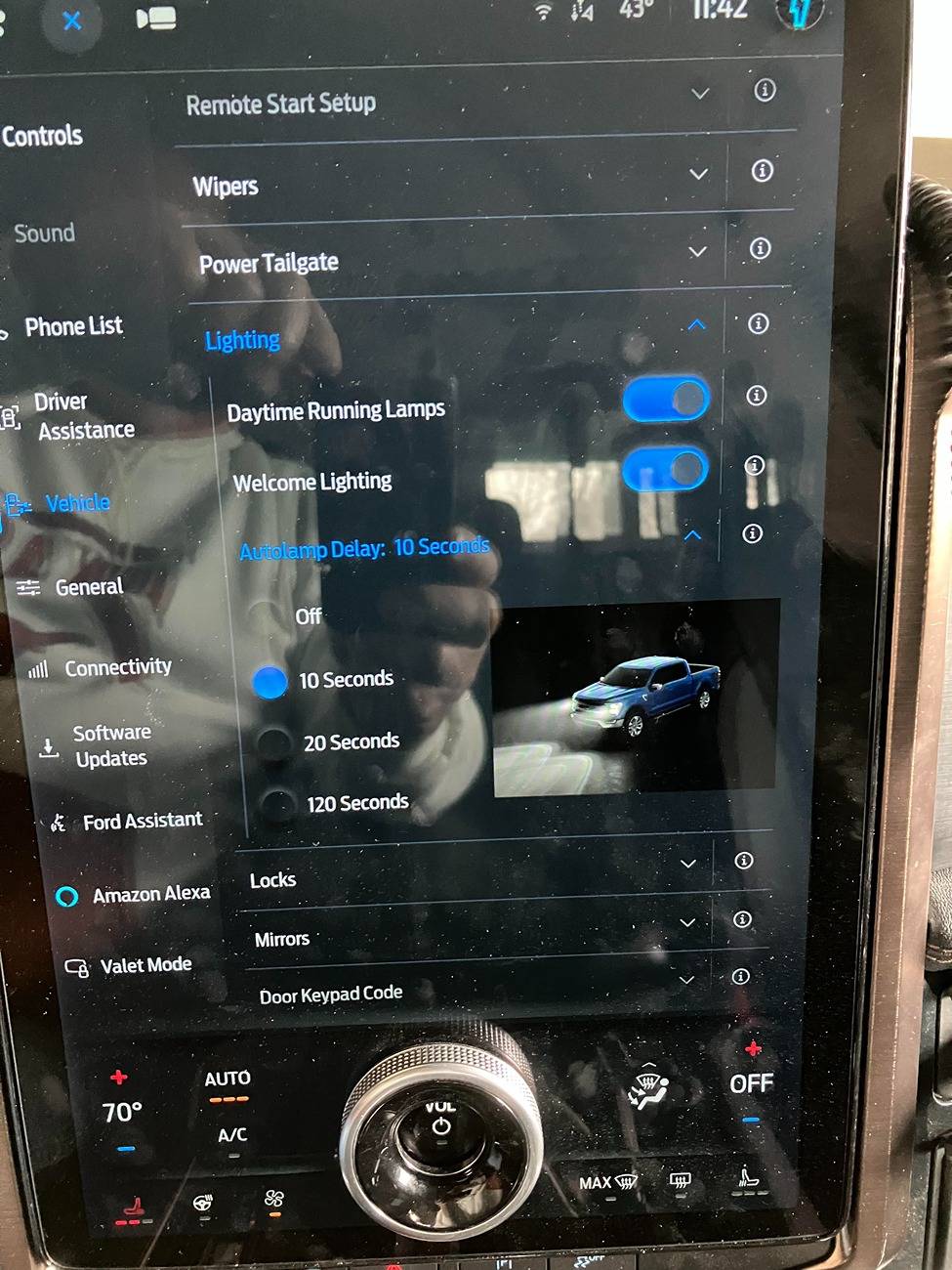
Ford F-150 Lightning F150 Lightning FORScan thread - Version 2 Lighting Options Sans Glare Free
 

carys98

Well-known member
First Name
Cary
Joined
Jan 15, 2022
Threads
34
Messages
903
Reaction score
1,470
Location
Raleigh, NC
Vehicles
2023 Lightning Lariat SR
Occupation
Retired EE
Well, I don't have the "Glare-free" on/off button on the Lighting screen for starters. I do get the all green glare free symbol.

The system worked as expected last two nights, you can see the typical left side high beam disappear, with some of the center lenses twitching on & off. GF also seems to react quicker on & off than the other auto high beam system, which sometimes would take 3-5 seconds to return.

I also get no response and never see the blue high beam symbol if I push the stalk forward with GF engaged. I can get the GF system to cycle on and off with repeated stalk pushes. I'll have to try the standard high beam setting.

Lighting Options Sans Glare Free.jpg
Check to be sure the APIM settings are correct. You might want to try a Sync reset to see if the options show up.
 

Karlos

Well-known member
First Name
Karl
Joined
Dec 4, 2022
Threads
2
Messages
178
Reaction score
165
Location
DFW & Kerrville Tx
Vehicles
2022 Ice Blue & 2023 Silver ER Lariat Lightnings, 2024 Mach-e Premium ER
Occupation
Retired CPA, active pilot
Check to be sure the APIM settings are correct. You might want to try a Sync reset to see if the options show up.
I've checked the settings. Screen reset after each write cycle in Forscan & I did an additional one after finishing. I'm presuming it does a reset every on/off startup as well.
 

Sponsored

B177y

Well-known member
First Name
Bill
Joined
Jul 16, 2024
Threads
16
Messages
781
Reaction score
1,074
Location
Olympic Peninsula, WA
Vehicles
'24 Pro SSV ER Max Tow, '23 MME Premium, '20 Bolt
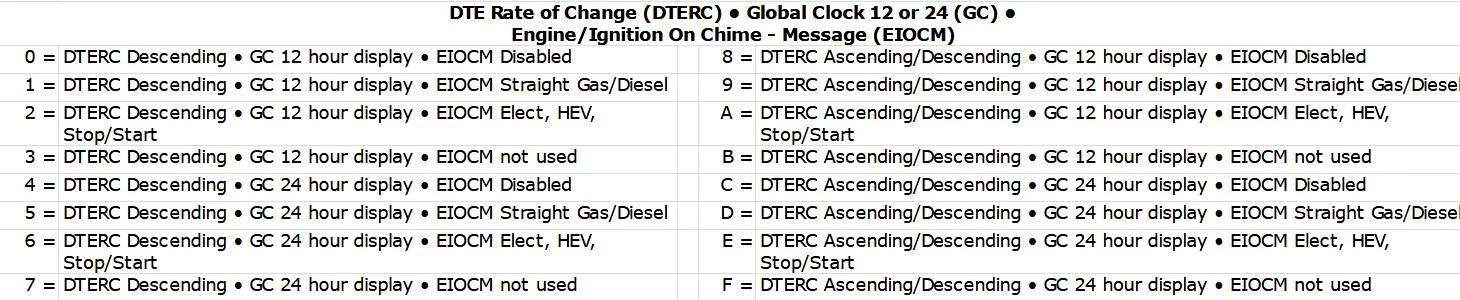
Thanks! I'll add the door ajar one (with edit for 24-hour clock). I already had the seat belt chime in there.

1735771532715-nz.jpg


Note this is one of the addresses that has less than 10 bytes of info, only 6.
So it's "xxxx xx--" instead of "xxxx xxxx xx--"
I was searching for a fix for my 24-hour clock that keeps reseting itself to AM/PM when I use the Sync clock settings. Does this forscan setting stay permanent or does it still have the bug of switching back to AM/PM?
 
OP
OP
bmwhitetx

bmwhitetx

Well-known member
First Name
Bruce
Joined
May 21, 2021
Threads
48
Messages
3,176
Reaction score
4,596
Location
DFW-Texas
Vehicles
2022 F150 Lightning Lariat ER
Occupation
Retired engineer
That instruction is not accurate for my truck. Pushing forward does not cycle through like that and the high beams will not turn on that way.
It worked for me in Park, that's how I got the IPC pics. I haven't tried it while driving. Be curious if it works that way for Canadian trucks that have this factory enabled. If, so there is likely a setting we're missing.

Any Canadians out there with factory glare-free that can send me your VIN?
 

jeffdemello

Member
First Name
Jeff
Joined
Feb 12, 2025
Threads
1
Messages
6
Reaction score
2
Location
MA
Vehicles
F150 v8
Has anyone successfully turned off seatbelt reminder on a 24? I updated forscan with no luck and the manual option doesn't work either. Just want to ask.
IPC 720-01-01 xxxx xx0x xx--
 

mattskr

Well-known member
First Name
Matt
Joined
Sep 11, 2022
Threads
3
Messages
331
Reaction score
489
Location
Austin, Texas
Vehicles
23 Lightning Platinum, 25 Armada, 26 Wrangler JLU
Just reporting that I was not able to get Beosonic working on 23 Platinum with B&O Unleashed. All I could get was the tab for Beosonic but nothing would appear. The equalizer tab was also broken so I had to revert all changes.

I see others reporting the same behavior.

Ford F-150 Lightning F150 Lightning FORScan thread - Version 2 IMG_1826
 
OP
OP
bmwhitetx

bmwhitetx

Well-known member
First Name
Bruce
Joined
May 21, 2021
Threads
48
Messages
3,176
Reaction score
4,596
Location
DFW-Texas
Vehicles
2022 F150 Lightning Lariat ER
Occupation
Retired engineer
Just reporting that I was not able to get Beosonic working on 23 Platinum with B&O Unleashed. All I could get was the tab for Beosonic but nothing would appear. The equalizer tab was also broken so I had to revert all changes.

I see others reporting the same behavior.

IMG_1826.jpeg
Thanks, I'm going to remove it from the first post. It's still documented in this thread but not worthy of front page.
Sponsored


Top