steelersmb
Well-known member
I was wondering if there is a list of recommended settings or toggles to turn on?
Sponsored
Coming Soon(TM)I was wondering if there is a list of recommended settings or toggles to turn on?
Brian is gonna sue the $hit outta you, he's gon be rollin' round in stacks of that 3D printed doughComing Soon(TM)
Well, a +0.4 on offset would cause it to ping pong like crazy. I've repeatedly explained that this setting should be only used as a last resort, because you are fighting the model when you try to adjust the offset. usually 0.05 or 0.1 is okay, but getting higher than that will cause problems.So far, I'm not really impressed with the Comma 4. I have my lane offset set to +40, and my truck still hugs the center lane, sometimes even goes over it, and it drives like it's been drinking, constantly moving within the lane. Also, the speed is way off and hardly ever accurate. Not a big fan so far, and I hesitate to use it.

Thanks, I will change the offset to .05 and see but I know it's going to hug the center lane. The unit is centered but I will confirm this.Well, a +0.4 on offset would cause it to ping pong like crazy. I've repeatedly explained that this setting should be only used as a last resort, because you are fighting the model when you try to adjust the offset. usually 0.05 or 0.1 is okay, but getting higher than that will cause problems.
If you don't like where it is positioned in the lane, verify that your device is properly centered in your windshield. Then you can try different models, as some tend to place you differently within the lane.
The Comma4 doesn't show your speed by default. There is a blue plot specific feature that placed information in the bottom right corner of the screen, and it is adjustable to what it shows. I suspect you have it set to show the speed of the vehicle in front of you.

What model are you using?Thanks, I will change the offset to .05 and see but I know it's going to hug the center lane. The unit is centered but I will confirm this.
installer.comma.ai/BluePilotDev/bp-6.0.1-betaWhat model are you using?
What is “the Model”, why does it change so often, and why can’t we fix problem x/y/z on Fords?installer.comma.ai/BluePilotDev/bp-6.0.1-beta
Okay, mine was set to the default option. I changed it to the one you are using. I'll test and see.What is “the Model”, why does it change so often, and why can’t we fix problem x/y/z on Fords?
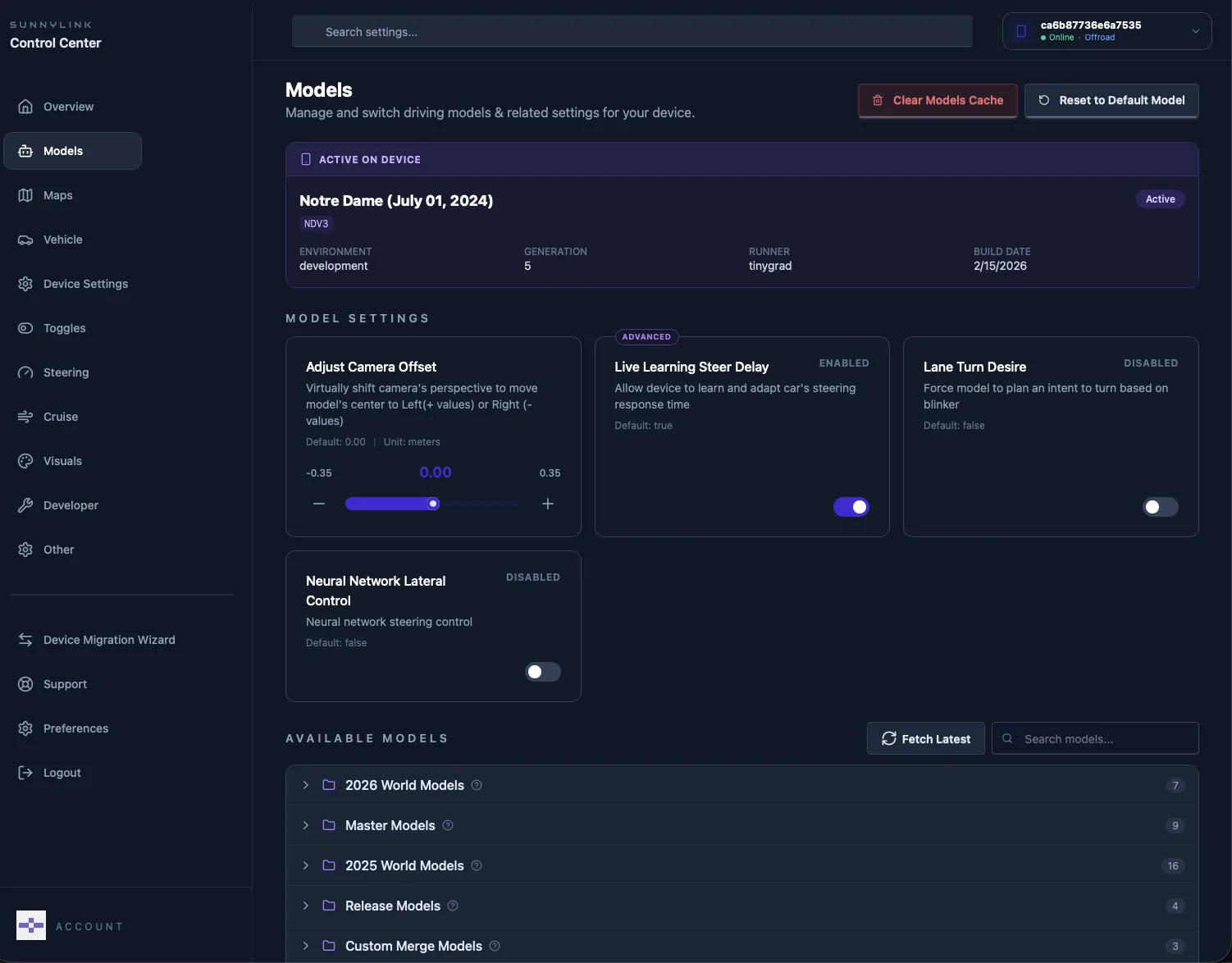
In Sunnylink you can change the model, I use suggest WD40 or Notre Dame, locate under legacy models:

I changed it to the Notre Dame model and the lane positioning is much better but the speed control is awful. It doesn't maintain the speed set even when the car in front is way ahead. I will try the other model to see how that works.Okay, mine was set to the default option. I changed it to the one you are using. I'll test and see.
not a model issue.I changed it to the Notre Dame model and the lane positioning is much better but the speed control is awful. It doesn't maintain the speed set even when the car in front is way ahead. I will try the other model to see how that works.