Sponsored

F150 Lightning FORScan thread - Version 2

OP
OP
bmwhitetx

bmwhitetx

Well-known member
First Name
Bruce
Joined
May 21, 2021
Threads
48
Messages
3,180
Reaction score
4,606
Location
DFW-Texas
Vehicles
2022 F150 Lightning Lariat ER
Occupation
Retired engineer
I have the toggle for silent mode in the sync settings but I'm not sure if it's actually working. I was hoping it would disable all the exterior lighting for when I take the truck to my local drive inn movies in the summer.
Note that silent mode is only for when the vehicle is off. You can open/close doors and lock/unlock them without lights or horn honks. If you turn the truck on to listen to the drive-in radio that mode goes away.
Sponsored


evowner

Well-known member
First Name
Frank
Joined
Jan 20, 2025
Threads
7
Messages
203
Reaction score
226
Location
SW Ohio
Vehicles
2024 Ford F150 Lightning Lariot
Occupation
Retired EE
The hex display in forscan may be convenient, but is very misleading. Either the UI should be much smarter about the data being changed or it should be done in binary. In this day and age why data structures like this exist are beyond imagination.
Exactly, they should be using JSON or XML. It is crazy to use such a cryptic method.
 

MJFlanigan

Active member
First Name
Michael
Joined
Oct 7, 2024
Threads
0
Messages
26
Reaction score
12
Location
Atlanta, GA
Vehicles
2023 Ford F-150 Lighting XLT
Occupation
IT
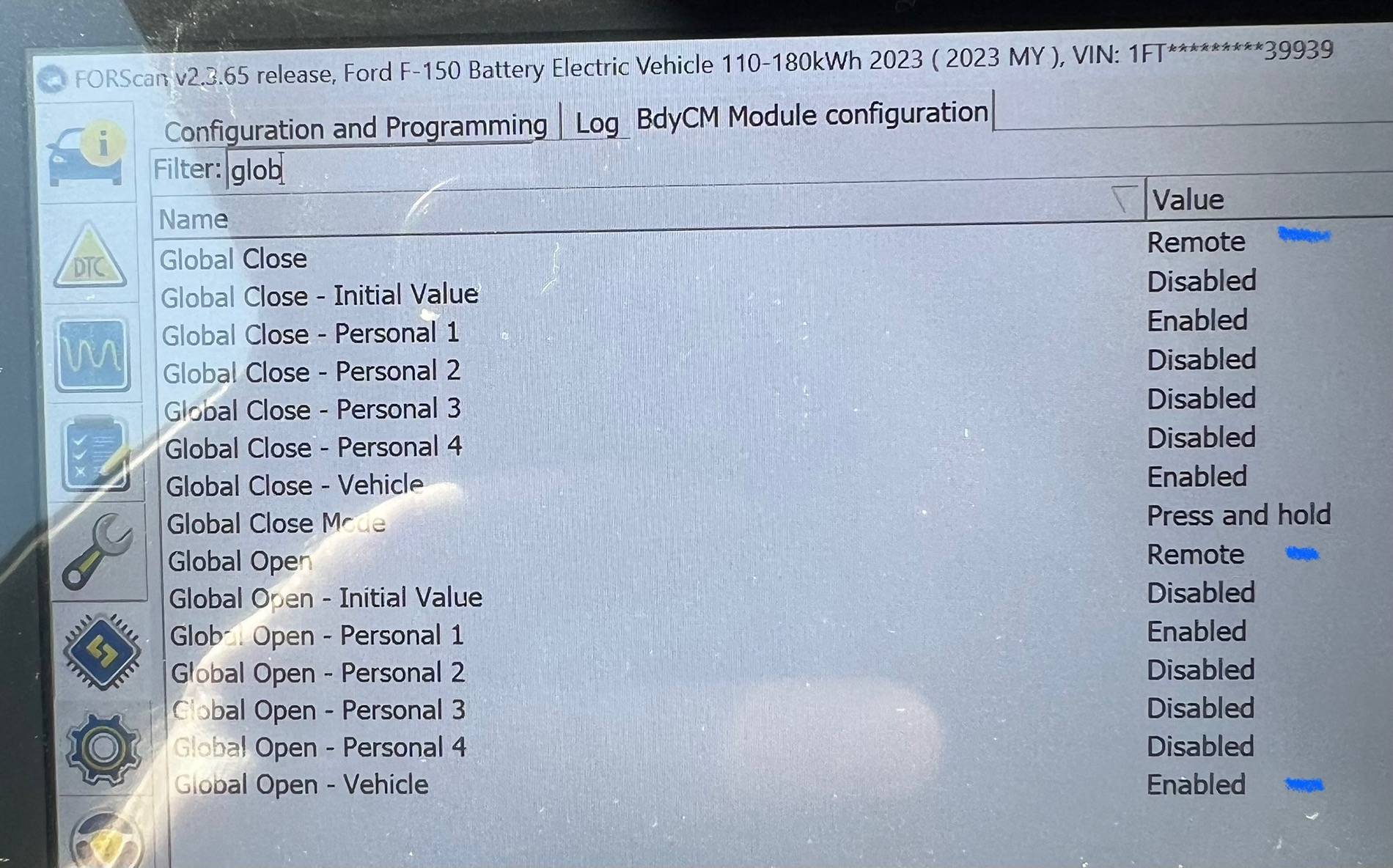
For anyone curious about Global Windows without “As Built”, I went ahead and did a quick pic before and after on the BCM. Just three quick changes from “Disabled” for my truck. The other 3 modules are obvious as they just say “Global Windows” Up and Down.
IMG_4756.jpeg
I still can't get mine to work that way. I have it enabled everywhere and still nothing
 

richguy82

Well-known member
First Name
Richard
Joined
Feb 20, 2025
Threads
14
Messages
184
Reaction score
139
Vehicles
2023 Ford Lightning Lariat
I still can't get mine to work that way. I have it enabled everywhere and still nothing
I actually made a mistake in saying it was 3 changes in that photo. It’s actually 4. The “Global Close Vehicle” should also be enabled. There are 3 other modules DDM, PDM, and APIM that also require updates. I believe it was just Global Windows Open and Global Windows Closed for each of those 3 modules.
 

MJFlanigan

Active member
First Name
Michael
Joined
Oct 7, 2024
Threads
0
Messages
26
Reaction score
12
Location
Atlanta, GA
Vehicles
2023 Ford F-150 Lighting XLT
Occupation
IT
I actually made a mistake in saying it was 3 changes in that photo. It’s actually 4. The “Global Close Vehicle” should also be enabled. There are 3 other modules DDM, PDM, and APIM that also require updates. I believe it was just Global Windows Open and Global Windows Closed for each of those 3 modules.
I did all those and couldnt get it to work still.
 

Sponsored

richguy82

Well-known member
First Name
Richard
Joined
Feb 20, 2025
Threads
14
Messages
184
Reaction score
139
Vehicles
2023 Ford Lightning Lariat
I did all those and couldnt get it to work still.
Might want to go in and make the changes “As Built”. When I made the changes in the text version I went back to look at “As Built” for each module and the values matched up perfectly with the reported values on page 1. Hopefully that works out for you. Sorry I can’t be of more help. There are much more qualified people on here than me that I’m sure would be happy to assist.
 

MJFlanigan

Active member
First Name
Michael
Joined
Oct 7, 2024
Threads
0
Messages
26
Reaction score
12
Location
Atlanta, GA
Vehicles
2023 Ford F-150 Lighting XLT
Occupation
IT
Might want to go in and make the changes “As Built”. When I made the changes in the text version I went back to look at “As Built” for each module and the values matched up perfectly with the reported values on page 1. Hopefully that works out for you. Sorry I can’t be of more help. There are much more qualified people on here than me that I’m sure would be happy to assist.
Appreciate the help I'll try it again.
 

richguy82

Well-known member
First Name
Richard
Joined
Feb 20, 2025
Threads
14
Messages
184
Reaction score
139
Vehicles
2023 Ford Lightning Lariat
Appreciate the help I'll try it again.
Just to clarify, I originally made the changes in the text mode for the first 3 modules and used the codes in “As Built” for BCM. The photo was me recording the values I saw that had changed, but I had only filtered for “Global”. I suppose it’s possible other changes occurred that I didn’t see. I mean, I made 3 changes in BCM AS BUILT, but there are at least 4 changes when I viewed in text. Hopefully that makes sense.
 

Fistandantilus

Active member
Joined
Mar 5, 2025
Threads
2
Messages
43
Reaction score
40
Location
Germany
Vehicles
2023 F150 Lightning Platinum
Hello, ist there any update on how to keep the power in the bed on while the truck is off just like the newer 2024 trucks.

F.
 

Andrewbens

Well-known member
First Name
Andrew
Joined
Mar 8, 2024
Threads
6
Messages
199
Reaction score
151
Location
Modesto
Vehicles
Lightning
Occupation
Mechanic
Hello, ist there any update on how to keep the power in the bed on while the truck is off just like the newer 2024 trucks.

F.
I believe you go to settings than vehicle and than turn off 30min count down.
 

Sponsored

PJnc284

Well-known member
Joined
Sep 30, 2024
Threads
0
Messages
1,221
Reaction score
1,391
Location
Garner, NC
Vehicles
2023 Ford F150 Lightning Lariat ER
Hello, ist there any update on how to keep the power in the bed on while the truck is off just like the newer 2024 trucks.

F.
Not currently available for pre 24MY. Ford will need to push out an OTA to enable it.
 

Fistandantilus

Active member
Joined
Mar 5, 2025
Threads
2
Messages
43
Reaction score
40
Location
Germany
Vehicles
2023 F150 Lightning Platinum
Hi, I yesterday did the following changes:

SCCM:
Blink 3 to 4
rain sensor disabled to enabled
Markt non-European to Europe

APIM
50/50 CAM
7D0-01-01 A0C1 180A BD19 -> A0C1 380A BD19
7D0-01-04 13E4 FEE3 6014 -> 13E4 FEE3 6114

IPC
3-times chime on start disabled
720-01-02 022F 80DB -> 020F 82DB

APIM
Beosonic
7D0-01-01 A0C1 380A BD19 -> A0C9 380A BD19

DSP
Beosonic
783-01-01 F50D 800E -> F51D 800E

IPC
Door Ajar Chime + 24h Clock
720-01-02 022F 82DD -> 020F 82DD


Glare-free headlights
APIM
7D0-09-01 6317 C2A8 FABF -> 6117 C2A8 FABF
7D0-09-03 0040 0004 072E -> 00C0 0004 072E
IPMA
706-01-01 8E50 A255 AE92 -> 8E50 A259 AE92
SCCM
724-04-01 2842 0000 9A -> 2844 0000 9A
HCM
734-01-02 0001 0100 0040 -> 0001 0200 0040
734-03-02 111E 1801 0088 -> 111E 1801 0188
734-11-01 B159 57 -> 0735 89
IPC
720-01-01 0F0A 1024 F46A -> 0F8A 1024 F46A
720-10-01 0B08 0021 006C -> 0B08 0023 006C

So far so good. Beosonic is not working so I anyway will revert it.

I am located in Germany so some settings regarding localization already where done.
Befor the changes the speedometer was showing km/h now it is mph no matter if I switch the metric system back and forth. So any of the above setting is responsbile for it.
I do have backups of the modules, so that is not the problem but I would like to avoid the effort doing that.

Do you have any idea what to change to get km/h back for the speedometer?

Car is an 2023 Lighning Platinum.

br
F.
 
Last edited:
OP
OP
bmwhitetx

bmwhitetx

Well-known member
First Name
Bruce
Joined
May 21, 2021
Threads
48
Messages
3,180
Reaction score
4,606
Location
DFW-Texas
Vehicles
2022 F150 Lightning Lariat ER
Occupation
Retired engineer
Do you have any idea what to change to get km/h back for the speedometer?
I suggest going into Easy Mode for the IPC (not As Built mode). There you will see a variety of toggles and settings. Find any that change display settings (mph/kph) or Country code (use CA for Canada instead of US).

For grins go into As Built mode first and do a Save All. The make the changes in Easy mode, and go back and do a Save All again. I would be interested in those two files to see what changed.

I think your issue is with IPC but all the values you showed above don't impact display units as far as I can tell.

If that doesn't work, do the same thing for the APIM.
 

Fistandantilus

Active member
Joined
Mar 5, 2025
Threads
2
Messages
43
Reaction score
40
Location
Germany
Vehicles
2023 F150 Lightning Platinum
Yes, think need to do that. Also just went again throught all IPC settings because that was my first thought too but everything seems to be ok there.
Just the 24h clock setting is wrong - need to change that too:

720-01-02 022F 82DD -> 020F 82DD -> 026F 82DD


Maybe it even is the easy mode setting for the market non-European to Europe
Will check that out tomorrow - quite late already here...
 
Last edited:

digitaldad

Well-known member
Joined
Jan 14, 2025
Threads
25
Messages
452
Reaction score
438
Location
ABQ
Vehicles
'23 Lariat ER MaxTow
FORScan questions:

1. I know we cannot force Sport mode permanently via programming but is there a way to extend the "resume Sport" timer? I find if I'm doing anything other than full front display focus, I tend to miss it then have to go into settings.

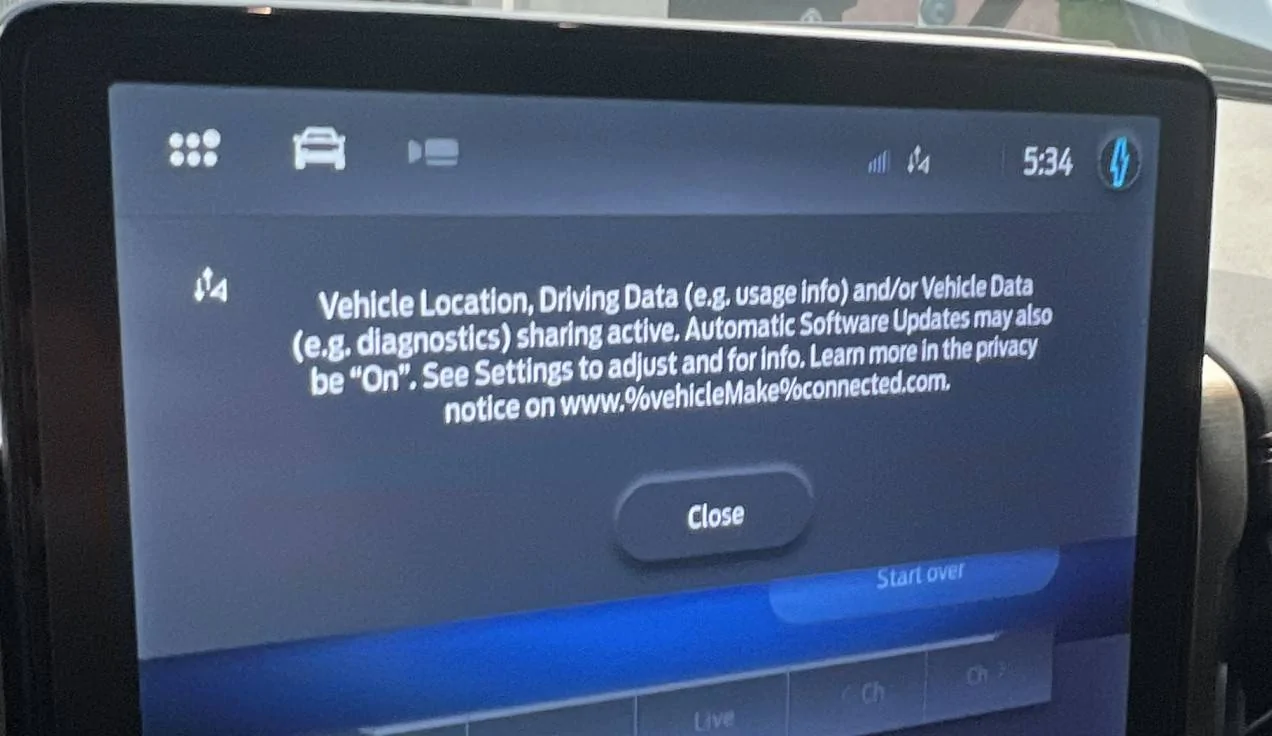
2. Is there a way to disable this Vehicle Location, Driving Data popup from coming on-screen?

Ford F-150 Lightning F150 Lightning FORScan thread - Version 2 Disable_This
Sponsored


Top