Sponsored

F150 Lightning FORScan thread - Version 2

Cowboy Kallonen

New member
First Name
Kari
Joined
Dec 28, 2025
Threads
0
Messages
4
Reaction score
2
Location
Finland
Vehicles
F-150 Lightning 2022 ER Platinum
Occupation
Investor
I want to disable the white LEDs around the headlights that continue as an LED bar. The reason is that one headlight is damaged in terms of that LED light and flashes from time to time. The LED bar in front of the frunk can be disconnected, but can ForScan turn off the ones around the headlights when the headlights or DRL's are on.

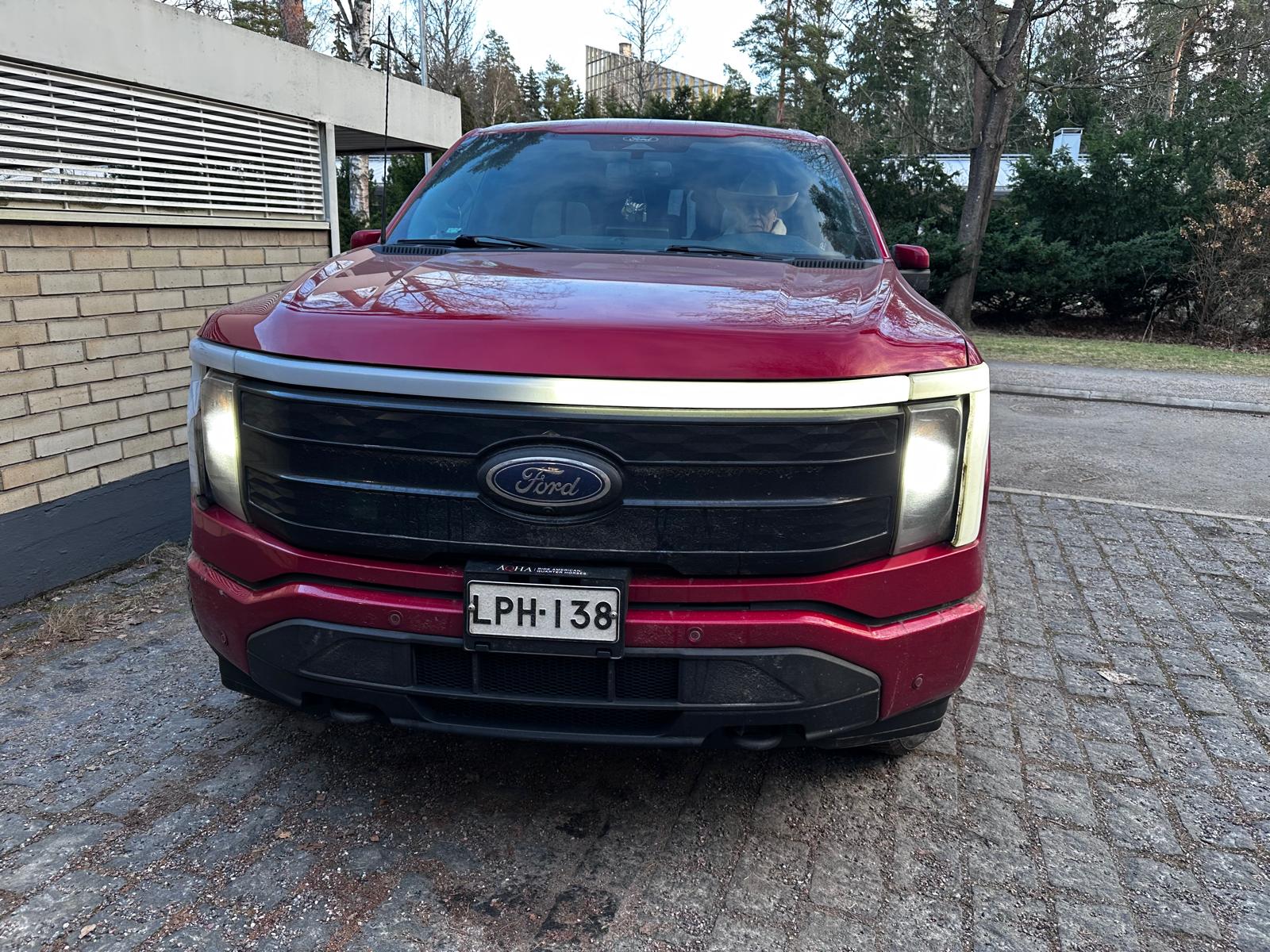
Ford F-150 Lightning F150 Lightning FORScan thread - Version 2 PHOTO-2025-12-24-12-28-48
Sponsored


Cowboy Kallonen

New member
First Name
Kari
Joined
Dec 28, 2025
Threads
0
Messages
4
Reaction score
2
Location
Finland
Vehicles
F-150 Lightning 2022 ER Platinum
Occupation
Investor
Don't recall seeing anything related to it in Forscan. Probably better to just unplug it from each light.
Thanks. I need to check if I can remove the LED section from the headlight separately. At a quick glance, it looks like there is only one connector to the headlight that controls both the headlights and the DRLs. I assume that there is a pin in the connector that controls the LED light, but I'm not sure if it can be blocked. I may just have to wait for a new headlight from Ford (or buy one from eBay or similar).
 

OMO7

Well-known member
Joined
Apr 26, 2024
Threads
3
Messages
75
Reaction score
100
Location
Canada
Vehicles
23 Lightning
I did the Glare Free, global windows, and 50/50 cam. They all worked originally.

Not sure how long after, but the option the choose glare free is no longer there and only auto high beams is available, but when my lights come on they're still the green auto from glare free and it looks like it's working. The global windows don't seem to work. 50/50 cam works without issue.

Any ideas? I have the AB files.
 

chriserx

Well-known member
First Name
Chris
Joined
Oct 3, 2025
Threads
4
Messages
761
Reaction score
594
Location
Louisiana
Vehicles
2025 Ford Lightning Flash Job 2 😭
I did the Glare Free, global windows, and 50/50 cam. They all worked originally.

Not sure how long after, but the option the choose glare free is no longer there and only auto high beams is available, but when my lights come on they're still the green auto from glare free and it looks like it's working. The global windows don't seem to work. 50/50 cam works without issue.

Any ideas? I have the AB files.
Pure guess, double check the APIM mods, I'd assume that the flags that show/hide the toggles are located there. Can also reboot the APIM and check. Also cross check the changes made with the other mods to make sure you didn't revert anything when making those.
 

Sponsored

OMO7

Well-known member
Joined
Apr 26, 2024
Threads
3
Messages
75
Reaction score
100
Location
Canada
Vehicles
23 Lightning
Pure guess, double check the APIM mods, I'd assume that the flags that show/hide the toggles are located there. Can also reboot the APIM and check. Also cross check the changes made with the other mods to make sure you didn't revert anything when making those.
I'll double check. Just found it odd that they all worked originally.
 

mmarchand

Active member
First Name
Matt
Joined
May 25, 2025
Threads
2
Messages
44
Reaction score
8
Vehicles
F150 Lightning
I definitely need to speed up the frunk opening/closing speed. I often skip using it because it's so slow. I missed what needs to be changed in ForeScan to make this happen. Where do I access the speed and how do I change it?
 
OP
OP
bmwhitetx

bmwhitetx

Well-known member
First Name
Bruce
Joined
May 21, 2021
Threads
48
Messages
3,190
Reaction score
4,620
Location
DFW-Texas
Vehicles
2022 F150 Lightning Lariat ER
Occupation
Retired engineer
I definitely need to speed up the frunk opening/closing speed. I often skip using it because it's so slow. I missed what needs to be changed in ForeScan to make this happen. Where do I access the speed and how do I change it?
It was mentioned a couple pages back. Be careful.
 

mmarchand

Active member
First Name
Matt
Joined
May 25, 2025
Threads
2
Messages
44
Reaction score
8
Vehicles
F150 Lightning
It was mentioned a couple pages back. Be careful.
i did see it a couple pages back, there’s where I found out about it. Just wasn’t sure where to change the setting. I’ve only used as built but I guess it’s just in the Easy mode?

I saw your concern posted earlier too, when you say be careful here are you talking about possible extra stress on the mechanism and possibly the pinch sensor not working? Has this been substantiated or still just a working theory?
 

Sponsored

bc1

Well-known member
Joined
Oct 25, 2025
Threads
12
Messages
450
Reaction score
326
Location
McPherson, KS
Vehicles
2025 Ford f150 Lightning Flash
Good Morning. Happy New Years. On my new 2025 Flash, I'd like to add a cd/dvd player. I have one that plugs into a computer with the rectangular USB-A plug. There is a port just below the sync screen next to a USB-C port. However when I plug it in it says it is for charging only. The manual says something about a place on the top line of the sync screen that it can be changed but I can't find anything. Manual says that port will recognize a jump drive with music and I understand it is looking for .wav files.

Have a different CD player with a headphone plug but no headphone type plug input anywhere on the vehicle. Most of the adapters on Amazon are one way going from usb-c to headphone and not the direction I need going from the player to the usb-c plug. Tried a bluetooth transmitter plugged into the cd player but couldn't get it to connect.

I am wondering if there is a Forscan change for that USB-A charge port to take music that can be made or if there is another alternative or recommended player? Thanks.

I've been looking on Amazon for a CD player that will plug in somewhere but don't really want to invest a fortune for an occasional CD.
 
OP
OP
bmwhitetx

bmwhitetx

Well-known member
First Name
Bruce
Joined
May 21, 2021
Threads
48
Messages
3,190
Reaction score
4,620
Location
DFW-Texas
Vehicles
2022 F150 Lightning Lariat ER
Occupation
Retired engineer
I am wondering if there is a Forscan change for that USB-A charge port to take music that can be made or if there is another alternative or recommended player?
Nothing in Forscan I have seen that changes that type of functionality. Your best bet is to rip your CDs to a USB drive and put it the USB-A port under the Sync screen. Search for "USB Fit flash drive". They are very low profile. In Sync, choose the Media App and you can play your songs with many options.

Also see this recent thread.
 

rathman44

New member
Joined
Oct 16, 2024
Threads
0
Messages
1
Reaction score
2
Location
Santa Maria, CA
Vehicles
2025 Lariat
In regards to "IPC Quick Boot"...on Saturday, I tried both:

IPC 720-07-01 xxxx xxxx 2xxx
&
IPC 720-07-01 xxxx xxxx 0xxx

No changes that I can see, looks stock/default (4xxx). I did reboot IPC modules after each attempt.

Same here. I tried using the "easy method" too and still have the splash screens. 2024 Pro.
I have had no luck either with my 2025 Lariat. I tried with AB edit, and then later I came back and opened up in Easy mode and it said Splash Screen was "Disabled", but I still get the IPC animation on truck start. Boo.

I've been successful with my other edits: Glare Free (truck needed to sit a while before update was reflected, not just some immediate restarts), Euro seat belt alert, disabled seat belt reminder, but this one has remained elusive so far.
 
Last edited:

bc1

Well-known member
Joined
Oct 25, 2025
Threads
12
Messages
450
Reaction score
326
Location
McPherson, KS
Vehicles
2025 Ford f150 Lightning Flash
Quick question. Does Silent mode/Dark mode cited at post #24 on page 2 make the truck go completely dark inside and out? Without having to throw a blanket or towel over the dash and sync screen.

We have occasions to go out to look at the stars or go to local night events such as fireworks shows and it's annoying to us and others parked around to pull in and wait for tail lights, interior lights, but we'd still like to play the radidio and/or have the heat or A/C on when doing so sometimes in the dead of winter or summer.
 
OP
OP
bmwhitetx

bmwhitetx

Well-known member
First Name
Bruce
Joined
May 21, 2021
Threads
48
Messages
3,190
Reaction score
4,620
Location
DFW-Texas
Vehicles
2022 F150 Lightning Lariat ER
Occupation
Retired engineer
Quick question. Does Silent mode/Dark mode cited at post #24 on page 2 make the truck go completely dark inside and out? Without having to throw a blanket or towel over the dash and sync screen.

We have occasions to go out to look at the stars or go to local night events such as fireworks shows and it's annoying to us and others parked around to pull in and wait for tail lights, interior lights, but we'd still like to play the radidio and/or have the heat or A/C on when doing so sometimes in the dead of winter or summer.
It only works when the truck is off. Think parked in a campground and you unlock the the truck to get something out. Opening doors keeps lights off. Then when you lock it back it won't honk or flash lights.

Once the truck is on, you have to take other measures to turn all those things off.
Sponsored


Top