Sponsored

Android auto without wireless?

TaxmanHog

Moderator
Moderator
First Name
Noel
Joined
Jan 19, 2022
Threads
232
Messages
16,500
Reaction score
18,595
Location
SE. Mass.
Vehicles
2022 Lightning Lariat-ER & 2024 HD Road Glide CVO-ST
Occupation
Retired
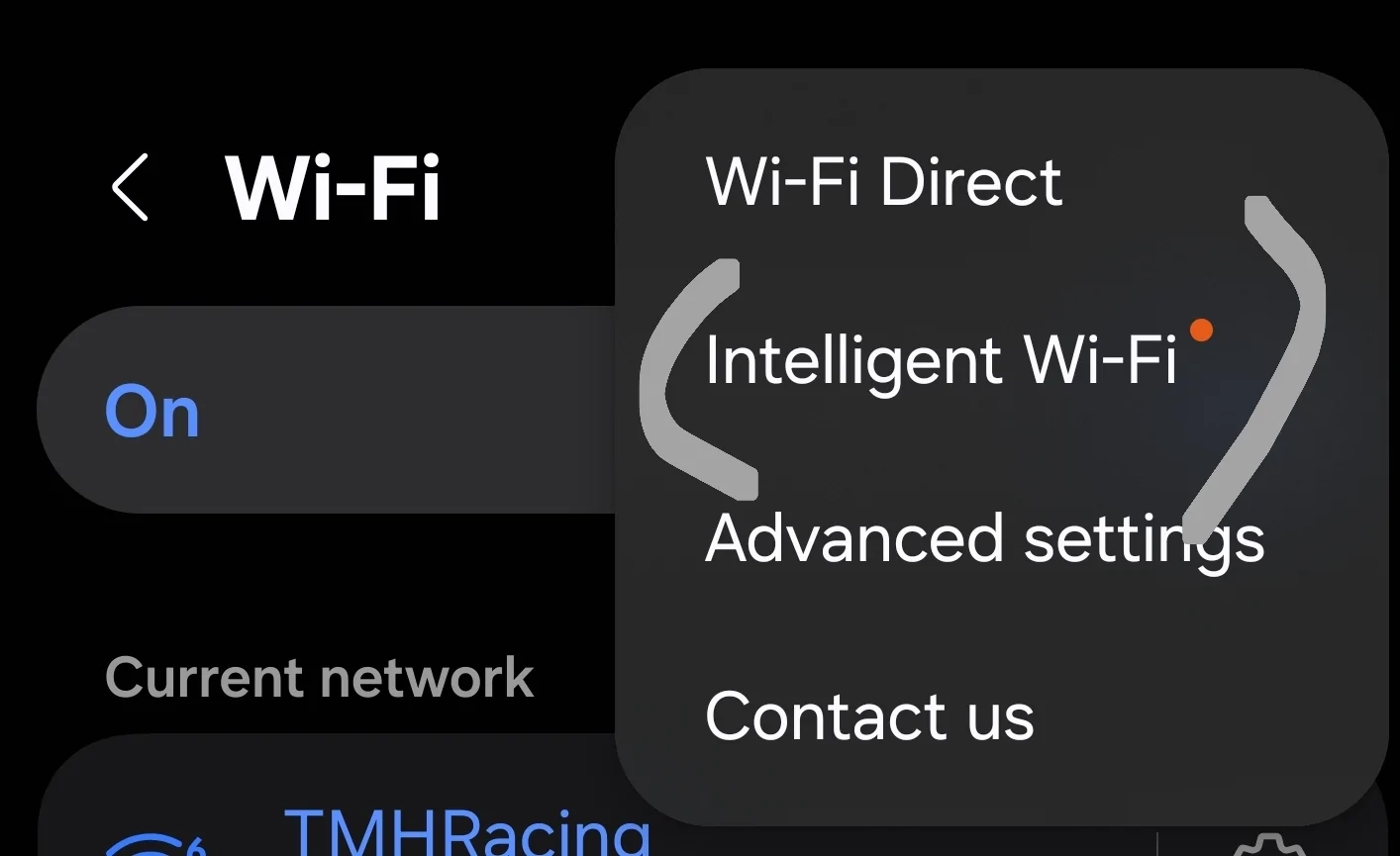
I may have misspoke, the phone wifi controls also has a feature to reenable when in the vicinity of saved SSID's, customizing that will help, only disable the projection SSID's

1776537744165-id.webp
1776537759171-km.webp
1776537780415-8c.webp
I tried this method with my phone, didn't work out because the projection SSID wasn't listed, just other wifi devices I've accessed in the past.

So I tried disabling Projection from Sync, ominous warning that all app's the had projection capability would cease to work and I'd have to connect via USB, so I allowed the projection to be turned off, immediately lost AA on Sync, then plugged in my double USB-C cable, made sure the phones USB handler allowed for transfer/Android Auto , but the phone would not load.

So I went back to allowing projection from Sync.

@WildBlue do you run the latest model of android phone?
Possibly you have an older model that's just not able to remain stable, I had an old S10e which frequently dropped out, not only with Sync but other usb devices, headphones, etc. When I upgraded to a S24u, I've much fewer problems.
Sponsored

 
Last edited:

B177y

Well-known member
First Name
Bill
Joined
Jul 16, 2024
Threads
15
Messages
739
Reaction score
974
Location
Olympic Peninsula, WA
Vehicles
'24 Pro SSV ER Max Tow, '23 MME Premium (on the way), '20 Bolt
I tried this method with my phone, didn't work out because the projection SSID wasn't listed, just other wifi devices I've accessed in the past.

So I tried disabling Projection from Sync, ominous warning that all app's the had projection capability would cease to work and I'd have to connect via USB, so I allowed the projection to be turned off, immediately lost AA on Sync, then plugged in my double USB-C cable, made sure the phones USB handler allowed for transfer/Android Auto , but the phone would not load.

So I went back to allowing projection from Sync.

@WildBlue do you run the latest model of android phone?
Possibly you have an older model that's just not able to remain stable, I had an old S10e which frequently dropped out, not only with Sync but other usb devices, headphones, etc. When I upgraded to a S24u, I've much fewer problems.
When the option comes up on the phone for what to do with the USB connection, you have to choose "File transfer/Android Auto". If it's not one of your options when you plug in your USB, go to Developer Options > Default USB Configuration

Ford F-150 Lightning Android auto without wireless? 1959


This ☝ and the SYNC toggle for app projection turned off.
 

bananaslug79

Well-known member
First Name
Samas
Joined
Oct 29, 2023
Threads
4
Messages
84
Reaction score
93
Location
17502
Vehicles
"Sparky" 2022 F-150 Lightning Lariat SR
Occupation
Self employed
I use mine exactly how you are trying to. Turn the "Wireless App Projection" toggle off (I need to double check the name), then AA only uses the cable to connect. I use mine this way daily.
This is the way. Wireless AA was too finicky for me so I use the wired option only.

Don't know if it makes a difference or not, but I also disabled any hotspot from the truck settings too as this seems to interfere with some connections. Bluetooth is required for hands-free calls (apparently, even using wired-only for AA).
 

TaxmanHog

Moderator
Moderator
First Name
Noel
Joined
Jan 19, 2022
Threads
232
Messages
16,500
Reaction score
18,595
Location
SE. Mass.
Vehicles
2022 Lightning Lariat-ER & 2024 HD Road Glide CVO-ST
Occupation
Retired
When the option comes up on the phone for what to do with the USB connection, you have to choose "File transfer/Android Auto". If it's not one of your options when you plug in your USB, go to Developer Options > Default USB Configuration

1959.webp


This ☝ and the SYNC toggle for app projection turned off.
I did that, I have the options, still did not work.
Maybe I needed to shut down the truck and let Sync startup from scratch.

I edited earlier post to standardize terminology, (I paraphrased previously) transfer/Android Auto
 

bananaslug79

Well-known member
First Name
Samas
Joined
Oct 29, 2023
Threads
4
Messages
84
Reaction score
93
Location
17502
Vehicles
"Sparky" 2022 F-150 Lightning Lariat SR
Occupation
Self employed
I did that, I have the options, still did not work.
Maybe I needed to shut down the truck and let Sync startup from scratch.

I edited earlier post to standardize terminology, (I paraphrased previously) transfer/Android Auto
Are you sure the cable can do power delivery/data transfer? I believe AA's requirements using a cable is different than any old USB cable. I've only found over the years to just try ones until I get one that works (usually older but still high quality cables).
 
  • Like
Reactions: bc1

Sponsored

TaxmanHog

Moderator
Moderator
First Name
Noel
Joined
Jan 19, 2022
Threads
232
Messages
16,500
Reaction score
18,595
Location
SE. Mass.
Vehicles
2022 Lightning Lariat-ER & 2024 HD Road Glide CVO-ST
Occupation
Retired
Are you sure the cable can do power delivery/data transfer? I believe AA's requirements using a cable is different than any old USB cable. I've only found over the years to just try ones until I get one that works (usually older but still high quality cables).
As far as I know, it's a brand new C to C cable, I'll try an older A to C.
 

Firn

Well-known member
Joined
Aug 26, 2024
Threads
35
Messages
1,622
Reaction score
1,876
Location
USA
Vehicles
23 Pro ER
Go to setting and search for Android Auto.

Ford F-150 Lightning Android auto without wireless? Screenshot_20260419_082905_Android Auto


Find "Version" and tap it many times. This will enable developer mode.

Ford F-150 Lightning Android auto without wireless? Screenshot_20260419_082955_Android Auto


Go to the 3 dots in the top and select developer mode. Turn off Wireless (first option)

Ford F-150 Lightning Android auto without wireless? Screenshot_20260419_082915_Android Auto


This way you are not disabling app projection for everyone.
 
Last edited:
OP
OP

WildBlue

Well-known member
Joined
May 8, 2023
Threads
29
Messages
264
Reaction score
236
Location
Somewhere
Vehicles
2024 F150 Lightning Flash
I think I understand what you are asking...

If I remember correctly, there is a Wireless App Projection setting in the Settings menu (probably Connectivity), disabling that might achieve what you are looking for. If that doesn't work, you can also disable Wifi on the truck.

I'm going from memory here, sorry.
Thanks for the response. This was the fix! Much appreciated!
 

Zprime29

Well-known member
First Name
Brandon
Joined
Jul 26, 2022
Threads
42
Messages
2,683
Reaction score
2,896
Location
Tucson, AZ
Vehicles
2022 Lightning ER, 2025 XC90 Recharge
I used the method @Firn mentioned very early on. The wireless AA always made my phone overheat so I gave up and disabled it. Have had no issues since.
Sponsored


Top