Sponsored

F150 Lightning FORScan thread - Version 2

OP
OP
bmwhitetx

bmwhitetx

Well-known member
First Name
Bruce
Joined
May 21, 2021
Threads
48
Messages
3,180
Reaction score
4,605
Location
DFW-Texas
Vehicles
2022 F150 Lightning Lariat ER
Occupation
Retired engineer
A couple things on my radar but not on the sheet (yet):
-MyColor options – also in both modules, possibly just waiting to be unlocked.
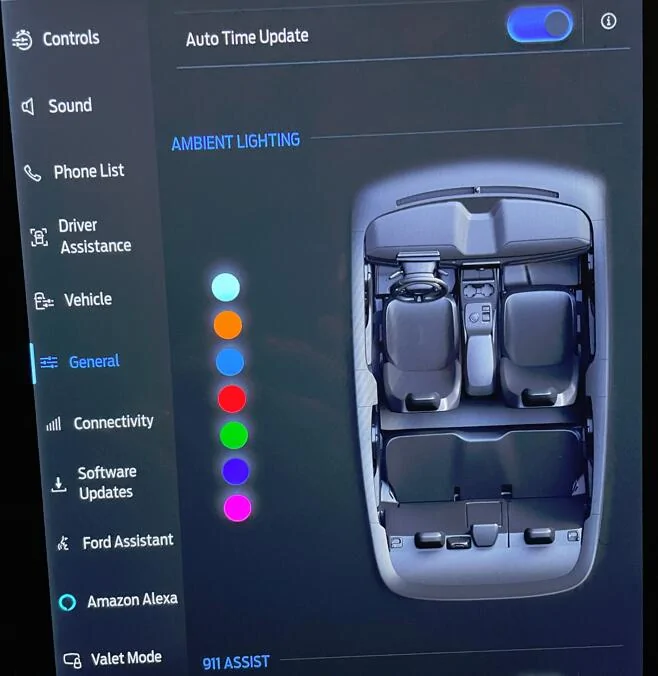
The Mach-E and older versions of the ICE F-150 had multi-color ambient lighting. We have only had Ice Blue (a single color LED). I suspect this parameter refers to the custom color you have selected if you have the Mach-E (or other models that support multi-color).

FYI, there is somewhat expensive mod where you can change all your LED's from Ice blue to the multi-color. Then you can enable a menu in Sync to select your color. I documented it here.
Ford F-150 Lightning F150 Lightning FORScan thread - Version 2 1753054938605-2n

This is on my own Sync screen but notice the graphic is of a Mach-E!
Sponsored
 
OP
OP
bmwhitetx

bmwhitetx

Well-known member
First Name
Bruce
Joined
May 21, 2021
Threads
48
Messages
3,180
Reaction score
4,605
Location
DFW-Texas
Vehicles
2022 F150 Lightning Lariat ER
Occupation
Retired engineer
Of the displays i added (fuel economy, trip1/2, eco something) they mostly do not add value. Fuel economy does not work (not surprised), Trip1/2 does not add value.
When you say these new displays do not add value, is that because they are already shown in another way? I am not familiar at all with the 12" screen so don't know how that ecosystem works. I know it's different than the 15" screen.

If you do find something, let me know the changes and I will add to post 1 (with disclaimer it's for 12" screen). Also feel free to DM me and I can tell you the existing hex values for a wide array of trims and model years for any of the FORScan parameters you are looking at. I have some Lightnings with the SSV option for instance.
 

rugedraw

Well-known member
First Name
Javier
Joined
Dec 14, 2021
Threads
4
Messages
1,897
Reaction score
2,321
Location
Miami
Vehicles
2021 Ford F150 Platinum FX4 EB/2023 Bronco Sport Badlands/1991 Mustang 5.0 coupe
Occupation
Auto Sales
Messed with the headlights some more tonight, capturing it here if anyone else goes looking.

First update, tried to enable VDB in the HCM module. Not sure the function here but in a bmw vdb widens the beam at low speed, at high speed it narrows it and raises the beam slightly. Unfortunately it just threw a checksum DTC and disabled bending beams and gfhb.

I have previously tried to enable camera and map based bending. That also causes a checksum DTC.

Beyond that I tried enabling welcome/farewell on the DRL, Low Beam, and SML (side marker light), no effects that i could see. This was on my pro so not sure if it may work on other modules.

Previously I enabled EVERY welcome farewell setting in the LDCMA and got weird results

So probably something here, just not sure what it is.

I also enabled sequential welcome farewell for the drl, also no change.

Last, I tried adding a delay to one segment in the welcome led drl, also no change.

Big lack of results, but it was fun trying
Welcome to the world of FAAFO. Kudos to you for trying. Most people just get weak at the knees and leave it alone.
 

Scorpio3d

Well-known member
First Name
Chris
Joined
Mar 18, 2024
Threads
33
Messages
1,318
Reaction score
1,748
Location
Texas
Vehicles
2023 Ford F150 Lightning Lariat ER
Occupation
SS/IBA car wash owner
Sure, let me give a quick follow-up on the additional APIM displays I enabled—unfortunately, most didn’t add much value beyond what’s already available on the truck:
  • Fuel Economy: This appears to be designed for gas vehicles and does not function correctly on the Lightning.
  • Trip 1 / Trip 2: These show similar info to the existing Trip display, but add MPG (which reads 0.0).
  • AUX Camera: This option didn’t display anything. It’s possible it only shows up when a trailer camera is connected.
  • Eco Behavior: Shows the odd bar graph I mentioned earlier. It starts at 99% and may drop while driving, but the logic behind it wasn’t clear, so I didn’t spend time analyzing it further.
  • TPMS: This already showed as enabled for my truck but there is no visible display on the center screen.

Additional Notes:
  • I didn’t manually input values—I used the APIM FORScan (the non-as built option) to enable these options.
  • FORScan lists two “IOD” groupings:
    • The first is labeled under “Cluster…” and was located with the ‘C’ entries. All were initially off, and enabling them had no noticeable effect.
    • The second group appears in the ‘I’ section under "IOD" or "Ignition-off Display" or similar. Some of these were already enabled. Aside from TPMS the ones enabled were displays already showing on my truck.

I believe the settings are located at:
7D0-01-03xxxxxxxx*x--Trailer Measurement (TM) • IOD - Pitch/Roll (IODPR) • IOD - Eco Behavior (IODEB)
7D0-01-03xxxxxxxxx*--IOD - Trip 1/2 (IODT) • IOD - Fuel Economy (IODFE) • IOD - Zone Lighting (IODZL) • IOD - Bed Camera (IODBC)
7D0-01-04x*xxxxxxxx--360 Lighting Vehicle HMI (LVHMI) • IOD - Navigation (IODN) • IOD - On Board Generator (IODOBG)
7D0-01-04xx*xxxxxxx--IOD - Phone (IODP) • IOD - Audio (IODA) • IOD - TPMS (IODTPMS) • Eco-Idle (EI)
7D0-02-02x*xxxxxxxx--IOD - EV Trip (IODEVT) • Climate Auto Heated Steering Wheel (CAHSW) • Mirror Defrost (MD) • Front Dual Zone, Dual / Link Button (FDZDLB)
7D0-10-04*xxxxxxxxx--Aux IOD (AIOD) • Always Show Odometer (ASO) • BEV Power Up/Power Down Chime (BEVPUPDC)


FYSA:
On the 12" screen, these are optional Sync display "cards" that appear on certain screens (e.g., Radio). They form a vertical carousel you can scroll through. However, there are quite a few, and many may not be important for all users.
For example, I don’t typically use cards like Phone, Audio, Pro Power, or Zone Lighting—but to access ones I do use (such as Navigation, Trip, or Bed Camera), I have to scroll through all of them.
These settings will also allow you to disable individual cards, letting you streamline the carousel and more quickly access the displays that matter most to you.

(and yes, I do need to get with you regarding the SSV as-built files)
Assume the Eco behavior screen is probably for hybrids?
I used to have a 2010 fusion hybrid, and my daughter has one now (2018)and you can scroll through some of the menus to get to something along those lines. To help you drive more fuel efficiently.
 

astrand1

Well-known member
First Name
Alex
Joined
Dec 16, 2021
Threads
9
Messages
759
Reaction score
809
Location
Michigan
Vehicles
2023 Ford F150 Lightning lariat ER
Occupation
Studio truck driver
Oh, and if anyone has tips on how to turn the DRL's OFF when the headlights are on I would greatly appreciate it.
Don’t we already have auto leveling enabled? At least with lariat trims and up? I do find it interesting that in my buddy’s 23 lariat PB his lights on start up go up and down and side to side. But in my 23 lariat the lights go side to side in startup but no up and down. And I do have sensors. One in the rear and one opposite in the front.
 

Sponsored

digitaldad

Well-known member
Joined
Jan 14, 2025
Threads
25
Messages
452
Reaction score
438
Location
ABQ
Vehicles
'23 Lariat ER MaxTow
Don’t we already have auto leveling enabled? At least with lariat trims and up? I do find it interesting that in my buddy’s 23 lariat PB his lights on start up go up and down and side to side. But in my 23 lariat the lights go side to side in startup but no up and down. And I do have sensors. One in the rear and one opposite in the front.
Does your '23 have the bed scales? I have a '23 Lariat as well and do not have the leveling sensors...and no bed scales.

I assumed those with leveling sensors, the light went 4-way (up/down/left/right) at start.

You may be able to test that FORScan setting.
 
OP
OP
bmwhitetx

bmwhitetx

Well-known member
First Name
Bruce
Joined
May 21, 2021
Threads
48
Messages
3,180
Reaction score
4,605
Location
DFW-Texas
Vehicles
2022 F150 Lightning Lariat ER
Occupation
Retired engineer
Does your '23 have the bed scales? I have a '23 Lariat as well and do not have the leveling sensors...and no bed scales.

I assumed those with leveling sensors, the light went 4-way (up/down/left/right) at start.

You may be able to test that FORScan setting.
I have a '22 with scales. All I have ever noticed is side to side at start :( .
 

astrand1

Well-known member
First Name
Alex
Joined
Dec 16, 2021
Threads
9
Messages
759
Reaction score
809
Location
Michigan
Vehicles
2023 Ford F150 Lightning lariat ER
Occupation
Studio truck driver
Does your '23 have the bed scales? I have a '23 Lariat as well and do not have the leveling sensors...and no bed scales.

I assumed those with leveling sensors, the light went 4-way (up/down/left/right) at start.

You may be able to test that FORScan setting.
No scales. I wonder what the sensors are that are on the axles (front and rear) if not for the headlights. Unless they do auto level but they just don’t animate at startup. 🤔
 

digitaldad

Well-known member
Joined
Jan 14, 2025
Threads
25
Messages
452
Reaction score
438
Location
ABQ
Vehicles
'23 Lariat ER MaxTow
No scales. I wonder what the sensors are that are on the axles (front and rear) if not for the headlights. Unless they do auto level but they just don’t animate at startup. 🤔
I'm sure they are for the headlights, wonder if yours was an early '23 build? Maybe you got the sensors right at the time of the scale delete...then by mine, it was both omitted. Mine is August '23 build.
 

astrand1

Well-known member
First Name
Alex
Joined
Dec 16, 2021
Threads
9
Messages
759
Reaction score
809
Location
Michigan
Vehicles
2023 Ford F150 Lightning lariat ER
Occupation
Studio truck driver
I'm sure they are for the headlights, wonder if yours was an early '23 build? Maybe you got the sensors right at the time of the scale delete...then by mine, it was both omitted. Mine is August '23 build.
Mine was an August 23 build as well. I’ve got to look and see if there is a connector unused in the other rear wheel well.
 

Sponsored

digitaldad

Well-known member
Joined
Jan 14, 2025
Threads
25
Messages
452
Reaction score
438
Location
ABQ
Vehicles
'23 Lariat ER MaxTow
Mine was an August 23 build as well. I’ve got to look and see if there is a connector unused in the other rear wheel well.
Welp, there goes that theory...glad you got them at least. I was minorly bummed that I didn't.
 

norpan

Member
First Name
Oscar
Joined
Aug 11, 2025
Threads
1
Messages
20
Reaction score
20
Location
Oslo, Norway
Vehicles
2024 F150 Lightning, Lariat, Extended Range
Hi,


I’ve been experimenting a bit with FORScan on my Lightning and wanted to get some feedback from others who’ve gone down this road.


From what I understand, Easy Mode is basically a safer, more user-friendly layer over As-Built, and it only shows options that match the modules/firmware in my specific truck. I’ve seen a lot of guides here that go straight to As-Built hex changes, but I’m wondering:


If a feature shows up in Easy Mode for my truck, is it generally safe to try it and see if it works? My thinking is that Easy Mode should protect you from changing the wrong thing, since it’s reading the module configuration directly.


Example: I just changed my “Seatbelt Reminder/Strategy” to the EU version using Easy Mode, and it worked perfectly – but the forum/manual instructions I found for that mod were all in As-Built format.


Do you guys also try Easy Mode first when possible, before touching raw As-Built? Or are there still good reasons to go straight to hex even if it’s available in Easy Mode?
 

RLXXI

Well-known member
Joined
Jun 10, 2021
Threads
39
Messages
2,106
Reaction score
2,095
Location
3rd rock
Vehicles
2025 F 150 Flash, 2013 F 150 XLT, 2014 Escape, 2011 Suzuki DR 650SE
Occupation
Automotive Technician
Hi,


I’ve been experimenting a bit with FORScan on my Lightning and wanted to get some feedback from others who’ve gone down this road.


From what I understand, Easy Mode is basically a safer, more user-friendly layer over As-Built, and it only shows options that match the modules/firmware in my specific truck. I’ve seen a lot of guides here that go straight to As-Built hex changes, but I’m wondering:


If a feature shows up in Easy Mode for my truck, is it generally safe to try it and see if it works? My thinking is that Easy Mode should protect you from changing the wrong thing, since it’s reading the module configuration directly.


Example: I just changed my “Seatbelt Reminder/Strategy” to the EU version using Easy Mode, and it worked perfectly – but the forum/manual instructions I found for that mod were all in As-Built format.


Do you guys also try Easy Mode first when possible, before touching raw As-Built? Or are there still good reasons to go straight to hex even if it’s available in Easy Mode?
Your assumptions are correct. As a general rule I always try the easy mode. What' I found over the years is even if it's in the easy mode menu, doesn't always = a functioning menu item.

With that said, I haven't used FORscan on the lightning yet, my experience is with my other truck, a 2013 ICE 150 and my wifes 14 Escape.
 

Henry Ford

Well-known member
First Name
John
Joined
Dec 21, 2022
Threads
9
Messages
1,754
Reaction score
2,659
Location
Michigan
Vehicles
2022 F150 Lightning Platinum
From what I understand, Easy Mode is basically a safer, more user-friendly layer over As-Built, and it only shows options that match the modules/firmware in my specific truck. I’ve seen a lot of guides here that go straight to As-Built hex changes, but I’m wondering:
There are easy mode options that aren't available on your vehicle. For instance, there are IP display options that are Mustang options. You won't be able to activate these options because they don't exist in the Lightning.

If a feature shows up in Easy Mode for my truck, is it generally safe to try it and see if it works? My thinking is that Easy Mode should protect you from changing the wrong thing, since it’s reading the module configuration directly.
Easy mode is easy to undo. In that sense it's safe. It's not always clear what easy mode changes though. That said, I've never seen any unexpected behavior when using easy mode.

Example: I just changed my “Seatbelt Reminder/Strategy” to the EU version using Easy Mode, and it worked perfectly – but the forum/manual instructions I found for that mod were all in As-Built format.
It's possible the instructions were written before the easy mode option was available.

Do you guys also try Easy Mode first when possible, before touching raw As-Built? Or are there still good reasons to go straight to hex even if it’s available in Easy Mode?
I do, but I haven't gotten deep in the weeds of Forscan.

I tried to use Forscan to activate matrix headlights on my wife's Navigator but gave up when I weighed the amount of work required against the facts that I don't know if the hardware is installed and my wife doesn't care about matrix headlights.😆
 
OP
OP
bmwhitetx

bmwhitetx

Well-known member
First Name
Bruce
Joined
May 21, 2021
Threads
48
Messages
3,180
Reaction score
4,605
Location
DFW-Texas
Vehicles
2022 F150 Lightning Lariat ER
Occupation
Retired engineer
So I’m the “owner” of post 1. I have included Easy Mode for a few items. You have to remember that Forscan is maintained by a group of volunteers, most in Russia, who are familiar with non US vehicles.

With that said, they are very smart but require feedback when things aren’t right. You are expecting them to know how a particular feature is modified and program easy mode correctly. For trucks they don’t own.

In post 1 I link to Livinup’s spreadsheet. He’s the expert on F-150’s. Once you understand hex, it is very safe to go the AsBuilt route. The danger is you fat-finger something so it’s important to do a Save All on a module before changing.

I am following on from Livinup’s experience. @rugedraw, who is also very smart when it comes to mods will tell you he never uses easy mode.

I maintain a database of over 80 Lightnings of every year, trim, and major option. Before I put anything in post 1 I validate that it is appropriate for the Lightning. Too many mods you see posted outside of post 1 are for ICE trucks or even other vehicles and can change other things negatively.

In the end, do what you want. I wouldn’t go crazy and just start changing things with easy mode. Forscan covers all Ford vehicles and easy mode is not Lightning specific. Post 1 is.
Sponsored

 
Last edited:


Top