Sponsored

Comma AI self driver assistant

steelersmb

Well-known member
First Name
Marc
Joined
Mar 10, 2024
Threads
13
Messages
57
Reaction score
27
Location
Atlanta
Vehicles
Ford Lightning Lariat
I just received my Comma 4, and I have a 2023 Lightning. I'm planning on attempting the installation this week. This is a pretty long thread, so I wanted to ask what the best video or guide is to follow for the installation?
 

Ajzride

Well-known member
First Name
Alan
Joined
Jun 6, 2021
Threads
4
Messages
715
Reaction score
693
Location
Houston
Vehicles
21Mach-E / 65Mustang / 21PB 502A 157"
Occupation
Eng

Sponsored

galstaf

Well-known member
Joined
Jul 20, 2025
Threads
3
Messages
105
Reaction score
51
Location
North Georgia
Vehicles
2015 LEAF x 2, 2022 F150 Lightning Lariat ER (511A trim)
Occupation
community offgrid training
that is a new one.

upload the route so I can take a peek:
Hey.. sorry.. been out of town but still having issues. I did get the device to reset via SSH with a Bash script chatgpt helped me make. It wipes out the existing calibration and gets the device ready to accept a brand new calibration.


cd /data/openpilot || exit 1

test -x ./launch_openpilot.sh || { ls -la; exit 2; }

pkill -f "launch_openpilot\.sh" 2>/dev/null
pkill -f "manager|modeld|controlsd|locationd|boardd|pandad|loggerd|logmessaged|camerad|sensord" 2>/dev/null
sleep 3

rm -f /data/params/d/LiveCalibration /data/params/d/CalibrationParams /data/params/d/IsOnroad 2>/dev/null
sync

nohup ./launch_openpilot.sh >/tmp/op_launch.out 2>&1 &
sleep 15

ps -ef | grep -E "launch_openpilot|manager|modeld|controlsd|locationd" | grep -v grep
cat /data/params/d/IsOnroad 2>/dev/null
ls -lh /data/params/d/CalibrationParams /data/params/d/LiveCalibration 2>/dev/null
tail -n 80 /tmp/op_launch.out


ps -ef | grep -E "python3 ./manager.py|modeld|controlsd|locationd|camerad|sensord" | grep -v grep
ls -lh /data/params/d/CalibrationParams /data/params/d/LiveCalibration 2>/dev/null
cat /data/params/d/LiveCalibration 2>/dev/null

sleep 20

ps -ef | grep -E "python3 ./manager.py|modeld|controlsd|locationd|camerad|sensord" | grep -v grep
ls -lh /data/params/d/CalibrationParams /data/params/d/LiveCalibration 2>/dev/null
cat /data/params/d/LiveCalibration 2>/dev/null


This put the C4 back into reset calibration mode and it worked fine for the rest of the day. However powering the truck off overnight and it was back in "Calibration Invalid" again.
I will try what you suggested and upload the logs for you.

Again, I have it on the factory mount just below the mirror and didn't move the device from one session to another. Also, the device seems to still be seeing other vehicles in the greyed out background, so it is doing stuff but just not actually doing it's job.
Would using another model help do you think?
 

Ajzride

Well-known member
First Name
Alan
Joined
Jun 6, 2021
Threads
4
Messages
715
Reaction score
693
Location
Houston
Vehicles
21Mach-E / 65Mustang / 21PB 502A 157"
Occupation
Eng
Hey.. sorry.. been out of town but still having issues. I did get the device to reset via SSH with a Bash script chatgpt helped me make. It wipes out the existing calibration and gets the device ready to accept a brand new calibration.


cd /data/openpilot || exit 1

test -x ./launch_openpilot.sh || { ls -la; exit 2; }

pkill -f "launch_openpilot\.sh" 2>/dev/null
pkill -f "manager|modeld|controlsd|locationd|boardd|pandad|loggerd|logmessaged|camerad|sensord" 2>/dev/null
sleep 3

rm -f /data/params/d/LiveCalibration /data/params/d/CalibrationParams /data/params/d/IsOnroad 2>/dev/null
sync

nohup ./launch_openpilot.sh >/tmp/op_launch.out 2>&1 &
sleep 15

ps -ef | grep -E "launch_openpilot|manager|modeld|controlsd|locationd" | grep -v grep
cat /data/params/d/IsOnroad 2>/dev/null
ls -lh /data/params/d/CalibrationParams /data/params/d/LiveCalibration 2>/dev/null
tail -n 80 /tmp/op_launch.out


ps -ef | grep -E "python3 ./manager.py|modeld|controlsd|locationd|camerad|sensord" | grep -v grep
ls -lh /data/params/d/CalibrationParams /data/params/d/LiveCalibration 2>/dev/null
cat /data/params/d/LiveCalibration 2>/dev/null

sleep 20

ps -ef | grep -E "python3 ./manager.py|modeld|controlsd|locationd|camerad|sensord" | grep -v grep
ls -lh /data/params/d/CalibrationParams /data/params/d/LiveCalibration 2>/dev/null
cat /data/params/d/LiveCalibration 2>/dev/null


This put the C4 back into reset calibration mode and it worked fine for the rest of the day. However powering the truck off overnight and it was back in "Calibration Invalid" again.
I will try what you suggested and upload the logs for you.

Again, I have it on the factory mount just below the mirror and didn't move the device from one session to another. Also, the device seems to still be seeing other vehicles in the greyed out background, so it is doing stuff but just not actually doing it's job.
Would using another model help do you think?
Take pictures of all your settings in sunnylink and send them to me in a DM. This is a weird issue for sure, and could even be a bad tilt sensor in the device. I can help you work through it in DM, no reason to tie up the thread.
 

galstaf

Well-known member
Joined
Jul 20, 2025
Threads
3
Messages
105
Reaction score
51
Location
North Georgia
Vehicles
2015 LEAF x 2, 2022 F150 Lightning Lariat ER (511A trim)
Occupation
community offgrid training
Take pictures of all your settings in sunnylink and send them to me in a DM. This is a weird issue for sure, and could even be a bad tilt sensor in the device. I can help you work through it in DM, no reason to tie up the thread.
Hi Alan.. thanks for the quick response! I will ask the following publicly in case it helps someone else. But I can send you any data you want privately.

Re: This issue with BP4
Should we even bother now that BP6 is released? Should I just use this instead? How stable is the beta?

If you do want the logs, question:

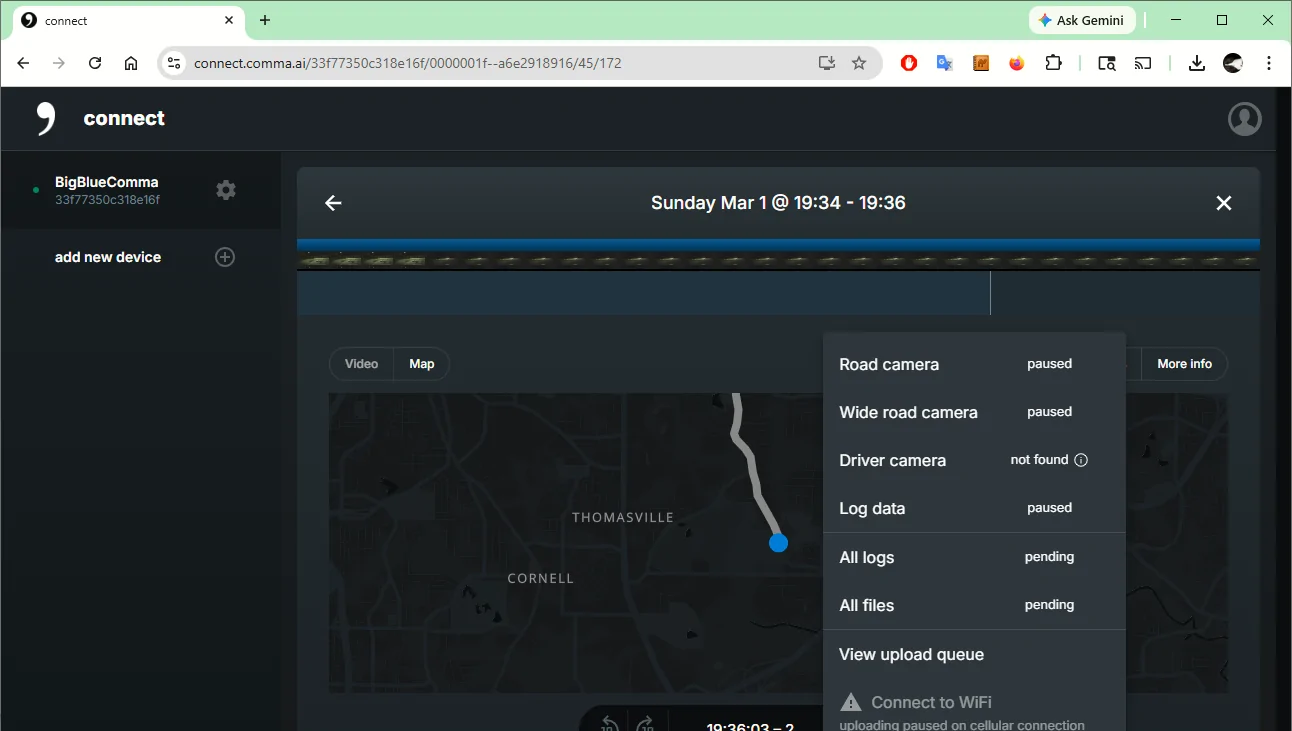
I am not near the truck right now and there is no wifi. I can connect to it via Comma Prime, but it is saying all the uploads are paused waiting on wifi. Does Sunny Pilot not permit uploading via the LTE modem? If that is not the default behaviour, is there a way to make it so? I don't have wifi access in our parking deck at home.


Ford F-150 Lightning Comma AI self driver assistant 1772516207541-cq
 

Sponsored

Ajzride

Well-known member
First Name
Alan
Joined
Jun 6, 2021
Threads
4
Messages
715
Reaction score
693
Location
Houston
Vehicles
21Mach-E / 65Mustang / 21PB 502A 157"
Occupation
Eng
Hi Alan.. thanks for the quick response! I will ask the following publicly in case it helps someone else. But I can send you any data you want privately.

Re: This issue with BP4
Should we even bother now that BP6 is released? Should I just use this instead? How stable is the beta?

If you do want the logs, question:

I am not near the truck right now and there is no wifi. I can connect to it via Comma Prime, but it is saying all the uploads are paused waiting on wifi. Does Sunny Pilot not permit uploading via the LTE modem? If that is not the default behaviour, is there a way to make it so? I don't have wifi access in our parking deck at home.


1772516207541-cq.webp
just take the device inside and power it with a phone charger overnight to upload logs
 

steelersmb

Well-known member
First Name
Marc
Joined
Mar 10, 2024
Threads
13
Messages
57
Reaction score
27
Location
Atlanta
Vehicles
Ford Lightning Lariat
I'm a bit confused about the coupler. The video says that if you are using a quick-release dock, you don't need to use the coupler. Where does the coupler connect to? I'm assuming you plug the coupler with the lightning end into the black piece with the USB C connector and then the long USB C cable into the Comma end of the coupler and then into the Comma 4.
 

Ajzride

Well-known member
First Name
Alan
Joined
Jun 6, 2021
Threads
4
Messages
715
Reaction score
693
Location
Houston
Vehicles
21Mach-E / 65Mustang / 21PB 502A 157"
Occupation
Eng
I'm a bit confused about the coupler. The video says that if you are using a quick-release dock, you don't need to use the coupler. Where does the coupler connect to? I'm assuming you plug the coupler with the lightning end into the black piece with the USB C connector and then the long USB C cable into the Comma end of the coupler and then into the Comma 4.
We did sell some docks with an integrated coupler, but we ran out of those. Most everyone has an external coupler.

IPMA --> Harness --> Harness box --> Long USB-C (ODB-C Cable) --> Coupler --> Short USB-C Cable --> C4 Dock --> C4.
Sponsored


Top