Sponsored
Status
Not open for further replies.

pkirby11

Well-known member
First Name
Kevin
Joined
Feb 12, 2024
Threads
3
Messages
121
Reaction score
137
Location
Champaign
Vehicles
F150 Lightning Lariat
A new versions of FDRS was released yesterday. I was hoping maybe it would address the BCM update issue but I'm beginning to think that it is acting the way Ford intended it too. Kind of a bummer but at least I can do all the other updates. And hey the update for the updates is available so might as well do that now. :)
Sponsored


FastCote

Member
First Name
Ben
Joined
Oct 16, 2022
Threads
0
Messages
11
Reaction score
5
Location
Columbus OH
Vehicles
2022 MachE GT, 2022 F150 Lightning Lariat, 2022 F150 Lightning Platinum

rugedraw

Well-known member
First Name
Javier
Joined
Dec 14, 2021
Threads
4
Messages
1,801
Reaction score
2,166
Location
Miami
Vehicles
2021 Ford F150 Platinum FX4 EB/2023 Bronco Sport Badlands/1991 Mustang 5.0 coupe
Occupation
Auto Sales
Trying to avoid shelling out a ton of money but still keep the LVB at safe levels. Does this look like a viable option for power?:

https://www.amazon.com/gp/product/B0BMLZ3SP6/ref=ox_sc_act_title_2?smid=A3U0J2BJFE26Z7&th=1

(Edit) there is a 60 amp version (currently unavailable) on Amazon.
Unless I am missing something, that seems to be a battery charger; not sure if that has power supply mode. I'm sure the guys on here can help point you in the right direction, though.
 

BennyTheBeaver

Well-known member
Joined
Jun 18, 2021
Threads
45
Messages
2,245
Reaction score
2,461
Location
PNW
Vehicles
2023 Lightning XLT ER
Ford refreshed their SYNC revision worksheet recently, sure enough I have a new APIM update ready for me today. Thanks, @Mike G, for the lookup. I believe it is only for '23 models that got the most recent Gateway update. If you have the the most recent Gateway Update and a '23 it's worth a look.
 
  • Wow
Reactions: GDN

GDN

Well-known member
First Name
Greg
Joined
Feb 15, 2022
Threads
94
Messages
3,766
Reaction score
4,838
Location
Dallas, TX
Vehicles
Lightning Lariat ER, Performance Y
Occupation
IT
Ford refreshed their SYNC revision worksheet recently, sure enough I have a new APIM update ready for me today. Thanks, @Mike G, for the lookup. I believe it is only for '23 models that got the most recent Gateway update. If you have the the most recent Gateway Update and a '23 it's worth a look.
It will be interesting to see what this brings and where it puts the '22's compared to the '23's. Lucky for what I had in 18 months for updates, but if they pull something here and leave the '22's behind for a while (they did this with the ICE trucks a couple years back) I'm not going to be real happy.
 

Sponsored

Daragh

Well-known member
Joined
Feb 20, 2024
Threads
5
Messages
174
Reaction score
238
Location
North Carolina
Vehicles
2023 Lightning Lariat ER
Occupation
Engineer
Ford refreshed their SYNC revision worksheet recently, sure enough I have a new APIM update ready for me today. Thanks, @Mike G, for the lookup. I believe it is only for '23 models that got the most recent Gateway update. If you have the the most recent Gateway Update and a '23 it's worth a look.

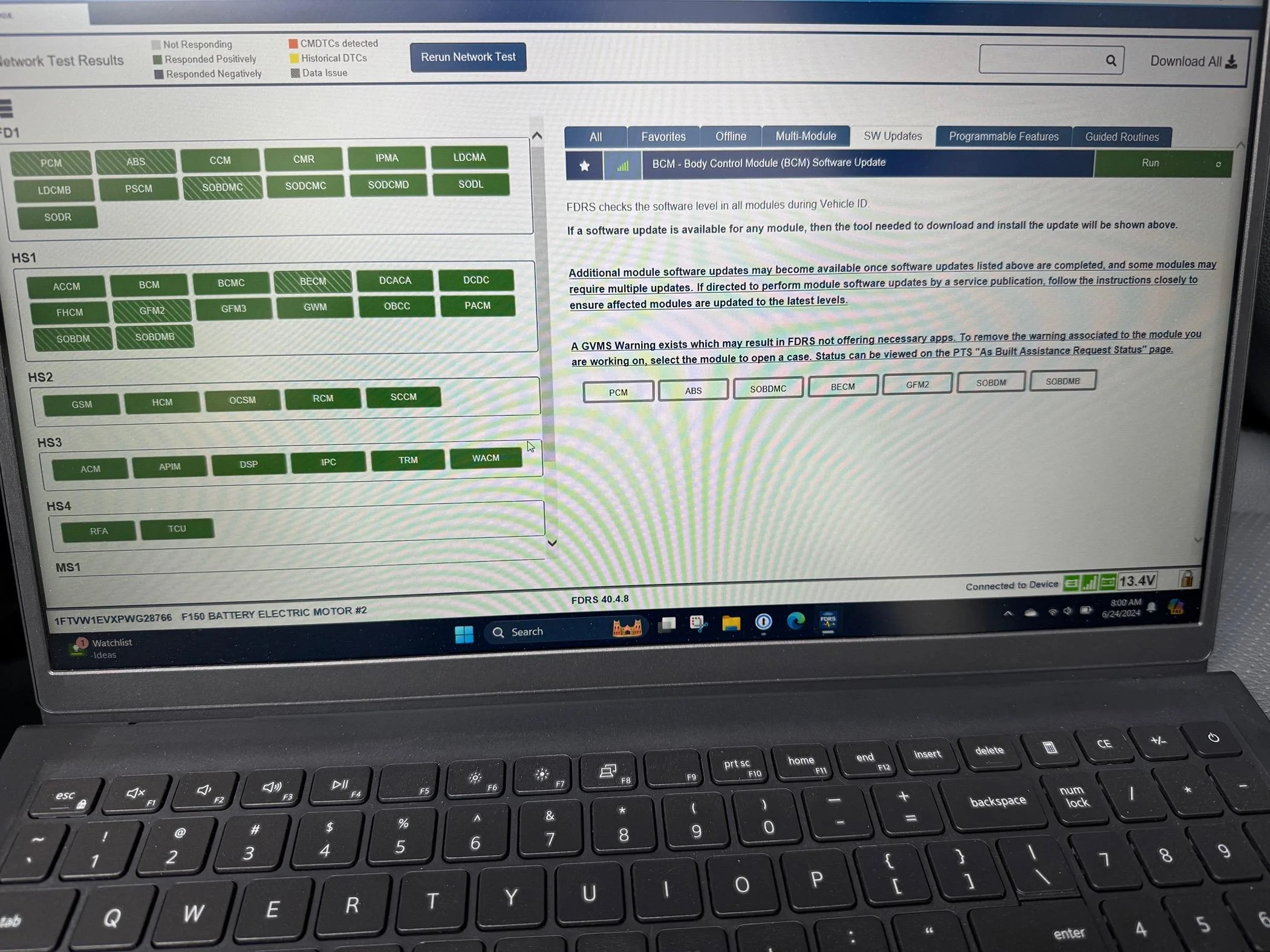
I have a 23 that got a recent gateway update. Ran FDRS this morning and didn't see any available APIM update, BCM still shows due to the need for a user id.

What I did notice is the last sentence saying " A GVMS Warning exists which may result in FDRS not offering necessary apps. To remove ...." see capture below. You can see the listed modules have a green striped box, not a solid green one on the left!

Anybody else seeing this and if so how can it be resolved?

Ford F-150 Lightning ECU module programming guide using FDRS IMG_0751
 

bmwhitetx

Well-known member
First Name
Bruce
Joined
May 21, 2021
Threads
46
Messages
2,961
Reaction score
4,224
Location
DFW-Texas
Vehicles
2022 F150 Lightning Lariat ER
Occupation
Retired engineer
I have a 23 that got a recent gateway update. Ran FDRS this morning and didn't see any available APIM update, BCM still shows due to the need for a user id.

What I did notice is the last sentence saying " A GVMS Warning exists which may result in FDRS not offering necessary apps. To remove ...." see capture below. You can see the listed modules have a green striped box, not a solid green one on the left!

Anybody else seeing this and if so how can it be resolved?

IMG_0751.jpeg
Documented over in this thread and specifically this post.
https://www.f150lightningforum.com/...-fdrs-temporarily-suspended.19409/post-397049
 

GoodSam

Well-known member
First Name
Good
Joined
Jan 5, 2022
Threads
36
Messages
904
Reaction score
517
Location
93111
Vehicles
17CRV, 22 Lightning XLT 312A SR iced blue silver
Occupation
occupying space
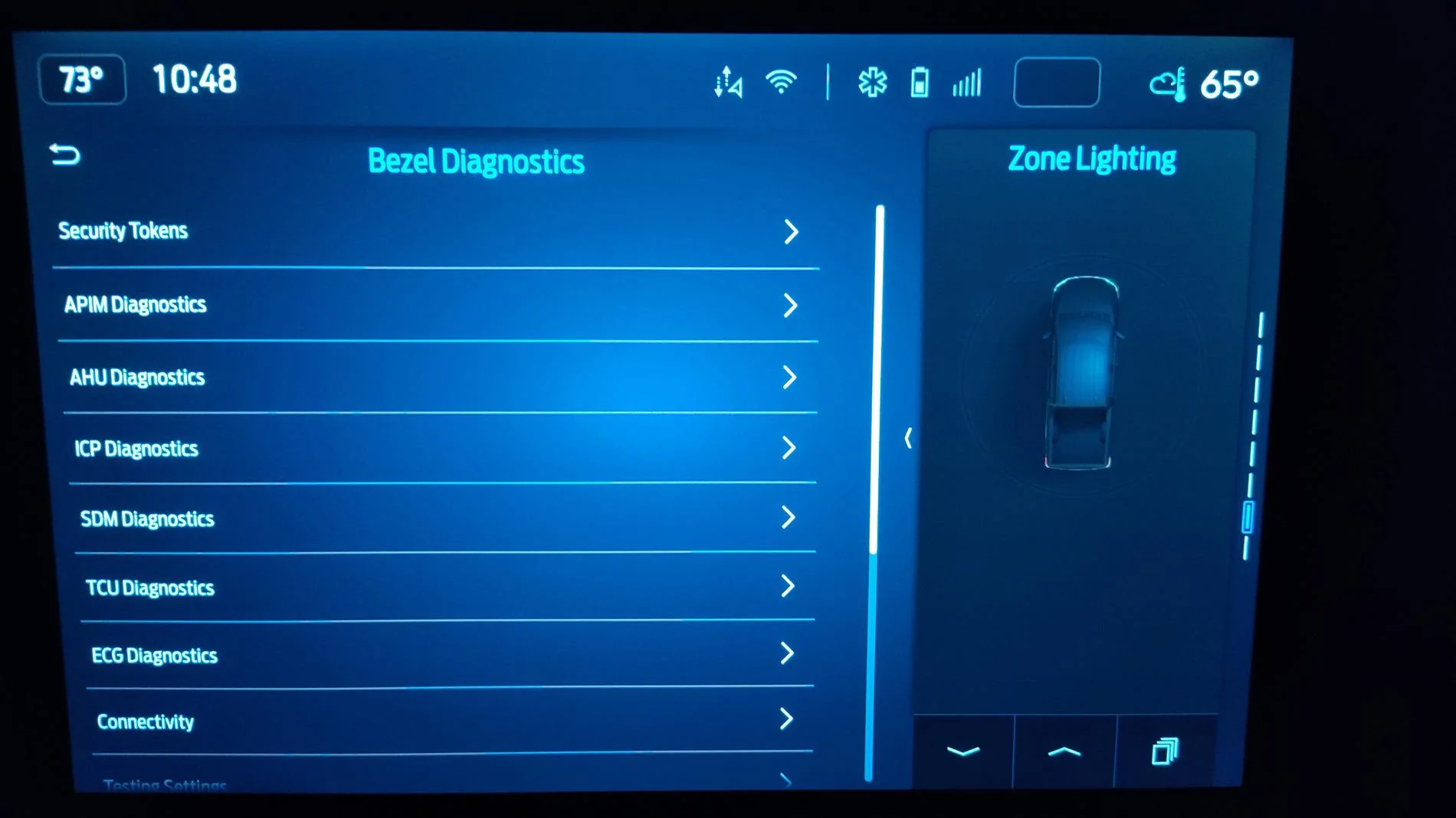
Sorry, have not seen much of the past in this thread, if this has been discussed before, but, for viewing diagnostics or settings or doing tests, how much better is FDRS than the Bezel Diagnostics, which has lots to show?
[to access on 15" screen?] Bezel Diagnostics. turn the radio to AM or FM press and hold volume down and arrow seek left at the same time
[or for my 22 XLT 312a 12" screen w buttons:] push steering wheel rightmost "go forward" (arrow seek right) button and also the Fast Forward button at the same time (of the audio system buttons under the 12" center screen) for ~10 seconds. Does a speaker test first for x seconds or so, then the Bezel Diagnostics access list shows up.)
Ford F-150 Lightning ECU module programming guide using FDRS 1720079641545-8y

Is there a listing of all the menu items available in Bezel Diagnostics?
 

chillaban

Well-known member
Joined
Nov 8, 2022
Threads
0
Messages
250
Reaction score
295
Location
California
Vehicles
2022 F-150 Lightning Lariat
Sorry, have not seen much of the past in this thread, if this has been discussed before, but, for viewing diagnostics or settings or doing tests, how much better is FDRS than the Bezel Diagnostics, which has lots to show?

[or for my 22 XLT 312a 12" screen w buttons:] push steering wheel rightmost "go forward" (arrow seek right) button and also the Fast Forward button at the same time (of the audio system buttons under the 12" center screen) for ~10 seconds. Does a speaker test first for x seconds or so, then the Bezel Diagnostics access list shows up.)
1720079641545-8y.jpg

Is there a listing of all the menu items available in Bezel Diagnostics?
most people don’t use FDRS as an extremely expensive diagnostics scanner or settings changer — Forscan is usually a more popular tool for that purpose and works with much cheaper cables too.

We mostly use it for updating firmware earlier than OTA offerings and for some tasks like recalibrating and installing specific modules, and bezel diagnostics can’t do that at all.
 

ScubaSteve_TheReal

Well-known member
First Name
Steve
Joined
Jan 31, 2023
Threads
2
Messages
410
Reaction score
344
Location
Midwest USA
Vehicles
2023 Lightning Platinum - Carbonized Gray Metallic
Occupation
Derivatives
Sorry, have not seen much of the past in this thread…
Is there a listing of all the menu items available in Bezel Diagnostics?
☝ This would be very useful to have.
Thanks for reminding us of this.
 

Sponsored

dustintinsley

Well-known member
First Name
Dustin
Joined
Jul 7, 2024
Threads
12
Messages
125
Reaction score
38
Location
Salem, CT
Vehicles
2023 F150 Lightning Lariat
What are the correct settings on the recommended battery charger? The PL3230 from the OP. Just want to make sure I have it setup correctly.
 

ziptbm

Well-known member
Joined
Jan 4, 2023
Threads
10
Messages
94
Reaction score
38
Location
Michigan
Vehicles
'22 MME GT & '22 F150 Lightning Lariat ER
re: battery, i use the schumacher INC100. used it when doing DME flashes on BMWs and it works perfect for this. the problem with the Noco and others is it only puts out 1, 2, or 5 amps (some do 10 i think?). my schumacher will do 10+ regularly even without programming. it does up to 100a in "flash/reprogram" mode for this specific type of work.
once you brick your BMW's most expensive piece of electronics, you don't screw around with subpar maintainers anymore :)

EDIT: anyone in the austin, TX area that needs some help, feel free to come on by as well.
For those that have the INC100 - what mode do you use when running FDRS updates? Service or Flash Reprogram?

The specifications on their webpage indicates that "Output Current: Service/13.5V,0-70A,Boost/14.4V,0-70A,Flash/13-14.8V,0-70A cont,100A int" - so I'm curious what people who have this use.
 

bmwhitetx

Well-known member
First Name
Bruce
Joined
May 21, 2021
Threads
46
Messages
2,961
Reaction score
4,224
Location
DFW-Texas
Vehicles
2022 F150 Lightning Lariat ER
Occupation
Retired engineer
What are the correct settings on the recommended battery charger? The PL3230 from the OP. Just want to make sure I have it setup correctly.
Power Supply mode - instructions in owners manual:

Upon making a proper battery connection (see Section F or G as applicable), plug AC power cord into an AC receptacle. All unit LEDs will light momentarily, then only the LEDs corresponding to charging settings should stay lit. The charger is now in Standby Mode. To activate the Power Supply mode, push the VOLTS button until the LED corresponding to Power Supply is lit. Note that this will disable all other controls and settings, such as battery type and charge rate settings. Press the START/STOP button to engage the Power Supply mode.

When the unit is operating in Power Supply mode, the display will show “PS” and the green Charging Complete LED will be lit. In this mode, the charger will supply steady power with a goal of maintaining steady system voltage at 14.1VDC, allowing the current supplied to the battery/system to vary as needed from 0-20 amps.
 

Mike G

Well-known member
First Name
Mike
Joined
Jan 6, 2022
Threads
32
Messages
1,797
Reaction score
2,625
Location
N. AL, USA
Vehicles
2022 F-150 Lightning, 2023(J1) Mach-E GT-PE
What are the correct settings on the recommended battery charger? The PL3230 from the OP. Just want to make sure I have it setup correctly.
The manual says:

"Upon making a proper battery connection (see Section F or G as applicable), plug AC power cord into an AC receptacle. All unit LEDs will light momentarily, then only the LEDs corresponding to charging settings should stay lit. The charger is now in Standby Mode. To activate the Power Supply mode, push the VOLTS button until the LED corresponding to Power Supply is lit. Note that this will disable all other controls and settings, such as battery type and charge rate settings. Press the START/STOP button to engage the Power Supply mode.

When the unit is operating in Power Supply mode, the display will show “PS” and the green Charging Complete LED will be lit. In this mode, the charger will supply steady power with a goal of maintaining steady system voltage at 14.1VDC, allowing the current supplied to the battery/system to vary as needed from 0-20 amps. If there is an increase in system need, the charger will react to it and supply as much current, up to 20A, as needed to maintain system voltage. If system voltage drops below 13.2VDC, the amber Charging in Progress LED will light in addition to the green Charging Complete LED to alert you that the charger may not be keeping up with system demand.

Like battery charging, if at any time during Power Supply mode operation, you wish to stop the charger, you can push the START/STOP button to return the unit to Standby Mode."

When I was using my PL2320 I used to put a charge on the battery to get it up to at least 90% SOC before starting any programming. The PL2320 is good for anything that doesn't go longer than about 25 minutes on a GT. You can check your SOC between updates and get your 12V battery back up above 90% before the next round if you think it might dip too low while updating. If while watching the lower right corner of FDRS you ever see your voltage dropping close to 10.0V it's time to cancel and go get more battery, whether it's pulling up another vehicle alongside with jumper cables or some other alternative.
 
Last edited:

dustintinsley

Well-known member
First Name
Dustin
Joined
Jul 7, 2024
Threads
12
Messages
125
Reaction score
38
Location
Salem, CT
Vehicles
2023 F150 Lightning Lariat
The manual says:

"Upon making a proper battery connection (see Section F or G as applicable), plug AC power cord into an AC receptacle. All unit LEDs will light momentarily, then only the LEDs corresponding to charging settings should stay lit. The charger is now in Standby Mode. To activate the Power Supply mode, push the VOLTS button until the LED corresponding to Power Supply is lit. Note that this will disable all other controls and settings, such as battery type and charge rate settings. Press the START/STOP button to engage the Power Supply mode.

When the unit is operating in Power Supply mode, the display will show “PS” and the green Charging Complete LED will be lit. In this mode, the charger will supply steady power with a goal of maintaining steady system voltage at 14.1VDC, allowing the current supplied to the battery/system to vary as needed from 0-20 amps. If there is an increase in system need, the charger will react to it and supply as much current, up to 20A, as needed to maintain system voltage. If system
voltage drops below 13.2VDC, the amber Charging in Progress LED will light in addition to the green Charging Complete LED to alert you that the charger may not be keeping up with system demand.

Like battery charging, if at any time during Power Supply mode operation, you wish to stop the charger, you can push the START/STOP button to return the unit to Standby Mode."

When I was using my PL2320 I used to put a charge on the battery to get it up to at least 90% SOC before starting any programming. The PL2320 is good for anything that doesn't go longer than about 25 minutes on a GT. You can check your SOC between updates and get your 12V battery back up above 90% before the next round if you think it might dip too low while updating. If while watching the lower right corner of FDRS you ever see your voltage dropping close to 10.0V it's time to cancel and go get more battery, whether it's pulling up another vehicle alongside with jumper cables or some other alternative.
Perfect. This has worked on all my modules thus far. I have the IPMA module remaining, just waiting one my SOC to get above 90%. Is the IPMA module update long? I have read it is a long update then I have also read that is just because it may "hang" during the update process. Just want to make sure I have a reliable setup before attempting it.
Sponsored

 
Status
Not open for further replies.


Top