Sponsored

Problem with Connectivity/connecting to FordPass. Tried fuse and 12V reset. Ideas?

jnthn98

Active member
First Name
Jonathan
Joined
Feb 27, 2025
Threads
7
Messages
27
Reaction score
16
Location
California
Vehicles
2024 F150 Lightning Flash
Two months into my 2024 Flash ownership, I still haven't been able to connect my phone to FordPass (so I don't have any of the connectivity options like BlueOval charging network). I read a lot of posts suggesting pulling the fuse in the front passenger area and at last, reset the 12V battery. I tried both and still no luck. I haven't had time to bring it to a dealership for service yet. Does anyone have other suggestions/ideas?

The 12V battery reset was my last resort (left it unconnected for 30 minutes before reconnecting). Weird thing is that my radio presets and Bluetooth paired phone are still in memory after the reset. I was expecting them to be lost. Did Ford switch over to using flash memory for the 2024s to not lose this info?

Other notes:
-In the Connectivity menu of the truck, the toggle button is stuck "on". I cannot turn it off (to turn it back on).
-FordPass tech support was no help. They said bring it to a dealership (not easy when I have kids and a busy schedule).
-Wired Android Auto works, but I cannot get wireless Android Auto to work.
-Regular bluetooth connection with my Samsung phone works
-I haven't had any OTA yet. Maybe because of this connectivity issue.
-This truck sat probably at least half a year between rolling off the production line and arriving at the dealership that I bought the truck at.
-My 2021 Mach-E didn't have any of this issue. Had FordPass/Connectivity setup completed on day one.
Sponsored

 

Heliian

Well-known member
Joined
Mar 9, 2023
Threads
5
Messages
1,914
Reaction score
2,203
Location
Canada
Vehicles
2023 LR Lariat, code name "Boogaloo"
FordPass tech support was no help. They said bring it to a dealership (not easy when I have kids and a busy schedule).
We all have kids and a busy schedule.
 

TaxmanHog

Moderator
Moderator
First Name
Noel
Joined
Jan 19, 2022
Threads
221
Messages
16,158
Reaction score
18,189
Location
SE. Mass.
Vehicles
2022 Lightning Lariat-ER & 2024 HD Road Glide CVO-ST
Occupation
Retired
I still haven't been able to connect my phone to FordPass (so I don't have any of the connectivity options like BlueOval charging network).
Do you have a security app on the phone that is blocking certain websites and servers?
A VPN using an alternate IP range that's outside the US for privacy concerns?

These settings & tools can interfere with Fordpass functions.
 

Maquis

Well-known member
First Name
Dave
Joined
May 20, 2021
Threads
9
Messages
4,289
Reaction score
5,730
Location
Illinois
Vehicles
2021 Mach-E E4-X; 2023 Lightning Lariat ER
There are multiple switches for data sharing in the โ€œConnectivityโ€ settings. Which ones are on?
 

Jesse-Infotainment

Well-known member
First Name
Jesse
Joined
May 27, 2021
Threads
5
Messages
1,034
Reaction score
1,317
Location
Dallas
Vehicles
2024 F150 Lightning Platinum
Have you done a master reset?

if you can send me the vin.
 

Sponsored

chl

Well-known member
First Name
CHRIS
Joined
Dec 16, 2022
Threads
9
Messages
2,922
Reaction score
1,822
Location
alexandria virginia
Vehicles
2023 F-150 LIGHTNING, 2012 Nissan Leaf, 2015 Toyota Prius, 2000 HD 883 Sportster
Occupation
Patent Atty / Electrical Engineer
Two months into my 2024 Flash ownership, I still haven't been able to connect my phone to FordPass (so I don't have any of the connectivity options like BlueOval charging network). I read a lot of posts suggesting pulling the fuse in the front passenger area and at last, reset the 12V battery. I tried both and still no luck. I haven't had time to bring it to a dealership for service yet. Does anyone have other suggestions/ideas?

The 12V battery reset was my last resort (left it unconnected for 30 minutes before reconnecting). Weird thing is that my radio presets and Bluetooth paired phone are still in memory after the reset. I was expecting them to be lost. Did Ford switch over to using flash memory for the 2024s to not lose this info?

Other notes:
-In the Connectivity menu of the truck, the toggle button is stuck "on". I cannot turn it off (to turn it back on).
-FordPass tech support was no help. They said bring it to a dealership (not easy when I have kids and a busy schedule).
-Wired Android Auto works, but I cannot get wireless Android Auto to work.
-Regular bluetooth connection with my Samsung phone works
-I haven't had any OTA yet. Maybe because of this connectivity issue.
-This truck sat probably at least half a year between rolling off the production line and arriving at the dealership that I bought the truck at.
-My 2021 Mach-E didn't have any of this issue. Had FordPass/Connectivity setup completed on day one.
Hopefully your dealership would give you a loaner so your driving schedule can be maintained while the system is checked out. It is a shame that when the dealerships deliver the vehicle they sometimes do not help the customer set up the FordPass system!

1) you say you can't connect your phone to FordPass - I assume the FordPass app installed in the phone and you have both wifi and cellular connections that your phone can use and there is no security program in your system (wifi) blocking access? It occurred to me that if you have a Mach-e then you already have a FordPass account and phone connection - can you add the truck to that account? Maybe you need two separate accounts for the 2 vehicles?

2) maybe you meant you can't connect to the truck with your phone via FordPass?

3) From the issues you are having with no OTA updates and connectivity, sounds like a truck modem problem. If the 12v battery gets too low, some of OTA updates will not install (many threads about that issue on the forum with solutions) or if you are in a bad area for cell reception.

Did you follow the steps to activate the modem per Ford below? Maybe try them again before resorting to dropping the vehicle off at the dealer.

Try this - I know it is a long set of steps (from the Ford web site), but maybe it will help?

These are the steps required and options if you have issues - I had some when I first got my truck because I had used two devices (phone and tablet) that had different user ids/email addresses associated with them (links included):

https://www.ford.com/support/how-tos/fordpass/fordpass-connect/how-do-i-activate-fordpass-connect/
--------
How do I activate my vehicle's modem using FordPassยฎ*?

Activating your FordPassยฎ Connect** modem enables your remote commands as well as other features. Use the steps below to activate your vehicle.

Before you begin, the following pre-conditions must be met:

Your vehicle must be ?equipped with the SYNCยฎโ€ /FordPass Connect embedded modem.
Your vehicle must be added to FordPass.
Your device has a strong cellular signal.
Your vehicle is in an open area.
Your Customer Connectivity Settings are turned on.

Activating FordPass Connect

Open the FordPass App.
Select the Home screen.
Tap Activate Vehicle.

Note: If your vehicle is equipped with the FordPass Connect modem and the Activate Vehicle button does not appear, contact us through Account > Help.

Enter and start your vehicle.
Leave it in Park and keep your vehicle running. A message should appear on your vehicle screen.
Accept the activation confirmation pop-up.
Refresh the Home screen in FordPass by swiping down on your device screen.

The Remote Commands should appear below your vehicle image.
---------------
Tips if You Are Unable to Activate

If you receive a "Feature Unavailable for fleet vehicles" message, contact us through Account > Help for additional assistance.
If you experience activation issues, try the Activation Pending Troubleshooting topic.
-----
https://www.ford.com/support/how-to...ing/why-is-my-activation-pending-in-fordpass/
-----
Why is my activation pending in FordPassยฎ*?

If you tried to activate your vehicle and received an Activation Pending status, please check the following:

When attempting to accept the in-vehicle prompt, ensure that your vehicle is:
On, running, in park, and in an open area with good cellular service.
Your vehicle must be running and not in Accessory mode.
Check your cellular strength and or Wi-Fi connection.
Wi-Fi connection
If Wi-Fi is turned off, turn Wi-Fi on and attempt to connect.
If Wi-Fi is turned on, turn Wi-Fi off and attempt to connect using cellular data.
Cellular connection
If cellular data is turned off, turn cellular data on and attempt to connect.
If cellular data is turned on, turn cellular data off and attempt to connect using Wi-Fi.

Are you connected to Bluetoothยฎ** in your vehicle? If so, disconnect your device from Bluetooth and try the activation again.

Has it been longer than 90 seconds since you tried to activate? If not, wait at least 90 seconds for your vehicle to populate the acceptance prompt.

Were you able to use commands in the past?

If so, did you create a second FordPass account after deleting FordPass or attempting to log in?

If yes, you may have another email address that contains your authorized vehicle. Please log out and try logging in with your other email address.

Are you getting a message that the vehicle has already been activated?
Yes, but I am the only user - You may have another email address that contains your authorized vehicle. Please log out and try logging in with your other email address.

Yes, but I am a secondary user - You will need approval from an authorized user.
Tap the Request Authorization tab if you will be an additional command user.
A message will be sent to all current activated users.
They will receive a message in their app of your request.
Once approved, you will have command access.
-------------------
If you attempted/confirmed the steps above and your vehicle did not activate, please select to Contact a Guide.

Note: If you want to activate a vehicle and remove all existing activated users, you can perform a Master Reset.
-----
https://www.ford.com/support/how-to.../how-do-i-perform-a-sync-masterfactory-reset/
-----
How do I perform a SYNCยฎ* master/factory reset?

Master/factory resets are performed using the SYNC system in your vehicle. To perform a reset, identify your SYNC generation and follow the steps outlined below.

Examples of reasons to perform a master/factory reset may include:

Before selling or transferring ownership.
After purchasing or leasing a pre-owned vehicle.
Before and after renting a vehicle.

Identify Your Vehicle's SYNC Generation

Use these resources to help identify your vehicle's SYNC generation:

The SYNC and Navigation Updates page allows you to enter your Vehicle Identification Number (VIN) or log in with your Ford credentials and select Check for update. Your current SYNC generation will appear on the right-hand side of the page.
The SYNC Visual Reference Guide has example images of each SYNC generation.

SYNC Master/Factory Reset Instructions

Important:
A master/factory reset erases all stored data, such as call history, text messages, previously paired phones, navigation favorites, and modem activation.
A master/factory reset does not return your SYNC system to previous software versions.
Your vehicle must be in Park (P) and running, not in accessory mode.
Make sure you are in a well-ventilated area.
-----
SYNC 4

Before performing a SYNC 4 factory reset, try a system reset to restore functionality. The system reset does not delete any data you have stored.
-----
Performing a System Reset
To reset the system, choose the option below that applies to your vehicle.

Vehicles equipped with a Power button: Press and hold both the Power button (center of the volume knob) and the Seek Right button for 10 seconds.

If the system reset does not resolve the issue, continue with a factory reset.
-----
Performing a Factory Reset
Important:
A factory reset will make all subscriptions (Navigation, Ford BlueCruise, etc.) unavailable for up to ten business days.
After the master/factory reset, you must re-activate your vehicle in the FordPass App for remote features (remote start, lock, unlock, etc.) to be available again.
---
Click here to see how to activate FordPass Connect.
https://www.ford.com/support/how-to...-i-activate-my-vehicles-modem-using-fordpass/
---
On your vehicle's SYNC screen:

Select Settings.
Press Reset.
Select Factory Reset.
Follow the on-screen prompts to complete the factory reset.

If you need further assistance, contact the Ford Customer Relationship Center at 1-800-392-3673 or choose our Live Chat option.
 

TaxmanHog

Moderator
Moderator
First Name
Noel
Joined
Jan 19, 2022
Threads
221
Messages
16,158
Reaction score
18,189
Location
SE. Mass.
Vehicles
2022 Lightning Lariat-ER & 2024 HD Road Glide CVO-ST
Occupation
Retired
-My 2021 Mach-E didn't have any of this issue. Had FordPass/Connectivity setup completed on day one.
Do you still have the Mach-E?
 

kstype

Well-known member
First Name
Kurt
Joined
Jul 21, 2023
Threads
11
Messages
286
Reaction score
371
Location
Pennsylvania
Vehicles
2023 F-150 Lightning Lariat ER
Occupation
Principle Systems Engineer
A ton of great suggestions here.

If none of those work for you I wanted to share that my 2023 Lariat ER had intermittent issues for about the first 9 months - Ford initially thought it was software but they ended up replacing the TCU Telematics Communications Unit and I have not had issues since then, itโ€™s been rock solid.
 
OP
OP

jnthn98

Active member
First Name
Jonathan
Joined
Feb 27, 2025
Threads
7
Messages
27
Reaction score
16
Location
California
Vehicles
2024 F150 Lightning Flash
Do you have a security app on the phone that is blocking certain websites and servers?
A VPN using an alternate IP range that's outside the US for privacy concerns?

These settings & tools can interfere with Fordpass functions.
Thanks for the ideas. I don't have VPN app turned on when I tried to connect for many times.

Is it possible that it the Ford servers detected that I had tried to connect once with VPN on in the past (accidentally left VPN on during first try on day one, but turned it off since then), then banned the VIN?
 
OP
OP

jnthn98

Active member
First Name
Jonathan
Joined
Feb 27, 2025
Threads
7
Messages
27
Reaction score
16
Location
California
Vehicles
2024 F150 Lightning Flash
There are multiple switches for data sharing in the โ€œConnectivityโ€ settings. Which ones are on?
All 4 toggles buttons were on. The only thing that isn't available is "Share Data for insurance", which is greyed out. I couldn't turn off any of these 4 buttons when I tried (even SiriusXM with 360L)...all are stuck on.
 

Sponsored
OP
OP

jnthn98

Active member
First Name
Jonathan
Joined
Feb 27, 2025
Threads
7
Messages
27
Reaction score
16
Location
California
Vehicles
2024 F150 Lightning Flash
Do you still have the Mach-E?
I don't have the Mach-E anymore as it was a trade-in. I deleted the Mach-E from my FordPass app on day 1 of Lightning ownership, as well as removing the Mach-E from my online Ford account in case it was interfering with the connection to Lightning, but no it didn't help.
 
OP
OP

jnthn98

Active member
First Name
Jonathan
Joined
Feb 27, 2025
Threads
7
Messages
27
Reaction score
16
Location
California
Vehicles
2024 F150 Lightning Flash
A ton of great suggestions here.

If none of those work for you I wanted to share that my 2023 Lariat ER had intermittent issues for about the first 9 months - Ford initially thought it was software but they ended up replacing the TCU Telematics Communications Unit and I have not had issues since then, itโ€™s been rock solid.
Thanks for sharing your experience. I am afraid this may be a possibility with my truck too since all the resets so far haven't helped. When I do end up with the time to drop off my Lightning at the dealership, I will mention this module to them and let the tech check it out.

Unrelated side question: Were you able to redeem your 25k Ford reward points given when buying the truck? When I try to claim it, it states that I must activate the modem within 2 months of purchase to claim it. But I can't activate the modem if it's broken. haha
 

TaxmanHog

Moderator
Moderator
First Name
Noel
Joined
Jan 19, 2022
Threads
221
Messages
16,158
Reaction score
18,189
Location
SE. Mass.
Vehicles
2022 Lightning Lariat-ER & 2024 HD Road Glide CVO-ST
Occupation
Retired
I don't have the Mach-E anymore as it was a trade-in. I deleted the Mach-E from my FordPass app on day 1 of Lightning ownership, as well as removing the Mach-E from my online Ford account in case it was interfering with the connection to Lightning, but no it didn't help.

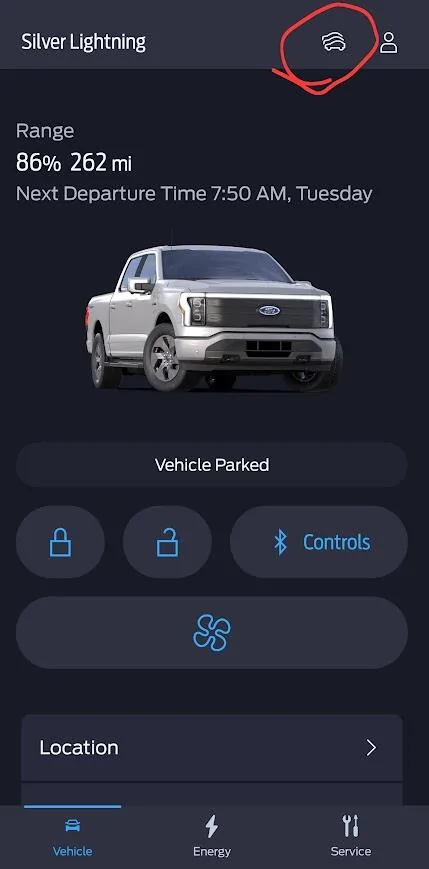
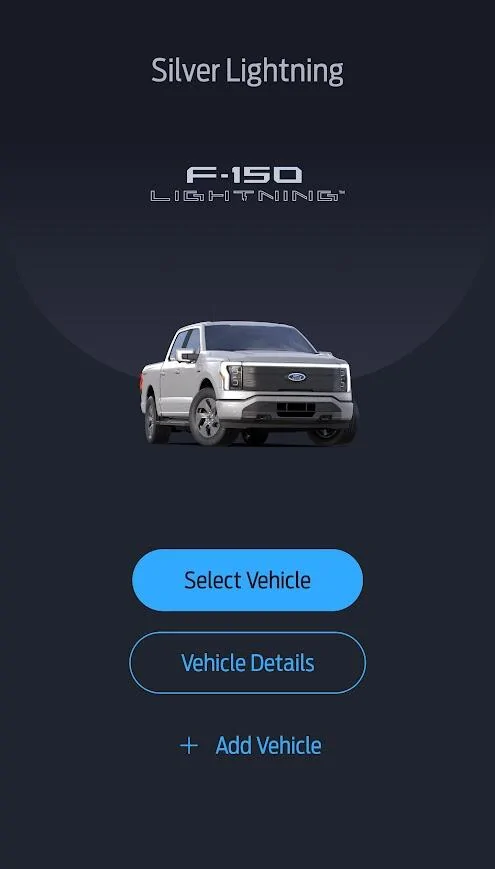
Good to know, though this tip is not relevant to your situation, just wanted to remind folks of the vehicle selector at the top of the home screen on Fordpass if one has multiple Ford vehicles profiled to a specific account. Hopefully the dealer figures out the problem, might be that TCU.

Ford F-150 Lightning Problem with Connectivity/connecting to FordPass. Tried fuse and 12V reset. Ideas? 1746471107766-kh
Ford F-150 Lightning Problem with Connectivity/connecting to FordPass. Tried fuse and 12V reset. Ideas? 1746471124563-19
 

TaxmanHog

Moderator
Moderator
First Name
Noel
Joined
Jan 19, 2022
Threads
221
Messages
16,158
Reaction score
18,189
Location
SE. Mass.
Vehicles
2022 Lightning Lariat-ER & 2024 HD Road Glide CVO-ST
Occupation
Retired
Thanks for the ideas. I don't have VPN app turned on when I tried to connect for many times.

Is it possible that it the Ford servers detected that I had tried to connect once with VPN on in the past (accidentally left VPN on during first try on day one, but turned it off since then), then banned the VIN?
Maybe, I think the customer service interaction should have been able to determine if your VIN is blocked.
 

kstype

Well-known member
First Name
Kurt
Joined
Jul 21, 2023
Threads
11
Messages
286
Reaction score
371
Location
Pennsylvania
Vehicles
2023 F-150 Lightning Lariat ER
Occupation
Principle Systems Engineer
Thanks for sharing your experience. I am afraid this may be a possibility with my truck too since all the resets so far haven't helped. When I do end up with the time to drop off my Lightning at the dealership, I will mention this module to them and let the tech check it out.

Unrelated side question: Were you able to redeem your 25k Ford reward points given when buying the truck? When I try to claim it, it states that I must activate the modem within 2 months of purchase to claim it. But I can't activate the modem if it's broken. haha
I activated them immediately - the dealer was pretty well informed and very helpful.
Sponsored


Top