Sponsored

FCSP Software Version 2.500.34-ford.27+26-08

Zprime29

Well-known member
First Name
Brandon
Joined
Jul 26, 2022
Threads
45
Messages
2,836
Reaction score
3,121
Location
Tucson, AZ
Vehicles
2022 Lightning ER, 2025 XC90 Recharge
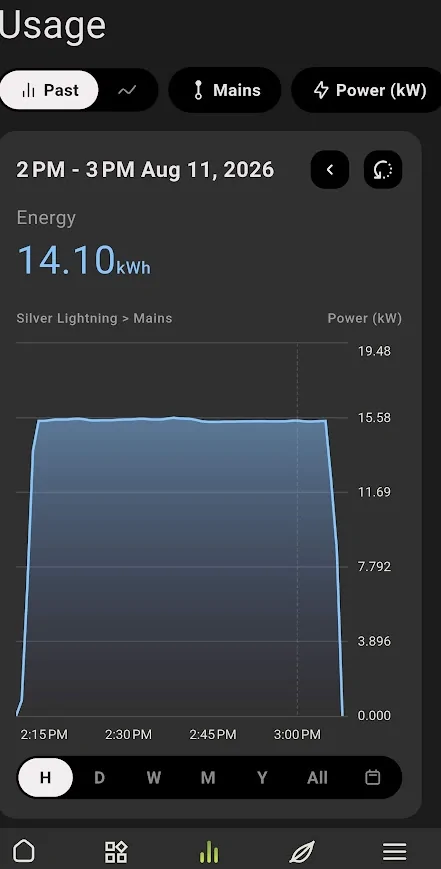
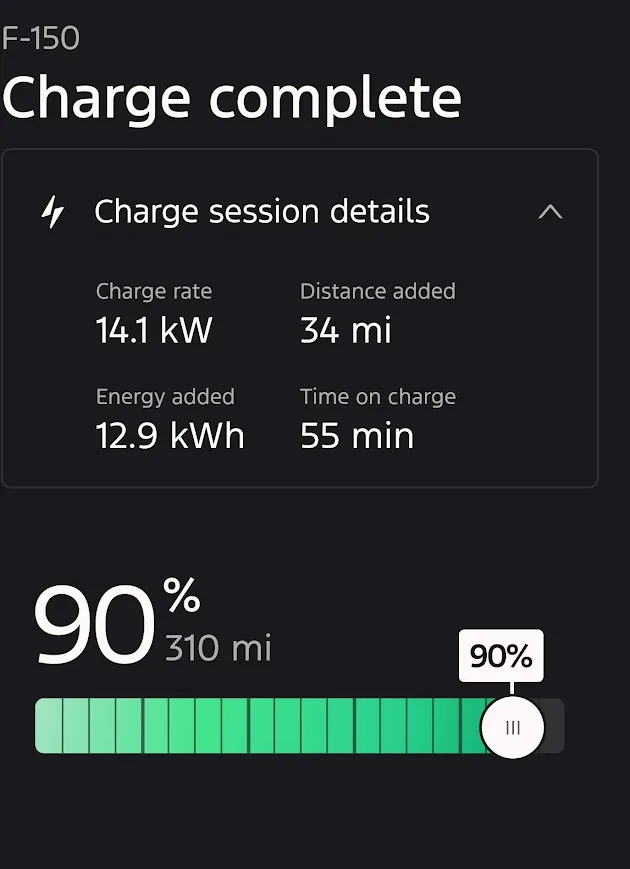
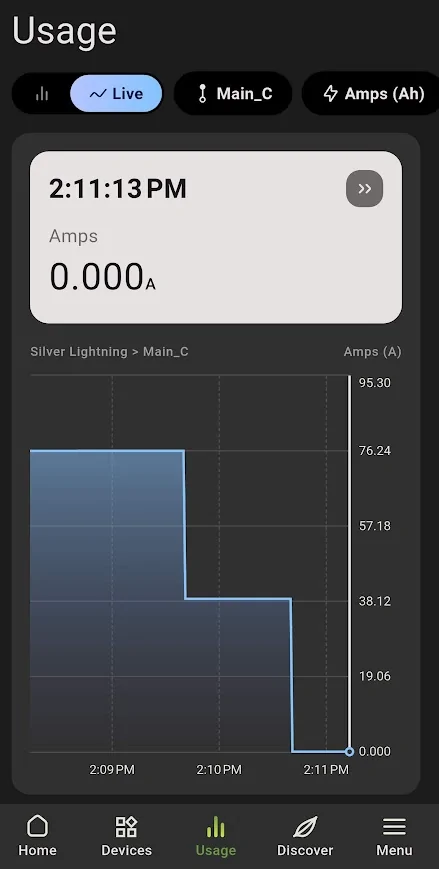
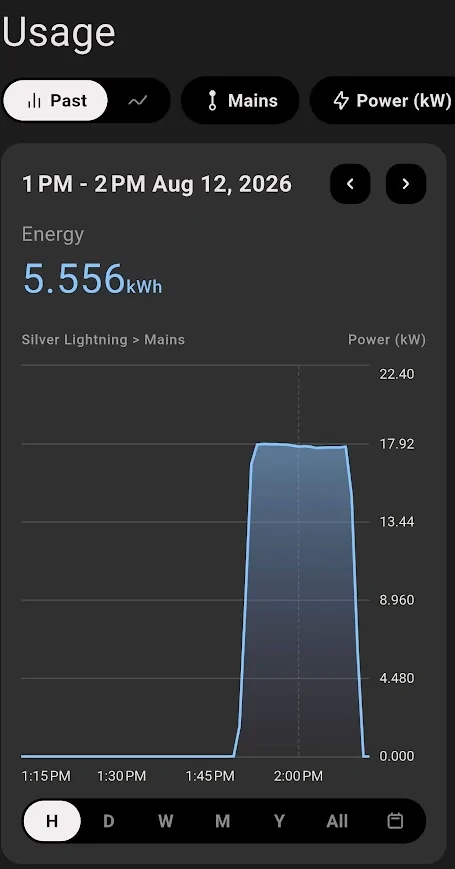
Yesterday afternoon I also was able to derate from 80 amps to 70 amps and the FCSP complies for the entire charging session, 10% 80 to 90% session, actual throughput was ~64 amps.

I've since updated it to 80 amps, looking forward to a future charging session, maybe today or Thursday to see if it went back to my normal 80 amp setting, in the past these adjustments were not reliable.

1786532601823-6v.webp
1786532614682-cl.webp
I'll try bumping mine back up tonight as well. If that takes, I'll also try adjusting mid charge. Thus far, the history still seems to be accurate on both the FordPass and Insight page of the FCSP.
Sponsored


K6CCC

Well-known member
First Name
Jim
Joined
Sep 12, 2024
Threads
34
Messages
1,318
Reaction score
1,484
Location
Glendora, Calif.
Vehicles
2024 Lightning Flash ER in Antimatter Blue w/9.6 PPO , 2017 Corolla (wife's car)
Occupation
Retired from 2-Way radio systems
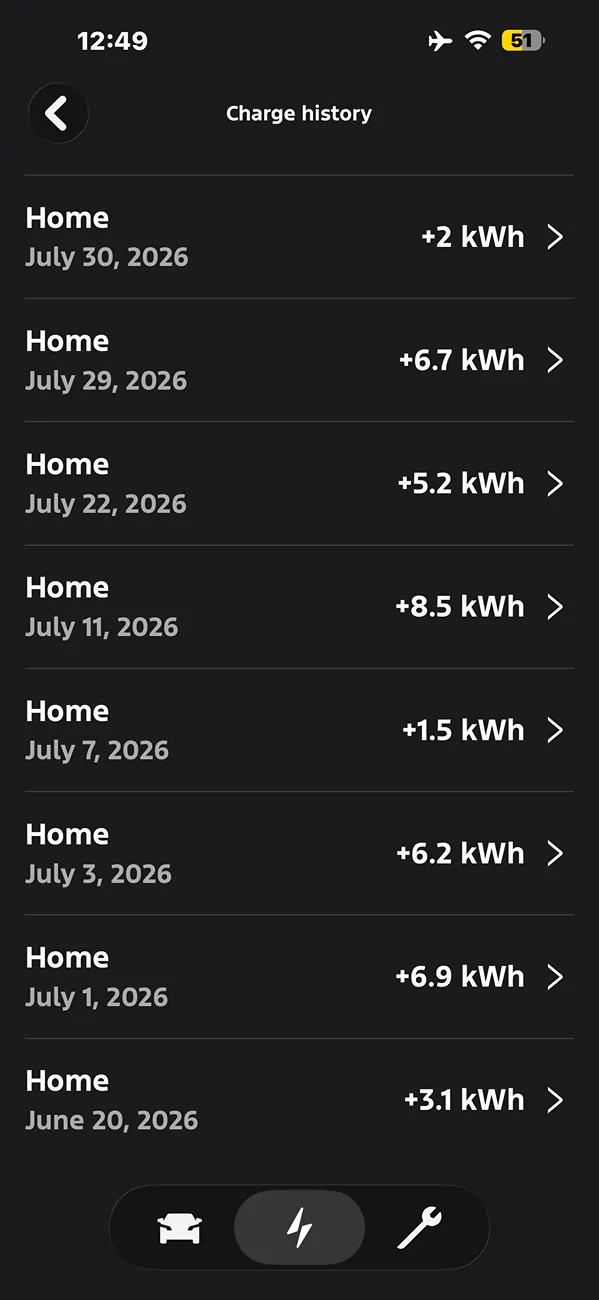
Here's what the Charging History section on the Charging tab in the Ford app says was my truck's true electric usage for the month of July. A total of 37 kWh.
Remember, that's battery KWH as opposed to AC power consumption, so if the 37 is accurate, then around 41 AC consumption. Confirm that you drove less than 100 miles in the entire month?
 

Zprime29

Well-known member
First Name
Brandon
Joined
Jul 26, 2022
Threads
45
Messages
2,836
Reaction score
3,121
Location
Tucson, AZ
Vehicles
2022 Lightning ER, 2025 XC90 Recharge
Remember, that's battery KWH as opposed to AC power consumption, so if the 37 is accurate, then around 41 AC consumption. Confirm that you drove less than 100 miles in the entire month?
1500kWh would've covered 3000 miles at 2.0mpk, I find it difficult to believe Jim drove that much given his track record. Something is off for his app, no clue what though. If mine starts to give me that, I'd probably nuke it and re-install. Knocking on wood that mine keeps *mostly* behaving.
 

Jim Lewis

Well-known member
First Name
Jim
Joined
Jan 10, 2023
Threads
56
Messages
1,101
Reaction score
1,078
Location
San Antonio, TX
Vehicles
Honda Accord 2017; 2023 Lariat ER
Occupation
Retired
Remember, that's battery KWH as opposed to AC power consumption, so if the 37 is accurate, then around 41 AC consumption. Confirm that you drove less than 100 miles in the entire month?
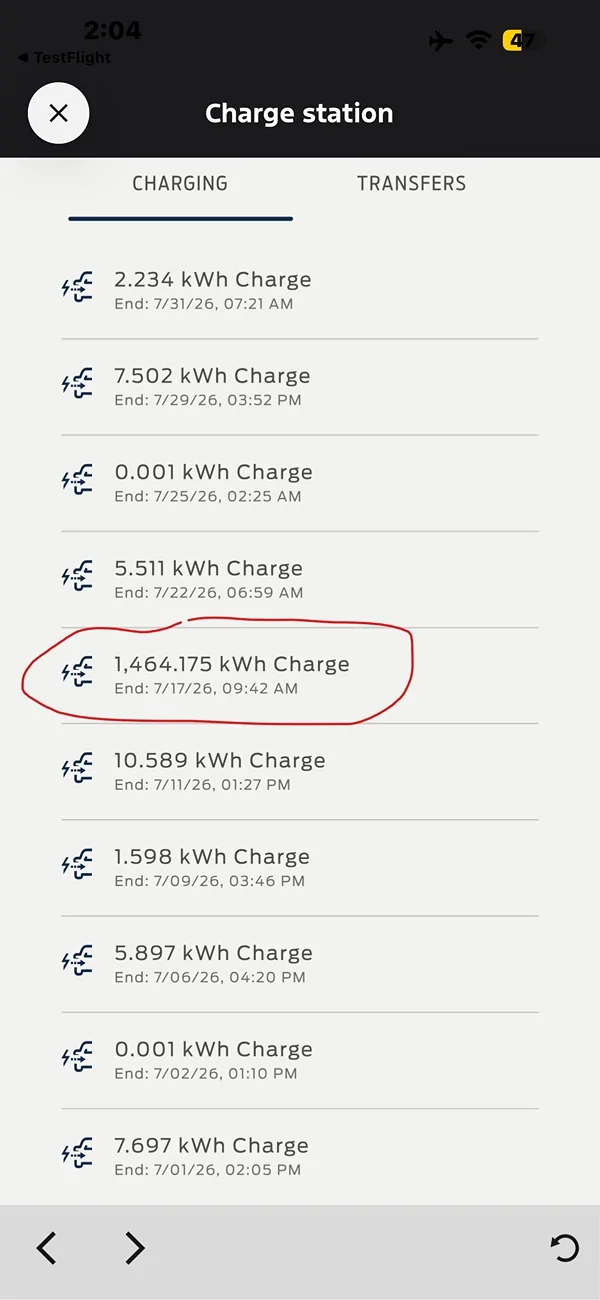
Actually, instead of going to the Cost tab in the Ford app under Charge Station, if one goes to Insights, Charging, picks the month view and then below the graph, one taps "View All Events," one gets a daily view the appears to show the TOTAL power consumption by the FCSP, as opposed to the Charging History view, which, as you say, is likely just kWh added to the HVB. Below is the View All Events vs. the Charging History view for the month of July. One can see in the Charge Station, Insights, Charging History that a single spurious event is reported on 7/17/26 where the truck apparently consumed 1,464 kWh in one day!

BTW, I've now joined the Lost Connection crowd. Can't connect to FCSP itself either in the Ford app or the Ford CSP Pro Setup app.
Ford F-150 Lightning FCSP Software Version 2.500.34-ford.27+26-08 IMG_1711_EDIT.PNG
Ford F-150 Lightning FCSP Software Version 2.500.34-ford.27+26-08 IMG_1709
 
Last edited:

TaxmanHog

Moderator
Moderator
First Name
Noel
Joined
Jan 19, 2022
Threads
240
Messages
16,968
Reaction score
19,312
Location
SE. Mass.
Vehicles
2022 Lightning Lariat-ER, 2024 HD Road Glide CVO-ST
Occupation
Retired
I'll try bumping mine back up tonight as well. If that takes, I'll also try adjusting mid charge. Thus far, the history still seems to be accurate on both the FordPass and Insight page of the FCSP.
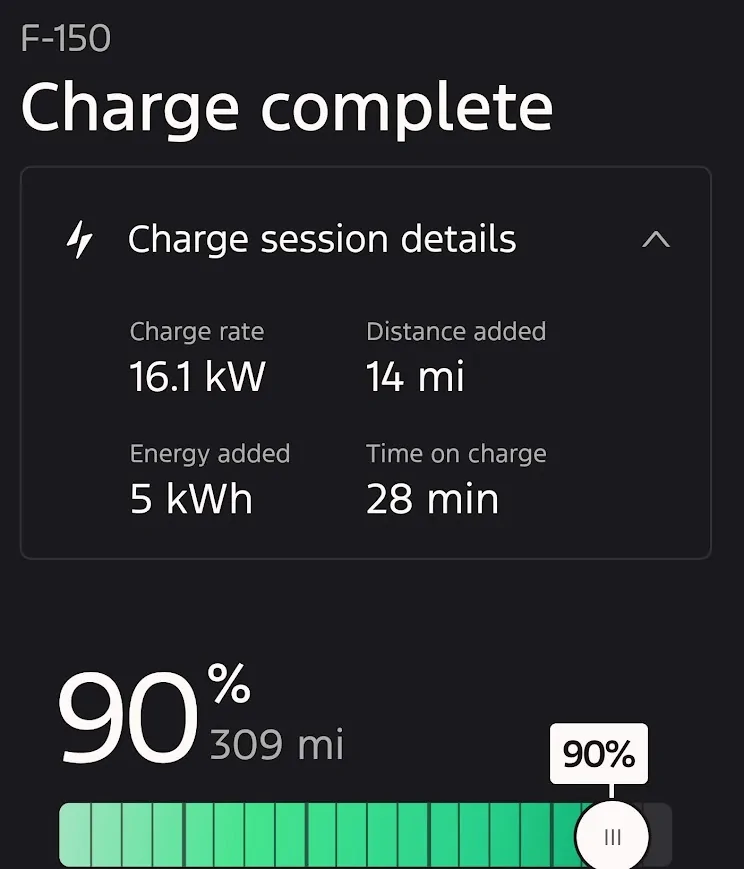
Did a 4% charge up to 90% the rate was back to the normal 80 amps, actual throughput ~76 amps
Note the setting was established prior to plugging in.

Ford F-150 Lightning FCSP Software Version 2.500.34-ford.27+26-08 1786563036130-df
Ford F-150 Lightning FCSP Software Version 2.500.34-ford.27+26-08 1786563149840-85

Ford F-150 Lightning FCSP Software Version 2.500.34-ford.27+26-08 1786563061713-a6
 

Sponsored

Aminorjourney

Well-known member
First Name
Nikki
Joined
Jun 6, 2022
Threads
21
Messages
456
Reaction score
1,150
Location
Internet
Website
www.transportevolved.com
Vehicles
2023 F150 Lightning Lariat, 2017 Chevrolet Bolt EV, 2006 Vectrix VX-1
Ok. I don't want to get anyone's hopes up, but thanks to @cjueden I was able to gain root access to my 'backup' FCSP. It's been a paperweight for nearly a year.

The process is quite involved, and I'm purposely being a little vauge until I can fully confirm this works on my other unit, but I think all of our issues stem from the same problem: an out-of-memory issue.

My bench unit had a single file called
Code:
--processes=5
that was 1.3 GB large in
Code:
/media/data/evsewifi/www/evsesg/
!

It *looks like an error in the programming* that should be a log file command but is just dumping stuff to the limited storage on the unit.

Before it was deleted, I was unable to actually get the unit to do anything. Afterward, my secondary unit booted, went through the commissioning process using the app, and is sitting unceremoniously on my bench happy as happy can be.

Now I have a unit functional, I'm going to go outside and try this with the currently broken unit. Wish me luck ;)
 

TaxmanHog

Moderator
Moderator
First Name
Noel
Joined
Jan 19, 2022
Threads
240
Messages
16,968
Reaction score
19,312
Location
SE. Mass.
Vehicles
2022 Lightning Lariat-ER, 2024 HD Road Glide CVO-ST
Occupation
Retired
Ok. I don't want to get anyone's hopes up, but thanks to @cjueden I was able to gain root access to my 'backup' FCSP. It's been a paperweight for nearly a year.

The process is quite involved, and I'm purposely being a little vauge until I can fully confirm this works on my other unit, but I think all of our issues stem from the same problem: an out-of-memory issue.

My bench unit had a single file called
Code:
--processes=5
that was 1.3 GB large in
Code:
/media/data/evsewifi/www/evsesg/
!

It *looks like an error in the programming* that should be a log file command but is just dumping stuff to the limited storage on the unit.

Before it was deleted, I was unable to actually get the unit to do anything. Afterward, my secondary unit booted, went through the commissioning process using the app, and is sitting unceremoniously on my bench happy as happy can be.

Now I have a unit functional, I'm going to go outside and try this with the currently broken unit. Wish me luck ;)
Very interesting, so doing a factory reset would not solve this condition?

Would we need another download to fix this issue, if that's even possible now?
 

Aminorjourney

Well-known member
First Name
Nikki
Joined
Jun 6, 2022
Threads
21
Messages
456
Reaction score
1,150
Location
Internet
Website
www.transportevolved.com
Vehicles
2023 F150 Lightning Lariat, 2017 Chevrolet Bolt EV, 2006 Vectrix VX-1
Very interesting, so doing a factory reset would not solve this condition?

Would we need another download to fix this issue, if that's even possible now?
I won't know until I try :)
 

Zprime29

Well-known member
First Name
Brandon
Joined
Jul 26, 2022
Threads
45
Messages
2,836
Reaction score
3,121
Location
Tucson, AZ
Vehicles
2022 Lightning ER, 2025 XC90 Recharge
Very interesting, so doing a factory reset would not solve this condition?

Would we need another download to fix this issue, if that's even possible now?
On the contrary, it sounds like a factory reset would fix it. Assuming of course, that it clears the directory as part of the reset.
 

Aminorjourney

Well-known member
First Name
Nikki
Joined
Jun 6, 2022
Threads
21
Messages
456
Reaction score
1,150
Location
Internet
Website
www.transportevolved.com
Vehicles
2023 F150 Lightning Lariat, 2017 Chevrolet Bolt EV, 2006 Vectrix VX-1
On the contrary, it sounds like a factory reset would fix it. Assuming of course, that it clears the directory as part of the reset.
Sadly, no, it doesn't. When the drive is full, it's full. That's why even the factory reset won't work on the really worst-hit units.

OK, I have some good news, and some not so good news.

The good news: I fixed my unit. It's connected to the Internet. It's accessible through FordPass, and it's accessible using the Ford Charge Station Pro setup app!

The bad news: the fix is ugly, and complicated, and requires some root skill.

Here's the technical explanation, kept high-level on purpose.

What's actually happening: The unit's internal storage (a small flash partition, not RAM) fills up completely — 100% used, zero free. Once that happens, the Linux system running the WiFi, cloud connectivity, app pairing, and web interface can no longer write to its own database, logs, or config files. Every one of those subsystems depends on that Linux OS running properly on that filesystem — so once it's full, WiFi dies, cloud connectivity dies, the setup app can't talk to it, and factory reset hangs partway through (because reset itself needs to write to the disk it can no longer write to).

The actual EVSE power-delivery hardware — the part that safely delivers current to your vehicle — is handled by separate hardware that doesn't depend on that same Linux storage being healthy. That's why some "dead" units still technically charge even while completely unreachable over WiFi/app: the brains are down, but the muscle still works.

What fills the disk: A single runaway file, generated by what looks like a bug in one of the unit's own startup scripts. It grows without limit over time and eventually consumes the entire partition. Yes, I will be reaching out to my contacts at Ford and YES I will be reporting this as a bug. My thinking is that this entire bug has been causing our units to go unresponsive for the last few years, and that Ford has just been replacing hardware to fix what I think has been a software bug all along.

Now to the HOW DO I FIX IT.

I'm going to be really f'ing clear here. Yes, I alluded to a swear. YOU SHOULD NOT DO THIS. DO NOT ATTEMPT THIS. IF YOU DO, YOU COULD KILL YOURSELF. DO NOT DO THIS.

Ford F-150 Lightning FCSP Software Version 2.500.34-ford.27+26-08 il_fullxfull.5388775258_16nl

DID I MENTION NOT TO DO THIS?


Okay, Hypothetically...

High-level fix (requires opening the unit and root-level access — not something to attempt casually):

  1. Power down, remove the cover, gain root access via a boot SD card method (documented by @cjueden in this thread The safest way to do this, since the unit needs to have power while this happens, is to power it form the 12V pins that are meant for the Home Integration Dark Start Battery. The unit will need to be fully powered down before putting the SD card in. That includes its 12V system.
  2. Locate and remove the offending file. You'll need some linux skills. Don't blame me if you rm -rf... ;)
  3. Reboot
I've now confirmed this exact same failure on two separate units. Given how consistent it is, I strongly suspect this is the root cause behind a large share of the "unit stopped responding" reports in this thread over the last few years — not a WiFi bug, not an app bug, a disk-full bug wearing a dozen different disguises depending on what happens to try writing at the wrong moment.

I'm intentionally not detailing the exact file/path here or the full root-access steps — this isn't something I want people attempting on units they don't want to risk further, and I'd rather this get fixed properly at the firmware level. I am reaching out to my Ford contacts directly with the full technical writeup to get this treated as the systemic defect I believe it is.
 
Last edited:

Sponsored

TaxmanHog

Moderator
Moderator
First Name
Noel
Joined
Jan 19, 2022
Threads
240
Messages
16,968
Reaction score
19,312
Location
SE. Mass.
Vehicles
2022 Lightning Lariat-ER, 2024 HD Road Glide CVO-ST
Occupation
Retired
I'm intentionally not detailing the exact file/path here or the full root-access steps — this isn't something I want people attempting on units they don't want to risk further, and I'd rather this get fixed properly at the firmware level. I am reaching out to my Ford contacts directly with the full technical writeup to get this treated as the systemic defect I believe it is.
'Thank you for the quick analysis, hoping the Ford or Siemens could develop a less risky fix or replacement of the corrupted hardware/firmware.
 

Zprime29

Well-known member
First Name
Brandon
Joined
Jul 26, 2022
Threads
45
Messages
2,836
Reaction score
3,121
Location
Tucson, AZ
Vehicles
2022 Lightning ER, 2025 XC90 Recharge
Don't blame me if you rm -rf...
This made me laugh harder than it should have :D

It's good news indeed that we at least will be able to continue charging until a proper fix is implemented. Thank you for taking the risk and figuring this out! And a big shout out to @cjueden for the root access! The two of you deserve medals 🎖
 

JayF

Well-known member
First Name
Jay
Joined
Apr 12, 2026
Threads
4
Messages
101
Reaction score
181
Location
Tacoma, WA
Website
jay.jvf.cc
Vehicles
2023 F150 Lightning Lariat SR
Occupation
Open Source Developer
I'm intentionally not detailing the exact file/path here or the full root-access steps — this isn't something I want people attempting on units they don't want to risk further, and I'd rather this get fixed properly at the firmware level. I am reaching out to my Ford contacts directly with the full technical writeup to get this treated as the systemic defect I believe it is.
I guess this means I won't get my curiosity answered as to if the fix involved an `ls -sf /dev/null /path/to/silly-filename` :D
 

abcut973

Well-known member
First Name
Anthony
Joined
Mar 12, 2025
Threads
8
Messages
253
Reaction score
199
Location
Denham Springs
Vehicles
2022 F150 Lightning Platinum, 2020 BMW X7 xDrive40i, 2019 Mercedes C300 cab
Awesome find by @Aminorjourney . Thanks for taking the time to do this.
My question is why all of a sudden several units are experiencing the same issue of having a full disk? Was this triggered by the recent OTA?
It seems odd to have several units getting their drive full on the same day. For a fact I installed mine new a year and a half ago. Never really rebooted it that much, maybe 3 times at max. So how can my disk be already full?
 

Aminorjourney

Well-known member
First Name
Nikki
Joined
Jun 6, 2022
Threads
21
Messages
456
Reaction score
1,150
Location
Internet
Website
www.transportevolved.com
Vehicles
2023 F150 Lightning Lariat, 2017 Chevrolet Bolt EV, 2006 Vectrix VX-1
Awesome find by @Aminorjourney . Thanks for taking the time to do this.
My question is why all of a sudden several units are experiencing the same issue of having a full disk? Was this triggered by the recent OTA?
It seems odd to have several units getting their drive full on the same day. For a fact I installed mine new a year and a half ago. Never really rebooted it that much, maybe 3 times at max. So how can my disk be already full?
To be clear, I don't know 100% if this is a separate issue, or one that's caused BY this.

What I do know is that my unit stopped working over the weekend while the OTAs were rolling out, and my logs show that it had multiple 'failed' downloads.

I'm running 2.112.125:0.0:0.0:0.0 on the outside unit that stopped over the weekend.

The inside unit I repaired today is now running 2.112.125:3:15:3:15:3.15

Those are both BEFORE the problematic OTAs, so maybe my issue saved me?
Sponsored


Top