Firn
Well-known member
- Thread starter
- #1
I’ve been working on getting better data visibility for my F-150 Lightning. While FORScan and Car Scanner are the gold standards for seeing what’s going on, they are not always the most convenient tool for long-term logging or custom dashboards. I wanted to move that high-level data into Torque, but that requires knowing the exact hex PIDs and the specific math formulas Ford uses—and the current PID list is inadequate.
To solve this, I used Google Gemini Pro as a data science partner. By feeding the AI raw Bluetooth packet logs and comparing them to live app data, I was able to bridge the gap. We aren't "finding" PIDs that didn't exist—FORScan already sees them—but we are deconstructing them so they can be used in other applications.
The Breakthrough: AI-Enabled Correlation
Typically, matching raw hex values to real-world sensor data requires significant experience in signal processing or software engineering. You have to account for clock drift, filter out thousands of background messages, and solve for linear equations (Scale/Offset) manually.
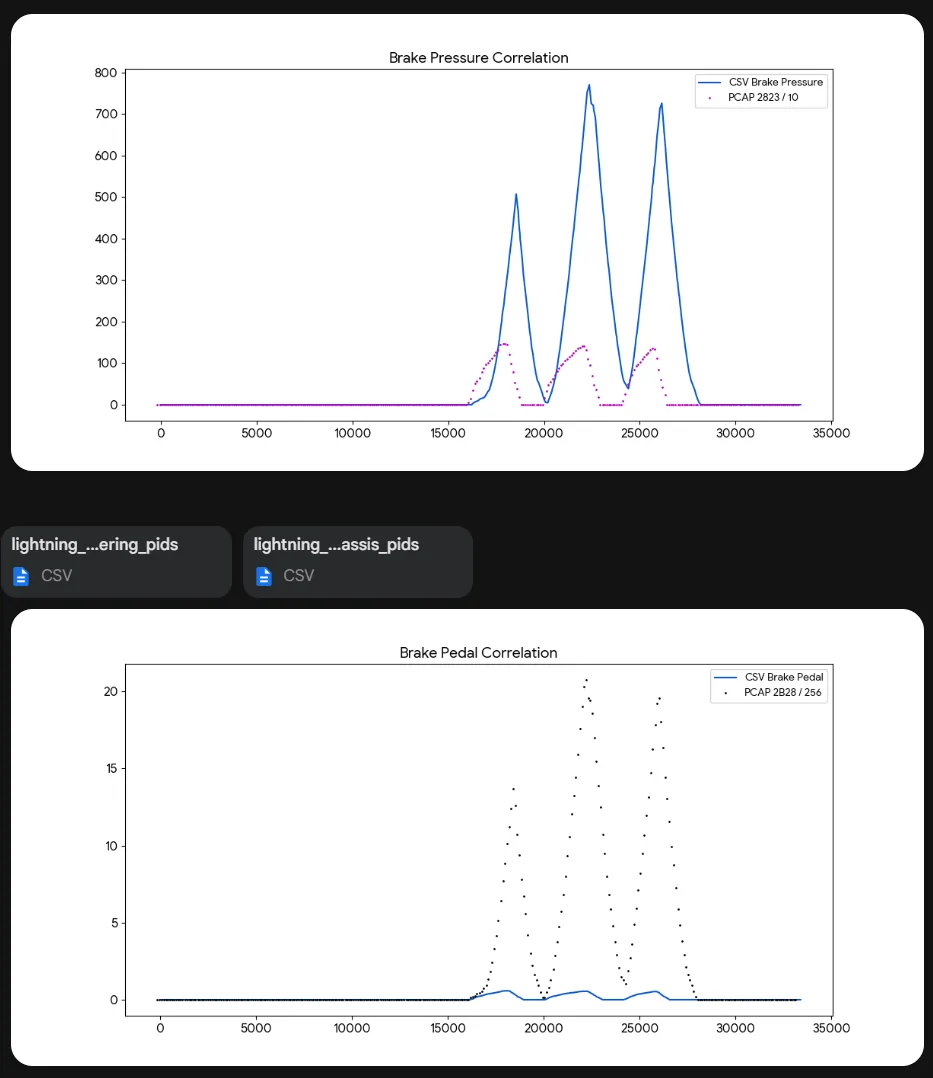
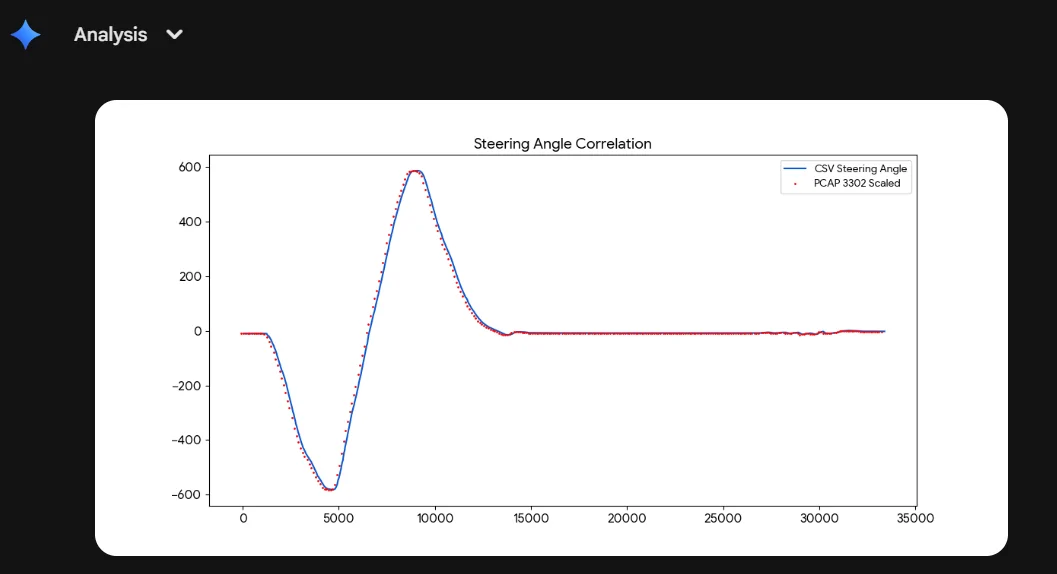
By using Gemini , I was able to upload the raw .pcapng packet logs and the CSV logs from the diagnostic apps directly. The AI performed the time-syncing and regression analysis automatically. You still have to validate the results, in one instance it switched brake pedal travel and LF brake pressure, but to be honest it also identified that the brake pedal travel PID had unusually high precision. This mistake is not surprising, brake pedal travel and pressure exactly matched (truck was parked) so the plots looked near the same.

Note: While I used a paid Gemini account for the massive context window needed for long logs, you can do this with the free version by feeding it smaller snippets of data.
How to Do It Yourself (Instructional Guide)
If you want to help expand our community PID list, here is the pathway to capture the data.

1. The Sniffer Setup (Windows)
Standard Wireshark on Windows can’t see Bluetooth traffic without help. You need the Microsoft Bluetooth Virtual Sniffer (BTVS).

3. The Analysis
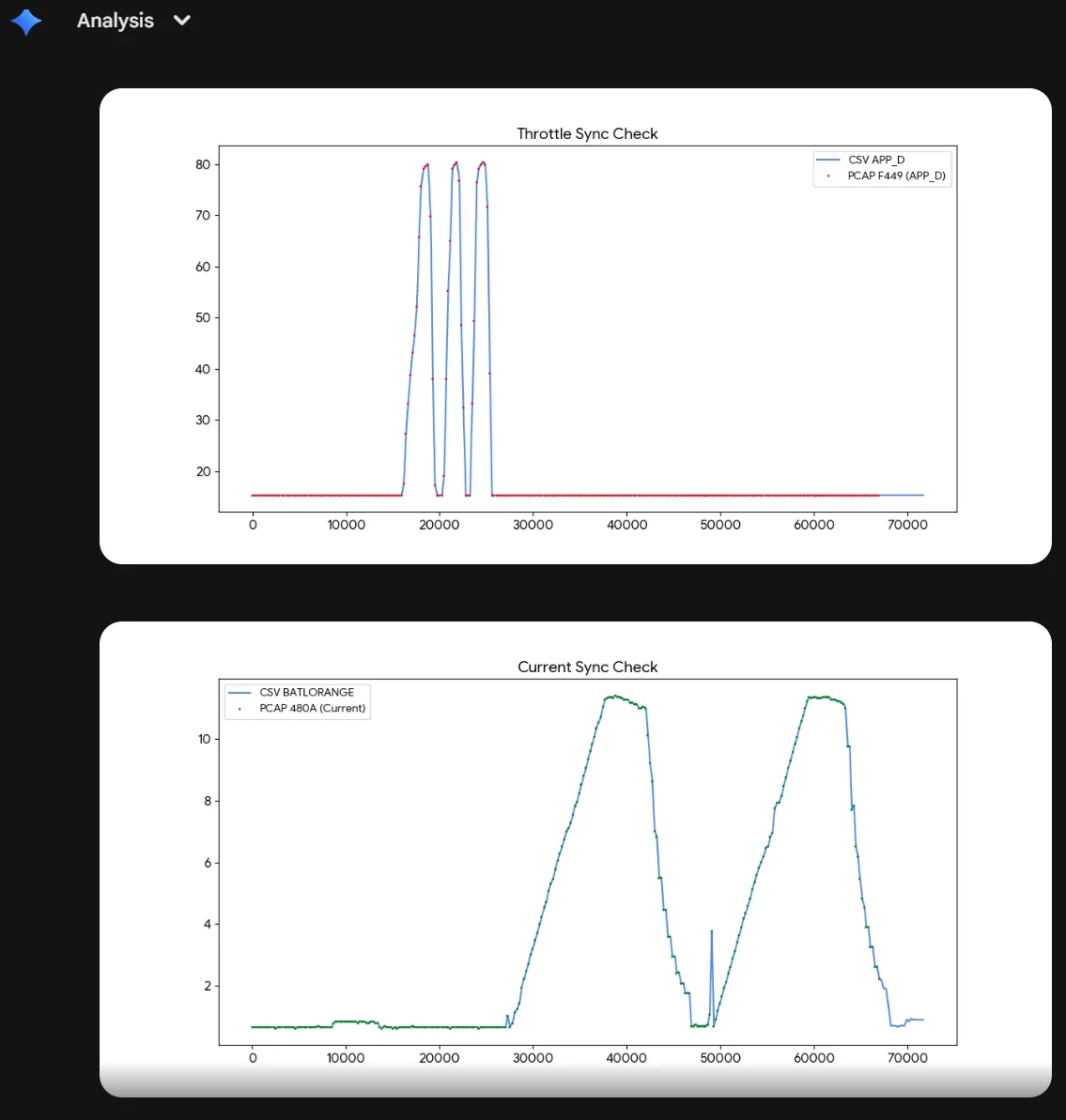
Once you have your logs, you can use an AI like Gemini to do the math. Tell it: "I have a Bluetooth log (hex) and a sensor log (decimal). Match the timestamps and find the hex PID and the formula for [Sensor Name]."

What We’ve Mapped So Far
Through this process, I’ve already moved several high-fidelity sensors over to Torque:
Call to Action: Let's Build the List
This is just the start. There are hundreds of PIDs available in the different modules. Tons for the IPC, IPMA, APIM, etc. If you have a favorite sensor or trigger in FORScan that you wish you had in Torque, use the pathway above to capture a log (or give me a shout).
Post your logs or your findings here, and let’s see how large of a "community dictionary" we can build for the Lightning.
Torque values extracted (copy to torque csv).
Name,ShortName,ModeAndPID,Equation,Min Value,Max Value,Units,Header
Battery SOC (High Res),SOC HR,224801,(A*256+B)/500,0,100,%,7E4
HV Battery Current,Amps,22480A,(SIGNED(A*256+B))/100,-500,500,A,7E4
Charging Power,Chg Watts,22484E,(A*256+B)*5,0,20000,W,7E4
Battery Energy to Empty,kWh Rem,224848,(A*256+B)/500,0,150,kWh,7E4
Accelerator Pedal Position,Throttle,22F449,A/2.55,0,100,%,7E4
Steering Wheel Angle,Steer Ang,223302,((A*256+B)-7810)/10,-900,900,°,760
Brake Pressure LF,Brk Press,222B28,(A*256+B)/6.89,0,2000,psi,760
Brake Pedal Position,Brk Pedal,222823,(A*256+B)/2500,0,2,in,760
Lateral Acceleration,Lat G,222B0C,SIGNED(A*256+B)/100,-2,2,G,760
Battery Coolant Inlet Temp,Clnt In T,224846,(A-50)*1.8+32,-40,150,°F,7E4

To solve this, I used Google Gemini Pro as a data science partner. By feeding the AI raw Bluetooth packet logs and comparing them to live app data, I was able to bridge the gap. We aren't "finding" PIDs that didn't exist—FORScan already sees them—but we are deconstructing them so they can be used in other applications.
The Breakthrough: AI-Enabled Correlation
Typically, matching raw hex values to real-world sensor data requires significant experience in signal processing or software engineering. You have to account for clock drift, filter out thousands of background messages, and solve for linear equations (Scale/Offset) manually.
By using Gemini , I was able to upload the raw .pcapng packet logs and the CSV logs from the diagnostic apps directly. The AI performed the time-syncing and regression analysis automatically. You still have to validate the results, in one instance it switched brake pedal travel and LF brake pressure, but to be honest it also identified that the brake pedal travel PID had unusually high precision. This mistake is not surprising, brake pedal travel and pressure exactly matched (truck was parked) so the plots looked near the same.
Note: While I used a paid Gemini account for the massive context window needed for long logs, you can do this with the free version by feeding it smaller snippets of data.
How to Do It Yourself (Instructional Guide)
If you want to help expand our community PID list, here is the pathway to capture the data.
1. The Sniffer Setup (Windows)
Standard Wireshark on Windows can’t see Bluetooth traffic without help. You need the Microsoft Bluetooth Virtual Sniffer (BTVS).
- Download: Get the "Bluetooth Test Platform" from Microsoft.
- The Shortcut: Navigate to the folder containing btvs.exe. Click into the Address Bar of your File Explorer, type cmd, and hit Enter.
- Launch: In the command window, type btvs.exe -Mode Wireshark. This will open Wireshark and start piping your Bluetooth traffic into it.
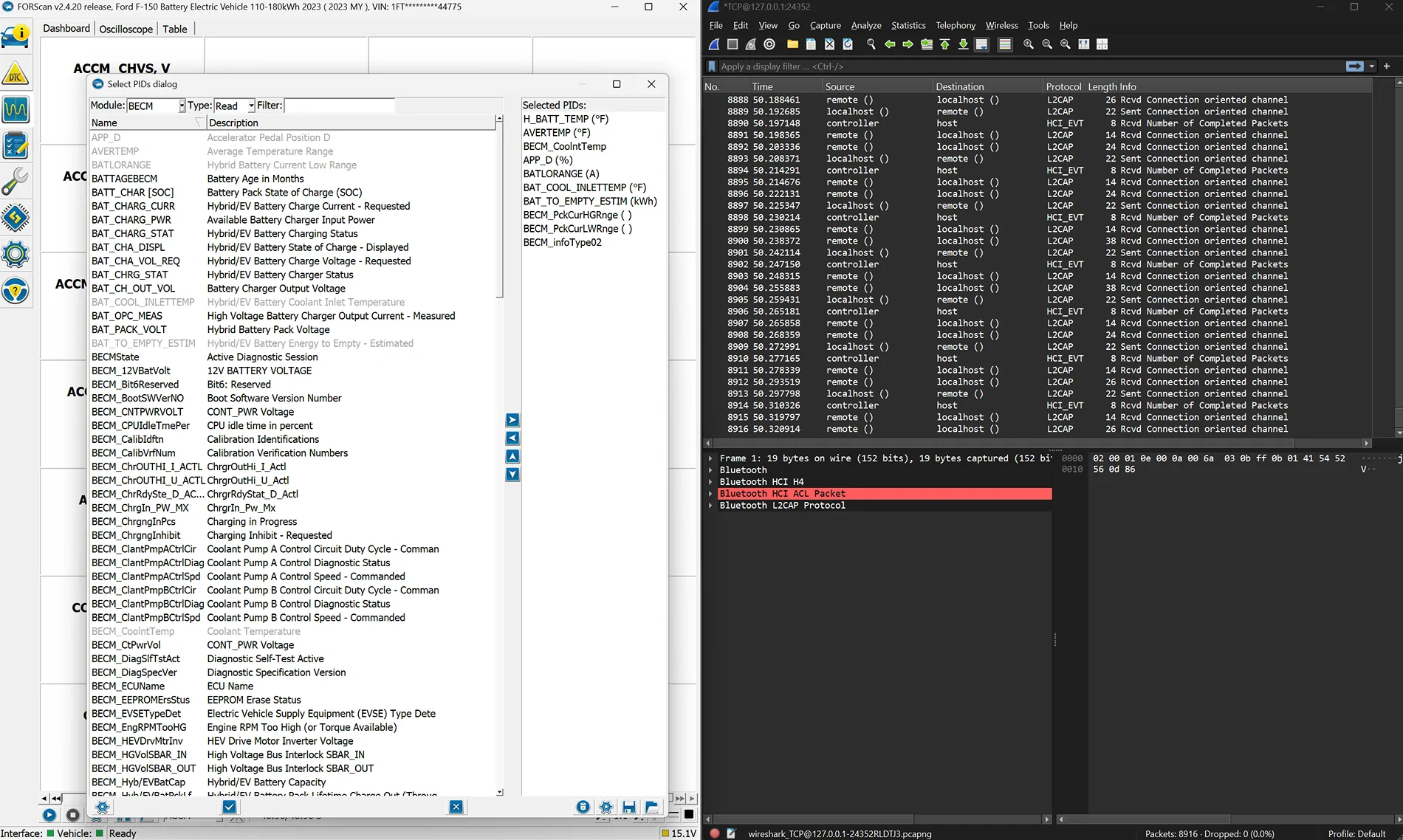
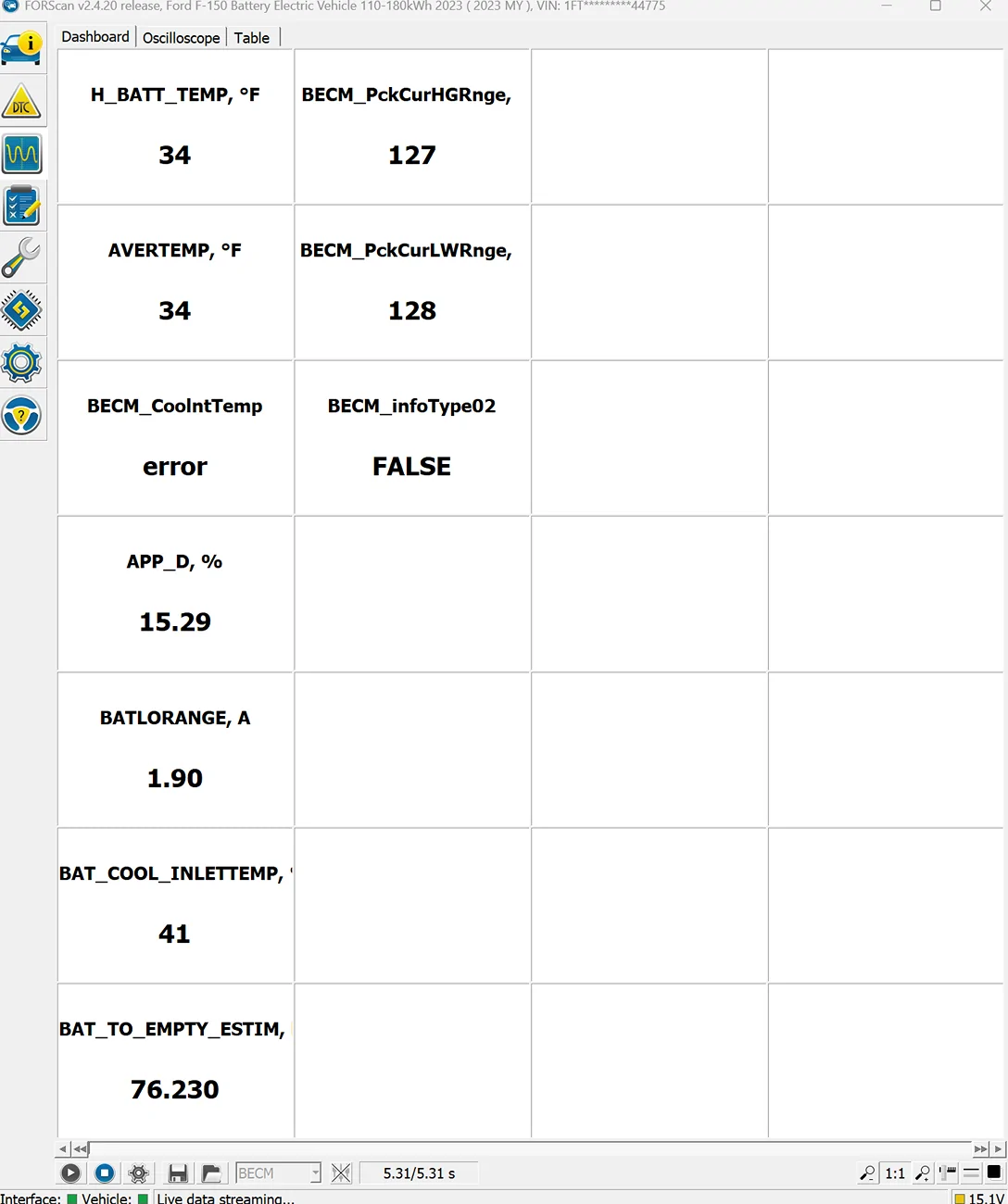
- Laptop Method: Run FORScan and select 5–10 PIDs you want to map. Start your Wireshark capture and perform a specific action (e.g., sweep the steering wheel or plug in a charger).
- Android Method: Enable "Bluetooth HCI Snoop Log" in Developer Options. Run CarScanner or similar, do your test, and then pull the log via a Bug Report.
3. The Analysis
Once you have your logs, you can use an AI like Gemini to do the math. Tell it: "I have a Bluetooth log (hex) and a sensor log (decimal). Match the timestamps and find the hex PID and the formula for [Sensor Name]."
What We’ve Mapped So Far
Through this process, I’ve already moved several high-fidelity sensors over to Torque:
| Sensor | PID | Equation | Header |
| High-Res SOC | 224801 | (A*256+B)/500 | 7E4 |
| Brake Pressure (LF) | 222B28 | (A*256+B)/6.89 | 760 |
| Charging Power (W) | 22484E | (A*256+B)*5 | 7E4 |
| Energy to Empty (kWh) | 224848 | (A*256+B)/500 | 7E4 |
Call to Action: Let's Build the List
This is just the start. There are hundreds of PIDs available in the different modules. Tons for the IPC, IPMA, APIM, etc. If you have a favorite sensor or trigger in FORScan that you wish you had in Torque, use the pathway above to capture a log (or give me a shout).
Post your logs or your findings here, and let’s see how large of a "community dictionary" we can build for the Lightning.
Torque values extracted (copy to torque csv).
Name,ShortName,ModeAndPID,Equation,Min Value,Max Value,Units,Header
Battery SOC (High Res),SOC HR,224801,(A*256+B)/500,0,100,%,7E4
HV Battery Current,Amps,22480A,(SIGNED(A*256+B))/100,-500,500,A,7E4
Charging Power,Chg Watts,22484E,(A*256+B)*5,0,20000,W,7E4
Battery Energy to Empty,kWh Rem,224848,(A*256+B)/500,0,150,kWh,7E4
Accelerator Pedal Position,Throttle,22F449,A/2.55,0,100,%,7E4
Steering Wheel Angle,Steer Ang,223302,((A*256+B)-7810)/10,-900,900,°,760
Brake Pressure LF,Brk Press,222B28,(A*256+B)/6.89,0,2000,psi,760
Brake Pedal Position,Brk Pedal,222823,(A*256+B)/2500,0,2,in,760
Lateral Acceleration,Lat G,222B0C,SIGNED(A*256+B)/100,-2,2,G,760
Battery Coolant Inlet Temp,Clnt In T,224846,(A-50)*1.8+32,-40,150,°F,7E4
Sponsored